Category: Uncategorized

  • Cyber Attack Canada: Email Threats Targeting Businesses

    Cyber Attack Canada: Email Threats Targeting Businesses

    A cyber attack in Canada doesn't need a complex exploit to hurt your business. A stolen mailbox password, a fake supplier invoice, or a hidden forwarding rule can redirect payments before anyone notices.

    Statistics Canada found that 16% of Canadian businesses with at least 10 employees experienced a cybersecurity incident in 2023. That’s down from 18% in 2021 and 21% in 2019. Yet recovery spending moved in the opposite direction, reaching approximately $1.2 billion in 2023, twice the roughly $600 million recorded in 2021. Only 13% of affected businesses reported incidents to police. (Statistics Canada's 2023 cybersecurity results)

    Our view at Typewire is straightforward. Treat email as a security system, not just an inbox. Protect identities, monitor mailbox changes, verify financial requests outside email, and prepare a response before someone clicks.

    The State of Cyber Attacks in Canada

    The headline incident rate can mislead you. Fewer businesses reported attacks in 2023 than in earlier survey years, but the cost of recovery increased sharply. That means incident frequency alone doesn't describe the risk your organization carries.
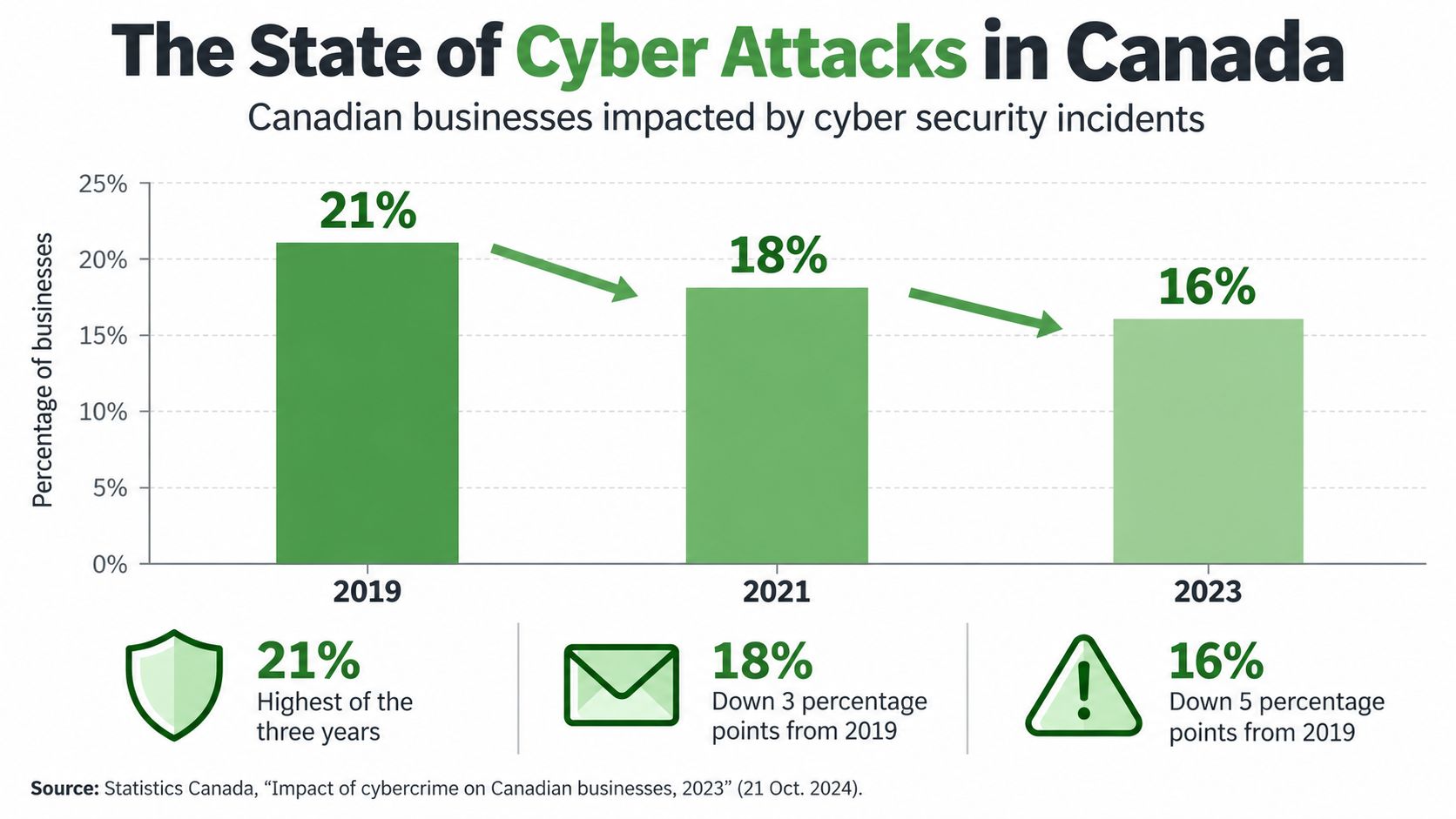
    A bar chart showing the percentage of Canadian businesses impacted by cyber security incidents from 2019 to 2023.

    The earlier Statistics Canada survey found that 18% of businesses with at least 10 employees were affected in 2021. Exposure rose with business size. Small businesses (10 to 49 employees) were affected at 16%, medium-sized businesses at 25%, and large businesses at 37%. Among affected businesses, about 40% experienced downtime, with average downtime lasting 36 hours. (Statistics Canada's 2021 survey)

    Those figures measure reported business experiences. They don't capture every attempted attack, undetected compromise, or organization that chose not to disclose an incident.

    Why email sits at the centre

    Email connects identity, payments, customer records, payroll, and external suppliers. A criminal who controls one mailbox can search old conversations, impersonate an executive, create forwarding rules, approve a fake invoice, or use stored links to reach other services.

    The Canadian Centre for Cyber Security describes ransomware as the top cybercrime threat to Canada’s critical infrastructure. According to its ransomware outlook, ransomware incidents known to the Cyber Centre grew by an average of 26% a year from 2021 to 2024. In Statistics Canada’s latest survey, 13% of affected businesses reported a ransomware attack.

    Canada's government networks also face enormous background noise. Communications Security Establishment Canada sensors blocked approximately 2.4 trillion suspicious cybersecurity events from April 2023 through March 2024. Shared Services Canada blocked about 6.6 trillion events from October 2023 through September 2024. These counts include scanning and other activity, not confirmed compromises, but they show why perimeter filtering alone isn't enough. (Office of the Auditor General report)

    Practical rule: Count compromised identities, lost access, downtime, and recovery work. An incident that never becomes a news story can still disrupt your business.

    Most Common Email-Based Attacks

    Most email attacks combine two weaknesses: a message that earns trust and an account or process that lacks a strong second check. Technical controls reduce the first problem. Good payment and access procedures reduce the second.

    Phishing uses a deceptive message or website to make someone reveal credentials, open a file, or approve an action. The message may imitate Microsoft 365, a bank, a shipping company, or a familiar supplier. A convincing logo matters less than the destination of the link and the urgency of the request.

    Business email compromise, or BEC, targets money and authority. An attacker may compromise a real mailbox, imitate a manager, or register a lookalike domain. The request often sounds ordinary: change a direct-deposit account, pay a revised invoice, or keep a transaction confidential.

    Credential theft becomes more dangerous when staff reuse passwords or depend on authentication methods that a live phishing proxy can intercept. Phishing-resistant multifactor authentication, such as a security key using FIDO2 or WebAuthn, binds the sign-in to the legitimate website rather than merely confirming a code.

    Malicious attachments deliver malware through invoices, shipping notices, resumes, or shared documents. Virus filtering helps, but it can't replace patching, endpoint controls, restricted file execution, and staff who know how to report a suspicious message.
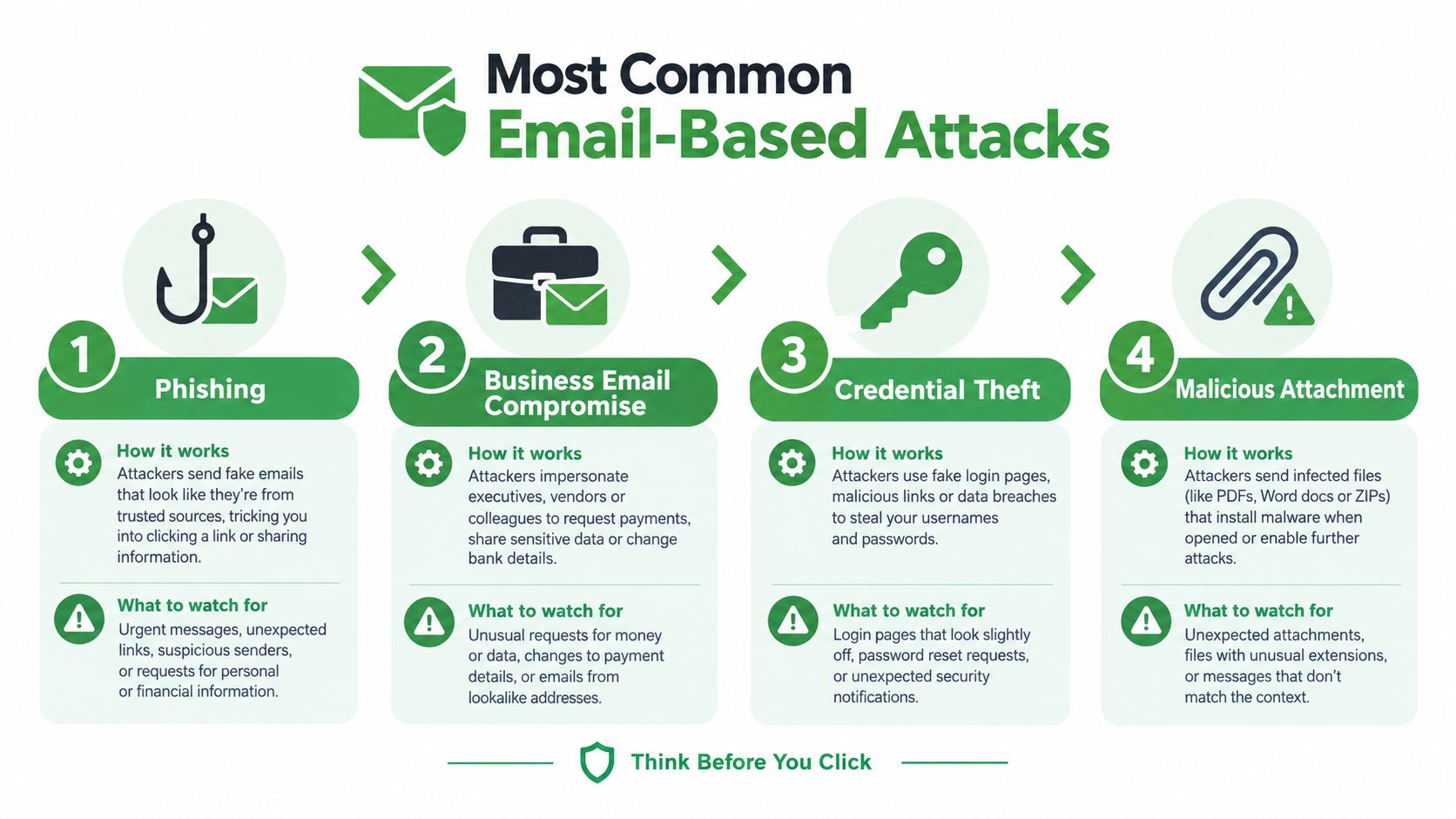
    An infographic detailing four common email-based attacks including phishing, business email compromise, credential theft, and malicious attachments.

    How a fake invoice becomes a real loss

    In a common version, an attacker replies inside a real supplier thread with a revised invoice and new banking details. Confirm any payment change through a known phone number, never through contact details in the request. Our guide to spear phishing walks through this scenario step by step.

    Check whether your mail service alerts on new forwarding rules, unusual sign-ins, OAuth permissions, mass mailbox access, and sudden outbound volume. Review these events quickly, because a hidden rule can suppress warnings while the attacker works.

    Ask your team one uncomfortable question: which of these attacks have you rehearsed, rather than merely discussed? If the answer is none, start with a mailbox compromise drill. It should cover session revocation, password reset, MFA reset, rule removal, payment review, evidence preservation, and notification decisions.

    Sectors Most Targeted in Canada

    Canadian organizations attract cyberattacks when their email accounts provide access to money, sensitive records, or trusted relationships. Healthcare holds personal information and depends on continuous access. Finance manages funds. Legal, accounting, payroll, and consulting firms protect information for many other organizations.

    Small businesses face routine attacks as well. BDC reports that 73% of Canadian small businesses have experienced a cybersecurity incident, while email phishing was the most common reported event at 61%. (BDC analysis of small-business cyberattacks)

    The sector changes the attacker's preferred route and the consequences of a compromised mailbox:

    Sector Common Email Attack Primary Data at Risk Key Canadian Regulation
    Healthcare Credential phishing and ransomware Health records, identities, clinical operations Provincial health privacy laws
    Financial services BEC, credential theft, account takeover Payment data, account records, identity information PIPEDA and sector rules
    Government and critical infrastructure suppliers Spear phishing and vendor compromise Operational data, credentials, service access Federal and sector-specific requirements
    Legal and accounting Mailbox takeover and invoice fraud Client records, financial documents, privileged information PIPEDA and professional obligations
    Retail and e-commerce Malicious links, password theft, payment fraud Customer accounts, payment and order information PIPEDA and applicable provincial rules

    Where the pressure appears first

    Healthcare teams often put patient care ahead of suspicious email activity. Attackers exploit that urgency with messages about clinical systems, appointments, or urgent administrative work. Require staff to verify unexpected requests through a separate channel, especially during busy periods.

    Professional services face concentrated exposure. A compromised lawyer's or accountant's mailbox can reveal multiple client relationships, payment schedules, confidential documents, and trusted contacts. Review delegated access, forwarding rules, and sign-in alerts across every account with client-facing authority.

    Critical infrastructure suppliers should monitor identity and management systems closely. Use layered containment, including protected backups, separated networks, and phishing-resistant authentication. Monitor for new forwarding rules, OAuth grants, unusual administrative logins, and abnormal outbound SMTP activity.

    A small organization can be a high-value target when it holds trusted access to a larger one.

    Recent High-Profile Canadian Incidents

    Public incidents show why email security must connect to operational recovery. The details differ, but the pattern is familiar: attackers obtain access, organizations lose visibility, and staff must continue working while facts remain incomplete.

    Medical staff in a hospital hallway during a simulated emergency situation caused by a system outage.

    Healthcare incidents have demonstrated the cost of losing access to systems that staff use every day. The 2021 ransomware attack on Newfoundland and Labrador’s health network disrupted services and forced teams to work around unavailable systems. The lesson for a smaller clinic is practical: maintain downtime procedures, protect backups independently, and make sure staff can reach critical contacts without relying on one compromised platform.

    The 2023 MOVEit breach at Nova Scotia Health also showed how sensitive information can create lasting consequences after the initial access event. When personal information may be exposed, the organization must investigate scope, preserve evidence, assess harm, and communicate carefully. A mailbox review should include forwarding rules, delegated access, search activity, downloads, and suspicious sign-ins.

    Retail breaches create a different pressure. Customers expect access to orders and accounts, while the organization must investigate whether credentials, payment information, or personal data were exposed. A rushed public statement can create confusion, but silence can delay useful protective action for affected people.

    The Canadian Centre for Cyber Security responded to more than 3,200 cyber incidents affecting federal institutions and critical infrastructure in 2025–2026. That’s up from 2,561 the year before. These totals reflect incidents detected or reported through its channels, not every attack.

    The following video provides additional context on incident response and Canadian cyber risk.

    These examples don't prove that every incident starts with email. They do show why identity protection, continuity planning, and clear reporting paths must work together.

    How Canadian Regulations Respond

    A cyber incident creates two separate jobs. You must contain the technical problem, and you must determine whether privacy, contractual, regulatory, or insurance duties apply.

    Under Canada's federal private-sector privacy law, PIPEDA requires organizations to report a breach to the Office of the Privacy Commissioner of Canada when it poses a real risk of significant harm. Organizations must also notify affected individuals when that threshold is met, keep records of breaches, and cooperate with the Commissioner. The Commissioner's official PIPEDA breach guidance explains the assessment and documentation process.
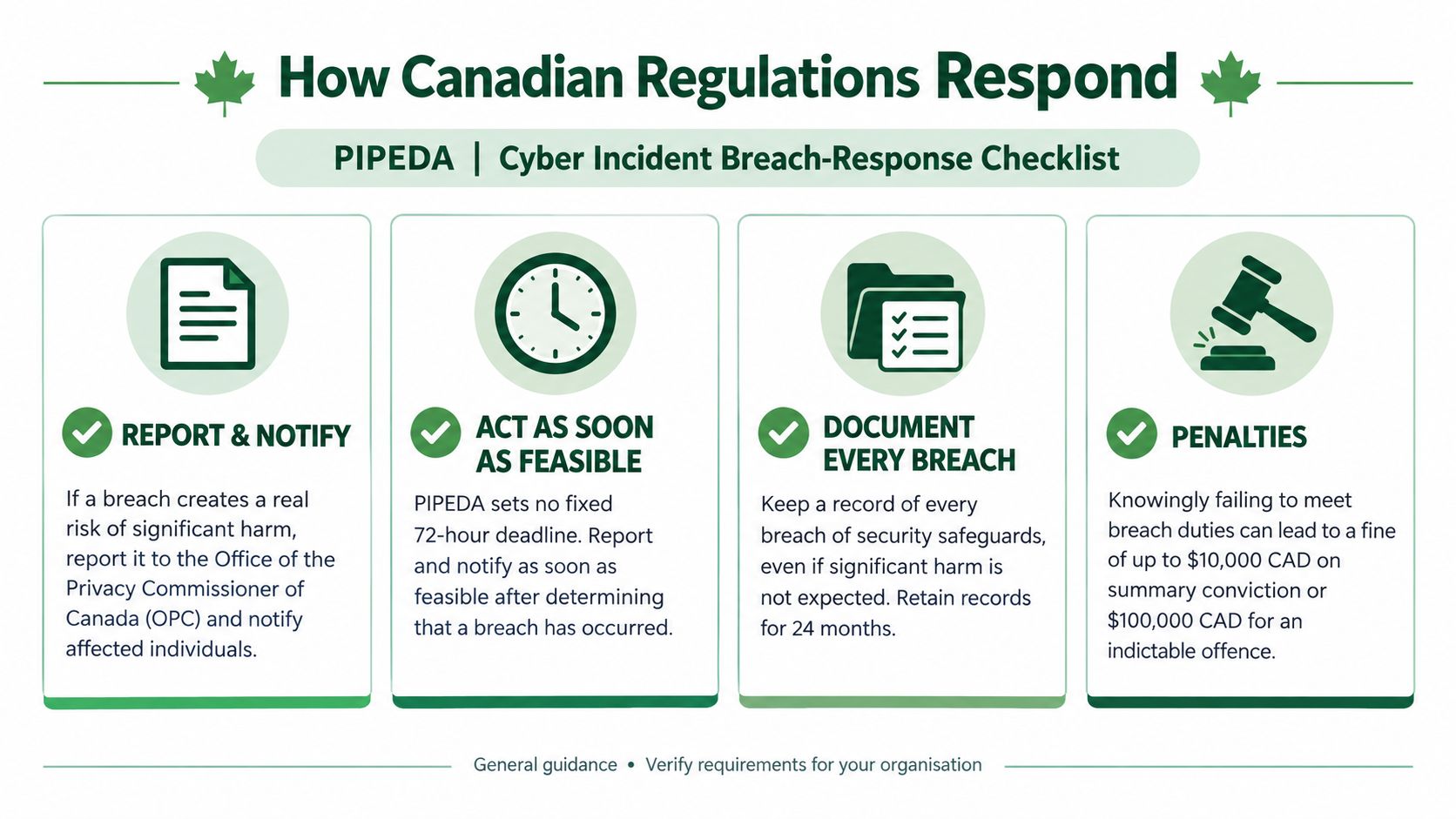
    An infographic titled PIPEDA Cyber Incident Breach-Response Checklist outlining reporting, notification, documentation, and penalty requirements for Canadian businesses.

    What to preserve first

    Don't wait for a perfect investigation before preserving evidence. Record the discovery time, affected accounts, suspicious messages, sign-in events, mailbox rules, OAuth approvals, endpoint findings, and actions taken. Preserve logs in a way that supports later review, and avoid deleting the original email before investigators can examine headers and content.

    PIPEDA isn't the only rule that may apply. Provincial health privacy legislation can govern hospitals, clinics, and service providers. Organizations in British Columbia, Alberta, and Quebec may also have breach obligations under their provincial private-sector privacy laws. Banks, telecommunications companies, energy operators, and other regulated sectors may face additional obligations. Contractual duties can also require prompt notice to customers or suppliers.

    Bill C-8 received Royal Assent in June 2026. It creates the Critical Cyber Systems Protection Act for designated operators in finance, telecommunications, energy, and transportation. Its obligations will come into force in phases. Don't assume a headline about new legislation automatically applies to your business. Ask counsel or your privacy lead to map the systems, information, and jurisdictions involved.

    For a plain-language overview of Canadian privacy responsibilities, see what Canadian businesses need to know about PIPEDA compliance.

    Choose the right reporting path

    Contact the Cyber Centre for cyber incident guidance and federal coordination. When fraud, extortion, identity theft, or other crimes may have occurred, contact local police. Then report it online at reportcyberandfraud.canada.ca. Notify the relevant provincial privacy or health regulator when provincial law applies, and involve your insurer before taking steps that could affect coverage or forensic support.

    Canadian hosting can simplify jurisdictional review because your provider operates under Canadian legal conditions, but it doesn't create automatic PIPEDA compliance. You still need a lawful purpose, access controls, retention rules, vendor oversight, and a breach process.

    How to Protect Your Canadian Business

    Start with the accounts that can move money or access other systems. Require multifactor authentication for administrators, finance, payroll, and mailbox access. Use phishing-resistant authentication where practical, because an attacker can steal passwords and relay weaker second factors through a convincing sign-in page.

    Separate your email, authentication, management, and backup environments. Keep at least one backup copy offline or independently protected from the production domain. Test restoration, not just backup completion. A backup you can't restore during a busy incident is an archive, not a recovery plan.

    Controls that pay off during a real incident

    Monitor for changes that attackers commonly use to stay hidden:

    • Mailbox rules: Alert when a user creates a rule that moves, deletes, or forwards messages involving banking, payroll, or security.

    • OAuth permissions: Review new application grants and remove permissions that users don't need.

    • Administrative sign-ins: Investigate unusual locations, devices, user agents, and activity outside normal working patterns.

    • Outbound mail: Apply rate limits and recipient controls so one compromised account can't send a flood of malicious messages.

    • Payment requests: Require confirmation through a known second channel before changing supplier, payroll, or banking details.

    Your incident playbook should name people, not just departments. The person who discovers a suspicious email should know who can revoke sessions, who contacts the bank, who calls the insurer, and who decides whether to notify customers.

    Preserve the suspicious message and relevant logs. Revoke active sessions, reset credentials, remove unauthorized MFA methods, inspect mailbox rules, and check for forwarding or data access. Tell your provider and security partner what happened, including the time window and affected accounts.

    Use the DMARC guide for simpler email security to understand how sender authentication helps prevent criminals from spoofing your domain. DMARC, which stands for Domain-based Message Authentication, Reporting, and Conformance, works with SPF and DKIM to help receiving systems evaluate whether messages claiming to come from your domain are legitimate.

    Typewire is one email option for organizations that want Canadian hosting, encrypted mail, phishing detection, virus filtering, anti-spam controls, custom domains, and support for multifactor authentication. Those controls can reduce exposure, but they don't replace identity governance, staff training, backups, or payment verification.

    What Canadian Organizations Should Do Next

    The gap between perceived and actual risk deserves action. BDC found broad exposure among small businesses. Yet in an Insurance Bureau of Canada survey, only 6% of business decision-makers strongly agreed their organization could be vulnerable. Just 47% said it was prepared for an attack or breach. (BDC's analysis of small-business cyber risk)

    Make three decisions this quarter. Require phishing-resistant MFA for privileged and financially sensitive accounts. Test mailbox-compromise recovery, including session revocation, rule inspection, payment review, and evidence preservation. Confirm backups can restore without relying on the same identity system an attacker may control.

    A private, Canadian-hosted email stack can support data residency and reduce dependence on advertising-driven services. It will not make your organization immune to cyber attacks. Security comes from habits, monitoring, recovery, and decisions made before pressure arrives.

    Typewire provides encrypted, ad-free email hosted in Canada, with phishing detection, virus filtering, anti-spam protection, custom domains, and multifactor authentication support. Start your 7-day free trial to set up privacy-focused email for your business.
  • What Is Spear Phishing and Why Targeted Attacks Hit Harder

    What Is Spear Phishing and Why Targeted Attacks Hit Harder

    Last updated: October 14, 2026

    Spear phishing is a personalized email attack that uses trusted context to make one recipient approve a payment, reveal credentials, or share sensitive information. In 2025, Canadians reported C$67.9 million in spear-phishing losses to the Canadian Anti-Fraud Centre. That total came from 813 reports and 571 victims. Only investment fraud cost Canadians more.

    You may be reviewing an invoice while messages keep arriving, when an email appears to come from a supplier you already use. The tone sounds normal, the project name is correct, and the request fits your role. Nothing looks like the cartoon version of a scam.

    That's why spear phishing deserves a different response from ordinary spam. We'll look at how targeted attacks work, why careful people still miss them, and which technical and business controls stop one mistaken click from becoming a payment or account takeover.

    What Spear Phishing Means

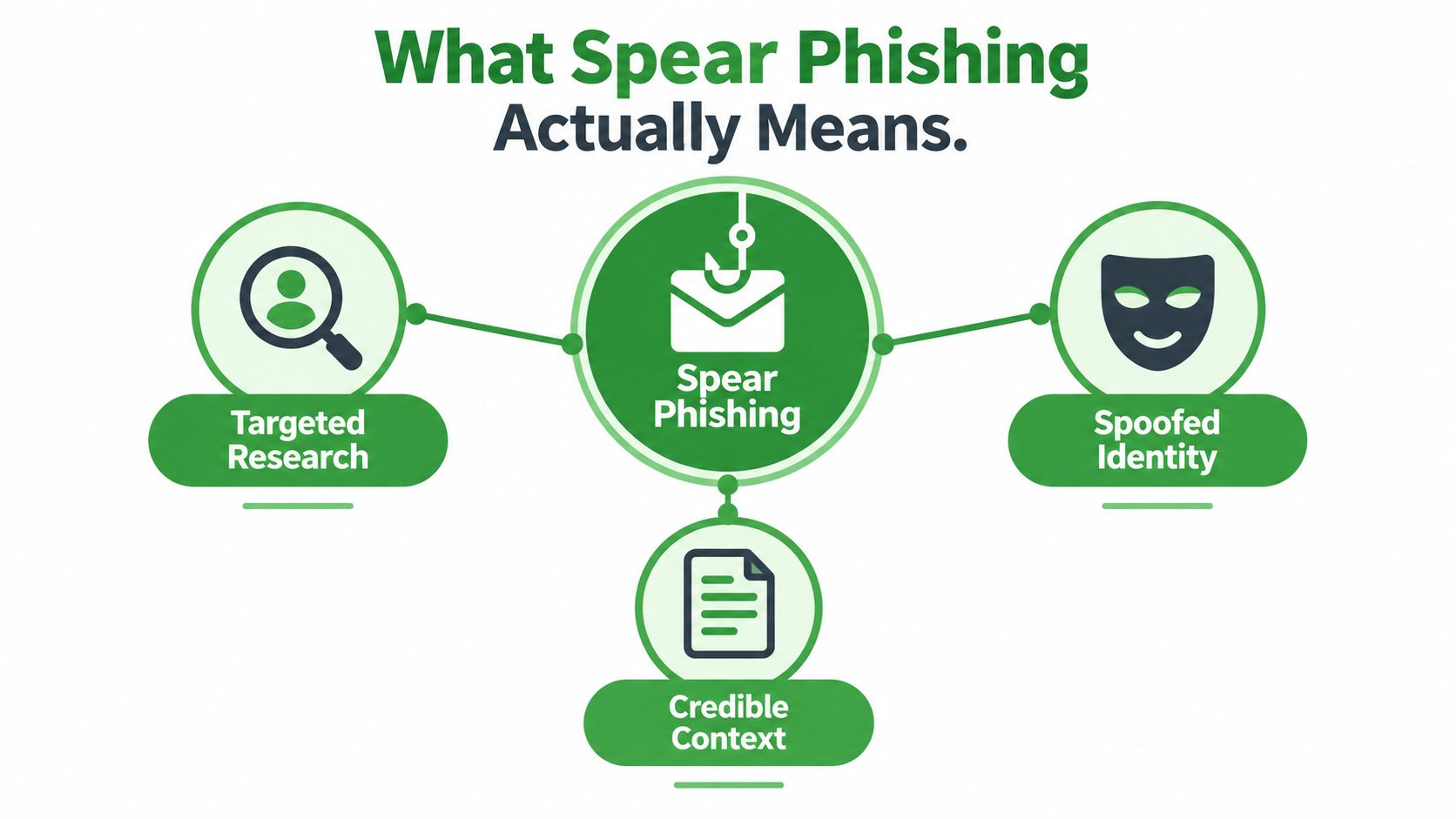
    Spear phishing is targeted deception by email or another message channel. An attacker researches a person or small group, impersonates a trusted identity, and shapes a request around the recipient's work or personal context. Relevance is the main hook. A polished design may help, but familiarity makes the request easier to accept.

    Consider a small-business example. An accounts payable clerk receives an email that appears to come from a real supplier. It uses the supplier's usual sign-off, mentions a recent order, and asks the clerk to update banking details before the next payment. The attacker might find the employee's role on the company website, learn about the supplier relationship from a public announcement, or gain access to an existing email thread.

    The request fits the employee's normal duties and arrives at a plausible time. That combination can defeat a quick review. If the new banking information is accepted without independent confirmation, the next payment may go to the attacker.

    An infographic showing the three main components of spear phishing: targeted research, spoofed identity, and credible context.

    The trust substitution principle

    A useful mental model is trust substitution. The attacker replaces a genuine identity or request with a false one, then counts on an authorized employee to complete the action.

    Spear phishing can succeed without a software exploit. The attacker may never enter the payment system directly. Instead, they persuade someone with legitimate access to approve a payment, change supplier details, disclose a password, or open a document.

    The Canadian Centre for Cyber Security's cyber hygiene guidance describes spear phishing as a customized social-engineering tactic that uses details about a person's job, interests, or characteristics. Its checks include confirming that you know the sender, that the tone matches normal communication, and that a link or attachment belongs in the message.

    Those checks are useful, but awareness alone has limits. Personalized messages turn a routine request into a recognition test, and a busy recipient may miss the warning. The recipient becomes the vulnerability because the request looks routine. Treat every unexpected payment, password, or account-change request as untrusted until you verify it through a separate channel, such as a known phone number or a new message thread.

    Spear Phishing Versus Regular Phishing

    A generic phishing email is like a flyer dropped into thousands of mailboxes. The sender repeats a fake delivery notice, account warning, or password-reset message and waits for a few recipients to click.

    Spear phishing works more like a forged note addressed to one person. The attacker selects a target, gathers context, and shapes the message around a role, relationship, or current project. “Your account is locked” is generic. A request mentioning your actual manager, supplier, or live contract feels connected to work, which makes the recognition failure harder to spot.

    Dimension Regular Phishing Spear Phishing
    Audience Large, broad recipient groups One person, team, or organization
    Personalization Limited or copied from a generic template Based on names, roles, relationships, and events
    Typical goal Clicks, credentials, malware, or small payments Payment diversion, account takeover, sensitive data, or privileged access
    Message style Often urgent but vague Urgent and operationally believable
    Useful warning signs Strange links, attachments, spelling, and generic greetings Lookalike domains, unusual requests, reply-to mismatches, timing, and process changes
    Main defence Filtering and cautious clicking Filtering, account protection, independent verification, and dual approval

    The number of messages is not the whole risk. In 2025, reported Canadian spear-phishing losses averaged about C$118,900 per victim, based on CAFC figures. Reported losses are a lower bound because individuals and organizations do not always report fraud.

    A targeted payment request may contain no malicious link. An attacker can impersonate an executive or supplier and ask for a transfer using an ordinary reply. That pattern is closely associated with business email compromise. Whaling and executive email fraud is one targeted form, while other attacks imitate suppliers, colleagues, or service providers.

    Awareness training helps people notice warning signs, but it cannot reliably confirm identity during a busy workday. Small teams need layers: filtering, account protection, clear payment procedures, dual approval, and independent verification. Confirm a changed bank detail or unusual transfer through a known phone number or a separate message thread, not through contact information in the email.

    Practical rule: Generic phishing asks, “Will anyone click?” Spear phishing asks, “Who has the authority to do this, and what would make the request feel normal?”

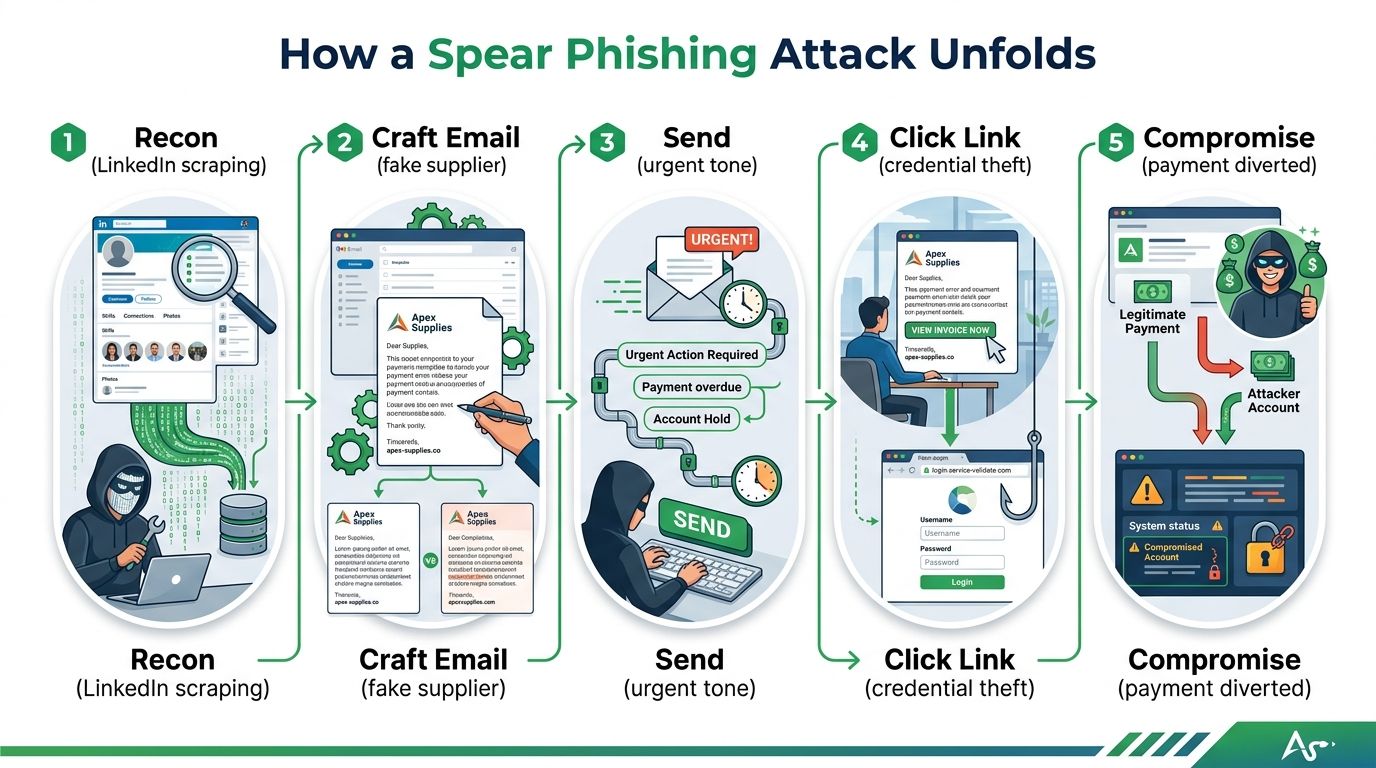
    How a Spear Phishing Attack Unfolds

    A targeted attack may begin days or weeks before an email appears. The attacker studies people, relationships, systems, and upcoming events, then uses those details to make a request sound routine.

    A small design firm announces a new contract. An attacker checks its public staff page, finds the person who handles invoices, and reviews the owner's role and supplier relationships. A LinkedIn profile may reveal the finance employee's title, while the company website supplies the project context needed for a believable message.

    Five stages in a typical attack

    1. Reconnaissance: The attacker gathers names, job roles, supplier relationships, and project timing from public pages. They may also use a compromised mailbox or exposed credentials.

    2. Identity selection: The attacker decides whether to imitate a supplier, executive, financial institution, or colleague. They may register a lookalike domain or take control of a genuine account.

    3. Message construction: The email copies the sender's tone and refers to a real business event. A payment-change request might follow a contract announcement. An executive request might arrive during payroll or another transaction period.

    4. Action request: The recipient is asked to approve a transfer, open an attachment, enter credentials, or provide information. The wording usually sounds like ordinary work rather than an emergency.

    5. Follow-on activity: After a click or login, the attacker may watch conversations, create forwarding rules, grant an application access, or send a more convincing message from the account.

    An infographic showing the five-step process of a spear phishing cyberattack from reconnaissance to payment compromise.

    A link may open a fake Microsoft or Google sign-in page. In an adversary-in-the-middle attack, that page proxies the connection between you and the service. You can enter the correct password and complete multifactor authentication, yet the attacker may capture the active session token.

    Each stage offers a chance to interrupt the chain. Email authentication can reduce direct domain spoofing. Mailbox alerts can reveal unusual logins or forwarding rules. Independent payment checks can stop a fraudulent transfer even if the message passes through every filter. For small teams, those layers matter because awareness training cannot verify identity on a rushed workday.

    Why Targeted Attacks Are So Hard to Spot

    Many security guides teach people to look for spelling errors, strange links, and unfamiliar attachments. Those checks still matter, but they don't cover the hardest cases.

    The federal Get Cyber Safe Awareness Tracking Survey found that 87% of online Canadians recognize requests for sensitive information as a phishing sign. Another 86% recognize unfamiliar links or incorrect sender addresses. Yet the share who said they’d been a victim of a phishing attack rose from 18% in 2022 to 26% in 2026 (Get Cyber Safe Awareness Tracking Survey).

    Recognition and prevention aren't the same thing. A well-personalized message can contain the correct names, a familiar writing style, and a real project reference. A trained employee may notice the request feels unusual, but pressure, workload, and authority can still push them to act.

    Design for mistakes, not perfect judgement

    The answer isn't to blame users or demand that everyone become a forensic email analyst. Build a workflow where one mistaken decision can't independently move money or expose an account.

    Useful controls include:

    • External-sender labels: Mark messages that originate outside your organization, even when the display name matches an executive.

    • Lookalike-domain detection: Flag domains with extra characters, unusual subdomains, or newly observed infrastructure.

    • Anomaly alerts: Watch for unusual sender-recipient relationships, unexpected login geography, and unfamiliar attachments or URLs.

    • Phishing-resistant MFA: Use passkeys or FIDO2 security keys for privileged accounts. These bind authentication to the genuine website more effectively than a code or approval prompt.

    • Out-of-band verification: Confirm payment, payroll, password-reset, and supplier-account requests using a known phone number or an independently opened account.

    The Canadian Centre for Cyber Security's National Cyber Threat Assessment identifies spear phishing as a fraud type with a high reported financial impact. The same guidance supports a layered approach because filtering alone can't detect a request sent from a compromised, legitimate mailbox.

    A good security process doesn't require every employee to identify every fake. It makes high-risk actions difficult to approve from email alone.

    The modern risk also includes session theft. A password manager and MFA can reduce many credential attacks, but a convincing proxy page may capture an authenticated session unless your organization uses phishing-resistant authentication, conditional access, device checks, and rapid token revocation. Logging should support investigation without collecting more employee content than the business needs, especially when personal information falls under PIPEDA obligations.

    A young woman wearing glasses looking intently at a laptop screen with a focused expression.

    Real Spear Phishing Examples

    The most useful spear phishing email examples rarely contain glaring mistakes. They show how a request can match current business activity while bypassing normal checks.

    The executive wire request

    A finance employee receives a brief message that appears to come from the chief executive. The company is handling a confidential acquisition, so a request to pay an adviser quickly sounds plausible. The message asks the employee to keep the transfer private and supplies new recipient-account instructions.

    Possible warning signs include secrecy, urgency, a different reply-to address, or a request that skips the usual approval process. A suspicious link or poor grammar may be absent. The message might contain no link at all, which makes the requested action, rather than the writing quality, the main clue.

    The supplier banking change

    An email that appears to come from a supplier’s genuine contact includes an updated banking form after the company announces a new contract. The timing feels right, and the employee already expects an invoice. The attacker may have spoofed the supplier's domain or compromised someone already involved in the conversation.

    The key warning is the change to payment instructions. Confirm it through a known phone number, not the number shown in the email or form. Require a second person to approve the update before sending payment. This small pause works like a second lock on a door, especially when the message itself looks routine.

    The shared document login

    An email that appears to come from a colleague links to a shared document for a current project. The page resembles a Microsoft or Google sign-in screen and may include the organization's branding. The recipient enters the correct password and completes MFA. As covered earlier, a proxy page can capture the session token even after MFA.

    A domain can differ by only a few characters, such as rnicrosoft.com instead of microsoft.com. Polished fakes can make that distinction difficult to notice, so open the service through a saved bookmark or known application, then locate the document inside the account. Our guide to spotting dangerous phishing email examples covers inspection habits that support this workflow.

    Across these examples, the attacker's goal is familiar work. Treat unusual secrecy, new payment details, and unexpected sign-in requests as separate verification triggers, even when the sender and timing seem credible.

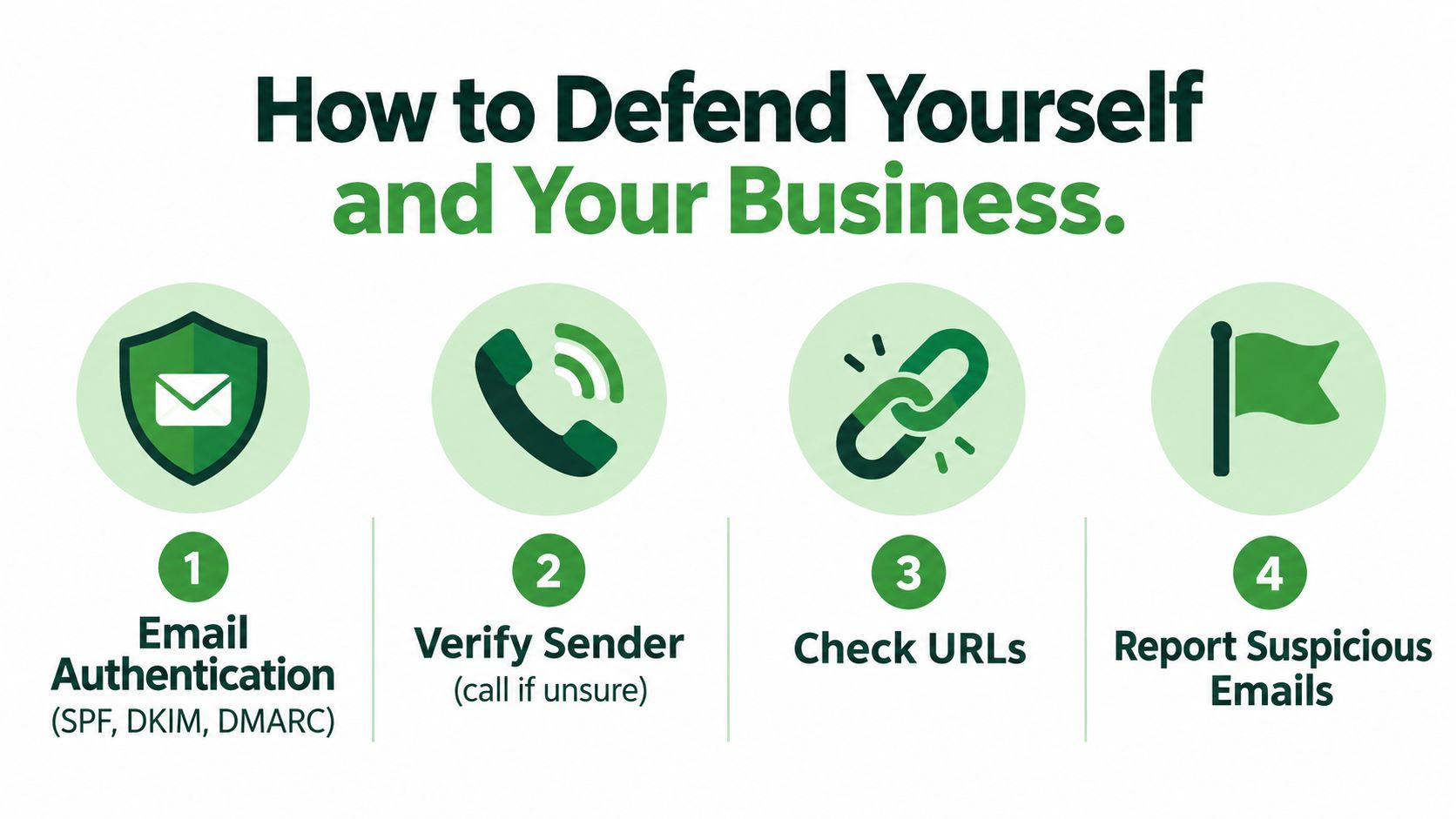
    How to Defend Yourself and Your Business

    Layered protection works better than a single warning banner or annual training session. We recommend starting with controls that reduce impersonation, then adding account safeguards and business rules that limit the damage.

    Start with the email foundation

    SPF, or Sender Policy Framework, lets a domain publish which mail servers may send messages for it. DKIM, or DomainKeys Identified Mail, adds a cryptographic signature that receiving systems can check. DMARC, or Domain-based Message Authentication, Reporting, and Conformance, tells receiving systems how to handle messages that fail alignment checks.

    These standards can reduce direct domain spoofing, but they don't prove that a genuine mailbox hasn't been compromised. They also won't stop an attacker from registering a similar domain. Use authentication alongside lookalike-domain detection, external-sender labels, URL inspection, attachment scanning, and alerts for unusual sender behaviour.

    Protect accounts and transactions

    Use MFA across business systems, with FIDO2 security keys or passkeys for administrators and other privileged users where possible. Push approvals are useful, but they can still be abused through repeated prompts or social engineering. Phishing-resistant methods reduce the chance that a fake login page can reuse the authentication.

    Your business process matters just as much:

    • Payment changes: Confirm them by calling a known number already stored in your records.

    • High-value transfers: Require two people to approve the request.

    • Credential resets: Never treat an email alone as proof of identity.

    • Reporting: Give staff a simple, blame-free way to report suspicious messages.

    • Mailbox monitoring: Alert on new forwarding rules, OAuth grants, mailbox delegation, and unusual sign-ins.

    The Canadian Centre for Cyber Security's social-engineering guidance recommends MFA, incident planning, software patching, spam filtering, malicious-domain blocking, and prompt action after someone clicks or downloads something. If a click happens, report it quickly, change affected passwords, reset MFA, and scan the device.

    An infographic titled How to Defend Yourself and Your Business listing four essential cybersecurity tips for email protection.

    Where a private email provider fits

    Typewire is one option for people who want ad-free email, phishing detection, virus filtering, spy-pixel blocking, and zero-access encryption without behaviour tracking. We host email in Canada on our own infrastructure in Vancouver, support custom domains and aliases, and offer unlimited sending on paid plans. Those features can reduce tracking and exposure, but they don't replace independent payment verification, MFA, or a written incident process.

    You can also review an email's technical details with our guide to reading an email header and spotting a fake sender. Headers can reveal mismatched paths and authentication results, although a compromised legitimate account may still pass ordinary checks.

    What to do after a spear phishing attempt

    If someone clicks, replies, or approves a suspicious request, move quickly. Preserve the message with its full headers, revoke active sessions, rotate affected credentials, and contact the bank if money or banking details were involved.

    Check mailbox forwarding rules, OAuth grants, delegated access, and recent sign-ins. Notify your security or IT contact, document what happened, and report suspected fraud to the Canadian Anti-Fraud Centre.

    A small-business policy can be short:

    Payment instructions, payroll changes, supplier banking updates, and credential resets require independent verification. High-risk transfers require two authorized approvers. Staff must report suspicious messages immediately, without fear of blame.

    Frequently asked questions

    Does MFA stop spear phishing?
    Not completely. Multifactor authentication blocks many attacks that rely on a stolen password. But some fake login pages act as a proxy between you and the real service. When you sign in and approve the MFA prompt, the attacker can capture your active session. Phishing-resistant methods, such as passkeys or FIDO2 security keys, offer stronger protection. Pair them with conditional access, device checks, and the ability to revoke sessions quickly.

    Does reporting spear phishing help?
    Yes. Reporting a suspicious email quickly gives your team time to warn other staff before they respond. It also lets you block the sender’s domain, revoke compromised sessions, and preserve evidence. If money was sent, a fast call to your bank improves the chance of stopping the transfer. Reports to the Canadian Anti-Fraud Centre also help authorities track fraud trends. The centre estimates only 5 to 10% of victims report.

    How can I tell if a polished email is real?
    Don’t judge an email by how it looks. Spear phishing messages often use correct names, real project details, and a familiar writing style. Focus on what the email asks you to do instead. If it changes payment details, requests credentials, or skips your normal approval process, verify it separately. Call the sender using a phone number you already have on file, or start a new email thread.

    What is the difference between spear phishing and whaling?

    Whaling is a type of spear phishing that targets senior executives or the people who act on their behalf. Spear phishing can target anyone, such as an accounts payable clerk or a new hire. Whaling aims higher, because executives can approve large payments or access sensitive data. Both rely on research and personalized messages. The main difference is who the attacker chooses as the target.

    How do I report spear phishing in Canada?

    If you lost money or shared banking details, contact your financial institution first. Then contact your local police and report the incident online at reportcyberandfraud.canada.ca. You can also call the Canadian Anti-Fraud Centre at 1-888-495-8501. Inside your organization, alert your IT or security contact right away. Keep the original email with its full headers, since investigators may need it.


    We provide private, ad-free email with phishing detection, virus filtering, spy-pixel blocking, zero-access encryption, and Canadian-hosted infrastructure. If you want an email setup that reduces tracking while supporting safer communication habits, visit Typewire and start with the seven-day free trial.