You've probably seen them a thousand times—those long, blocky text paragraphs at the bottom of an email from a doctor's office or hospital. That's a HIPAA email disclaimer, and while it looks official, its actual role in protecting patient data is widely misunderstood. While these disclaimers can inform recipients, they do nothing to ensure email privacy, secure transmission, or leverage secure hosted email platforms built for HIPAA compliance. To achieve genuine email privacy and security, organizations need to rely on robust hosted email platforms with end-to-end encryption and granular access controls.
So, what is it really? Think of it as a formal notice tacked onto your email signature. It’s there to warn recipients that the message might contain confidential information. It signals your organization's commitment to protecting patient data, but let’s be crystal clear: it does not make an unencrypted email secure or HIPAA compliant on its own.
What a HIPAA Email Disclaimer Actually Does

Here’s a helpful analogy: A HIPAA email disclaimer is like putting a "Private Property" sign on an unlocked gate. The sign tells people the rules and warns them not to trespass, but it does absolutely nothing to physically stop them from walking right through. And beyond this administrative notice, it offers no real privacy protection or security on hosted or cloud email services.
In the same way, a disclaimer simply informs recipients of their obligations if they stumble upon Protected Health Information (PHI). It offers zero technical protection for the actual data inside the email.
Its purpose is purely administrative, not technical. It’s a good-faith effort to communicate your organization’s confidentiality policies, which can be a useful procedural step if an email lands in the wrong inbox.
But this is where we have to draw a hard line. The HIPAA Security Rule is very specific about requiring technical safeguards—things like encryption and access controls—to protect electronic PHI (ePHI). A simple text disclaimer can't do that. Relying on it as your primary email security measure leaves a massive, dangerous hole in your compliance strategy and undermines both email privacy and security, especially compared to using a dedicated hosted email platform.
The Real Job of a Disclaimer
So if it doesn't secure anything, what's it for? The practical function of a HIPAA email disclaimer boils down to three key things:
- Stating Confidentiality: It declares that the email may contain sensitive information protected by federal law.
- Warning Unintended Recipients: It gives clear instructions to anyone who receives the email by mistake—telling them to delete it immediately and notify the sender.
- Signaling Intent: It shows auditors, business partners, and patients that your organization has policies in place to safeguard PHI, even if the disclaimer itself doesn't do the safeguarding.
Keep in mind these notices are administrative safeguards only—they don't encrypt or secure messages, nor do they tap into the privacy and security features of hosted email platforms.
The risk of sending an email to the wrong person is very real. Misdelivery is a major source of HIPAA violations, accounting for roughly 8% of all data breaches reported to the HHS Office for Civil Rights. In a single recent year, that translated to over 5,000 documented breaches involving misdirected emails. This is why disclaimers have become a common, though often misunderstood, part of a compliance toolkit. You can find more data-driven insights on this from Paubox's research on HIPAA-compliant email.
HIPAA Email Disclaimer Myths vs Reality
Getting a handle on what a disclaimer can't do is the first step toward building an email system that’s actually secure. Many organizations mistakenly believe these notices offer real protection, which creates a false sense of security and opens them up to serious compliance risks.
Let's clear the air and bust some common myths.
| Common Myth | HIPAA Reality |
|---|---|
| A disclaimer makes my email HIPAA compliant. | False. Compliance requires technical safeguards like encryption. A disclaimer is just a notice and offers no data protection. |
| The disclaimer legally binds the recipient to delete a misdirected email. | False. A disclaimer has limited legal enforceability on a third party. Its main value is in demonstrating your organization’s due diligence, not in compelling action from an unintended recipient. |
| It protects us from liability in case of a breach. | False. If a breach occurs due to a lack of encryption, regulators will focus on the absence of required security measures. The presence of a disclaimer will not absolve you of responsibility for the breach. |
| All emails from a healthcare provider must have a disclaimer. | It's a best practice, not a strict rule. While not explicitly mandated for every email, using it consistently helps build a culture of security and prevents accidental omissions when sending PHI. |
Ultimately, a disclaimer is a piece of a much larger puzzle. It’s a policy statement, not a security control. True HIPAA compliance for email means implementing robust technical measures that protect data from the moment you hit "send" until it’s read by the intended recipient.
The Hidden Dangers Of Relying On Disclaimers
Relying only on a HIPAA email disclaimer is like painting “Keep Out” on a screen door—it makes a statement but does nothing to hold the door shut. You’ve warned people, but you haven’t stopped anyone from walking right in. In other words, text alone won’t encrypt messages or stop a misdirected email from landing in the wrong inbox.
Under the HIPAA Security Rule, you need technical safeguards—real locks and keys, not just warning labels. Without these, you’re creating a false sense of safety that can leave you wide open to legal headaches and data breaches.
Where Disclaimers Fail In The Real World
Picture this: an employee meant to send lab results to a doctor but hits reply-all by mistake. The disclaimer politely asks the unintended recipient to delete the email. Unfortunately, once that sensitive PHI has left your server, there’s no guarantee it will ever be deleted.
Or consider a phishing scam. A hacker tricks your staff into handing over their credentials, then quietly sifts through years of patient emails. A footer message at the bottom of those emails won’t stop them from copying or sharing that data.
A disclaimer signals intent but does nothing to stop attackers or simple human errors. True HIPAA compliance depends on stopping unauthorized access before it happens, not pleading with recipients afterward.
The Legal Risks Of A False Sense Of Security
When auditors knock on your door, they’re looking for real security controls: end-to-end encryption, strict access protocols, audit logs. A block of text at the bottom of your email just isn’t going to cut it. Regulators call relying on disclaimers alone willful neglect, and fines can reach tens of thousands of dollars per violation.
Email is now the top attack vector for healthcare breaches. 74% of organizations using cloud services have faced account compromises. The biggest breaches have exposed millions of patient records, underlining how dangerous it is to treat a disclaimer as your only defense. For more details, check out the Cobalt.io blog on healthcare data breach statistics.
Shifting Focus To Proactive Email Security
A disclaimer should be one small part of a layered defense—not the cornerstone. Here’s what really makes a difference:
- Encrypted Email Services: Ensure every message and attachment is scrambled until it reaches the right eyes, guaranteeing email privacy.
- Secure Hosted Email Platforms: Solutions like Typewire build privacy and security into every layer of email delivery, offering dedicated servers, private data centers, and advanced threat protection.
- Granular Access Controls: Limit who can send, open, or forward PHI to only those who need it.
By adopting these proactive measures, your organization moves from simply warning about risk to actually preventing it. That’s the path to genuine HIPAA compliance and the only reliable way to protect sensitive patient information.
How to Write an Effective Disclaimer With Examples

While a well-written HIPAA email disclaimer isn't a security shield, it is a crucial piece of your overall email policy. The trick is to craft one that's clear, direct, and actionable. It’s all about communicating your commitment to privacy and setting clear expectations for anyone who gets an email from you.
Think of it as an administrative safeguard. It’s your first line of communication when an email with PHI accidentally lands in the wrong inbox, telling the recipient exactly how to handle a potential data exposure.
The goal here is to kill any ambiguity. Your disclaimer should leave no doubt about the confidential nature of the email or what someone's responsibility is if they weren't supposed to get it.
The Building Blocks of a Strong Disclaimer
Every solid HIPAA email disclaimer is built on four core components. Think of them as the pillars holding up your notice; each one serves a specific and necessary function.
- The Confidentiality Notice: Start by clearly stating that the email may contain confidential and legally protected health information. This sets the stage right away.
- The Intended Recipient Clause: Specify that the information is meant only for the person or entity it's addressed to. This legally defines who should be reading it.
- The No-Sharing Rule: Explicitly forbid any unauthorized review, sharing, distribution, or copying of the email. It's a direct command against letting the data spread.
- The "Oops" Instructions: Provide simple, clear steps for an unintended recipient to follow. Usually, this means notifying the sender immediately and permanently deleting the message.
These four elements work together to create a comprehensive notice that shows your organization is diligent about protecting PHI. While it doesn't encrypt the email itself, it provides a procedural backstop that can be incredibly important if a breach occurs.
Adaptable Disclaimer Templates
One size doesn't fit all. A long, comprehensive disclaimer might be perfect for the first email you send a new patient, but it's overkill and annoying on mobile for quick back-and-forth replies. It’s smart to have a few variations ready to go.
If you want to dive deeper into tailoring notices for different situations, you can check out our complete guide to email signature disclaimers.
Here are three practical examples you can adapt for your own use.
1. The Comprehensive Disclaimer
This is your "maximum coverage" version. It’s ideal for emails sent outside your organization, especially when they're likely to contain sensitive PHI. It’s detailed and leaves very little to chance.
CONFIDENTIALITY NOTICE: This email and any attachments are intended only for the use of the individual or entity to which it is addressed and may contain information that is privileged, confidential, and exempt from disclosure under applicable law, including the Health Insurance Portability and Accountability Act (HIPAA). If you are not the intended recipient, you are hereby notified that any dissemination, distribution, or copying of this communication is strictly prohibited. If you have received this email in error, please notify the sender immediately by reply email and permanently delete this message and all attachments from your system.
2. The Concise Mobile-Friendly Disclaimer
This one is all about brevity. It’s perfect for replies and ongoing conversations where a giant block of legal text would just get in the way. It hits the key points without overwhelming the reader.
This email may contain confidential PHI. It is intended for the recipient only. If you received this in error, please notify the sender and delete it immediately. Unauthorized sharing is prohibited.
3. Internal Communications Disclaimer
You can even use a disclaimer for emails inside your own organization. This version helps reinforce your internal security culture and reminds employees of their responsibilities when handling PHI, even when talking to a colleague.
This internal message may contain sensitive employee or patient data. Handle all information according to our company's HIPAA compliance and data security policies. Do not forward externally without authorization.
Moving Beyond Disclaimers to Real Email Security
While a well-written disclaimer is a decent administrative habit, it does absolutely nothing to protect patient data in transit. To actually meet the core requirements of the HIPAA Security Rule, you have to shift your focus from passive warnings to active security measures that truly safeguard Protected Health Information (PHI). That means choosing secure hosted email platforms that bake both privacy and security into every message.
It’s time to move beyond the fine print at the bottom of a message. Real email security isn’t about what you say in your footer; it’s about what’s happening behind the scenes to the data itself as it zips across the internet and sits on servers.
Think of a standard, unencrypted email like a postcard. Anyone who gets their hands on it can read it. A HIPAA email disclaimer is basically just writing "Private, please don't read!" on that postcard. It’s a nice thought, but it offers zero real-world privacy.
The Power of Email Encryption
Email encryption is the digital equivalent of putting that postcard inside a locked, armored box. It scrambles the message into unreadable code, making it completely useless to anyone who doesn't have the specific key to unlock it. This is the bedrock of genuine email security and a direct expectation under HIPAA.
Data needs protection at two critical points:
- In-Transit Encryption: This is what protects your email as it travels from your server to the recipient's. It prevents hackers from "eavesdropping" and snatching data as it crosses the public internet.
- At-Rest Encryption: This secures your email data while it's stored on a server, whether that’s in an inbox or an archive. If a server ever gets breached, at-rest encryption ensures the stored PHI stays unreadable.
A disclaimer can't do either of these things. Only a secure email platform can guarantee that PHI is encrypted every step of the way. For a deeper dive on this, our essential guide on HIPAA-compliant email encryption breaks down the technical details.
Why Secure Messaging Portals Are a Game Changer
Another fantastic tool for protecting PHI is a secure messaging portal. Instead of sending sensitive information directly into someone’s potentially insecure inbox, this approach keeps the data inside a protected online bubble.
It's simple. The recipient gets a plain notification email with a link. When they click it, they log into a secure, web-based portal to view the message and any attachments. The actual PHI never leaves the secure server, which sidesteps all the risks of interception or being stored on an unsecured device.
This method transforms email from a risky delivery service into a secure access point. By keeping PHI within a controlled ecosystem, organizations gain robust audit trails and access controls that are impossible to achieve with standard email.
Disclaimers have a small role in communicating policy, but they are just one piece of the puzzle. It takes a holistic understanding full HIPAA compliance to properly secure data across the board.
Hosted Email Platforms: The Ultimate Security Upgrade
By far, the most effective way to implement these safeguards and ensure email privacy is by using a secure hosted email platform. These services are built from the ground up with privacy and security as their top priority, making them worlds apart from standard, consumer-grade email providers.
A provider like Typewire bakes all these essential security features directly into the service. This means every email containing PHI gets protected automatically, without your staff having to remember any extra steps.
Here’s what a dedicated secure email host gives you that a simple disclaimer never could:
- End-to-End Encryption: Data is locked down from the moment you hit send until the recipient reads it.
- Access Controls: You can set strict rules defining who can send, receive, or even view emails containing PHI.
- Audit Trails: Every action is logged, giving you a crystal-clear record for compliance audits.
- Business Associate Agreement (BAA): This is the legally required contract that holds your email provider accountable for protecting your data, ensuring they are also HIPAA-compliant.
- Privacy-First Policies: Strict no-logs, no tracking, and data residency options to enforce email privacy.
When you choose a secure hosted email platform, you aren’t just adding another security layer. You're fundamentally changing how your organization handles patient information—moving from passive text notices to active, verifiable protection.
How To Choose A Secure Hosted Email Platform
Moving to a secure email system isn't just an upgrade; it's a fundamental shift toward real HIPAA compliance. It closes the dangerous security gaps that a simple email disclaimer can never hope to fix.
A secure hosted email platform doesn't just warn people about potential risks—it actively protects every single message with built-in safeguards. This is how you genuinely meet the HIPAA Security Rule's strict demands for encryption, access controls, and audit trails.
Think of it this way: a standard email is like a postcard, readable by anyone who handles it. A secure email platform turns your communication into a locked, armored truck.
Key Security Features To Look For
When you're shopping for a provider, you need to look past the marketing and focus on the core features that actually protect patient data. Each of these plays a critical role in safeguarding Protected Health Information (PHI).
- End-to-End Encryption: This is non-negotiable. It scrambles the email's content, making it completely unreadable to anyone without the specific key to unlock it.
- Detailed Audit Logs: You need a clear, unchangeable record of every action taken with an email. This is crucial for tracing a potential breach and proving compliance.
- Access Controls: This feature lets you decide exactly who can view, forward, or even send emails containing PHI, putting you in control of the data flow.
- Data Center Ownership: Knowing your provider owns and operates their own secure servers, rather than renting space on a public cloud, adds a massive layer of physical and digital security.
- Threat Protection Filters: Advanced filters are your first line of defense, proactively blocking phishing attempts, malware, and spam before they even have a chance to land in an inbox.
These features work together to create a fortress around your communications.
“True email security means stopping breaches before they happen, not just warning after the fact.” – Healthcare IT Expert
Each component helps build a stronger, more resilient compliance strategy.
Understanding Business Associate Agreements
If any third-party service handles PHI on your behalf, signing a Business Associate Agreement (BAA) is a legal requirement. This contract formally outlines each party's responsibilities for protecting that sensitive information.
Without a BAA in place, your practice is exposed to significant liability, even if the provider has the best technology in the world. Make sure you read the fine print, paying close attention to their incident response duties, breach notification timelines, and liability clauses.
Unfortunately, many small practices operate under dangerous assumptions. A shocking 98% of small practices believe automatic encryption is standard, and 83% incorrectly think that getting patient consent is a substitute for encryption. The result? Only 1.1% of healthcare organizations actually have a low-risk email security posture. You can learn more about these risky assumptions here.
Visual Guide To Email Security Decisions
This infographic breaks down the decision-making process, showing when encryption is mandatory versus when a disclaimer might suffice for general, non-PHI communication.
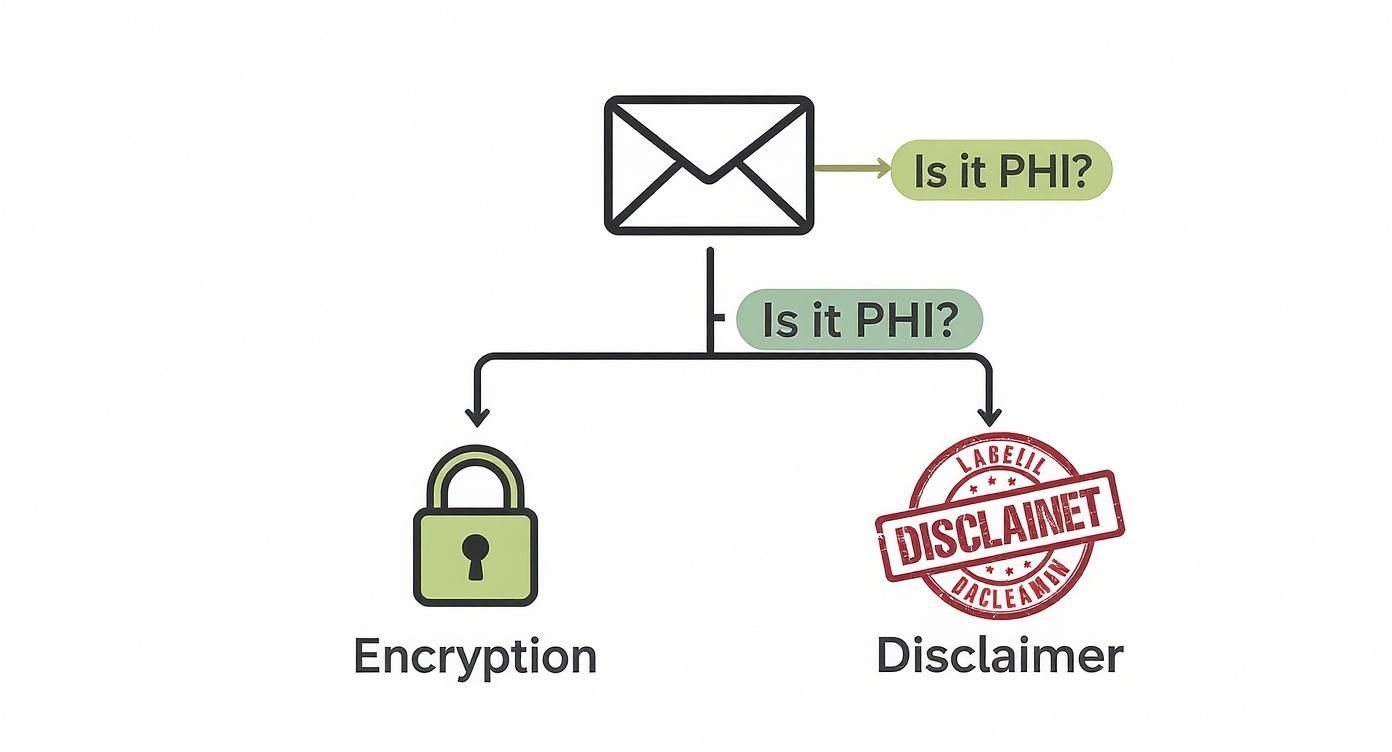
As the flowchart shows, there's no gray area: if an email contains PHI, it absolutely must be encrypted. Disclaimers are only appropriate for messages that are completely free of sensitive patient data.
Standard Email vs Secure Hosted Email
The difference between a standard, free email service and a platform built for healthcare is night and day. One is designed for casual convenience, while the other is engineered from the ground up for compliance and privacy. This table highlights the critical distinctions.
| Feature | Standard Email (e.g., Free Gmail) | Secure Hosted Email (e.g., Typewire) |
|---|---|---|
| End-to-End Encryption | Not available by default | Enabled automatically for all messages |
| Business Associate Agreement (BAA) | Not offered | Included with every plan |
| Audit Trail Detail | Limited and hard to access | Comprehensive and exportable |
| Data Center Ownership | Public cloud providers | Privately owned Vancouver data centers |
| Anti-Phishing and Malware Protection | Basic filters | Advanced AI-driven threat detection |
Notice how specialized providers like Typewire include a BAA and detailed audit logs by default—these aren't optional add-ons, they are core to the service. This kind of security architecture, which also keeps encryption keys under your control, is what makes a platform truly suitable for any organization handling PHI.
Making The Final Decision
Ready to choose a provider? Don't just pick the first one you find. A methodical approach will ensure you get a solution that truly fits your needs.
First, map out your clinic's workflows to pinpoint every touchpoint where PHI is handled via email. This will tell you exactly where encryption and detailed logging are most critical.
Then, it's time to put providers to the test.
- List your deal-breakers: What compliance features and workflow integrations are absolutely essential?
- Kick the tires: Sign up for a free trial and actively test the encryption process and the audit reporting. Is it easy to use? Is the data clear?
- Get it in writing: Confirm a signed BAA is provided and carefully review its terms, especially regarding breach notifications.
- Check for backup: How responsive is their support team? What are their disaster recovery plans?
Get your IT and compliance staff in a room to review the options together. Ensuring everyone is on board makes adoption much smoother. After all, the best security tool is the one your staff will actually use.
For a head-to-head comparison, check out our guide on the Top 7 HIPAA-Compliant Email Hosting Providers in 2025.
With the right platform, you can transform email from a major liability into a secure, reliable, and compliant communication tool. Every message is encrypted, tracked, and legally protected, giving you peace of mind and supporting your commitment to patient privacy.
Common Questions About HIPAA Email Disclaimers
Even when you have a solid email security plan, you're bound to run into some specific situations with disclaimers and patient messages that can be tricky. Let’s walk through some of the most common questions that pop up, clearing up any confusion about privacy, security, and staying compliant.
Can a Disclaimer Make My Personal Email Account Compliant?
Absolutely not. It's a common misconception, but a HIPAA email disclaimer is just a block of text. It doesn't magically add the technical safeguards—like encryption, audit trails, and access logs—that the HIPAA Security Rule demands.
Using a standard personal email like a free Gmail or Yahoo account to handle Protected Health Information (PHI) is a major compliance violation, no matter what disclaimer you slap on it. Real compliance starts with a secure, hosted email platform built for privacy, from a provider willing to sign a Business Associate Agreement (BAA). The disclaimer is a helpful procedural habit, not a substitute for a secure system.
Should Our Internal Staff Emails Include a Disclaimer?
Yes, this is an excellent best practice. Adding a disclaimer to internal emails does two very important things. First, it keeps security at the forefront of everyone's mind, acting as a constant, subtle reminder of how critical data privacy is in your day-to-day work.
Second, it's a vital safety net for human error. If an internal email with PHI is accidentally forwarded to someone outside your organization, that warning is already attached, telling the unintended recipient what to do. A consistent policy for all emails, internal and external, is simply the safest way to go.
What if a Patient Emails Me From an Unsecure Account?
This happens all the time. While HIPAA technically allows you to reply to a patient’s unsecure email, you have a duty to first warn them about the risks of talking over an unencrypted channel and get their consent to continue.
A much safer and more compliant approach is to redirect the conversation. Your response should avoid including any of their original PHI and guide them to a secure channel. You could say something like, "Thanks for getting in touch. To protect your privacy, please log in to our secure patient portal to see your results and continue this conversation." You acknowledge their message but move the sensitive talk to a protected space.
A patient's willingness to use unsecure email does not remove your organization's obligation to protect their data. Always default to the most secure communication method available.
Can a Disclaimer Protect Us From a Lawsuit After a Breach?
A disclaimer offers little to no real legal protection if you have a data breach. When regulators, auditors, or lawyers investigate an incident, they’re going to look past the fine print at the bottom of an email. They want to see your actual security measures: proof of encryption, access controls, audit logs, and a signed BAA with your email host.
A disclaimer might show you were thinking about compliance, but it won’t shield you from liability if you skipped the required technical safeguards. Proactive protection through a secure email platform is what really stands up in an investigation. When looking for a provider, it's crucial to review their data security protocols to ensure they can deliver that level of protection.
Ultimately, your security is only as strong as the technology behind it. Think of the disclaimer as a warning sign on the door, but a secure email host is the actual lock.
Ready to move beyond disclaimers to achieve genuine email security and privacy? Typewire provides secure, private email hosting built on our own privately owned data centers, ensuring your data is never tracked, mined, or shared. With end-to-end encryption and a commitment to user control, you can communicate with confidence. Start your free trial at https://typewire.com and experience true email privacy.