Author: williamwhite

  • How to Schedule Email Securely and Privately

    How to Schedule Email Securely and Privately

    Scheduling an email sounds straightforward, right? You write your message, find the "send later" option, and pick a time. It’s a great way to make sure your email hits an inbox at just the right moment.

    But there’s a crucial detail most people overlook: where that email sits and waits, and how its privacy and security are handled during that time.

    Why Secure Email Scheduling Is Non-Negotiable
    A person sitting at a desk with a laptop, focusing on a secure email interface, with digital lock icons floating around the screen.

    When you schedule an email, you're not just delaying its delivery—you're storing sensitive information. This is where the real privacy and security risks creep in, often without you even realizing it.

    Many people use handy browser plugins or the built-in scheduling tools in standard email clients. The problem? These often save your scheduled messages—and sometimes your account password—directly on your computer or a third-party server with questionable privacy policies. This is what we call client-side scheduling, and it's a huge weak spot. If your laptop gets stolen or hacked, all your pending emails are an open book.

    The Problem with Client-Side Scheduling

    This is where a privacy-focused, hosted email platform like Typewire completely changes the game. Instead of parking your data on your personal device, your scheduled messages are kept on heavily encrypted, dedicated servers. This server-side approach adds a powerful layer of protection.

    Let's break down why this difference is so important for your security and privacy:

    • Centralized Security: Your emails are guarded by professional, enterprise-grade security systems, not just whatever antivirus you have running on your machine.
    • Enhanced Privacy: Your login details and the content of your emails aren't just sitting in a browser cache or a local file, waiting for a breach. Hosted platforms protect your data from snooping.
    • Reliable Delivery: The send is handled by a robust, secure server. It doesn't matter if your computer is off or disconnected—the email will go out on time, every time.

    The real goal isn't just to send an email later. It's to ensure the message stays private and intact from the moment you hit "schedule" until it's delivered. True email security means protecting your data at every single stage.

    Getting a handle on the bigger picture of email protection is essential. I always recommend that businesses explore comprehensive email security solutions to understand all their options.

    And if you want to dig deeper into what makes an email genuinely private, check out this excellent resource on what is a secure email and why is it crucial for your privacy. For now, let’s focus on how Typewire’s secure, hosted approach puts you back in control.

    Building a Secure Foundation on a Hosted Platform
    A digital illustration of a shield icon overlaying a secure server rack, symbolizing data protection and security.

    Before you even think about scheduling your first email, let's talk about security and privacy. They are the bedrock of everything you'll do on a hosted email platform like Typewire. Setting up your account is just the beginning; true peace of mind comes from building layers of defense to protect your sensitive communications.

    The single most important step you can take is enabling two-factor authentication (2FA). Think of it as a double-lock on your digital front door. Even if a bad actor steals your password, they can't access your account without the second code from your phone. It’s a simple move that drastically reduces the risk of unauthorized access.

    Why Hosted Platforms Are a Security and Privacy Game-Changer

    One of the best things about using a hosted email platform like Typewire is its secure infrastructure. When you schedule an email, that message isn't just sitting in a folder on your laptop, vulnerable to malware or physical theft. Instead, it’s stored securely on Typewire’s own private servers until it's time to send.

    This server-side approach has massive advantages for your email security:

    • Data Encryption at Rest: Your scheduled messages are encrypted while they wait, making them unreadable to intruders.
    • No Device Dependency: Your email goes out on time, whether your computer is on, off, or halfway across the world.
    • Centralized Protection: Your data is guarded by industrial-strength security measures, which go far beyond your personal antivirus software.

    The core idea here is that your email's security shouldn't hinge on your personal device's safety. A hosted email platform moves that responsibility to a dedicated, purpose-built environment designed for privacy and protection.

    I always recommend taking a few minutes to read up on Typewire's security features. It helps you appreciate the architecture working behind the scenes to keep your communications safe from the moment you start typing.

    Getting this right isn't just about security, either—it's about impact. For instance, in B2B campaigns, simply adjusting your send times to match your recipient's work hours can boost engagement rates by 8.5%. It's a clear reminder that smart, secure scheduling really pays off. If you're curious, you can discover more B2B email marketing statistics that drive home the importance of timing.

    Sending Your First Timed Email

    Alright, let's put this into action. Scheduling a secure email on a hosted platform like Typewire isn't a complicated technical task—it's actually quite simple once you see it. We'll walk through a common scenario to get you started.

    Picture this: you've just finished a critical project update, but your lead developer is in a different time zone. You want that email to be the first thing they see when they start their day at 9:00 AM, not buried under a pile of overnight messages. This is the perfect job for a scheduled send.

    Writing and Scheduling Your Email

    You'll start by writing your message just as you normally would. The magic happens right before you send it. Instead of clicking the big "Send" button, look for a "Schedule Send" option or a little clock icon. This is standard in most modern email platforms, especially those focused on security.

    This is your control panel for timing. Clicking it reveals the options to dictate exactly when your message arrives.

    Here’s what the Typewire composer looks like. It’s a clean slate, designed to keep you focused on your message without any of the usual digital clutter.

    Nailing the Delivery Time

    Once you're in the scheduling menu, you can pick a specific date and time. For our cross-time-zone scenario, you'd choose the date and set the time to 9:00 AM. Here’s a crucial detail: a good hosted email platform lets you select the recipient's time zone. This simple feature eliminates all the mental math and guesswork, ensuring your timing is perfect.

    After you've locked in the time, just confirm the schedule. The email is then securely whisked away from your computer to Typewire's servers. It waits there, fully encrypted, until the precise moment it's set to be delivered. You can shut down your laptop and go about your day; the secure server takes care of the rest.

    This is where a hosted email platform really shines. The moment you schedule the email, it's no longer sitting on your local device. It’s already protected within a secure, dedicated environment designed for privacy.

    As you get more comfortable with scheduling, think about how timing can make your messages more effective. There's a real art to crafting effective timed emails, like sending a follow-up right after a meeting or event. It’s not just about security; it’s about making an impact.

    Going Beyond the Basics: Advanced Scheduling and Privacy in Typewire

    Once you get the hang of basic scheduling, you're ready to explore some of Typewire's more powerful tools. This is where you move from just sending emails later to gaining real control over your communications, all while keeping your data private and secure.

    For example, think about automating those repetitive tasks. You can set up a weekly project summary to go out like clockwork every Friday at 4:00 PM. Set it once, and you’re done. Typewire takes care of the rest from its secure, hosted environment, which means no more last-minute scrambles to send routine updates.

    This whole process is designed to be simple and secure, from composition to delivery.
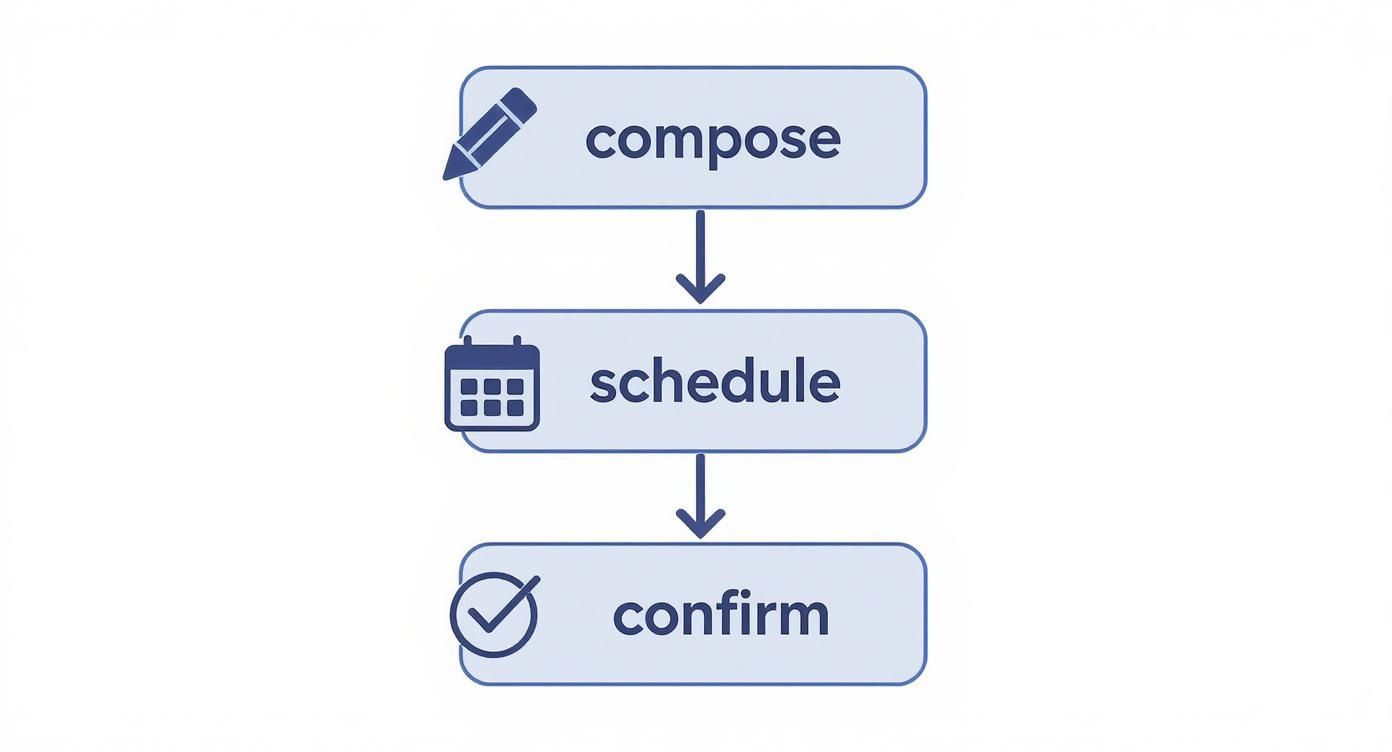
    Infographic about how to schedule email

    The crucial difference here is that every scheduled email is confirmed and stored on Typewire’s secure servers. It's not just sitting on your computer, waiting for you to be online and creating a privacy risk.

    Taking Control with Advanced Privacy

    True control isn't just about automation; it's about protecting the message itself. This is where a hosted platform like Typewire really shines. You can schedule emails with self-destruct timers, which adds an essential layer of privacy for sensitive information.

    Imagine sending a confidential contract proposal that you’ve timed to arrive tomorrow morning. With this feature, you can also set it to automatically delete from the recipient's inbox 24 hours after they've read it. The information is there when they need it, and gone when they don't, enhancing your data security.

    This capability also works seamlessly with encrypted messages. You can schedule an end-to-end encrypted email for a future date, confident that it remains completely unreadable—even to us—while it's waiting to be sent. If you're curious about how that works, you can learn more about what end-to-end encryption is in simple terms. It’s peace of mind for your most important communications.

    The real power of a hosted email platform isn't just sending emails later; it's the ability to apply advanced security protocols to those future messages, giving you complete control over your data's lifespan and accessibility.

    How you schedule your emails makes a huge difference in security. A dedicated platform like Typewire provides advantages that common email client plugins just can't match.

    Here’s a look at how they stack up.

    Typewire Hosted Scheduling vs. Standard Client Plugins

    Many people use plugins for their email clients, but a dedicated, hosted email platform offers a fundamentally different—and more secure—approach.

    Feature Typewire (Hosted Platform) Standard Client Plugins
    Security Emails are encrypted and stored on secure, private servers until the send time. Your device doesn't need to be involved. Emails and credentials might be stored locally on your device or a third-party server, creating potential vulnerabilities.
    Reliability Delivery is guaranteed whether your computer is on, off, or offline. Once scheduled, it’s set. Sending depends entirely on your device being powered on and connected to the internet at the scheduled time.
    Privacy Your data and message content are protected within a privacy-first infrastructure. Your info isn't the product. Your data could be exposed to the plugin developer or other third-party services, creating significant privacy risks.

    Ultimately, plugins can be convenient, but they often operate as a "middleman" that introduces new security and reliability concerns. A hosted system like Typewire handles everything on its own secure servers, ensuring your scheduled messages are safe and sent on time, every time.

    How to Manage and Troubleshoot Scheduled Emails

    https://www.youtube.com/embed/-6aOf-aGNUg

    So, you've scheduled your email and can cross it off your to-do list. But what happens when plans change? A last-minute update, a new piece of data, or even just a typo you spot after the fact.

    Luckily, managing your pending messages in a secure, hosted email platform like Typewire is simple. It gives you complete control right up until the scheduled send time.

    Making Changes on the Fly

    Everything you’ve scheduled lives in a dedicated “Scheduled” folder right in your Typewire dashboard. Think of this as your command center for future communications.

    From here, you can click into any email to tweak the content, adjust the send time, or just cancel it altogether. This is a huge advantage of using a server-side, hosted platform—your control isn't tied to your own device being online.

    Responding to Real-World Scenarios

    Let's say you've lined up a weekly report to go out every Friday, but a key attachment needs a last-minute revision. Or maybe you've scheduled a big proposal for tomorrow morning and suddenly realize you need to update a few figures.

    No sweat. With Typewire, you just:

    • Head to the "Scheduled" folder and find the email.
    • Open it up and make your edits—correcting text, swapping attachments, you name it.
    • Resave the schedule. The updated version is now securely queued up on the server, ready to go at the original time.

    This centralized control means you can rest easy knowing an outdated or incorrect message won't slip through the cracks, all while maintaining the privacy of your data.

    A question I get a lot is, "What if my email didn't send?" With a hosted platform, this is pretty rare since delivery doesn't depend on your computer being on. If you suspect an issue, the first place to check is your "Sent" folder. More often than not, it went out just fine.

    With the number of global email users expected to hit 5.61 billion by 2030, the inbox is more crowded than ever. Properly managing your scheduled sends is a small but critical step to ensure every message you send is polished, professional, and secure.

    If you're curious about where things are headed, you can read the full report on email trends to get a better sense of why precise, secure communication is becoming so important.

    Answering Your Top Questions About Secure Email Scheduling

    Diving into a secure, hosted email platform for scheduling emails for the first time usually brings up a few questions. It’s a different way of thinking about your workflow, moving security from your own computer to a protected server. So, let's tackle some of the most common things people ask.

    The biggest one I hear is whether a platform like Typewire is actually safer than a simple browser extension. The answer is a resounding yes. Most browser plugins handle your data on your local device or bounce it through various third-party servers, which can open up security holes and privacy issues. A dedicated, hosted platform keeps everything inside its own encrypted environment, so your account login and the email itself are never exposed.

    Can I Still Edit My Emails? And What About Encryption?

    People also worry about losing flexibility. What if you need to change something after you’ve scheduled an email? Not a problem. On a hosted platform like Typewire, all your queued-up messages live in a "Scheduled" folder.

    You can pop in there anytime to:

    • Tweak the body text
    • Swap out an attachment
    • Change the recipient list
    • Adjust the send time

    You have full control right up until the moment it goes out the door.

    The most important question for anyone serious about privacy is about encryption. Does scheduling an email somehow compromise its security? Absolutely not. Your email is encrypted before it even gets stored on the server, and it stays locked down the entire time it's waiting to be sent.

    It’s only decrypted when your recipient opens it, giving you true end-to-end protection. This means your message is safe while you write it, while it waits on a secure server, and all the way to its final destination. You never have to trade security for the convenience of scheduling.


    Ready to get a handle on your email timing and privacy? Typewire gives you a secure, hosted platform built to protect your conversations without cutting corners. Start your free 7-day trial today and see for yourself.
  • 8 Essential Email Etiquette Examples for Security & Privacy

    8 Essential Email Etiquette Examples for Security & Privacy

    In an era of data breaches and overflowing inboxes, proper email etiquette has evolved far beyond simple politeness. It's now a critical component of your digital security and privacy. The way you compose, send, and manage your messages directly impacts your privacy, prevents costly misunderstandings, and protects sensitive information. This guide moves past the basics, providing actionable email etiquette examples that make you a more effective communicator and a smarter, more secure one. We'll show you how simple rules form a powerful defense against digital threats and communication breakdowns.

    For professionals and businesses prioritizing data sovereignty, the foundation of this strategy is a secure, hosted email platform that operates on private infrastructure and avoids third-party clouds. The principles here are universal, but their effectiveness is magnified when you control your data environment. Understanding the technical side, like the nuances of understanding email attachment size limits, is also a crucial part of modern etiquette, ensuring your well-crafted messages are always delivered successfully. Let’s dive into the practical examples that will protect your inbox, your information, and your professional reputation.

    1. Professional Subject Line Template

    The email subject line is your first, and often only, chance to make an impression. It acts as a digital handshake, setting the tone and expectations for the entire communication. A clear, specific subject line respects the recipient's time and attention, allowing them to prioritize their inbox efficiently. This fundamental aspect of email etiquette examples is crucial for ensuring your message is opened, understood, and acted upon promptly.

    Professional Subject Line Template

    This practice is especially vital in environments focused on email privacy and security. A vague subject like "Question" can be mistaken for spam or a phishing attempt, potentially getting blocked by advanced security filters common in secure hosted email platforms. Clear subject lines establish legitimacy and build trust from the outset, reducing the risk of your important messages being quarantined.

    Strategic Analysis and Breakdown

    A strong subject line conveys purpose and, when necessary, urgency. It transforms an ambiguous message into a clear task or piece of information.

    • Wrong: Meeting or Hi
      • Analysis: These provide zero context. The recipient doesn't know the topic, importance, or if action is needed. They are easily ignored or lost, and can appear suspicious to security systems.
    • Right: Q4 Budget Review - Action Required by Friday
      • Analysis: This subject line is a perfect example of clarity. It states the topic (Q4 Budget Review), the required action (Action Required), and the deadline (by Friday). It's immediately scannable and easy to search for later.
    • Right: FYI: Project Timeline Update - No Response Needed
      • Analysis: The "FYI" prefix and "No Response Needed" suffix are powerful tools. They manage expectations, informing the recipient that this is purely informational, which reduces their cognitive load.

    Actionable Takeaways for Implementation

    To master this skill, integrate these tactics into your daily email routine:

    • Use Standard Prefixes: Implement team-wide prefixes like ACTION, URGENT, or FYI to create a consistent and predictable system.
    • Include Keywords and Dates: Add specific project names, client names, or deadlines directly in the subject. This aids in searchability and prioritization.
    • Update the Subject in Long Threads: If a conversation's topic evolves, update the subject line to reflect the new direction. This prevents confusion for everyone involved.

    2. Proper Greeting and Closing Format

    The greeting and closing of your email frame the entire message, establishing the tone and level of respect from the very first word to the last. These salutations are a critical component of professional communication, signaling your awareness of the relationship with the recipient and the context of the conversation. Getting this right is a cornerstone of strong email etiquette examples and ensures your message is received with the intended professionalism.

    This is particularly important in the context of email privacy and security. A poorly chosen greeting can seem unprofessional or even suspicious, potentially triggering scrutiny from recipients who are wary of unsolicited or phishing emails. Using an appropriate salutation helps establish your credibility and reassures the recipient that the communication is legitimate, a key factor when using secure hosted email platforms.

    Strategic Analysis and Breakdown

    A well-chosen greeting and closing should align with the formality of the relationship and the specific situation. Mismatched tones can create awkwardness or undermine your message.

    • Wrong: Hey! or no closing at all.
      • Analysis: An overly casual greeting can appear unprofessional, especially in an initial outreach. Omitting a closing is abrupt and can be perceived as dismissive or careless.
    • Right (Formal): Dear Mr. Sanchez, ... Sincerely, Jane Doe
      • Analysis: This classic format is perfect for initial contact, communicating with senior leadership, or in traditionally formal industries. It conveys a high level of respect and professionalism.
    • Right (Semi-Formal): Hello David, ... Best regards, Jane Doe
      • Analysis: Ideal for ongoing communication with colleagues or clients you know reasonably well. It's friendly yet maintains a professional boundary. Learning how to start an email with effective openings is key to mastering this balance.
    • Right (Internal/Casual): Hi team, ... Thanks, Jane
      • Analysis: This works well for internal communications with a close-knit team where a casual, collaborative tone is the norm. It's efficient and friendly.

    Actionable Takeaways for Implementation

    To consistently apply the correct tone, use these guidelines:

    • Mirror the Recipient: When in doubt, match the formality of the person you are emailing. If they sign off with "Best," it's generally safe for you to do the same.
    • Err on the Side of Formal: For initial contact, always start more formally. It is much easier to shift to a more casual tone later than to recover from being overly familiar upfront.
    • Use a Professional Signature: Always include a signature block with your full name, title, and contact information. This provides essential context and reinforces your professionalism, regardless of the closing used.

    3. Concise and Clear Body Copy Template

    In the professional world, time is the most valuable commodity. The body of your email should reflect this by being direct, scannable, and easy to understand. Concise body copy gets straight to the point, eliminating fluff and ensuring your core message is delivered and comprehended without ambiguity. This pillar of email etiquette examples is about respecting the recipient's cognitive load and enabling quick, decisive action.

    This approach is also a subtle but effective email security measure. Within hosted email platforms that prioritize privacy, straightforward and expected communication patterns are less likely to be flagged by behavioral analysis filters designed to detect anomalies like social engineering. Overly complex or poorly structured emails can sometimes mimic the confusing language used in sophisticated phishing attacks, making clarity a component of secure communication.

    Strategic Analysis and Breakdown

    Effective email body copy prioritizes clarity over verbosity. It guides the reader directly to the necessary information or required action, preventing misinterpretation.

    • Wrong: I was thinking that maybe we could look at the budget numbers for the last quarter soon. There are a few things that need your approval and it would be great to get that handled before the main finance deadline, which is coming up. Let me know what you think.
      • Analysis: This is passive, vague, and buries the key request. It creates unnecessary work for the recipient to decipher the purpose and deadline.
    • Right: PURPOSE-FIRST: I'm writing to request approval for the Q4 budget allocation. I need your sign-off by COB Friday to submit to finance.
      • Analysis: This is a perfect example of a direct ask. The purpose is stated in the first sentence, followed immediately by the required action and a clear deadline.
    • Right: `BULLET POINT FORMAT: Next steps are:
      • Review the attached proposal
      • Provide feedback by EOD Wednesday
      • Schedule stakeholder meeting for next week`
      • Analysis: Using bullet points or a numbered list breaks down complex information into digestible, actionable tasks. It is immediately scannable and serves as a clear checklist for the recipient.

    Actionable Takeaways for Implementation

    To make your email body copy more effective, adopt these clear communication habits:

    • State Your Purpose First: Always open with your primary request or the main point of your email. This "bottom line up front" (BLUF) approach is highly efficient.
    • Use Active Voice and Short Paragraphs: Write with strong, action-oriented verbs. Keep paragraphs to 2-3 sentences to improve readability and prevent walls of text.
    • Leverage Formatting Judiciously: Use bolding, bullet points, and numbered lists to draw attention to key details like deadlines, action items, and important data.
    • Practice in Common Scenarios: To put these principles into practice for common scenarios, review these professional annual leave request email templates that demonstrate clarity and conciseness.

    4. Respectful Reply-All and CC/BCC Usage

    Misusing the "Reply-All," "CC" (Carbon Copy), and "BCC" (Blind Carbon Copy) functions is one of the quickest ways to create inbox chaos and professional frustration. Proper usage demonstrates respect for your colleagues' time and attention, preventing unnecessary information overload. This is a cornerstone of effective email etiquette examples that keeps communication channels clear, focused, and secure.

    Respectful Reply-All and CC/BCC Usage

    In the context of email privacy and security, indiscriminately using "Reply-All" can inadvertently expose sensitive information to individuals who should not see it. Secure hosted email platforms often have strict access controls, but human error remains a significant risk. Using BCC correctly is vital for protecting recipient email privacy during mass announcements, preventing recipients' email addresses from being shared with the entire list—a common tactic for spammers who harvest addresses.

    Strategic Analysis and Breakdown

    Understanding the specific function of each field is crucial for maintaining clear and secure communication. Each choice has a direct impact on who sees what information and why.

    • Wrong: Using "Reply-All" to send a simple Thanks! to a 47-person email chain.
      • Analysis: This action clutters dozens of inboxes with irrelevant information. It interrupts workflow and creates unnecessary digital noise, showing a lack of consideration for others' focus.
    • Right: Using "Reply" to the original sender to confirm receipt: Got it, thanks for the update.
      • Analysis: This respects everyone's time by directing the confirmation only to the person who needs it. It achieves the goal without creating a distraction for the wider group.
    • Right: Using BCC to send a monthly newsletter to a client list.
      • Analysis: This is a perfect use of BCC for confidentiality and email privacy. It ensures that no recipient can see the email addresses of the others, protecting their contact information from being exposed to the entire group.

    Actionable Takeaways for Implementation

    To improve your use of these powerful tools, integrate the following habits into your workflow:

    • Default to "Reply": Train yourself to use "Reply" as the default. Only use "Reply-All" when you are certain every single person on the original email needs your specific response.
    • Audit the Recipient List: Before sending, review the "To" and "CC" fields. Remove anyone who is no longer relevant to the evolving conversation.
    • Use BCC for Privacy: When sending an email to a large group of people who do not know each other, use BCC to protect their email addresses and privacy. This is also standard for newsletters or mass announcements. For more information, explore these internal communication best practices to refine your strategy.

    5. Timely Response and Availability Setting

    Managing expectations around response times is a cornerstone of professional communication. It demonstrates respect for the sender's needs while protecting your own time and focus. This crucial aspect of email etiquette examples involves clearly communicating your availability, preventing misunderstandings, and ensuring that critical tasks are not delayed, even when you are unavailable.

    In the context of email privacy and security, this practice also reinforces professional boundaries and system integrity. An automated out-of-office reply from a secure hosted email platform confirms the message was successfully delivered and not lost to spam filters. It also provides a legitimate, alternative point of contact, reducing the chance of senders seeking out less secure communication channels or falling prey to attackers impersonating an unavailable colleague.

    Strategic Analysis and Breakdown

    A well-crafted availability message sets clear expectations and provides a clear path forward for the sender. It turns potential frustration into a well-managed process.

    • Wrong: No response for days or a generic "Out of office" auto-reply.
      • Analysis: Silence creates uncertainty and can appear unprofessional. A generic reply without a return date or an alternative contact leaves the sender in limbo, especially with time-sensitive issues.
    • Right: AUTO-REPLY: I am out of the office until June 15th with limited email access. For urgent matters, please contact Sarah at sarah@company.com.
      • Analysis: This is a perfect out-of-office message. It provides a specific return date (June 15th), manages expectations about access ("limited"), and offers a clear, actionable alternative for urgent needs.
    • Right: RESPONSE TEMPLATE: Thanks for your message. I'm currently focused on a project with a tight deadline but will review this and respond by EOD Wednesday.
      • Analysis: This proactive response acknowledges receipt and provides a specific timeline. It shows the sender their message is valued while allowing you to manage your workload without constant interruptions.

    Actionable Takeaways for Implementation

    To implement this etiquette effectively, build these habits into your workflow:

    • Set Detailed Auto-Replies: Always include your return date and a designated contact for urgent issues in your out-of-office messages.
    • Use Quick Response Templates: Create templates to acknowledge receipt of non-urgent emails, providing a timeframe for your full response. This can be done in seconds but saves significant goodwill.
    • Update Your Email Signature: For shorter periods of high focus, add a brief note to your signature, such as "Please note: I am responding to emails after 3 PM this week."

    6. Professional Tone and Avoiding Miscommunication

    Email lacks the non-verbal cues of face-to-face conversation, such as vocal inflection and body language, making it easy for tone to be misinterpreted. Maintaining a professional, neutral tone is a cornerstone of effective digital communication, preserving relationships and ensuring messages are received as intended. This is one of the most critical email etiquette examples for preventing conflict and fostering a positive work environment.

    In the context of email privacy and security, a calm, professional tone helps de-escalate potentially tense situations that could otherwise lead to rash decisions or security oversights. Emotionally charged emails can create friction, which distracts from important tasks like verifying sender identity or scrutinizing attachments on secure hosted email platforms. A measured approach ensures clarity and maintains focus on email security protocols.

    Strategic Analysis and Breakdown

    The goal is to communicate clearly and respectfully, even when addressing difficult topics. This involves framing your message constructively to invite collaboration rather than provoke a defensive reaction.

    • Wrong: WHY HAVEN'T YOU FINISHED THIS YET??
      • Analysis: This is unprofessional and accusatory. The use of all caps feels like shouting and puts the recipient on the defensive, damaging rapport and hindering a productive outcome.
    • Right: I wanted to check on the status of [project]. Do you anticipate completion by the deadline?
      • Analysis: This is a perfect example of a professional inquiry. It assumes good intent and opens a dialogue to understand the situation, rather than assigning blame. It's calm, respectful, and focused on a solution.
    • Wrong: You clearly didn't read my previous email.
      • Analysis: This message is condescending and immediately creates conflict. It presumes negligence and shuts down any chance for collaborative clarification.
    • Right: I want to make sure we're aligned—let me clarify my earlier point.
      • Analysis: This phrasing takes ownership and focuses on alignment. It offers to provide clarity without accusing the recipient of an oversight, keeping the conversation constructive.

    Actionable Takeaways for Implementation

    To consistently maintain a professional tone, integrate these habits into your email practices:

    • Read It Aloud: Before sending, read your email out loud to yourself. This simple check helps you hear how the tone might be perceived by the recipient.
    • Avoid Sarcasm and Ambiguity: Humor and sarcasm are notoriously difficult to convey in writing and are often misinterpreted. Stick to clear, direct language.
    • Draft and Wait: If an email is emotionally charged, write a draft and wait at least 30 minutes (or even overnight) before reviewing and sending it. This "cooling off" period provides valuable perspective.
    • Use Positive Framing: Frame requests and feedback positively. For instance, say "Looking forward to your update" instead of "Don't forget to send the update."

    7. Proper Attribution and Forwarding Etiquette

    Forwarding an email seems simple, but it's a practice layered with unspoken rules of integrity and professionalism. Proper forwarding etiquette involves giving credit to original authors, providing context, and protecting sensitive information. This foundational element of email etiquette examples demonstrates respect for intellectual property and professional relationships, preventing miscommunication and maintaining trust within and outside your organization.

    This practice is a cornerstone of email privacy and security, especially when using secure hosted email platforms. Forwarding an email without permission or failing to redact sensitive data can create significant security vulnerabilities or email privacy breaches. A thoughtless forward can inadvertently expose confidential discussions, personal data, or strategic information, undermining the security measures your organization has in place.

    Strategic Analysis and Breakdown

    Effective forwarding and attribution transform a simple pass-along into a clear, respectful, and secure communication. It’s about adding value and maintaining the integrity of the information chain.

    • Wrong: A user forwards a long email chain with the simple note thoughts?
      • Analysis: This is lazy and disrespectful of the new recipient's time. It provides no context, fails to summarize the key points, and may contain sensitive or irrelevant information buried in the thread.
    • Right: CONTEXT ADDED: FYI – Jane shared this market analysis from her research. She has given permission to circulate.
      • Analysis: This example is perfect. It adds a clear contextual header, attributes the work to the correct person (Jane), and confirms that permission was obtained to share it, addressing both etiquette and privacy concerns.
    • Right: REDACTION: Removing the previous salary discussion before forwarding the HR policy update.
      • Analysis: This demonstrates critical email security awareness. By actively redacting sensitive information, the sender protects individuals' privacy and prevents confidential data from reaching an unintended audience, a crucial step in secure communication.
    • Right: ATTRIBUTION: 'Per John's email from yesterday...' or 'As discussed by the marketing team...'
      • Analysis: This simple act of crediting the source builds a culture of trust and collaboration. It acknowledges others' contributions and provides a clear trail of information for reference.

    Actionable Takeaways for Implementation

    To integrate these best practices, make the following steps a part of your forwarding routine:

    • Ask Before You Forward: Always seek permission before forwarding emails that contain sensitive, confidential, or personal information. When in doubt, ask the original sender.
    • Add a Context Line: Start your forwarded message with a brief sentence explaining why you are sending it and what you need from the recipient (e.g., "FYI," "Your review is needed," "See below for background").
    • Clean Up Email Chains: Before forwarding, remove clutter like old signatures, redundant headers, and irrelevant replies. If a thread is excessively long (full of FW: FW: FW:), copy the essential text into a new email for clarity.
    • Always Credit the Source: When sharing ideas or information from an email, explicitly mention the person or team who originated it. This fosters a positive and respectful professional environment.

    8. Call-to-Action (CTA) Clarity and Next Steps

    The purpose of most professional emails is to prompt an action. A clear, direct Call-to-Action (CTA) and defined next steps are essential for turning an email into a productive outcome. This practice eliminates confusion and ensures recipients know exactly what is expected of them, which is a cornerstone of effective email etiquette examples. Without this clarity, emails can lead to delays, misunderstandings, and unnecessary back-and-forth communication.

    Call-to-Action (CTA) Clarity and Next Steps

    In the context of email security, an ambiguous email without a clear purpose can raise red flags. Malicious actors often send vague messages to trick users into clicking harmful links or sharing private information. A well-defined CTA from a known contact signals legitimacy and helps the communication pass through the advanced security filters of secure hosted email platforms, reinforcing a culture of trust and safety.

    Strategic Analysis and Breakdown

    A strong CTA is specific, time-bound, and easy to act upon. It guides the recipient toward the desired outcome, preventing your message from being deprioritized or forgotten.

    • Wrong: Let me know what you think.
      • Analysis: This is too vague. It doesn't specify what kind of feedback is needed, by when, or why. The lack of direction makes it easy for the recipient to procrastinate or provide unhelpful input.
    • Right: **ACTION NEEDED:** Please review the attached Q3 report and provide your feedback on the 'Growth' section by EOD Friday.
      • Analysis: This CTA is exemplary. It uses bold formatting to draw attention, specifies the exact document and section to review, and provides a firm deadline. This leaves no room for misinterpretation.
    • Right: Once you approve the attached invoice, I will process the payment immediately.
      • Analysis: This clearly outlines the next steps and establishes a cause-and-effect relationship. It shows the recipient how their quick action directly benefits the workflow, motivating a prompt response.

    Actionable Takeaways for Implementation

    To make your emails more action-oriented, apply these strategies consistently:

    • Front-Load Your CTA: Place your most important request in the first or second paragraph. This respects the recipient's time and ensures they see the key action item immediately.
    • Use Formatting to Highlight: Employ bold text, bullet points, or a numbered list to make your CTA and next steps stand out from the rest of the email body.
    • Offer Simple Choices: When scheduling, provide specific options (e.g., "Are you free Tuesday at 3 PM or Wednesday at 10 AM?") instead of asking open-ended questions like "When are you free?" This simplifies the decision-making process for the recipient.

    8-Point Email Etiquette Comparison

    Item Implementation Complexity (🔄) Resource Requirements (⚡) Expected Outcomes (⭐📊) Ideal Use Cases (💡) Key Advantages
    Professional Subject Line Template Low 🔄 — simple rules, brief planning Low ⚡ — time to craft per message Higher open & response rates ⭐ · fewer missed messages 📊 External announcements, urgent requests, status updates Improves prioritization; searchable; signals professionalism
    Proper Greeting and Closing Format Low–Medium 🔄 — choose tone by context Low ⚡ — minimal research on names/titles Appropriate tone & rapport ⭐ · clearer follow-up paths 📊 Formal client outreach, hiring, cross‑cultural emails Sets tone; provides contact info; builds trust
    Concise and Clear Body Copy Template Medium 🔄 — requires editing discipline Low–Medium ⚡ — time to revise & format Faster comprehension ⭐ · fewer clarifying replies 📊 Requests, updates, mobile readers, busy stakeholders Improves clarity; mobile‑friendly; action‑focused
    Respectful Reply-All and CC/BCC Usage Medium 🔄 — judgment on recipients needed Low ⚡ — awareness rather than tools Reduced inbox clutter ⭐ · better privacy protection 📊 Large threads, vendor comms, HR and mass emails Protects confidentiality; reduces noise; maintains relevance
    Timely Response and Availability Setting Medium 🔄 — consistent coordination required Medium ⚡ — calendar + auto‑reply setup Clear expectations ⭐ · fewer escalations & follow‑ups 📊 Project deadlines, OOO periods, client support Sets response norms; redirects urgent issues; reduces uncertainty
    Professional Tone and Avoiding Miscommunication Medium–High 🔄 — careful phrasing & review Low–Medium ⚡ — time to craft and possibly train Fewer conflicts ⭐ · preserved reputation and clarity 📊 Sensitive topics, feedback, escalations, cross‑teams Prevents misunderstandings; maintains professionalism
    Proper Attribution and Forwarding Etiquette Medium 🔄 — sanitize content and request permission Low–Medium ⚡ — time to redact/contextualize Maintains trust ⭐ · controls information spread 📊 HR, confidential reports, research sharing Protects privacy; credits sources; keeps context accurate
    Call-to-Action (CTA) Clarity and Next Steps Low–Medium 🔄 — structure the ask clearly Low ⚡ — minimal formatting & scheduling effort Higher completion rates ⭐ · faster decisions and accountability 📊 Approvals, scheduling, deliverable requests Reduces back‑and‑forth; clarifies deadlines and owners

    Your Next Step: From Knowing to Doing

    We've explored a comprehensive set of email etiquette examples, from crafting the perfect subject line to using CC and BCC with strategic precision. Each template and analysis was designed not just to show you what to do, but to explain the underlying strategy of why it works. Understanding these principles is the first critical step, but true mastery comes from consistent application.

    The journey from knowing to doing is where you transform theoretical knowledge into a powerful professional asset. The goal isn't just to write "good" emails; it's to communicate with intention, respect, and security at the forefront of every interaction. This is how you build trust, prevent misunderstandings, and protect sensitive information in a digital landscape filled with risks.

    Bridging Theory and Practice

    Moving these concepts from the page into your daily workflow requires a conscious effort. It’s about building muscle memory. Think of it less as memorizing rules and more as adopting a new, more effective communication framework.

    Start small to build momentum:

    • This Week's Focus: Choose one specific area from the article, such as refining your call-to-action (CTA) clarity or mastering respectful follow-up timing.
    • Conscious Application: For the next five business days, actively review every email you send through the lens of that single principle. Ask yourself: "Is my CTA clear?" or "Is this follow-up adding value?"
    • Review and Repeat: At the end of the week, reflect on what worked. The following week, maintain that habit and add a new focus area, like proper greeting and closing formats.

    This incremental approach prevents overwhelm and embeds these best practices into your natural workflow until they become second nature.

    The Overlooked Connection: Etiquette, Security, and Privacy

    In today's digital environment, good email etiquette is intrinsically linked to robust email security and privacy. Every email you send is a data point. Hasty forwarding without consent can inadvertently expose private conversations. A vague subject line on a sensitive topic might be overlooked or mishandled by the recipient. Using "Reply All" inappropriately can broaden the attack surface for a potential data breach.

    This is why your email habits are the first line of defense. The email etiquette examples we’ve covered are more than just politeness; they are practical security measures.

    Strategic Insight: When you are mindful of who is on the recipient list, clear about your intentions, and respectful of others' data, you are actively practicing digital security hygiene. This user-level diligence is the foundation upon which technical security measures, like encryption and the use of a secure hosted email platform, become truly effective.

    By combining these respectful communication habits with a platform designed for privacy, you create a powerful, multi-layered shield for your digital correspondence. You move from a reactive to a proactive security posture, where your actions inherently protect your information and that of your collaborators. Communicating with confidence means knowing your message is clear, professional, and secure from creation to delivery.


    Ready to pair professional etiquette with professional-grade security? Typewire provides a secure, private, and ad-free email platform that respects your data and enhances your communications. Reinforce your commitment to security by choosing a service that puts your privacy first. Discover the Typewire difference today.