Author: williamwhite

  • How to Password Protect an Email Securely

    How to Password Protect an Email Securely

    Firing off an email feels like second nature, but the information we send is often far from casual. To keep prying eyes out, you can password-protect an email using built-in tools like Gmail's Confidential Mode or Outlook's Encryption, which adds a basic layer of access control. But for truly robust security, you'll want to look at dedicated third-party services that offer advanced encryption to lock down your most sensitive conversations.

    Why Securing Your Emails Matters More Than Ever

    Image

    In our day-to-day, email has become the digital filing cabinet for our most private details. It’s all too easy to forget that every message we send zips across multiple networks, creating a digital trail that's wide open if left unprotected. The need for security isn't some abstract technical concern; it's about protecting real-world, tangible data that affects our lives.

    Think about a financial advisor sending a client their quarterly portfolio review. That one email is packed with investment details, account numbers, and personal net worth—a goldmine for any cybercriminal. Or consider a recruiter sharing a candidate's resume and salary history with a hiring manager. That's highly personal data, and without protection, it’s just sitting there, vulnerable.

    The Real Risks of Unsecured Communication

    This isn't just a hypothetical threat. Attackers are actively hunting for specific types of information commonly sent via email, creating serious risks for you and your business. Once you know what they’re looking for, the danger feels much more real.

    • Personal Identifiable Information (PII): This is everything from Social Security numbers and birthdates to home addresses. In the wrong hands, it's the perfect toolkit for identity theft.
    • Financial Data: Bank account details, credit card numbers, and investment information are direct lines to your money.
    • Business Intelligence: Confidential data like product roadmaps, secret merger plans, or sensitive client lists can be devastating if they fall into a competitor's lap.
    • Login Credentials: How many password reset links have you gotten in your inbox? Attackers use these to get a key to your other online accounts.

    The scale of this issue is massive. Credential theft is a worldwide problem, with nearly 46% of people reporting they've had at least one password stolen. Weak passwords are a huge part of the problem, with over 35% of those hacked saying it was the main reason for the breach. With email accounts being the second most targeted platform in data breaches—affecting roughly 15% of users—it's clear that learning how to password-protect an email is non-negotiable. You can see more eye-opening password vulnerability statistics from Huntress.

    The casual nature of email often masks its inherent insecurity. Every unencrypted message is like a postcard—readable by anyone who happens to handle it along its journey.

    Securing your emails isn't just a "nice-to-have"; it's a fundamental necessity. Whether you’re trying to protect your personal privacy or doing your professional duty to safeguard company data, taking that extra step to password-protect a message can be the one thing that prevents a catastrophic data leak.

    Using Built-In Protection in Gmail and Outlook

    Before you rush out to find specialized software, it’s always a good idea to see what tools you already have at your fingertips. Both Gmail and Outlook come with their own built-in features that act as a great first line of defense for sensitive messages. This means you can add a layer of protection to your emails right away, without any extra cost.

    Think about the everyday situations where you need a bit more control. Maybe you're sending a job offer with salary details, or sharing a draft of a confidential report with a colleague. In these cases, you don't just want to hit "send" and hope for the best; you want to manage who sees it and for how long. That's exactly where these native tools come in handy.

    Securing Messages with Gmail Confidential Mode

    Gmail's solution is Confidential Mode, and it’s all about access control. It’s less about hardcore encryption and more about giving you power over the email after it has already left your outbox. Honestly, it’s a game-changer for anyone who’s ever sent an email and immediately wished they could pull it back.

    With Confidential Mode, you can get pretty specific:

    • Set an expiration date: You can make an email self-destruct, so to speak. Have it become inaccessible after a day, a week, or even a few years. This is fantastic for time-sensitive info like a special offer or temporary login details.
    • Require an SMS passcode: For an extra check, you can force the recipient to verify their identity with a passcode sent right to their phone. This makes sure that only the person with that specific phone can actually open your message.
    • Revoke access anytime: This is probably its most powerful feature. You can pull the plug on an email at any moment, even if the recipient has already read it.

    Finding the feature is simple. When you're writing a new message, just look for the little lock-and-clock icon at the bottom.

    Image

    One click is all it takes to change how your email works, preventing the recipient from forwarding, copying, printing, or downloading its contents.

    Using Encryption in Outlook

    Outlook, on the other hand, takes a more traditional approach with its built-in encryption, which is available if you have a Microsoft 365 subscription. When you encrypt an email in Outlook, it essentially scrambles the content, making it unreadable to anyone who can't prove they're the intended recipient.

    Unlike Gmail's focus on access control, Outlook's feature is true encryption. It protects the data itself by making it unreadable to unauthorized parties, which is a higher level of security, especially while the email is in transit.

    You’ll usually find these settings under the "Encrypt" button in a new message window. From there, you get a couple of clear choices:

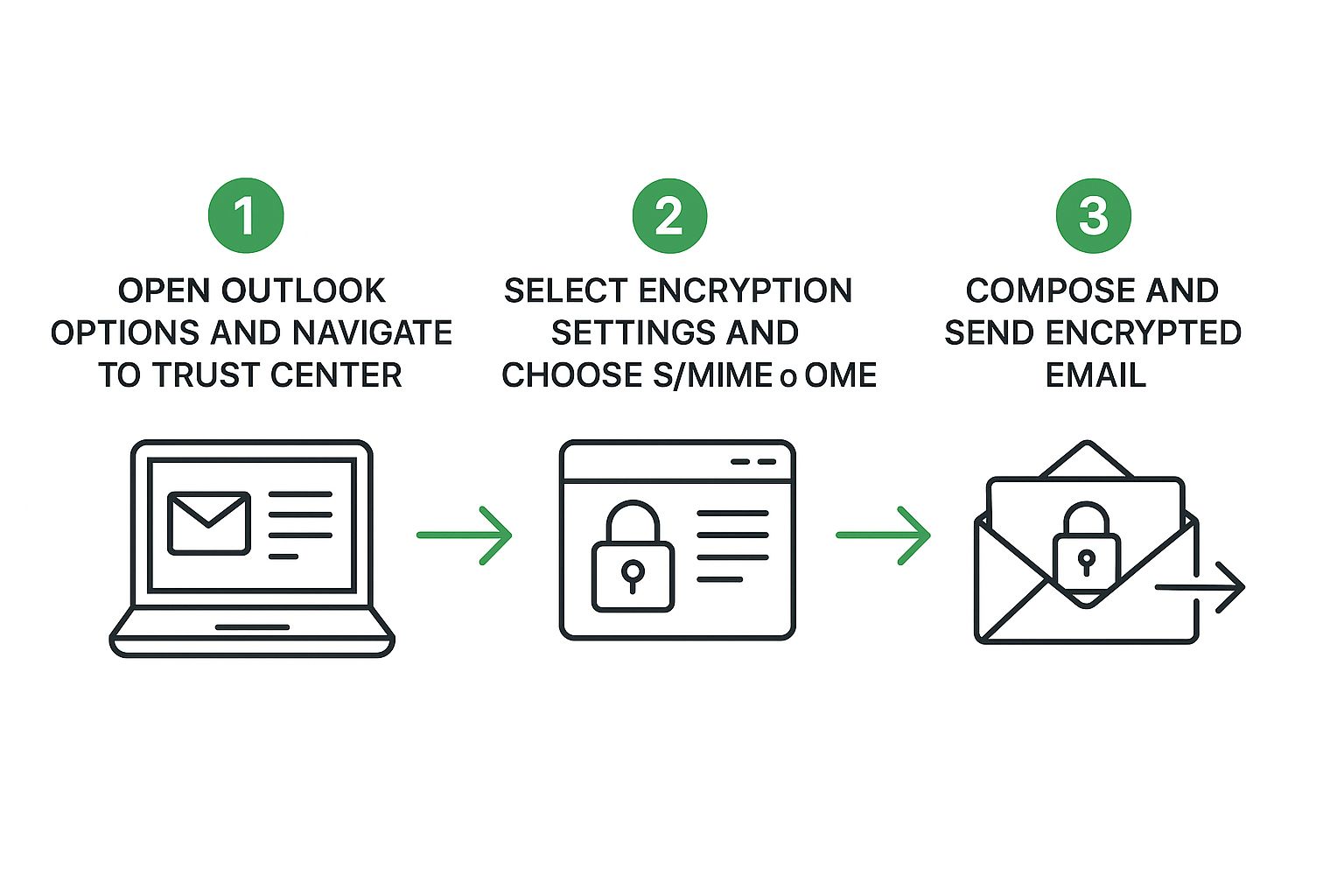
    • Encrypt-Only: This applies standard S/MIME or Microsoft 365 Message Encryption. The recipient can read it seamlessly if they’re also in the Microsoft 365 ecosystem or can get a one-time passcode to view it in a web browser.
    • Do Not Forward: This handy option bundles encryption with strict permission controls, preventing the recipient from forwarding, printing, or copying the message—much like what Gmail's Confidential Mode does.

    Built-in Email Protection Features Compared

    So, how do these two popular options really stack up against each other? Here’s a quick side-by-side look to help you decide which one fits your needs for a specific task.

    Feature Gmail Confidential Mode Outlook Encryption
    Primary Goal Access Control (preventing sharing, setting expiration) Data Protection (scrambling content to make it unreadable)
    Key Function Prevents forwarding, copying, printing, and downloading. Encrypts the email body and attachments during transit and at rest.
    Verification Optional SMS passcode for non-Gmail users. Requires Microsoft account login or a one-time passcode for external recipients.
    Access Revocation Yes, you can revoke access at any time. No direct revocation, but access is tied to user credentials.
    Best For Time-sensitive information and preventing casual sharing. Protecting highly sensitive data like financial records or legal documents.

    Ultimately, both are incredibly useful tools to have in your security toolkit. They offer a significant step up from a standard, unprotected email.

    While these built-in options are great for many scenarios, they do have their limits. For a more thorough look at when to use these features versus when you might need something more robust, our guide on how to send a password protected email the right way breaks down more advanced strategies. The key is always to match the tool to the specific risk you're trying to manage.

    When Do You Need a Third-Party Email Encryption Tool?

    Image

    Let's be real—the built-in security in Gmail and Outlook is pretty solid for your average, everyday emails. But "average" is the key word here. Sometimes, the information you're sending is so critical that "pretty solid" just doesn't cut it. That's when you need to bring in the specialists: dedicated third-party encryption tools.

    Imagine you're a lawyer sending legally privileged documents to a client. The stakes are incredibly high. Any risk of that information being intercepted is simply unacceptable. Relying on standard email protection means you're also trusting the recipient's email provider, introducing variables you can't control. This is a perfect example of a time when you absolutely must guarantee the message is secure from your outbox to their inbox, and everywhere in between.

    When Standard Protection Isn't Enough

    The big difference comes down to control. The built-in features are convenient, sure, but they operate within the provider's own system. A dedicated third-party tool, especially one offering end-to-end encryption (E2EE), creates a private, sealed tunnel. It ensures that only you and your intended recipient can ever read the message. Period. Not even the service provider can peek at the decrypted content.

    Think about these high-stakes situations where a specialized tool is the only sensible choice:

    • Sharing Intellectual Property: A startup founder sending a patent application or proprietary source code to a potential investor can't afford any leaks.
    • Transmitting Medical Records: Healthcare professionals are bound by strict privacy laws like HIPAA. Sharing patient data demands the most rigorous security measures available.
    • Handling Financial Agreements: Details about a merger, a sensitive contract, or a large transaction require a level of security that leaves no room for error.

    The real beauty of end-to-end encryption is that it takes trust out of the picture. You don't have to trust your email provider, the recipient's provider, or any server the message passes through. To everyone except the key holder, your message is just a scrambled, unreadable block of data.

    What Are Your Options?

    Third-party encryption tools generally come in two main flavors, and both offer a serious security upgrade over what's built into standard email.

    1. Dedicated Secure Email Services
    Platforms like ProtonMail and Tutanota were built from the ground up for privacy. For them, end-to-end encryption isn't an add-on; it's the entire point. When you email another user on the same service, it's automatically E2EE. If you need to message someone on a standard service like Gmail, you can send a password-protected link that lets them view the encrypted message in a secure portal.

    2. Add-ins for Your Existing Email Client
    Don't want to give up your current email address? No problem. You can use plugins that integrate directly with clients like Outlook or Apple Mail. These tools add an E2EE layer to your existing setup, letting you choose to encrypt specific, sensitive messages before you hit send. It's a fantastic way to add powerful security without overhauling your entire workflow.

    Deciding which route to take really depends on your specific needs and threat model. If you'd like to dive deeper, we've put together a practical guide to sending secure email that breaks down these methods even further.

    Ultimately, when you're dealing with your most critical information, these advanced tools provide a level of confidence and peace of mind that standard email simply can't offer.

    Knowing how to password-protect a single email is a handy skill, but it's only one piece of the puzzle. The real bedrock of your digital security is locking down your entire email account. Think about it: if a hacker gets into your main inbox, they don't just see one protected message—they see everything. Bolstering your account's main defenses is the single most important security step you can take.

    This all starts with your password, but it certainly doesn't end there. The goal is to build a primary line of defense so tough that it stops threats dead in their tracks, long before they ever get a peek at your individual emails. A solid foundation for any online account, especially email, is understanding how to create strong passwords that are a nightmare for both people and bots to crack.

    Move Beyond Basic Passwords

    Let's be honest—our own habits are often the weakest link in our security chain. So many of us reuse passwords or fall into simple, predictable patterns, basically rolling out the red carpet for an attacker. It's a common mistake to think a password like "P@ssword2024!" is safe. Sure, it checks a few complexity boxes, but the pattern is so well-known that it offers almost no real-world protection.

    Sadly, these risky habits are everywhere. Data shows that a jaw-dropping 79% of people form passwords by just mixing common words with numbers. Another 57% admit to recycling old passwords across different websites. It gets worse: 41% write them down, and 34% save them right in their web browsers, creating a perfect target for malware. These practices don't just weaken your security; they practically dismantle it.

    If you do one thing for your password hygiene, make it this: start using a password manager. It's not just a nice-to-have tool for convenience; it's an essential piece of security that generates and remembers unique, complex passwords for every single site you use.

    Tools like 1Password or Bitwarden can instantly break the dangerous cycle of password reuse. They let you create long, random, and completely unique passwords for every service, dramatically beefing up your defenses without you having to memorize a thing.

    Enable Multi-Factor Authentication

    Even with the strongest, most unique password in the world, you still need a second layer of defense. This is where multi-factor authentication (MFA) is a game-changer. MFA forces anyone trying to log in to provide at least two pieces of proof that they are who they say they are—typically, something you know (your password) and something you have (your phone).

    You have a few solid options for MFA:

    • Authenticator Apps: Apps like Google Authenticator or Authy generate a fresh, six-digit code on your phone every 30 seconds. This is a fantastic, highly secure method that I recommend to everyone.
    • SMS Codes: Getting a code sent via text message is definitely better than nothing. However, it's seen as less secure these days because of the risk of "SIM swapping" attacks, where a criminal hijacks your phone number.
    • Security Keys: A physical USB key, like a YubiKey, is the gold standard for MFA. It's almost completely phishing-proof because the physical device has to be plugged into your computer to log in.

    Turning on MFA is simply non-negotiable for securing your email in this day and age. It creates a powerful barricade, meaning that even if a thief somehow steals your password, they still can't get into your account. For a closer look at these and other critical security tactics, be sure to check out our complete modern guide to email password protection.

    Common Email Security Mistakes to Avoid

    Image

    Learning how to password-protect an email is a great first step. But even the best intentions can be completely undermined by a few simple, all-too-common mistakes. These small slip-ups can leave your sensitive information just as exposed as if you'd done nothing at all.

    Honestly, knowing what not to do is just as important as knowing the right way to do it.

    One of the biggest mistakes I see people make is sending the password in a separate, unencrypted email. Just think about that for a second. You've essentially locked the front door and then slid the key right under the doormat for everyone to see. If an attacker gets into the recipient's inbox, they'll find both the locked message and the key needed to open it. All your hard work is gone in an instant.

    Don't Get Lulled into a False Sense of Security

    Another major pitfall is thinking password protection is a silver bullet against every possible threat. It's a fantastic tool for access control, but it doesn't magically make the email's contents safe from everything.

    For example, a password-protected file can still be loaded with malware. If your recipient opens an infected attachment, their computer can still be compromised, no matter how securely you sent the message. This is exactly why secure sending habits must go hand-in-hand with smart digital hygiene, like running updated antivirus software.

    The real goal of password protection is to control who can see the message, not to sanitize what's inside it. Always treat attachments with caution, no matter how they arrive.

    A huge part of email security is also learning to spot and sidestep social engineering attacks. Understanding the dangers of email phishing is non-negotiable, as it's a constant threat designed to trick people out of their information. Even seasoned experts can fall for a clever scam when they're busy or distracted.

    Critical Blunders You Need to Dodge

    To make sure your security efforts actually count, here are some critical blunders to avoid at all costs.

    • Sharing Passwords Carelessly: Never, ever send the password via email or a standard text message. The only safe way is to share it through a secure, "out-of-band" channel—think a phone call or an encrypted messaging app like Signal. This separation makes it incredibly difficult for an attacker to get both pieces of the puzzle.

    • Using Weak, Obvious Passwords: A password like "ProjectABC" or "TaxDoc2024" is just asking for trouble. It's too easy to guess. You should always use strong, randomly generated passwords that have no connection to the email's content.

    • Forgetting About the Subject and "To" Fields: Most built-in email encryption only protects the body and attachments. The subject line and recipient list are often left completely exposed. Always keep sensitive details out of the subject line; it's not protected.

    • Assuming the Recipient is Secure: You can lock down your own security, but you have zero control over the person on the other end. If their email account is already compromised, your protected message is vulnerable the second they open it. For truly sensitive data, this is where a service like Typewire shines by providing true end-to-end encryption that secures the entire conversation, not just a single message.

    Common Questions on Email Security Answered

    Even after walking through the steps to lock down an email, a few practical questions always seem to pop up. Let's tackle some of the most common ones I hear from people trying to put these security measures into action.

    Is Password Protection the Same Thing as Encryption?

    That's a great question, and the short answer is no, but they're closely related. It's best to think of them as two different layers of security.

    Password protection is all about access control. Imagine it as a simple locked door. You need the right key (the password) to open it and see what's inside. This is basically what you get with features like Gmail's Confidential Mode—it stops someone without the password from opening the email.

    Encryption, on the other hand, is much more robust. It scrambles the actual contents of your message into a complex, unreadable code. A service like Outlook's encryption might use a password as part of the process, but its main job is to unscramble that code for the recipient. The encryption is the high-tech vault itself, not just the key.

    The easiest way to remember it is this: Password protection controls who can open the message. True end-to-end encryption ensures that what's inside the message stays unreadable to everyone else, even if they manage to intercept it.

    Can My Recipient Just Forward a Protected Email?

    Usually, no. Both Gmail and Outlook have built-in features specifically to prevent this. When you turn on Gmail's Confidential Mode or choose the "Do Not Forward" option in Outlook, you're directly blocking the recipient's ability to forward, copy, print, or download the email's contents.

    It's a solid deterrent against casual sharing, but it’s not completely bulletproof. A really determined person could still just take a photo of their screen or a screenshot to pass the information along. It’s a crucial limitation to keep in mind, especially when you're handling truly sensitive information.

    What’s the Absolute Most Secure Method?

    For ironclad security, nothing really compares to using a service built from the ground up for privacy. I'm talking about dedicated end-to-end encrypted (E2EE) platforms like ProtonMail or a secure communication tool like Typewire. With these, security isn't just an add-on feature; it's their entire reason for existing.

    Here's what sets them apart:

    • Encryption by Default: Your messages are automatically encrypted. This means absolutely no one can read them—not even the people who run the email service.
    • Total Control: You aren't just locking down one message at a time. The entire conversation, back and forth, is secured from prying eyes.
    • Phishing Resistance: Even the pros can be tricked by a convincing phishing attack that gets around standard two-factor authentication. Renowned security researcher Troy Hunt famously shared how his own credentials were phished, proving that even OTP codes aren't foolproof. E2EE platforms make these kinds of attacks much, much harder to pull off.

    When you're dealing with something truly critical, like a legal contract, financial records, or company trade secrets, a dedicated secure service is the only way to get real peace of mind.


    Ready for email security that actually works without the hassle? Typewire gives you true private email hosting with end-to-end encryption baked right in, so your conversations stay protected, always. No ads, no tracking—just secure communication. Start your free 7-day trial of Typewire today!

  • What Is Zero Trust Security and Why It Matters

    What Is Zero Trust Security and Why It Matters

    Here’s the simple truth: Zero trust security is a modern cybersecurity strategy built on one foundational principle—never trust, always verify. It completely throws out the old idea that anything inside a corporate network is automatically safe. Instead, it demands strict identity verification for every single user and device trying to access resources, regardless of where they are.

    Moving Beyond The Digital Castle And Moat

    Image

    For decades, we protected our digital assets like a medieval fortress. We built a strong wall (the firewall) and a deep moat (the network perimeter) around our sensitive data and applications. If you were inside those defenses, you were considered trusted by default. This "castle-and-moat" model made sense when everyone worked in the office on company-issued computers.

    But the way we work today has completely shattered that old fortress. People now connect from home, coffee shops, and airports. They use a mix of personal and company devices to access applications that no longer live on-site but are scattered across different cloud environments. This new, distributed reality means the concept of a secure "inside" of the network has essentially vanished.

    The Problem With Assumed Trust

    The fatal flaw in the old model is its reliance on assumed trust. Once a threat actor breaches the outer wall—often with something as simple as stolen login credentials—they have free rein to move laterally across the internal network. This is precisely why traditional security struggles to keep up with modern cyber threats.

    Zero trust turns this entire model on its head. It starts with the assumption that threats exist both outside and inside the network. Because of this, trust is never a default setting; it must be continuously earned and re-verified.

    This fundamental shift from trusting a location to verifying an identity is why so many organizations are making the switch. The market for zero trust solutions is booming, projected to grow from USD 36.96 billion in 2024 to an incredible USD 92.42 billion by 2030. If you're interested in the numbers, you can dive deeper into this trend by reading the full zero trust security market report on grandviewresearch.com. This growth isn't just hype; it's driven by the urgent need to secure data in a world without perimeters.

    Traditional Security vs Zero Trust Security At a Glance

    To really understand the difference, it helps to see the two philosophies side-by-side. The following table breaks down the core thinking behind the outdated castle-and-moat approach versus the modern Zero Trust model.

    Security Aspect Traditional Security (Castle-and-Moat) Zero Trust Security (Never Trust, Always Verify)
    Core Philosophy Trust anything inside the network. Trust no one, verify everything, every time.
    Primary Defense A strong network perimeter (firewalls). Micro-segmentation and identity verification.
    Trust Model Implicit trust based on location. Explicit trust earned through continuous authentication.
    Access Control Broad access once inside the network. Least-privilege access, granted per-session.
    Assumption The internal network is a safe, trusted zone. Threats can exist anywhere, inside or out.
    Focus Protecting the network perimeter. Protecting resources (data, apps, services).

    As you can see, the change is a complete overhaul in security thinking. It’s a move from a static, location-based defense to a dynamic, identity-centric one that is far better suited for today's complex IT environments.

    The Three Pillars of Zero Trust Security

    To really get what zero trust is all about, we have to move past the "never trust, always verify" soundbite and look at its core structure. The entire strategy rests on three fundamental pillars that work in tandem to create a tough, adaptive defense. Don't think of them as separate items on a checklist; they're interconnected ideas that give the whole framework its power.

    These pillars give us a clear blueprint for tearing down old-school, perimeter-based security and wrapping protection directly around our most valuable assets: our data and applications. Each one tackles a critical piece of the modern cybersecurity puzzle, from the moment someone tries to log in to the uncomfortable reality that a breach could happen at any time.

    Pillar 1: Verify Explicitly

    The first and most important pillar is to verify explicitly. This means every single request to access a resource—any resource—is treated as a potential threat until it's proven safe. It doesn't matter if the request is from a trusted employee, a company laptop, or from inside the office. The system challenges it. Every. Single. Time.

    Think of it like getting into a secure government facility. An employee can't just stroll in because they work there. They have to show their ID badge at every checkpoint, every single day. Zero trust applies this same logic to the digital world. It authenticates and authorizes access based on all the data points it has in that moment, including:

    • User Identity: Is this a known employee, a contractor, or an automated service?
    • Device Health: Is the device updated, malware-free, and meeting our security policies?
    • Location: Is the user connecting from their usual city or somewhere totally unexpected?
    • Service or Application: What exact resource are they trying to reach?

    This pillar ensures trust is never implied or carried over from a previous session. It has to be earned, right here and now.

    Pillar 2: Use Least Privileged Access

    Once a user is verified, the second pillar kicks in: use least privileged access. This principle is simple but powerful. Users should only get the absolute minimum level of access they need to do their jobs. Nothing more.

    It’s like giving a hotel cleaner a keycard that only opens the specific rooms on their cleaning list, and only during their work hours. That card won't open the general manager’s office or the cash vault. This approach dramatically shrinks the potential damage if a user's account ever gets hijacked.

    Even if a hacker steals an employee's password through a phishing email, their access is so limited they can't move around the network and cause widespread harm. This is a game-changer for defending against account takeovers. To learn more about this common attack, check out our complete defense guide against email security threats.

    Pillar 3: Assume Breach

    The final pillar is a mindset shift: assume breach. This forces you to design your security from the inside out. Instead of pouring all your energy into keeping attackers out, you operate under the assumption that they're already inside.

    This prompts a critical question: "If an attacker is already on our network, how do we limit the damage?" The answer is all about containing the "blast radius" of an attack.

    This is where technologies like micro-segmentation are so important. By breaking your network up into tiny, isolated zones, you can stop a threat in its tracks. If one small segment is compromised, the breach is contained there, protecting the rest of your critical systems. The infographic below shows how these core ideas—least privilege and micro-segmentation—are at the very heart of the Zero Trust model.

    Image

    As the diagram shows, a solid Zero Trust strategy depends on enforcing strict access controls (least privilege), containing threats (micro-segmentation), and staying vigilant (continuous monitoring). Together, these three pillars transform your security from a brittle wall into a smart, flexible defense system built for today's world.

    How a Zero Trust Architecture Is Built

    Image

    It’s one thing to grasp the principles of zero trust, but actually putting them into practice is a whole different ballgame. A genuine zero trust architecture isn't a single product you can just buy and install. It’s a carefully orchestrated system where specific technologies work in concert to enforce that core rule: "never trust, always verify."

    Think of it like building a high-tech security system for a smart home. You wouldn't just slap a heavy-duty lock on the front door and call it a day. Instead, you'd integrate cameras, motion sensors, and smart locks on every single window and door. All these components feed information back to a central hub that makes intelligent, real-time security decisions. Each piece has its own job, but it’s their combined strength that creates a truly secure environment.

    This integrated approach is absolutely essential because attackers are relentless. Old security models just aren't cutting it anymore—in 2022, 39% of UK companies experienced a cyber-attack. In that same timeframe, cybercrime impacted over 53 million people in the U.S. alone. These aren't just numbers; they represent a clear and present danger that demands a more dynamic defense. You can get a deeper look at the market drivers in this deep dive into zero trust security market trends.

    The Core Technology Components

    A solid zero trust framework stands on several key technological pillars. Each one tackles a specific piece of the access puzzle, from figuring out who the user is to locking down the network itself. While the exact tools you use might differ, they almost always fall into these fundamental categories.

    • Identity and Access Management (IAM): This is the brain of the whole operation. IAM solutions are the central authority for creating, managing, and defining user identities and what they’re allowed to touch. They are the first and last word on who gets in.

    • Multi-Factor Authentication (MFA): If IAM is the brain, think of MFA as the uncompromising bouncer at the door. It adds a powerful layer of security by demanding two or more ways to prove you are who you say you are. This makes a simple stolen password almost useless to an attacker.

    • Micro-segmentation: This is your internal security detail. It works by chopping up the network into tiny, isolated zones and containing all traffic within those segments. So, even if an attacker manages to breach one part of the network, micro-segmentation stops them from moving laterally to compromise everything else.

    A Zero Trust strategy moves security away from the network perimeter and places it directly around the data and applications themselves. It's a shift from protecting the "network" to protecting the "resource."

    This is a fundamental change in how we approach security architecture. It guarantees that protection is applied consistently, no matter where the resource—or the user—happens to be.

    Securing Every Connection Point

    Beyond managing who gets in and segmenting the network, a complete zero trust setup has to secure the devices connecting to it and keep a close eye on all activity. This is where endpoint security and advanced analytics come into play, feeding the system crucial data to make those split-second access decisions.

    Endpoint Security: This is all about making sure every device—whether it's a laptop, server, or mobile phone—is healthy and compliant before it gets access. It checks for things like up-to-date antivirus software, the latest OS patches, and other security hygiene markers. A device that fails these checks can be blocked from ever touching your critical applications.

    Security Analytics and Automation: These tools are the system's ever-watchful eyes. They constantly pull in and analyze data from every corner of your environment, hunting for suspicious behavior. By using machine learning, they can spot anomalies that might signal a compromised account or an active threat. From there, they can automatically trigger a response, like instantly revoking access or forcing the user to re-authenticate. Protecting the data as it moves is also crucial, which is why understanding end-to-end encryption is so important.

    Putting Zero Trust Into Practice

    Theory is one thing, but how does zero trust actually hold up in the real world? When you strip away the buzzwords, it’s a dynamic, adaptive shield that protects organizations in scenarios where older security models would simply crumble.

    Let's walk through a few everyday situations where a zero trust approach makes all the difference. These examples really show how its core ideas—always verify, grant minimal access, and assume you've already been breached—work together to build a powerful defense.

    Securing the Modern Remote Workforce

    Think about a marketing specialist working from their local coffee shop. Under the old model, the moment they logged into the company VPN, they were "on the network" and trusted. This is a massive security hole. If their laptop or login details were stolen, an attacker could have the keys to the kingdom.

    Zero trust flips that script entirely.

    • Always Verify, Everywhere: Before our specialist can even open the marketing drive, the system demands multi-factor authentication (MFA). It doesn't stop there. It also checks that their laptop's security software is patched and that no strange processes are running in the background.

    • Least Privilege in Action: Access is granted only to the marketing files and the specific campaign tools they need for their job. They can't wander into the company's financial records or the engineering team's code repositories. This simple step contains any potential breach to a tiny, manageable area.

    This granular control means people can be productive from anywhere without the company having to blindly trust their connection.

    Protecting Hybrid Cloud Environments

    Most businesses today run a mix of their own on-premise servers and cloud services from providers like AWS or Azure. This hybrid setup can be a real headache to secure, and attackers love to exploit it by hopping from a less-secure cloud app into a critical on-site database.

    Zero trust stops this "lateral movement" dead in its tracks using a technique called micro-segmentation. It essentially builds a secure, isolated bubble around each and every application, no matter if it's running in the cloud or in your own server rack.

    So, if an attacker manages to break into a public-facing web server in the cloud, they're trapped inside that bubble. They can't sniff network traffic or try to connect to the internal database because the zero trust policy explicitly forbids that communication. The "blast radius" of the attack is kept incredibly small.

    Granting Secure Contractor Access

    Finally, let's say you bring on a third-party developer for a six-week project. They need access to one specific code repository and a single testing server—and absolutely nothing else.

    With zero trust, you can create a policy that is incredibly specific and temporary. The developer gets access only to those two resources, only from their registered device, and only for the six-week duration of their contract. The second their contract expires, access is automatically shut off.

    This is the principle of least privilege executed perfectly. It eliminates the all-too-common risk of forgotten accounts and lingering access that could be exploited months or years down the line.

    The proven effectiveness of this model is driving serious investment. In the U.S. alone, the Zero Trust market was valued at USD 17.79 billion in 2024 and is projected to surge to nearly USD 62.92 billion by 2032. For a closer look at this growth, you can dive into these detailed zero trust statistics on zerothreat.ai.

    Here is the rewritten section, designed to sound completely human-written and natural.


    Your Roadmap to Implementing Zero Trust

    Image

    Thinking about moving to a zero trust model? It's important to see it as a gradual evolution, not an overnight project. This is a fundamental shift in how you approach security, touching both your tech stack and your company culture. Trying to do it all at once is a classic mistake and a sure path to frustration. A smarter, phased approach is what sets successful teams apart.

    Everything starts with a simple, but crucial, question: what are we actually trying to protect? You can't secure what you can't see. This initial discovery work is the foundation for every single security decision you'll make down the line.

    Phase 1: Identify and Map Your Assets

    First things first, you need a comprehensive inventory of your most important assets. I’m not just talking about a list of servers and databases. You have to get granular and think about the data itself. What are your "crown jewels"? Is it sensitive customer data, priceless intellectual property, or confidential financial records? Pinpoint what would hurt the most if it fell into the wrong hands.

    Once you know what you're protecting, the next step is to understand how it moves and who uses it. This means mapping out your data flows. Trace the paths to see which users, devices, and applications legitimately need access to that critical information. When you have a clear picture of what "normal" looks like, spotting unusual or suspicious activity becomes infinitely easier. For example, a common attack vector is a compromised email account, making it a critical chokepoint to secure. You can dive deeper into safeguarding this area in our complete guide to business email security.

    This mapping exercise gives you the real-world context you need to build a zero trust environment that's based on how your business actually works, not on outdated assumptions.

    Visibility is everything in zero trust. You have to see and understand all your data, assets, and access pathways before you can even begin to secure them properly.

    Phase 2: Architect the Network and Create Policies

    With your asset map in hand, you can start architecting your zero trust network. This is where you bring in powerful concepts like micro-segmentation to create small, isolated security zones around your most valuable assets. Think of it as building digital vaults around your crown jewels. The core idea is to make "deny" the default setting for everything, granting access only when a specific, verified request is made.

    From there, you'll craft your security policies. These aren't the old, static "set it and forget it" rules. A modern zero trust policy is dynamic and context-aware. It should look at multiple factors before ever granting access, including who the user is, the health of their device, their location, and the specific resource they want to reach.

    For example, a solid policy might enforce these conditions:

    • User: Must be an authenticated member of the marketing team.
    • Device: Must be a company-managed laptop with the latest security patches.
    • Resource: Only allows access to the Q4 marketing campaign folder.
    • Action: All other attempts to access this resource are automatically blocked.

    Phase 3: Address Hurdles and Foster Culture

    Let's be realistic—no major change like this comes without a few bumps in the road. A common challenge is dealing with legacy systems. Many older applications were built in an era of high trust and simply weren't designed for this kind of security model. In these cases, you often have to get creative, perhaps by placing the old app inside a modern, segmented "wrapper" to strictly control who and what can talk to it.

    But the technical hurdles are often easier to solve than the human ones. The biggest challenge? Culture. You're asking everyone to shift their mindset from "trust by default" to "verify first." This requires a concerted effort to educate employees on why these changes are happening and how the new security checks ultimately protect them and the company. Getting buy-in at every level, from the newest hire to the seasoned executive, is an ongoing process of communication, training, and reinforcement. It’s not just an IT project; it’s a company-wide commitment.

    Here is the rewritten section, crafted to sound like it was written by an experienced human expert.

    The Future of Security Is Built on Verification

    So, after everything we've covered, it's clear that zero trust isn't just another buzzword or a passing trend. It's a fundamental shift in our thinking—a necessary evolution in how we defend what matters in a world where the old rules of security simply don't apply anymore. This isn't about buying one more piece of software; it’s about embracing a completely new mindset.

    We've walked through the three core pillars that give this strategy its power: verifying explicitly, granting least privileged access, and always maintaining an assume breach mentality. These aren't just abstract concepts. They work together to build a security posture that's both tough and agile, wrapping protection directly around your most critical data and applications instead of just guarding a flimsy, outdated network border.

    Think of it this way: Zero trust creates a living, breathing security framework. It’s constantly questioning, checking, and re-validating who gets access to what, and why. That's why it's becoming the new gold standard—it meets modern threats and scattered workforces head-on.

    At the end of the day, adopting this "never trust, always verify" approach is the most logical and effective way forward. It gives you a practical, step-by-step guide to creating a more secure future for your organization, no matter how big or small it is.

    Your Top Zero Trust Questions, Answered

    Even after you get the hang of the basic idea, it's totally normal to have a few lingering questions about how zero trust actually plays out in the real world. Let's tackle some of the most common ones to really solidify your understanding.

    Think of this less as installing a new program and more as adopting a completely new mindset for your entire security operation.

    Can I Just Buy a "Zero Trust" Product?

    Not really. You can't just go out and buy a single "zero trust" box and call it a day. It’s a complete security strategy, a framework for how you approach security—not a product you can purchase off the shelf.

    You'll definitely use specific technologies to make it happen, like Identity and Access Management (IAM) tools, Multi-Factor Authentication (MFA), and micro-segmentation software. But the real shift is philosophical. It's all about embracing the core principle of "never trust, always verify." You're moving away from trusting someone just because they're "inside the network" and toward a much stronger model where identity is everything.

    Does This Mean I Can Get Rid of My Firewall?

    No, zero trust doesn’t make tools like firewalls obsolete, but it does change their job description. Your firewall might still be great for blocking obviously bad traffic at the network’s edge, but it's no longer your one and only line of defense. It's not the sole gatekeeper of trust anymore.

    In a zero trust world, security checks happen everywhere, at every single access request. This means the inside of your network is just as defended as the outside perimeter.

    Traditional tools like firewalls become just one layer in a much deeper defense strategy. Security gets applied directly to the resource itself, not just the network it lives on.

    Is This Too Complicated for My Small Business?

    While the thought of a complete overhaul can feel overwhelming, small businesses can absolutely adopt zero trust principles piece by piece. The journey doesn't have to happen all at once. You can start with a few foundational steps that give you a big security boost right away.

    • Start with Strong MFA: The single best place to begin is by requiring Multi-Factor Authentication on all your critical apps, especially email and any cloud platforms you use.
    • Embrace "Least Privilege": Go through your user accounts and make sure people can only access the exact data and systems they need to do their jobs—and nothing more.
    • Lock Down Your Endpoints: Ensure every single device (laptops, phones) that connects to your resources is up-to-date and secure.

    Many cloud services you're probably already using have zero trust features built right in, making it easier than ever to get started. The key is to take it one step at a time instead of trying to do everything at once.


    Ready to secure your communications with a platform built on privacy and trust? Typewire provides private, ad-free email hosting that puts you in control. Explore our features and start your free 7-day trial today.