It's a frustrating, all-too-common problem. You spend time crafting the perfect email, hit send, and then… nothing. It turns out your message went straight to the recipient's spam folder, never to be seen. This isn't just a fluke; it’s a clear signal that something in your setup has tripped the alarm for an email provider's automated gatekeepers.
Why Your Emails Are Landing in the Spam Folder
Email service providers are fighting a constant battle against a tidal wave of junk mail. In 2025, a staggering 45% of all emails sent every day are spam. That's over 14.5 billion unwanted messages hitting inboxes daily, forcing providers like Gmail and Outlook to be incredibly strict.
Unfortunately, this means well-intentioned senders often get caught in the net. Even a minor oversight in your email setup or content can get you flagged, sending your important communications into the void.
How Spam Filters Think
Think of a spam filter as a bouncer at an exclusive club. It's not looking at just one thing; it's sizing up your entire profile to decide if you belong in the main inbox. It calculates a "spam score" based on dozens of signals, and if you cross its threshold, you're out.
These filters scrutinize everything from your technical credentials to the very words you use. They're programmed to protect their users, so they operate on a "better safe than sorry" model. The first step to fixing the problem is understanding what they’re looking for.
Here are the big three areas under the microscope:
- Sender Reputation: Does your sending domain or IP address have a history of shady behavior?
- Email Authentication: Can you technically prove you are who you claim to be using standards like SPF, DKIM, and DMARC?
- Content & Engagement: Are you using spammy phrases, weird formatting, or sending emails that people ignore or report?
The hard truth is that inbox providers care about their users' experience far more than your deliverability. If your emails generate negative signals—like low open rates or, worse, spam complaints—their filters will quickly learn to distrust you.
In this guide, we'll unpack each of these factors. You’ll learn not just why your emails are going to spam, but the specific, actionable steps to fix it for good. We’ll dive into the nitty-gritty of email authentication and the nuances of writing content that builds trust.
First, let's break down the most common culprits.
Common Reasons Your Emails Go to Spam
Many factors can land your emails in the junk folder. While some are technical, others relate to your content or how recipients interact with your messages. This table summarizes the top issues that trigger spam filters.
| Category | Specific Issue | Why It Triggers Spam Filters |
|---|---|---|
| Authentication | Missing SPF, DKIM, or DMARC | Without these records, providers can't verify you are a legitimate sender, making you look suspicious. |
| Sender Reputation | New or "Cold" Domain/IP | A sending address with no history is untrustworthy. It needs to be "warmed up" with low-volume sends first. |
| Content | Using "Spammy" Words | Phrases like "$$$," "Free Gift," or "Act Now!" are classic red flags used in phishing and junk mail. |
| Formatting | Excessive Caps or Punctuation | ALL CAPS or lots of exclamation points (!!!) mimics aggressive, low-quality spam tactics. |
| Recipient List | High Bounce Rate | Sending to invalid or inactive addresses signals that your list is old or poorly managed. |
| Engagement | Low Open Rates | If very few people open your emails, it tells filters your content isn't wanted or relevant. |
| Compliance | No Unsubscribe Link | Hiding or omitting an unsubscribe option is a major violation of anti-spam laws like CAN-SPAM. |
Understanding these triggers is the first step. To dig deeper, it’s helpful to know more about what is spam filtering and how it works to protect email security. Now, let’s get into how to fix these issues.
Mastering Email Authentication to Build Trust
If you're asking, "my emails are going to spam," the conversation has to start with one thing: trust. Inbox providers like Gmail and Outlook are incredibly protective of their users. They see every unverified sender as a potential threat, and email authentication is how you prove you’re one of the good guys.
Think of it as your domain's official ID. Without it, you're just a stranger knocking on a locked door. The inbox provider has no way to confirm you are who you claim to be, which makes the spam folder your most likely destination. Getting these records set up correctly is the single most important thing you can do to build a foundation of trust and fix your deliverability.
Your Domain's Security Trio: SPF, DKIM, and DMARC
Email authentication really boils down to three core technologies working together. Each one tackles a different part of the verification puzzle, protecting your reputation from scammers who want to impersonate you. Those three are SPF, DKIM, and DMARC.
When you have all three working in concert, you’re sending a powerful signal to receiving mail servers that your emails are legitimate and should be trusted. Let's dig into what each one actually does.
SPF: The Authorized Senders List
SPF (Sender Policy Framework) is basically a public guest list for your domain. It’s a simple text record in your DNS that tells the world which mail servers are allowed to send email for you.
When an email from your domain arrives, the recipient's server glances at your SPF record. If the server that sent the message is on your approved list, it passes the check. If not, it fails—a huge red flag that the message might be a forgery.
- What it does: It stops spoofers from sending emails that look like they came from you.
- Why it matters: This is the first layer of verification. Mailbox providers absolutely expect to see it.
DKIM: The Tamper-Proof Seal
DKIM (DomainKeys Identified Mail) is like a digital wax seal on an old-fashioned letter. It attaches a unique, encrypted signature to every email you send, which is linked directly to your domain. The public key to verify that signature is published right in your DNS.
When the email lands, the receiving server uses that public key to check the signature. If everything matches up, it proves two critical things: the email definitely came from your domain, and its contents haven't been messed with along the way. A broken seal means the message was tampered with and will be treated with suspicion.
Key Takeaway: SPF confirms the sender is authorized, while DKIM confirms the message itself is authentic. You need both for a rock-solid sending identity.
DMARC: The Security Policy
DMARC (Domain-based Message Authentication, Reporting & Conformance) is the final piece that ties it all together. It sits on top of SPF and DKIM and tells receiving servers what to do if an email fails either of those checks. It’s like giving the bouncer a clear set of instructions.
Your DMARC policy can tell servers to take one of three actions:
- None (p=none): Just monitor the messages and deliver them. This is perfect when you're just starting out and want to gather data without affecting email delivery.
- Quarantine (p=quarantine): Send any failed emails straight to the spam folder.
- Reject (p=reject): Block the failed emails from being delivered at all.
Beyond enforcement, DMARC sends back reports that give you incredible insight into who is sending email from your domain. This is how you spot spoofing attacks in real-time and make sure all your sending tools are configured correctly. Implementing DMARC shows providers you're serious about security, which is a massive factor in keeping your emails out of spam.
If you're ready to get your hands dirty with the technical setup, our real-world setup guide to authenticate email walks you through the entire process.
By properly configuring SPF, DKIM, and DMARC, you give mailbox providers the verifiable proof they need. This builds the trust that’s essential for landing your messages where they belong: the inbox.
Working On Your Sender Reputation
Once you've nailed the technical authentication, the next mountain to climb is your sender reputation. The easiest way to think about it is like a credit score for your email domain. Just as a bank looks at your financial habits, inbox providers like Gmail and Outlook are constantly grading your sending behavior to figure out if you're trustworthy.
A good reputation is your VIP pass to the inbox. A bad one sends you straight to spam, no matter how amazing your content is or how perfectly you've set up your SPF and DKIM records. This score isn't a "set it and forget it" metric, either. It's a living, breathing thing that you either build up or tear down with every single campaign you send.
Consistency Builds Trust
Inbox providers get really nervous about unpredictable behavior. If a domain suddenly blasts out 50,000 emails after being silent for months, it screams "hacked account" to their filters. This is a classic spammer move. The real key to building trust is to create a predictable and consistent sending pattern.
If you’re working with a new domain or just getting started with email marketing, you absolutely have to "warm it up" first. This process involves starting small, sending a low volume of emails to your most engaged subscribers, and then slowly increasing how many you send over a few weeks.
This gradual ramp-up shows the filters that you're a legitimate sender establishing positive habits, not a spammer trying to make a quick buck. It lets you build a solid history of good engagement before you go big.
The Make-or-Break Role of List Hygiene
Nothing will destroy a sender's reputation faster than a dirty email list. Sending to invalid or nonexistent addresses causes a hard bounce, and a high hard bounce rate is a massive red flag. It tells inbox providers your list is probably old, purchased, or scraped from the internet—all things that spammers do.
You have to be disciplined about list hygiene. It’s not optional.
- Validate new contacts from the start: Use a double opt-in process. When someone signs up, send them a confirmation email they have to click. This guarantees you're adding real people who actually want to hear from you.
- Clean your list regularly: Every few months, go through and remove subscribers who haven't opened or clicked an email in a while (say, 90-180 days). This keeps your engagement rates high.
- Act fast on bounce rates: If you see a sudden spike in bounces after a campaign, jump on it. Find the bad addresses and get them off your list immediately.
Your email list is a game of quality, not quantity. A smaller, highly engaged list is infinitely more valuable—and safer for your reputation—than a giant list filled with dead contacts.
This kind of proactive management proves you're a responsible sender who respects people's inboxes. It's one of the most direct ways to protect your reputation.
How Your Audience's Actions Shape Your Reputation
Ultimately, your reputation comes down to how your subscribers react to your emails. Mailbox providers are watching a delicate balance of positive and negative signals to calculate your score.
Positive signals are the good things you want to see:
- High open rates: People are actually opening your emails.
- High click-through rates: Your content is getting them to click.
- Replies: A direct reply is a massive vote of confidence.
- Moving from spam to inbox: When someone rescues your email from spam, it sends a powerful positive signal.
On the flip side, negative feedback is incredibly damaging. Spam complaints are the worst possible signal you can get. Even a tiny complaint rate—as low as 0.1%, or just one complaint for every 1,000 emails—can trigger serious deliverability problems. Unsubscribes aren't great, but they are far better than a spam complaint because they show you're respecting their choice.
With global email traffic expected to hit 376.4 billion messages per day by 2025, it’s tougher than ever to prove you're one of the good guys. Since nearly half of all email is spam, filters are on high alert. You can dig into the numbers on daily email traffic on MacKeeper.com. By focusing on consistent sending, clean lists, and genuine engagement, you build the trust you need to make sure your messages land where they belong.
Even with perfect technical authentication and a rock-solid sender reputation, the words inside your email can be the one thing that lands you in the spam folder. If you've nailed the technical side but are still asking, "Why are my emails going to spam?" it's time to take a hard look at what you're actually writing.
Spam filters have gotten incredibly smart. They aren't just looking for obvious scams anymore; they're analyzing language, email structure, and even your linking habits to protect their users. This is especially true with phishing attacks on the rise.
Think about it from the email provider's perspective. In the first quarter of 2025 alone, there were over one million reported phishing attacks, with billions of malicious emails flying around daily. This constant barrage forces providers like Google to be hyper-vigilant, and sometimes, well-meaning emails get caught in the net. You can see just how big the problem is by checking out the latest phishing statistics on Keepnetlabs.com.
What does this mean for you? Your content has to be squeaky clean, professional, and valuable—without ever looking like a threat.
Are You Using "Spammy" Words?
Over the years, spammers have burned certain words and phrases to the ground. Using them, even innocently, can set off immediate alarms for email filters. While one or two might not kill your deliverability, a message littered with them is a huge red flag.
And we're not just talking about the obvious stuff. Filters are trained to spot patterns of manipulative, high-pressure, and overly hyped language.
- Money Talk: Words like
$$$,cash,free,credit, andlowest priceare classic triggers. - False Urgency: Phrases like
act now,limited time,urgent, anddon't deletereek of desperation that filters are designed to catch. - Over-the-Top Claims: Be careful with words like
amazing,miracle,guaranteed, orrisk-free. They make your message sound too good to be true.
My rule of thumb: If it sounds like something a late-night infomercial host would shout, it probably reads like spam to an email filter. Stick to clear, direct language that communicates real value.
To help you out, here's a quick-reference list of common words and phrases across different categories that can increase your email's spam score.
Spam Trigger Words to Avoid
| Category | Trigger Words and Phrases |
|---|---|
| Urgency & Pressure | Act now, Limited time, Urgent, Don't delete, For a limited time, Last chance |
| Financial & Money | $$$, Free, Cash, Credit, Lowest price, No cost, Save $, Income, Investment |
| Exaggerated Claims | Amazing, Miracle, Guaranteed, Risk-free, 100% satisfied, Fantastic deal |
| Shady & Manipulative | As seen on, Dear friend, Click here, This is not spam, Winner, Congratulations |
This isn't an exhaustive list, of course, but it gives you a good idea of what to avoid. The goal is to sound genuine and helpful, not like you're trying to pull a fast one.
How Your Email Looks Matters, Too
It’s not just what you say; it’s how you present it. Messy or deceptive formatting is another classic spammer tactic that can get your emails flagged in a heartbeat.
One of the worst offenders? Sending an email that's just one giant image. Spammers did this for years to hide trigger words from filters, so now, inbox providers are extremely suspicious of image-only emails. Always maintain a healthy text-to-image ratio. Your message should be mostly text, with images used to support your point, not to be the entire point.
A few other formatting no-nos:
- Excessive capitalization: TYPING IN ALL CAPS IS THE DIGITAL EQUIVALENT OF SHOUTING. Don't do it.
- Too many exclamation points!!!: One can show excitement. A bunch of them just looks unprofessional and desperate.
- Funky fonts and colors: Keep your design clean and simple. A rainbow of different fonts, colors, and sizes looks messy and is a common spam tactic.
The Links You Use Are Part of Your Reputation
Every link you include in your email is a direct reflection of your trustworthiness. Spam filters scrutinize every single URL to make sure you're not sending people somewhere malicious or sketchy.
A common pitfall is using generic URL shorteners (like bit.ly). While they’re great for saving space on social media, in email, they hide the link's final destination—a technique spammers absolutely love. Filters can’t verify where the user is going, so they treat the link as a potential threat. Always use the full, direct URL to a reputable site.
Most importantly, a prominent and easy-to-find unsubscribe link is non-negotiable. Hiding it or making it a 5-step process doesn't just frustrate your subscribers; it's a guaranteed way to get your emails marked as spam and can even get you blacklisted. It's not just a best practice; it's a legal requirement under regulations like the CAN-SPAM Act. It's always better for someone to opt out cleanly than to hit the spam button.
Ultimately, your goal is to build a positive relationship with both your subscribers and their inbox providers. For inspiration on crafting messages that hit the mark, check out these powerful follow-up sales email templates as a great reference. A subject line that accurately reflects your email's content and a message that delivers on that promise is the best strategy you can have.
Your Action Plan for Better Email Deliverability

Knowing the theory is one thing, but putting it into practice is what gets your emails out of the spam folder. If you're still asking, "Why are my emails going to spam?" this is your game plan. It’s a practical checklist to help you diagnose the real problems and start building trust with inbox providers.
Think of this as your go-to troubleshooting guide. The next time you see deliverability tank, just work through these points one by one. You'll methodically uncover what's holding you back.
First, Check Your Sender Reputation
Before you tweak a single word of your email copy, you need to know where you stand. Your sender reputation (often called a sender score) is basically your credit score for email. It tells inbox providers like Gmail and Outlook whether you’re a trustworthy sender. A low score is a one-way ticket to the junk folder.
You can find plenty of free tools online to check this. They look at your domain’s sending history, checking for spam complaints and whether you’re on any blocklists. If your score is low, that’s your first major clue: it's time to focus on building a better track record.
Nail Your Authentication Trio: SPF, DKIM, and DMARC
I can't stress this enough: email authentication is non-negotiable. It's the technical bedrock of your entire email strategy. If you don't have SPF, DKIM, and DMARC set up correctly, you look sketchy to every server you send to.
Here’s what you need to do right now:
- Run a Check: Use a free DMARC checker online. It will instantly tell you if your domain has these records in place and, more importantly, if they’re configured correctly.
- Spot the Gaps: The results will highlight any missing records or errors. This is your roadmap for the technical fixes.
- Implement and Watch: Getting these records set up is step one. DMARC is especially powerful because it sends you reports on who is sending email from your domain, helping you catch any unauthorized senders.
Pro Tip: When you first set up DMARC, use the
p=nonepolicy. This is "monitoring mode." It lets you see all the data without accidentally blocking your own legitimate emails. Once you’re confident that all your sending services are authenticated, you can tighten the screws and move top=quarantine.
Don't Skip the Domain Warm-Up
If you’re working with a new domain or IP address, you absolutely cannot just start blasting out thousands of emails. I’ve seen this mistake sink reputations before they even get started. You have to "warm up" your domain first.
This isn't complicated, but it does require patience.
- Start small. Really small. Begin with just 50-100 emails a day, sending only to your most engaged subscribers—the people you know will open and click.
- Ramp up slowly. Gradually increase your volume. A common approach is to double your sends every 3-4 days, but only if your engagement stays strong.
- Watch your metrics like a hawk. Keep a close eye on open rates, click rates, and bounces. If they start to dip, ease off the gas and figure out what’s wrong before continuing.
This process proves to inbox providers that you're a legitimate sender building a positive history, not a spammer.
Continuously Refine Your Audience and Content
Even with a perfect technical setup, your reputation will suffer if you send content that people ignore. Your final focus should be on who you're emailing and what you're sending them.
- Segment Your Lists: Stop the "batch and blast" approach. Group your subscribers based on their behavior, interests, or purchase history, and send them content they'll actually find relevant.
- Always Provide Value: Every single email should be useful. Whether it’s an insightful tip, a helpful resource, or a genuinely good offer, make opening it worth their while.
- Analyze Performance: Don't just send emails and hope for the best. Dig into the data for every campaign—opens, clicks, and spam complaints tell a story about what your audience wants.
By consistently working through this action plan, you can systematically solve the issues that get your emails flagged as spam. For more advanced, ongoing strategies, check out these expert tips to improve email deliverability and keep your messages where they belong.
Frequently Asked Questions About Email Deliverability
So, you've done everything by the book. Your domain is authenticated, your lists are clean, and your content is genuinely great. Yet, you're still left wondering, "Why are my emails still going to spam?" It’s a frustrating spot to be in, but you're not alone.
This is where we tackle those tricky, specific scenarios that often trip people up. Let's dive into the common "what ifs" and "what abouts" that can mean the difference between landing in the inbox and getting lost in the junk folder for good.
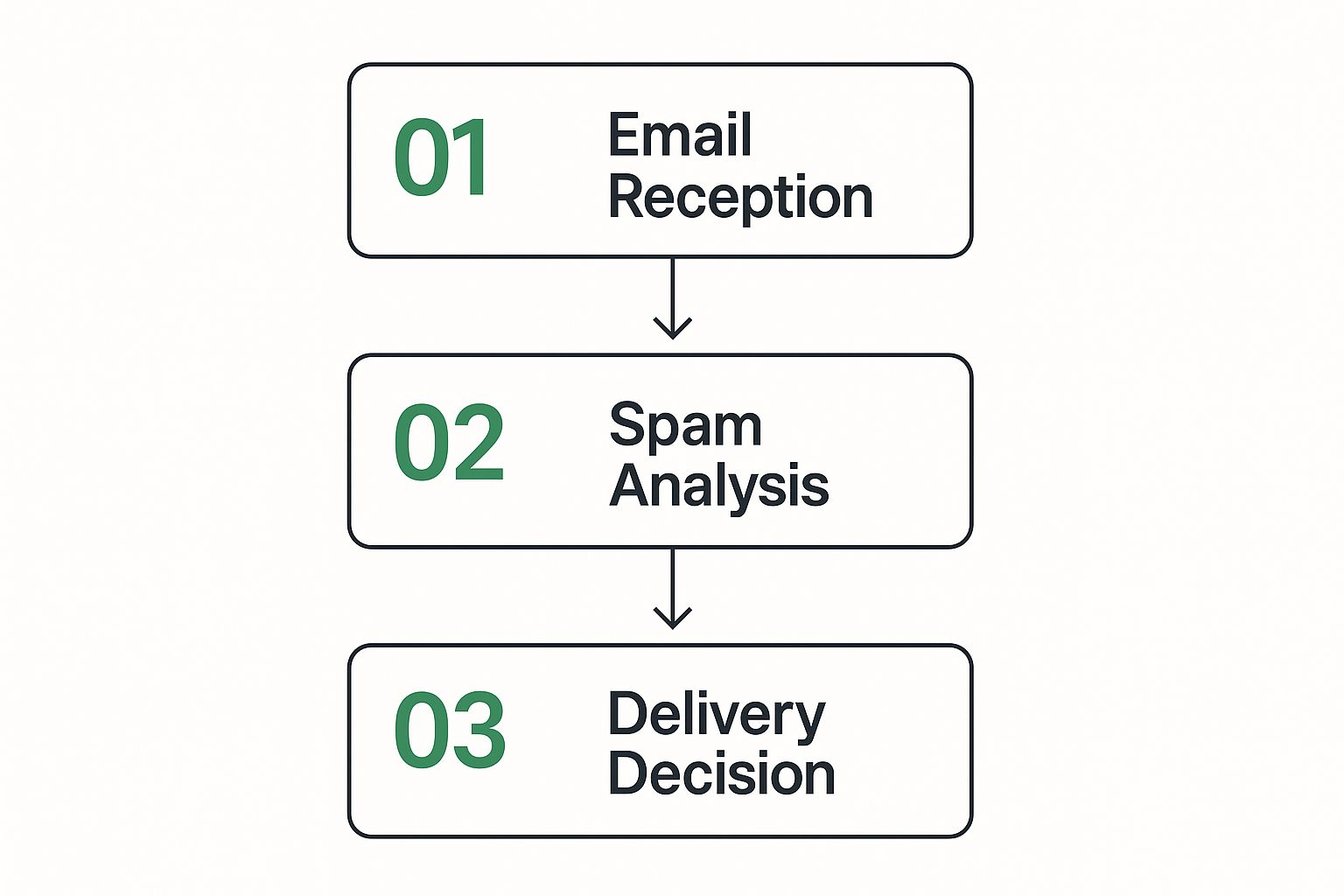
This simple breakdown illustrates the core cycle of fixing deliverability issues.
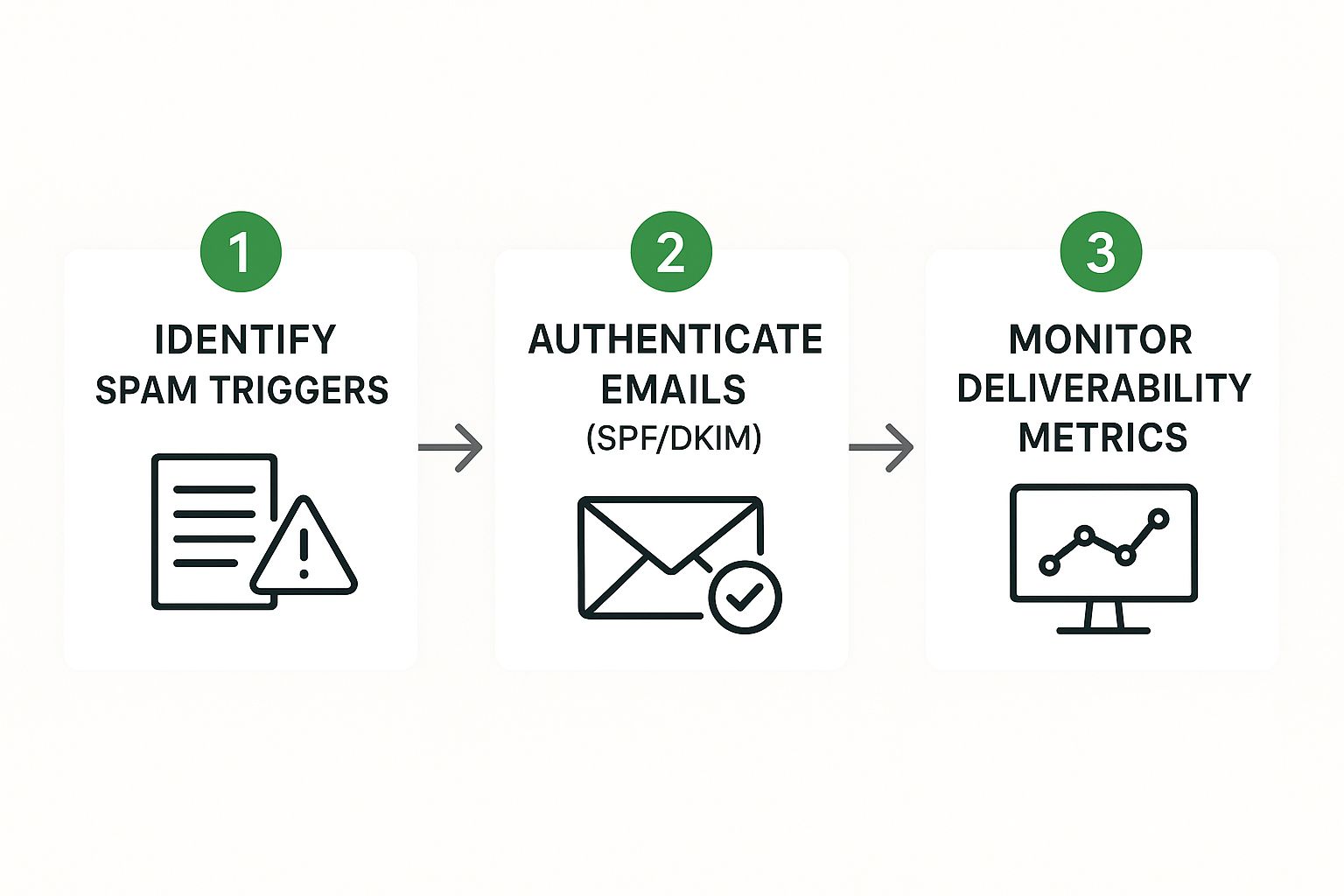
It’s all about a continuous loop: pinpointing the problem, implementing the right fixes, and then watching the results to fine-tune your approach.
Can I Fix My Reputation After Being Blacklisted?
Yes, you absolutely can, but it requires swift and focused action. Landing on a blacklist means a specific server has flagged your domain or IP address as a source of spam. Your first job is to figure out which blacklist you’re on. A few quick searches with online lookup tools will tell you what you need to know.
Once you’ve identified the blacklist, head to their website. Every list has its own delisting process, but they all share one requirement: you have to prove you’ve fixed the root cause. This isn't a "sorry, my bad" situation. You must demonstrate that you've secured a compromised account, scrubbed a bad email list, or corrected the poor sending habits that got you into trouble in the first place.
Why Do My Emails Go to Spam for Some and Not Others?
This is one of the most common and confusing problems in email marketing. The answer is that there’s no single, universal spam filter. Every provider—Gmail, Outlook, Yahoo—and even individual corporate servers run their own unique algorithms.
An email might land perfectly in a Gmail inbox but get flagged by Outlook’s notoriously aggressive filters. This happens for a few reasons:
- Engagement History: If your Outlook recipients consistently ignore your emails, Outlook’s algorithm takes note and starts downgrading your reputation specifically with them.
- Server-Side Rules: A company’s internal email server might have much stricter security protocols than a public one, blocking emails for reasons Gmail wouldn't even consider.
- Personal Filters: The user themselves might have created a rule that sends emails containing certain words to spam, or they might have marked one of your previous emails as junk.
The key takeaway is that deliverability isn't a single score. You have a different reputation with every single receiving system. Your goal is to send as many positive signals as you can, to all of them.
Does Asking Subscribers to Whitelist Me Actually Work?
It’s not just a nice suggestion—it's a fantastic practice. When you ask a new subscriber to add your email address to their contacts or "safe sender" list, you're giving them a chance to send a powerful, positive signal to their email provider on your behalf.
Not everyone will do it, of course. But for those who do, it's like giving you a golden ticket.
By whitelisting you, a user is explicitly telling their inbox filter, "I trust this sender, and I always want to see their messages." This single action can often override other negative signals and dramatically improve your inbox placement with that person. Think of it as a personal vote of confidence that helps build a rock-solid foundation of trust with email providers.
Stop letting spam filters dictate your conversations. At Typewire, we provide secure, private email hosting that puts you in control. With advanced anti-spam protection and a commitment to your privacy, we ensure your important messages get delivered.