Category: Uncategorized

  • 7 Email Deliverability Best Practices for 2025

    7 Email Deliverability Best Practices for 2025

    Ever wondered why your perfectly crafted emails vanish into the digital ether, never to be seen by your audience? The culprit is often poor email deliverability. It's the silent killer of email marketing ROI, determining whether you land in the coveted inbox or the dreaded spam folder. With inbox providers like Gmail and Yahoo continually tightening their filters, understanding the nuances of deliverability is non-negotiable for anyone relying on email for communication, from small businesses to privacy-conscious individuals.

    This guide moves beyond generic advice. It's a deep dive into actionable email deliverability best practices that directly impact your inbox placement. We will cover the critical technical foundations and strategic approaches required to ensure your messages are not just sent, but actually seen and engaged with.

    You will learn how to:

    • Implement sender authentication protocols like SPF, DKIM, and DMARC.
    • Maintain a healthy, permission-based contact list.
    • Proactively manage your IP and domain reputation.
    • Optimize content to bypass spam filters.
    • Use engagement data to inform your sending strategy.

    By mastering these concepts, you can build trust with Internet Service Providers (ISPs) and your audience, ensuring your valuable communications consistently reach their destination. Let's get started.

    1. Sender Authentication (SPF, DKIM, DMARC)

    Think of sender authentication as the digital passport for your emails. It’s a foundational element of email deliverability best practices, proving to receiving mail servers that your message is legitimate and not a fraudulent attempt at spoofing or phishing. This is achieved through a trio of protocols working in concert: SPF, DKIM, and DMARC.

    • SPF (Sender Policy Framework): This protocol allows you to publish a list of authorized IP addresses permitted to send email on behalf of your domain. Receiving servers check this list to verify the sender’s IP.
    • DKIM (DomainKeys Identified Mail): This adds a tamper-proof digital signature to your emails. It ensures the message content wasn't altered in transit, confirming its integrity from sender to recipient.
    • DMARC (Domain-based Message Authentication, Reporting & Conformance): DMARC acts as the policy layer. It tells receiving servers what to do if an email fails SPF or DKIM checks (e.g., quarantine or reject it) and provides crucial reporting back to you.

    Actionable Implementation Steps

    Implementing these protocols is non-negotiable for anyone serious about landing in the inbox. PayPal, for example, uses a strict DMARC policy to combat phishing, while Salesforce's comprehensive authentication framework helps them achieve a 99.9% deliverability rate.

    Start with a phased approach. First, set up SPF and DKIM, as DMARC relies on them. Once those are in place, introduce DMARC with a monitoring-only policy (p=none). This allows you to collect data on who is sending emails from your domain without affecting mail flow. After analyzing the reports and authorizing all legitimate senders, you can gradually move to a more restrictive policy like p=quarantine or p=reject. For a deep dive, you can learn more about how to set up email authentication with this real-world guide.

    The following infographic illustrates the sequential workflow of these three critical protocols.
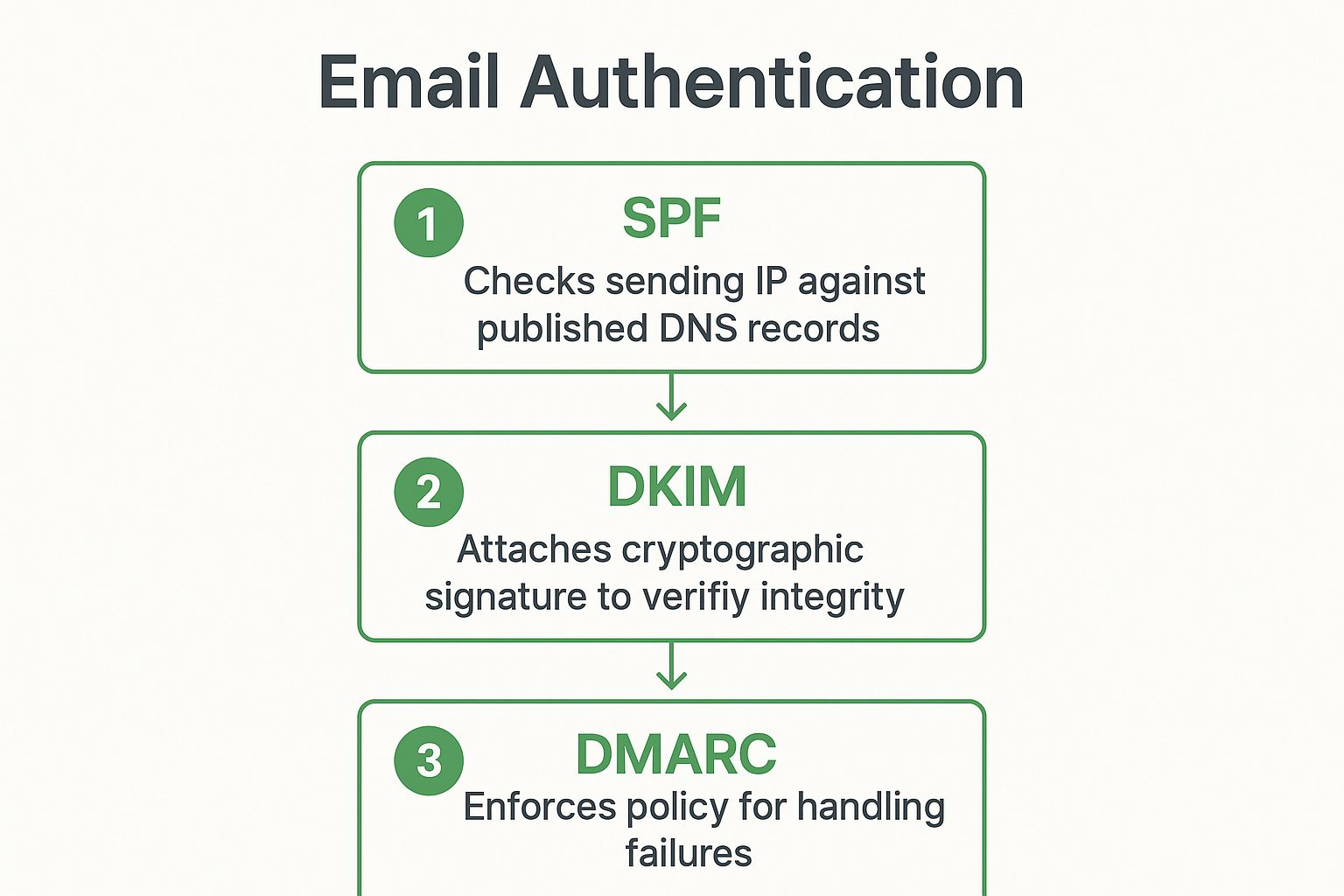
    Infographic showing the three-step email authentication workflow: SPF, DKIM, and DMARC.

    This process flow highlights how DMARC builds upon the verification checks performed by SPF and DKIM to enforce your domain's sending policy.

    2. List Hygiene and Permission-Based Marketing

    Think of your email list not as a static database, but as a living community. List hygiene and permission-based marketing are the practices of nurturing this community by ensuring it consists only of engaged, willing participants. This approach, championed by marketing visionary Seth Godin, focuses on sending emails exclusively to recipients who have explicitly opted in, while continuously removing inactive or invalid addresses. This isn't just a courtesy; it's a cornerstone of modern email deliverability best practices.

    • Permission-Based Marketing: This is the foundation. You only communicate with users who have given you explicit consent (opt-in). This builds trust and ensures your audience is receptive from the very first email.
    • List Hygiene: This is the ongoing maintenance. It involves regularly cleaning your list of hard bounces, unengaged subscribers, and spam traps to maintain high quality and protect your sender reputation.
    • Engagement Focus: The goal is to cultivate a list of people who want to hear from you, leading to higher open rates, click-through rates, and fewer spam complaints, all of which are positive signals to inbox providers.

    Actionable Implementation Steps

    Maintaining a clean, permission-based list is crucial for long-term email success. For instance, Mailchimp's double opt-in feature has helped its users achieve 20-30% higher open rates by confirming subscriber intent. Similarly, HubSpot’s list hygiene tools automatically manage bounces and suppression lists, taking the manual labor out of maintaining a healthy sender reputation.

    Start by implementing a double opt-in process for all new subscribers to confirm their interest. Immediately remove any hard bounces from your list, and establish a policy for removing soft bounces after 3-5 consecutive failures. Before purging long-term inactive subscribers, try a targeted win-back campaign to re-engage them. Finally, offer a preference center where users can adjust the frequency or type of emails they receive, which can significantly reduce unsubscribe rates and keep your list healthy and engaged.

    3. IP and Domain Reputation Management

    Think of your IP address and sending domain as your digital mailing address and business card, respectively. Their reputation determines whether Internet Service Providers (ISPs) view you as a welcome guest or a potential threat. Effective IP and domain reputation management is a core component of email deliverability best practices, directly influencing whether your emails land in the inbox, spam folder, or get blocked entirely.

    An illustration showing a computer with a checkmark, representing good IP and domain reputation, leading to successful email delivery to inboxes.

    This practice involves the strategic oversight of the scores ISPs assign to your sending infrastructure. A high reputation score, built over time through consistent, positive sending behavior, tells ISPs that your emails are wanted and valuable to recipients. Conversely, a poor reputation, often caused by high bounce rates or spam complaints, will severely limit your inbox placement.

    • IP Reputation: Tied to the specific IP address sending the email. Senders can use shared IPs (pooled with other senders) or dedicated IPs (exclusive to them). A dedicated IP gives you full control over your sending reputation.
    • Domain Reputation: Associated with your sending domain (e.g., @yourcompany.com). It is influenced by the quality of emails sent from that domain, regardless of the IP address used.

    Actionable Implementation Steps

    Managing reputation requires a proactive and meticulous approach. It is not a one-time setup but an ongoing process of building and protecting your sending credibility. For example, Amazon SES provides dedicated IP pools for enterprise customers to isolate and manage reputation across different brands or email streams. Similarly, SendGrid offers automated IP warming services to help new senders methodically build a positive reputation from scratch.

    A critical first step is a process called IP warming. Start by sending very low volumes of email to your most engaged subscribers and gradually increase the volume over four to six weeks. This slow ramp-up demonstrates good sending habits to ISPs. You should also segment your mail streams; use separate IPs for transactional emails (password resets, receipts) and marketing emails to protect the deliverability of critical messages.

    Finally, daily monitoring is non-negotiable. Use tools like Google Postmaster Tools or Validity’s Sender Score to track your reputation metrics. Implementing feedback loops (FBLs) with major ISPs will alert you when a recipient marks your email as spam, allowing you to remove them from your list immediately and protect your score. This diligent management is key to maintaining a healthy sender reputation and achieving long-term email success.

    4. Content Optimization and Spam Filter Avoidance

    Think of your email's content as its handshake. Even with perfect authentication, what you say and how you say it can either welcome you into the inbox or send you straight to the spam folder. Content optimization is a systematic approach to crafting emails that bypass spam filter triggers, ensuring your message is judged on its merit, not on technical missteps. This involves a careful balance of text, images, code, and language.

    Spam filters analyze hundreds of signals, from "spammy" words and excessive punctuation to poor HTML coding and imbalanced image-to-text ratios. A core tenet of email deliverability best practices is to create content that looks and feels like it was made for a human, not a bot. This builds trust with both subscribers and their inbox providers.

    An email being analyzed for content quality before it gets sent to the recipient's inbox, highlighting elements like subject line, text, and images.

    Actionable Implementation Steps

    Optimizing content is a continuous process of testing and refinement. BuzzFeed, for instance, famously A/B tests its subject lines to improve open rates and deliverability, leading to a 15% improvement. Similarly, Airbnb's highly personalized content strategy not only boosts engagement but also signals to inbox providers that its emails are valuable and wanted, contributing to higher inbox placement.

    Start by pre-flighting your campaigns. Before sending, use a tool like Mail Tester or GlockApps to get a spam score and identify potential issues. During creation, adhere to these key principles:

    • Balance Text and Images: Aim for a 60:40 or 70:30 text-to-image ratio. Emails that are just one large image are a major red flag for spam filters.
    • Write Clean Subject Lines: Avoid all caps, excessive exclamation points (!!!), and trigger words like "free," "winner," or "urgent." Keep them clear and descriptive.
    • Maintain Clean HTML: Ensure your code is clean and well-structured. Broken HTML can be a spam signal. Always include a plain-text version of your email as a fallback.
    • Personalize Meaningfully: Use subscriber data to go beyond just using their first name. Tailor content based on their past behavior, preferences, and purchase history to increase relevance.

    By focusing on high-quality, relevant content, you create a positive feedback loop. Higher engagement tells inbox providers your emails are valued, which in turn improves your sender reputation and future deliverability. You can learn more about how to reduce spam email by focusing on these content-centric strategies.

    5. Engagement-Based Sending Strategies

    Moving beyond one-size-fits-all broadcasts, engagement-based sending is a sophisticated strategy that tailors email frequency, timing, and content to individual recipient behavior. This approach treats your mailing list not as a monolith but as a collection of segments with varying levels of interest. By prioritizing your most engaged subscribers, you send strong positive signals to mailbox providers, significantly improving your sender reputation and overall email deliverability best practices.

    • Active Subscribers: These users frequently open, click, and interact with your emails. They should receive your most frequent and important communications.
    • Less-Active Subscribers: This group shows sporadic engagement. Sending to them less frequently, perhaps with re-engagement campaigns, prevents them from becoming completely dormant or marking your messages as spam.
    • Inactive Subscribers: These are users who haven't opened or clicked an email in an extended period (e.g., 90-180 days). Continuing to email them harms your deliverability and wastes resources.

    Actionable Implementation Steps

    Implementing this strategy is crucial for long-term list health and inbox placement. For example, Spotify reportedly achieved a 40% higher click-through rate by adjusting email frequency based on user listening habits and engagement. Similarly, Netflix optimizes send times based on viewing behavior to hit impressive 60% open rates.

    Begin by defining engagement tiers. Score subscribers based on recent opens, clicks, and even website activity. Use this data to create dynamic segments in your email service provider. A key aspect of engagement is the initial hook. For a detailed guide on optimizing your email subject lines to boost open rates, explore these 8 email subject line best practices. For your most engaged segment, maintain your regular cadence. For less-engaged users, reduce frequency and test targeted re-engagement campaigns. For inactive users, implement a sunset policy to gently phase them out or remove them from your active list after a final attempt to win them back. This strategic focus ensures you are sending to people who want to hear from you, which is the cornerstone of great deliverability.

    6. Technical Infrastructure and Email Hosting

    Your technical infrastructure is the engine that powers your email delivery. It encompasses everything from the servers you send from to the software that manages your email campaigns, forming the bedrock of your email deliverability best practices. A robust and well-configured setup ensures your emails are sent efficiently, reliably, and securely, directly impacting how mailbox providers perceive your sending reputation.

    This foundational layer includes several critical components working together:

    • Email Service Provider (ESP) or Mail Transfer Agent (MTA): This is the core service or software responsible for sending your emails. A high-quality ESP provides a pre-built, optimized infrastructure.
    • IP Addresses: Whether shared or dedicated, your sending IP addresses are a key part of your identity. Dedicated IPs give you full control over your reputation, while shared IPs pool resources and reputation.
    • Server Configuration and Routing: This involves the technical setup of your mail servers, including how they handle connections, process queues, and route messages to their final destination.

    Actionable Implementation Steps

    Choosing the right infrastructure is a strategic decision that prevents deliverability headaches down the line. Giants like Twilio SendGrid, which handles over 100 billion emails monthly with 99.9% uptime, and Amazon SES, with its enterprise-grade global infrastructure, showcase the power of a solid technical foundation. These providers invest heavily in maintaining high deliverability rates for their customers, managing everything from IP reputation to ISP relationships.

    To build a reliable sending system, start by selecting an ESP with a proven track record of strong deliverability and infrastructure. Implement proper error handling and retry logic within your sending applications to manage temporary failures like soft bounces. For high-volume senders, consider using multiple sending services for redundancy to ensure business continuity. You should also regularly monitor technical metrics like bounce rates, delivery latency, and connection errors to proactively identify and resolve issues. For a deeper understanding of the technical setup, explore this guide to secure email hosting to ensure your architecture is sound from the start.

    7. Compliance and Legal Requirements

    Navigating the legal landscape of email marketing is a non-negotiable aspect of email deliverability best practices. Compliance isn't just about avoiding fines; it’s about building trust with your audience and signaling to mailbox providers that you are a responsible sender. Adherence to regulations like GDPR, CAN-SPAM, and CASL demonstrates respect for user privacy and consent, which are critical factors inbox providers consider when filtering mail.

    • Consent: This is the foundation of legal email marketing. Regulations require clear, affirmative consent from individuals before you can send them marketing messages. This means no pre-checked boxes or ambiguous language.
    • Identification: Your emails must clearly identify you as the sender. This includes providing a valid physical mailing address in every promotional email, a key requirement of laws like the CAN-SPAM Act.
    • Opt-Out Mechanisms: Every marketing email must include a clear and easy-to-use unsubscribe link. More importantly, you must honor these requests promptly, typically within 10 business days, to remain compliant.

    Actionable Implementation Steps

    Failing to comply can have severe consequences, from hefty fines to permanent damage to your sender reputation. For instance, Google was hit with a €50 million penalty under GDPR for not providing clear enough consent mechanisms, while platforms like Mailchimp and HubSpot build compliance features directly into their tools to help users avoid such violations.

    Start by conducting a thorough audit of your email list and consent-gathering processes. Ensure you have detailed, timestamped records of how and when each subscriber opted in. Implement a double opt-in process to create a stronger, more verifiable record of consent. Always include your physical business address in your email footer and ensure your unsubscribe link is functional and prominent. Regularly review your practices against the latest updates in regulations across all jurisdictions where you operate, as this proactive approach is a cornerstone of maintaining high deliverability.

    7 Key Email Deliverability Practices Compared

    Item Implementation Complexity 🔄 Resource Requirements ⚡ Expected Outcomes 📊 Ideal Use Cases 💡 Key Advantages ⭐
    Sender Authentication (SPF, DKIM, DMARC) Moderate to high (DNS setup, ongoing monitoring) Moderate (DNS management, monitoring tools) Improved deliverability, spoofing protection, detailed reports Email domains needing authentication and brand protection Strong inbox placement, brand protection, standards compliance
    List Hygiene and Permission-Based Marketing Moderate (continuous maintenance & consent management) Moderate (tools for list cleaning & segmentation) Higher engagement, lower complaints, regulatory compliance Marketers focusing on quality over quantity and compliance Better sender reputation, higher engagement rates
    IP and Domain Reputation Management High (technical, volume-dependent) High (dedicated IPs, monitoring tools) Enhanced deliverability, reputation control High-volume senders managing sending infrastructure Full control over reputation, improved deliverability
    Content Optimization and Spam Filter Avoidance Moderate to high (ongoing testing & adjustments) Moderate (testing tools, content creation resources) Higher inbox placement and engagement Marketers optimizing email content for deliverability Reduced spam flagging, better engagement and brand image
    Engagement-Based Sending Strategies High (complex segmentation and automation) High (advanced platforms, data analysis) Improved engagement and ROI, reduced complaints Sophisticated marketers with automation capabilities Better resource allocation, increased subscriber value
    Technical Infrastructure and Email Hosting High (technical setup and maintenance) High (infrastructure, monitoring systems) Reliable delivery, scalability, infrastructure control Organizations requiring robust email delivery architecture Scalable and controlled sending environment
    Compliance and Legal Requirements Moderate to high (jurisdiction-specific rules) Moderate (legal monitoring, documentation) Avoidance of penalties, legal compliance, trust building All email marketers sending to regulated regions Legal protection, improved trust, global compliance

    Bringing It All Together for Inbox Dominance

    Navigating the complex world of email deliverability can feel like a daunting task, but as we've explored, it's not about a single, secret trick. Instead, true inbox success is the result of a deliberate, holistic strategy. Mastering the email deliverability best practices outlined in this guide means weaving together multiple threads into a strong, resilient tapestry that proves your value to Internet Service Providers (ISPs) and your audience alike.

    Think of each practice as a critical pillar supporting your entire communication framework. Technical authentication with SPF, DKIM, and DMARC is your digital passport, verifying your identity. Meticulous list hygiene and permission-based marketing ensure you're speaking to a willing and engaged audience, which is the lifeblood of a healthy sending reputation. Proactive management of your IP and domain reputation acts as your credit score in the email world, a score you must diligently protect.

    From Strategy to Execution

    The journey doesn't end with technical setup and clean lists. Your success is continuously reinforced by the content you create and the strategies you employ. By optimizing your messages to avoid spam filter triggers and focusing on engagement-based sending, you transform your emails from simple broadcasts into valuable, anticipated communications. This active relationship with your subscribers sends powerful positive signals to mailbox providers, reinforcing that your content is wanted.

    Underpinning all of this is a solid technical infrastructure and a firm grasp of legal requirements like CAN-SPAM and GDPR. These elements are non-negotiable foundations. A weak infrastructure can undermine even the best content, and legal non-compliance can shut down your operations entirely. Each of these seven pillars works in concert with the others:

    • Authentication proves you are who you say you are.
    • List Hygiene ensures you're sending to people who want to hear from you.
    • Reputation is the trust you build with ISPs over time.
    • Content delivers the value that keeps subscribers engaged.
    • Engagement is the proof that your content is succeeding.
    • Infrastructure provides the stable platform needed for consistent delivery.
    • Compliance keeps you operating legally and ethically.

    By consistently applying these principles, you move from a reactive position of fighting spam folders to a proactive one of building a trusted, authoritative sending presence. This is the ultimate goal of mastering email deliverability best practices: creating a sustainable system where your messages are not only delivered but welcomed. The digital landscape will always change, but these foundational strategies will remain your North Star for reaching the inbox, every single time.


    Ready to take full control of your email infrastructure and build an unimpeachable sending reputation from the ground up? Typewire offers secure, private email hosting on our own data centers, giving you the ultimate oversight of your deliverability. Start with a foundation built for privacy, security, and inbox success by exploring our solutions at Typewire today.


  • Top Microsoft Exchange Alternatives for Your Business

    Top Microsoft Exchange Alternatives for Your Business

    When you think of business email, Microsoft Exchange has long been the default. But the best alternatives today are cloud-native suites like Google Workspace and Zoho Mail, which bake in collaboration tools, simplify management, and often come with a lower total cost of ownership. These platforms are really picking up steam as businesses look for something more agile than traditional email hosting.

    Why Smart Businesses Are Looking Beyond Microsoft Exchange

    For years, Microsoft Exchange was the undisputed king of corporate communication. It was the powerful, reliable workhorse for email, calendars, and contacts. But the way we work has changed dramatically. Now, businesses are starting to ask if the long-standing champion still fits their needs, which is kicking off a serious search for alternatives.

    The main reasons for this shift? Complexity and cost. Let's be honest, managing an on-premises Exchange server is a heavy lift. It demands a lot from your IT team—hardware maintenance, software licensing, and specialized expertise to keep it secure and updated. Even its cloud sibling, Exchange Online, can feel complicated with administrative hurdles and pricing tiers that don't always make sense for every company's budget or growth plans.

    Image

    Shifting Priorities in a Modern Workplace

    The drift away from a single-vendor ecosystem is also speeding up. Modern teams use a whole stack of tools, from project management apps like Asana to communication hubs like Slack. They expect everything to integrate seamlessly, but Exchange wasn't originally built for that kind of world. This friction leads to clunky workarounds that get in the way of getting things done.

    The conversation isn't just about email anymore; it's about the entire collaborative fabric of an organization. Businesses need a communication system that enhances their workflows, not one that complicates them.

    This new reality is pushing leaders to look at platforms designed from the ground up for cloud-based collaboration. They're on the hunt for solutions that offer:

    • Simplified Administration: Intuitive, web-based control panels that don't require a dedicated IT specialist.
    • Predictable, Scalable Costs: Clear subscription models that grow with the business, eliminating surprise hardware costs.
    • Deep Ecosystem Integration: Built-in connections to a wide range of third-party apps.
    • Enhanced User Experience: Modern, easy-to-use interfaces for email, chat, video calls, and document sharing.

    A Strategic Pivot, Not a Forced Retreat

    Microsoft's own roadmap is also pushing companies to re-evaluate. The upcoming retirement of key legacy protocols—like Basic Authentication for SMTP AUTH in April 2026 and Exchange Web Services (EWS) in October 2026—means businesses have to modernize their infrastructure anyway.

    For many, this forced update is the perfect trigger to ask a bigger question: is now the time to switch to a more agile platform altogether? It’s a natural moment to pause, reassess, and make sure your communication stack is actually set up to support where your business is headed.

    Comparing the Top Microsoft Exchange Alternatives

    When you start looking for alternatives to Microsoft Exchange, you’ll quickly notice a few names keep popping up. Each of these platforms has its own philosophy and feature set, and figuring out their core strengths is the first step to finding the right fit for your team. These aren't just email inboxes; they're complete ecosystems built for how we work today.

    The main players are targeting different needs. Google Workspace is the obvious one, built from the ground up for cloud collaboration and simultaneous document editing. Then there's Zoho Mail, which is a huge draw for businesses wanting a full suite of apps that goes way beyond email, usually at a fantastic price. And for those who need total control, open-source options like Zimbra offer deep customization if you have the IT muscle to manage it.

    Exchange has been around forever, but the market is definitely shifting. Even though many Exchange deployments are already in the cloud, competitors are seizing the opportunity. According to The Radicati Group, while 67% of Exchange mailboxes were expected to be cloud-based by 2025, the on-premises servers that remain are prime candidates for a switch. This migration to the cloud is what opens the door for other platforms to prove their worth. For more on this trend, you can read the full research at https://typewire.com/blog/read/2025-08-20-finding-the-best-business-email-providers.

    High-Level Platform Overviews

    To make a smart choice, you need to understand what makes each alternative tick. They aren't just carbon copies of each other; they offer fundamentally different ways of thinking about communication and getting work done. Your decision really hinges on what you value most: simplicity, an all-in-one business suite, or complete control.

    • Google Workspace (Formerly G Suite): This is the go-to for businesses that are all-in on the cloud and live by collaboration. The seamless connection between Gmail, Drive, Docs, and Meet makes for a smooth experience that many find more natural than Microsoft's. If you want a quick taste of its power, learning about efficient meeting scheduling in Google Calendar is a great place to start.

    • Zoho Mail: An incredible option for small and medium-sized businesses that need more than just email. Zoho’s ecosystem includes over 40 integrated apps, from a CRM and project management tools to accounting software. It's less of an email provider and more of a central operating system for your entire business.

    • Zimbra Collaboration Suite: This open-source platform is built for organizations that demand total data sovereignty and the ability to customize everything. You can deploy it on your own servers or in a private cloud, giving your IT team fine-grained control over security, compliance, and every last feature.

    To get a better sense of how these platforms stack up at a glance, the table below provides a quick summary of their core characteristics.

    At-a-Glance Comparison of Leading Email Platforms

    Platform Primary Focus Ideal Business Size Typical Pricing Model
    Microsoft Exchange Enterprise-grade security & integration Medium to Enterprise Per user, per month (Cloud) / Licensing (On-Prem)
    Google Workspace Cloud-native collaboration SMB to Enterprise Per user, per month
    Zoho Mail All-in-one business application suite SMBs & Startups Per user, per month (often with a free tier)
    Zimbra Customization & data sovereignty Varies (tech-savvy teams) Open-source (free) / Licensing for support

    This table helps frame the initial decision. Each platform carves out its own niche, whether it's Google's collaborative flow, Zoho's business-in-a-box value, or Zimbra's ironclad control.

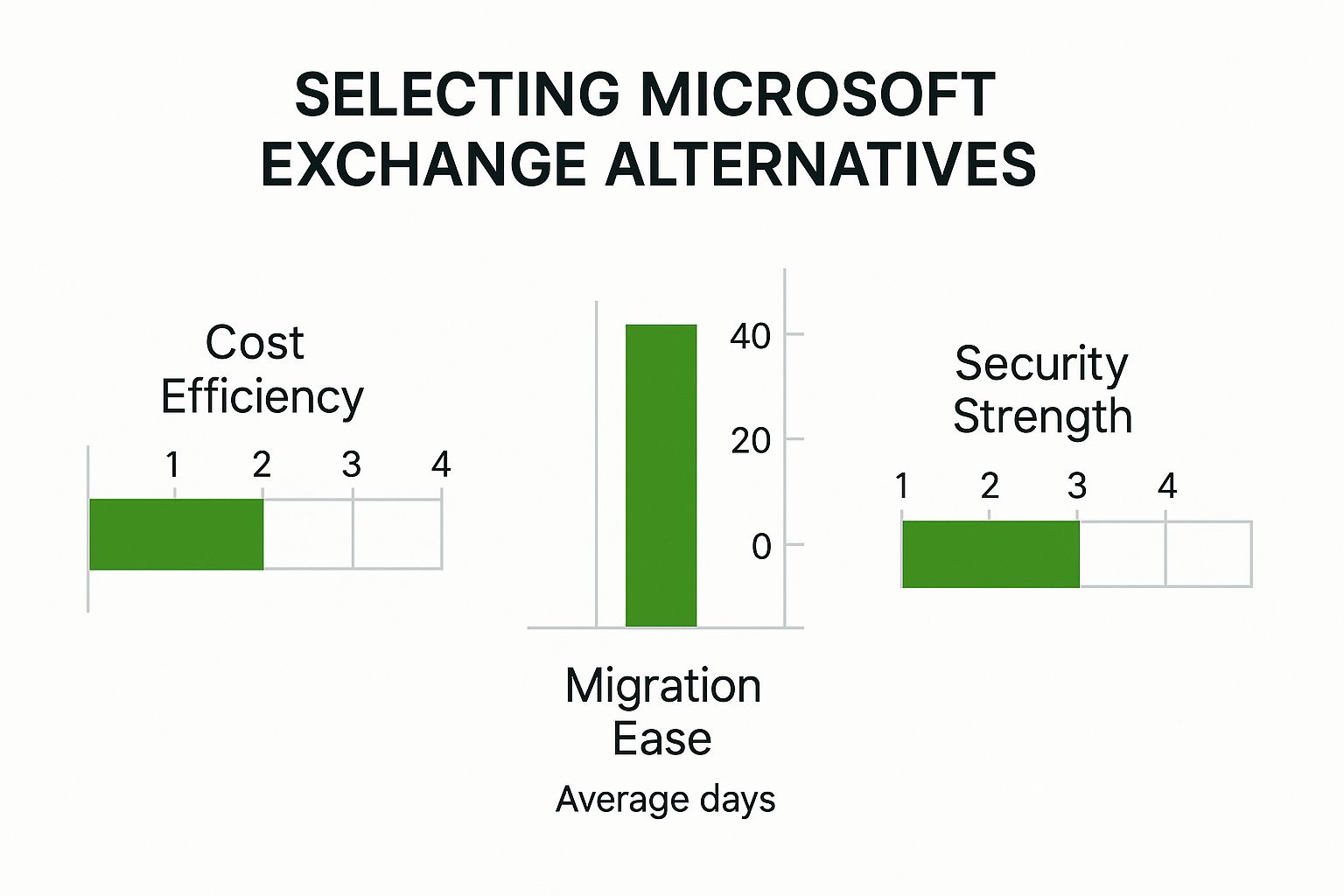
    The image below gives you a visual breakdown of key decision points—like cost, migration difficulty, and security—for these leading alternatives.

    Image

    As you can see, Google strikes a strong balance across the board. Zoho really shines on cost-effectiveness, while Zimbra delivers top-tier security for those who can manage it themselves. This overview should give you a solid starting point for figuring out which platform aligns with what your business really needs.

    A Deep Dive on Security and Data Privacy

    When you're shopping for an email provider, nothing matters more than security and data privacy. Let's be honest, an email breach isn't just an inconvenience—it can be a company-ending event, causing data loss, destroying your reputation, and racking up massive fines. That's why we need to go beyond the marketing fluff and look at how each of these platforms actually handles your data.

    Microsoft Exchange has been the enterprise standard for decades, and its security reflects that. It's a fortress, built with multiple layers of defense. We're talking about features like Data Loss Prevention (DLP) to stop sensitive info from leaving the building, advanced threat protection against sophisticated malware and phishing, and a whole binder full of compliance certifications like HIPAA and GDPR. This setup is perfect for large organizations that need fine-grained control and want everything to plug neatly into the wider Microsoft security ecosystem.

    The catch? All that power comes with complexity. Getting Exchange security configured just right takes serious IT know-how. One wrong move can leave a door wide open for attackers, which is why a simpler, yet equally secure, approach often makes more sense for a lot of businesses.

    Contrasting Security Philosophies

    Google Workspace comes at security from a completely different angle. Instead of relying on manual configuration, it throws massive data-processing power at the problem. Its AI models are constantly sifting through trillions of signals every single day to automatically block over 99.9% of spam, phishing, and malware before it ever hits your inbox. It’s a set-it-and-forget-it model that delivers fantastic protection without needing a dedicated security guru on staff.

    Then you have the privacy-first players like Proton Mail. Their entire philosophy is built on zero-knowledge encryption. What does that mean? In simple terms, your emails are encrypted in such a way that no one—not even Proton itself—can read them. You hold the only key.

    This is the fundamental trade-off: Microsoft and Google secure your data for you. Privacy-focused platforms like Proton let you secure your data from everyone, including them.

    This difference is front and center in how they market themselves.

    Image

    The focus is squarely on user-controlled privacy, a stark contrast to mainstream providers that often scan email content to power features like smart replies or ad targeting.

    Data Residency and Compliance Considerations

    Another critical piece of the puzzle is where your data actually lives. Both Microsoft and Google run massive global networks of data centers, which is great because it lets you choose to store your data in specific regions to comply with local laws like GDPR. For any business with international operations, this is a must-have.

    The privacy-focused alternatives often go one step further. Many, like Proton, are legally based in countries with famously strict privacy laws, like Switzerland. This adds another legal shield against data requests from foreign governments.

    Ultimately, all these platforms offer strong security. The right choice really comes down to your organization's specific needs and risk tolerance. A good starting point is to get educated on how to protect personal information online; picking the right email host is a huge part of that strategy.

    A Look at Collaboration and Ecosystem Integration

    An email service isn't just an inbox anymore—it's the command center for your entire workflow. When you're looking at Microsoft Exchange alternatives, you have to think about how well a platform plays with the other tools you rely on every day. It's no secret that the two giants, Microsoft and Google, have built massive ecosystems designed to keep you locked into their world.

    Microsoft 365 is a great example of a deeply interconnected system. Everything from Outlook and Teams to OneDrive and the classic Office suite is designed to work as one. Share a file in a Teams chat, and it lands in OneDrive. Schedule a meeting in Outlook, and a Teams link pops up automatically. For companies already living in the Microsoft universe, that level of synergy is tough to beat.

    But that tight-knit feeling can also be a bit suffocating, especially if your team loves using best-in-class tools from other developers. While Microsoft allows for third-party integrations, the experience isn't always as smooth as sticking with their native apps.

    The Power of a Cloud-Native Ecosystem

    This is where Google Workspace really shines as a compelling, cloud-native alternative. Its entire suite—Gmail, Google Drive, Chat, and Meet—was born in the cloud and built for real-time teamwork. We've all seen it in action: multiple people editing a single Google Doc, all from a link shared in a Gmail thread. It’s a completely frictionless experience, and that simplicity has won a lot of fans.

    The numbers tell a fascinating story. As of early 2025, Microsoft Office 365 (often packaged with Exchange Online) was the second most popular office suite, used by over 3.6 million companies, which is about 31% of the market. But it's Google Workspace that actually leads the pack with a 44% market share. This really highlights how many businesses—especially those who are cost-conscious and cloud-focused—are drawn to its collaborative strength.

    Third-Party Integrations and Flexibility

    Beyond the big two, the real test is how well a platform connects with other critical software like Salesforce, Asana, or Slack. Both Microsoft and Google have huge marketplaces full of add-ons, but their approaches feel different. Google often comes across as more open, with an enormous library of integrations that can seriously expand what its core apps can do.

    The real question you need to ask is this: Does your business value the deep, native integration from a single provider, or do you need the flexibility to build a custom tech stack with specialized tools?

    If you're thinking about changing your collaboration tools as part of a move away from Exchange, digging into a detailed Slack vs Teams comparison is a smart move. It sheds light on the differences between a fully baked-in solution like Teams and a standalone leader like Slack that thrives on connecting with everything else.

    Ultimately, picking the right Microsoft Exchange alternative comes down to which ecosystem best fits the software you use now and plan to use in the future. You want your communication hub to simplify your operations, not make them more complicated.

    Untangling the True Cost: Total Ownership and Scalability

    When you're pricing out an email platform, the monthly subscription fee is just the tip of the iceberg. The real story is told by the Total Cost of Ownership (TCO), which factors in every single hidden expense that quietly drains your budget over time. This is especially true if you're running Microsoft Exchange on your own servers.

    The initial license fee? That's just the entry ticket. You've got to buy the server hardware, pay for the electricity to run it, and account for the countless IT hours spent on maintenance, patching, and late-night troubleshooting. These operational costs can easily balloon, making a solution that seemed affordable at first a much more expensive reality down the road.

    What Are the Hidden Costs of Hosting Your Own Email?

    This is where cloud-based Microsoft Exchange alternatives like Google Workspace and Zoho Mail change the game. Their straightforward per-user, per-month pricing strips away most of that financial complexity.

    • IT Overhead: With a cloud service, all the server maintenance, security patches, and hardware headaches are handled for you. This frees up your IT crew to work on things that actually move your business forward.
    • Third-Party Add-ons: A standard Exchange setup often needs extra, separately licensed tools for things like serious spam filtering or email archiving. The top alternatives usually bake these features right into their main plans.
    • The Cost of Moving: Migrating away from an old on-premise server is no small task. It’s a complex project that often means hiring specialist consultants, which adds a hefty one-time bill to your budget.

    This all-in-one financial model is a huge driver for companies looking at other options. It's also worth noting the competitive world of cloud infrastructure that powers these services. Microsoft isn't the only player; it's in a constant battle with Amazon Web Services (AWS), which holds a massive lead in the market. As of Q2 2025, AWS commanded a 22.98% market share of total cloud revenue, while Microsoft sat at 9.66%.

    This matters because many of the best Exchange alternatives run on AWS or other providers, not just Microsoft Azure. It’s a diverse ecosystem. You can find more data on the cloud market competition over at csimarket.com.

    Planning for Tomorrow's Growth

    When it comes to scaling your business, cloud-native platforms have a clear advantage. Need to add a new employee to Google Workspace or Zoho? It takes a few clicks in the admin dashboard, and your bill adjusts automatically. This kind of flexibility is a lifesaver for businesses that see seasonal hiring spikes or are in a rapid growth phase.

    For a growing business, the ability to scale resources up or down without capital expenditure isn't just a convenience—it's a significant competitive advantage that directly impacts cash flow and operational agility.

    An on-premise Exchange server, on the other hand, forces you to play fortune-teller. You have to guess your capacity needs years in advance. If you guess too low and outgrow your server, you're looking at a huge capital investment and a painful migration project. Guess too high, and you've just wasted a ton of money on hardware that's collecting dust. Cloud alternatives take all that guesswork out of the equation, letting your email system expand right alongside your business.

    Making the Right Choice for Your Business

    Image

    Picking the right email and collaboration platform is a cornerstone decision. It directly shapes everything from day-to-day productivity to your company's long-term security posture. The goal isn't to find a single "best" solution, but to find the one whose strengths perfectly align with your specific business needs. This means looking past feature lists and getting real about your own operational realities.

    A fast-moving tech startup, for example, is probably going to feel right at home with Google Workspace. It's built for agile, real-time collaboration. The way Docs, Sheets, and Meet are baked right into Gmail just removes friction from the creative process, prioritizing speed and teamwork.

    Aligning the Platform with Your Priorities

    On the other hand, a small business looking to simplify its software stack and keep a close eye on costs might find Zoho Mail to be a perfect match. The real power of Zoho isn't just its email, but the sheer breadth of its connected business apps, covering everything from CRM to accounting. For any organization that wants a central command center for its operations without the enterprise price tag, Zoho makes a very strong argument.

    Then you have businesses where security and compliance are non-negotiable, like in healthcare or finance. For them, a highly controlled platform like an on-premise Exchange server or a privacy-focused provider like Proton Mail is often the only viable path. These solutions offer granular control over data location, encryption, and access, ensuring you stay on the right side of strict regulations.

    The right platform is the one that solves your biggest operational challenges. Don’t get distracted by features you won’t use; focus on the solution that directly supports your business model, compliance needs, and company culture.

    Scenario-Based Recommendations

    To make the decision a little clearer, think about which of these common scenarios best describes your business and which Microsoft Exchange alternatives fit the bill:

    • The All-in Cloud Collaborator: Google Workspace is the undisputed choice for teams that live in shared documents and depend on seamless video calls and chat being part of their natural workflow.

    • The Budget-Conscious All-in-One Seeker: Zoho Mail provides incredible value by packaging robust email with a huge library of business applications, making it ideal for SMBs aiming to simplify their operations.

    • The Control and Customization Purist: Open-source solutions like Zimbra offer the ultimate level of control over your data and infrastructure. This is the way to go for organizations with the in-house technical chops to manage their own environment.

    Once you’ve zeroed in on the best fit, the next big step is planning the migration itself. A smooth transition hinges on careful preparation, from backing up data to communicating the plan to your team. To get you ready, we've put together a complete guide on how to switch email providers without losing data. This walkthrough covers all the essential steps for a secure and seamless move, keeping your business running without a hitch.

    Got Questions About Leaving Exchange? We've Got Answers.

    Making the leap from Microsoft Exchange is a big decision, and it’s natural to have questions. You're probably wondering about everything from the migration process to basic features. Let's tackle the most common concerns head-on so you can move forward with confidence.

    Getting straight answers is the first step. Think of this as your starting point for figuring out which platform truly fits your business.

    What's the Go-To Alternative to Microsoft Exchange?

    If you're looking for the biggest name in the game, it's Google Workspace. No question about it. It has carved out a massive piece of the market, particularly with startups and teams that live and breathe real-time, cloud-based collaboration.

    But popular doesn't automatically mean perfect for you. The "best" choice really comes down to what you need.

    • Zoho Mail is a fantastic pick if you're after a budget-friendly powerhouse that offers a whole suite of business apps, not just email.
    • Open-source solutions are the way to go for organizations that demand total control, from data sovereignty to deep customization of their entire setup.

    How Painful Is It to Migrate Off Exchange?

    Honestly, it depends. The difficulty of a migration really hinges on the size of your organization, how much data you have, and which new platform you're moving to. But here’s the good news: this is a road many have traveled, and the top providers have put a lot of effort into smoothing out the bumps.

    Major players like Google and Zoho have built dedicated migration tools and provide tons of documentation. These resources are designed to get your emails, contacts, and calendars moved over with as little disruption as possible. For bigger companies or more complex setups, hiring a third-party migration expert is often money well spent.

    The secret to a smooth migration isn't the tool, but the plan. A successful switch comes down to meticulous planning, keeping your team in the loop, and rolling things out strategically to avoid chaos.

    Can I Still Use My Custom Domain with These Alternatives?

    Yes, 100%. This is a non-negotiable feature for any email service that calls itself professional. Every serious Microsoft Exchange alternative—from Google Workspace to Zoho Mail and all the privacy-first options—is designed to work with your custom domain name (like yourname@yourcompany.com).

    Using your own domain is essential for your brand and credibility. Setting it up usually just involves proving you own the domain and tweaking your DNS records. Every provider gives you clear, step-by-step guides to walk you through it. It's a standard part of getting started.


    Ready to secure your communications with a private, ad-free email solution? Typewire offers the control and privacy your business deserves. Explore our powerful features with a 7-day free trial at https://typewire.com.