
Spear phishing isn't your average email scam. It's a highly targeted cyberattack where criminals do their homework on you first. They'll use personal details—your name, where you work, who you report to, even what projects you're working on—to craft an email that looks incredibly convincing. This direct threat to your email privacy makes it much harder to spot than a generic phishing attempt sent to thousands of people at once.
What's the Difference Between Spear Phishing and Regular Phishing?
Think of it this way: traditional phishing is like a commercial fishing trawler casting a huge net, hoping to catch whatever swims into it. Attackers blast out thousands of identical, generic emails with vague greetings like "Dear Valued Customer." They're playing a pure numbers game, banking on a tiny percentage of people falling for the trick.
Spear phishing, however, is like a skilled angler who has studied a specific fish, knows its habits, and uses the perfect lure to catch it. The attacker has already researched you. They know your name, your job title, and maybe even the names of your colleagues. This research allows them to build a message that feels legitimate and often urgent, tricking you into taking an action you otherwise wouldn't. This targeted approach is a major concern for email security.
The Power of Personalization
The real danger of spear phishing is how it cleverly sidesteps our natural skepticism. When an email addresses you by name and mentions something specific and familiar, your internal alarm bells are far less likely to go off. This is a massive threat to both personal and business email security.
For instance, an attacker might pose as a trusted vendor and send you an invoice that references a real purchase your company recently made. To pull this off, they often combine a personalized message with a fake sender address, a tactic known as spoofing. You can dive deeper into how this works in our guide on what is email spoofing and how to protect yourself.
Because these attacks are so carefully tailored, they have a dramatically higher success rate than generic phishing campaigns. Attackers weaponize trust, using credible details to make their malicious requests seem like just another part of your daily work.
This targeted approach is why protecting your email privacy is so crucial. The more an attacker can find out about you online, the more convincing their fake emails become. While secure hosted email platforms are built to filter these advanced threats, understanding the attacker's playbook is your first and best line of defense.
Anatomy of a Modern Spear Phishing Campaign
To stop a spear phishing attack, you have to get inside the attacker's head. These aren't just random, sloppy emails; they're carefully planned operations that roll out in distinct phases. It’s less like a random crime and more like a well-rehearsed heist.
This methodical approach is exactly why spear phishing is such a massive concern for email security. The whole game is designed to bypass your natural skepticism by playing on trust and familiarity.
Stage 1: The Research Phase
First things first, the attacker does their homework. They become digital private investigators, piecing together a profile of their target from whatever they can find online. They’ll live on LinkedIn, noting job titles, work connections, and current projects. They'll dig through company websites to map out the organizational chart.
Even personal social media can be a goldmine, revealing hobbies or recent trips that can be used to make an email feel unnervingly personal. The more they know, the more convincing the final message will be. This deep dive into your digital life is a stark reminder of how closely email privacy and security are linked.
This image really drives home the difference between a broad phishing net and a targeted spear.
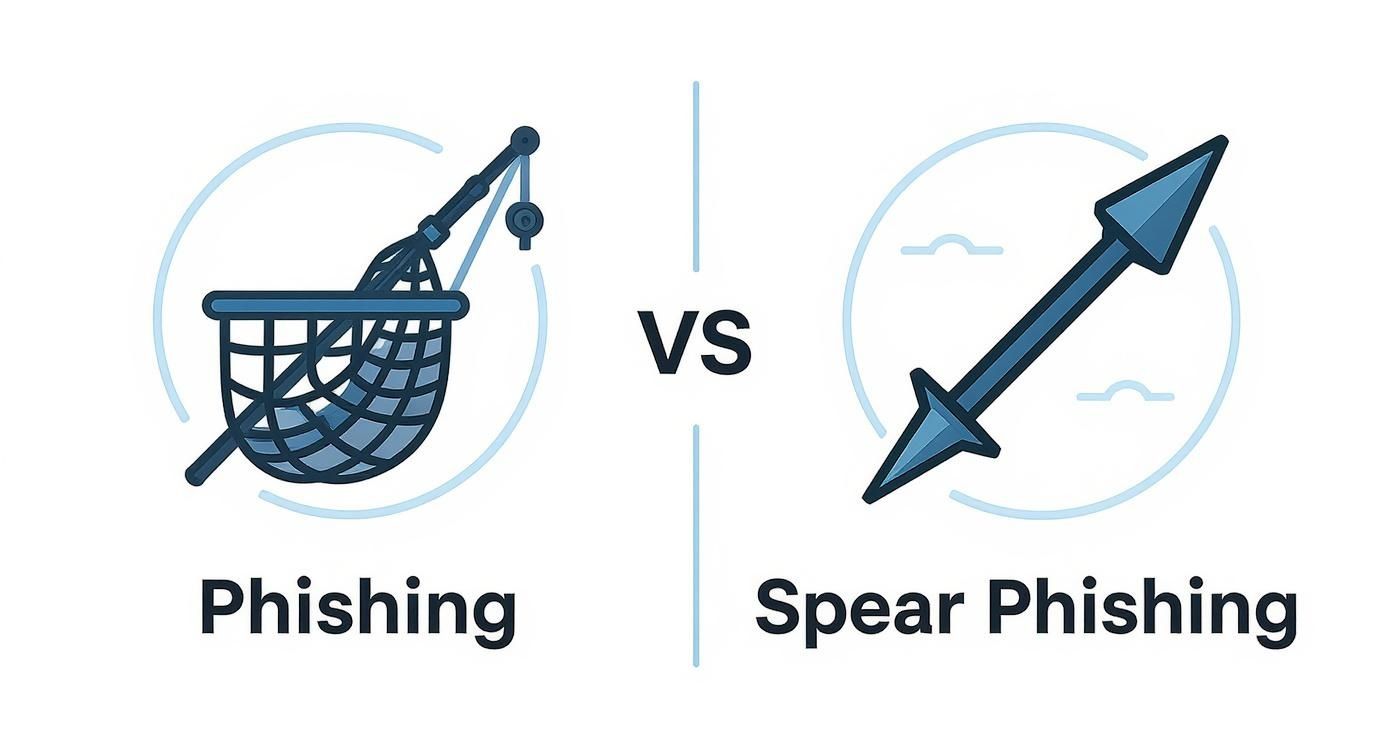
One is a numbers game; the other is all about precision, and that precision comes from solid research.
Stage 2: The Weaponization Phase
Once they have enough intel, the attacker builds their weapon: the email itself. All that gathered information is used to craft a message that feels completely legitimate. It might look like it’s from your boss, a trusted vendor you work with every week, or even your own IT department.
The email will almost always contain a few key ingredients:
- A Familiar Tone: The language and style will mimic the person they're impersonating.
- Specific Details: They’ll drop in a reference to a real project, a recent meeting, or a mutual colleague to make it believable.
- A Call to Action: This is the trap. It could be a link to a fake login page, an attachment loaded with malware but disguised as an invoice, or an urgent request to wire money.
The goal is to create something that doesn't set off any alarm bells. It should look like just another part of your busy workday, bypassing both human and technical defenses.
Stage 3: The Delivery Phase
With the trap set, it's time for delivery. Attackers use techniques like email spoofing to make the message look like it came from a real address. The "From" field can be a perfect replica of a legitimate internal email, tricking both you and basic email filters.
This is where the defenses of modern hosted email platforms are so important. These systems are built to analyze incoming mail for subtle signs of impersonation and other red flags that a simple glance might miss. Without that safety net, a perfectly crafted fake can slide right into an inbox, making strong email security essential.
Stage 4: The Execution Phase
The final act depends entirely on the target. If the attacker did their job well in the earlier stages, you receive an email that seems plausible, maybe even urgent. You click the link. You open the attachment. You approve the wire transfer.
And just like that, it's over. The attacker has what they came for—your credentials, access for ransomware, or a trove of sensitive company data. There's a reason this method is so popular. Research back in 2019 found that 65% of known cybercriminal groups used spear phishing as their main vector, and a whopping 96% of these attacks were designed for intelligence gathering. You can see more on these trends in this detailed report on phishing statistics.
This multi-stage process shows that spear phishing is less about technical wizardry and more about psychological manipulation. By exploiting human trust and the routines of corporate life, attackers turn an employee's inbox into a gateway for a major security breach.
Real-World Examples of Spear Phishing Attacks
It’s one thing to know the definition of spear phishing, but seeing how these attacks play out in the real world is something else entirely. These aren't just theories from a textbook; they are sophisticated, psychologically-driven attacks that trick smart people into making costly mistakes every single day. The most successful ones are masters of disguise, using trust, urgency, and a little bit of inside knowledge to slip past our natural defenses.
These real-life scenarios prove that strong email security isn't just a technology problem—it's a human one. An attacker’s main goal is to make a dangerous request feel completely normal, like just another part of the workday. They sprinkle in personalized details to make you lower your guard.
Let's break down a few common, yet incredibly effective, scenarios to see how a single, well-crafted email can bring an organization’s security crashing down. This is why protecting your email privacy isn't just a feature; it's the foundation of your defense.
The Fraudulent Invoice Ploy
Picture an employee in the finance department—let's call her Sarah. Her job involves processing dozens of vendor invoices every week. One afternoon, an email lands in her inbox from "accounts@trusted-vendor.net" with an urgent invoice attached. It looks legitimate, even referencing a recent project by name and using the vendor's logo.
The email explains that the vendor has recently switched banks. To avoid payment delays, Sarah needs to direct all future payments, including the "overdue" one attached, to the new account listed. The tone is professional but firm, creating a subtle pressure to act now.
- The Hook: The email appears to come from a real vendor Sarah pays all the time.
- The Lure: It mentions a specific, ongoing project, which makes the request feel authentic.
- The Trap: The attached PDF contains the attacker’s bank details. One click and a routine payment sends thousands of dollars straight to the criminal.
This attack works so well because it slots perfectly into a routine business process. A request to update payment details isn’t out of the ordinary for Sarah. The attacker simply did a little homework on the company’s partners and weaponized a mundane administrative task.
The CEO Impersonation Scam
Another all-too-common attack is Business Email Compromise (BEC), where a scammer pretends to be a top executive. Imagine Tom, an employee, gets an email that looks like it's from his CEO. The display name is right, the signature is a perfect copy, and the tone is spot-on.
The message is short and to the point: "Tom, I'm tied up in meetings all day. I need you to wire funds for a confidential acquisition immediately. Handle this quietly and don't discuss it with anyone."
This is pure psychological warfare. The attacker uses authority and demands secrecy to isolate the target. Tom is now under immense pressure to act fast, and the fear of letting down the CEO can easily override his security training.
This is where a secure hosted email platform can be a lifesaver. Many have built-in features that flag impersonation attempts, like displaying a warning when an email from an external address uses an internal executive's name. Without that safety net, Tom is on his own, forced to make a high-stakes judgment call under pressure.
The Compromised Account Attack via LinkedIn
Attackers are getting creative and starting their scams outside the inbox. In one highly effective recent attack, the first move was a direct message on LinkedIn. An executive received a message from what appeared to be a trusted peer’s account, starting a conversation about a lucrative investment opportunity.
This friendly chat led the target to a professional-looking landing page hosted on Google Sites. From there, a series of quick redirects—all designed to fly under the radar of security filters—sent the executive to a perfect replica of a familiar login page.
- The Delivery: Kicking things off on LinkedIn bypasses traditional email security gateways completely.
- The Evasion: The attacker cleverly used redirects through trusted services like Google and Microsoft Dynamics to mask the final, malicious destination.
- The Goal: The final stop was an Attacker-in-the-Middle (AitM) phishing kit built to steal not just passwords, but active session cookies, letting the attacker bypass multi-factor authentication entirely.
This example shows just how adaptable cybercriminals are. By initiating contact on a trusted social network, they build a rapport and disarm the target long before the malicious link ever appears. This makes the final phishing attempt far more likely to work. These stories hammer home why truly understanding what is spear phishing is the critical first step in building a defense that can withstand real-world attacks.
How to Spot a Spear Phishing Email in Your Inbox
Knowing what to look for is your best defense against a spear phishing attack. These emails are intentionally designed to slip past security filters by playing on human nature, so your ability to catch the subtle red flags is what truly counts. This isn't just about spotting typos anymore—modern attackers are far more sophisticated than that.
You need to learn to be a bit of a digital detective. Get in the habit of questioning the context behind every unexpected or unusual request you receive. Think of it as developing a healthy dose of skepticism, especially when an email pressures you to act on something involving sensitive data or money.
The Technical Red Flags to Look For
Even the most convincing emails often have technical tells that give them away, but you have to know where to look. Attackers are banking on you being too busy to notice the small details. Training your eye to spot these inconsistencies is a huge step toward improving your personal email security.
Here are the key technical clues to check for before you even think about clicking a link or downloading a file:
- Mismatched Sender Information: Always hover your mouse over the sender's name to see the actual email address it came from. A classic trick is to use a familiar display name (like "Jane Doe | Finance Dept") while the real address is a jumble of random letters or a generic Gmail account.
- Suspicious Links: Never take a link's text at face value. Before you click, hover your cursor over it and look at the bottom corner of your screen. A small pop-up will show you the true destination URL. If that domain looks weird or doesn't match who the email is supposedly from, it's a dead giveaway.
- Unusual File Attachments: Be extremely cautious with unexpected attachments, especially executable files (.exe), scripts, or password-protected zip files. A legitimate invoice from a vendor will never ask you to run a program.
For a deeper dive into these warning signs, our complete guide explains how to identify phishing emails with expert tips.
The Psychological Triggers Attackers Use
More than any technical trick, spear phishers rely on psychological manipulation. Their emails are carefully crafted to provoke an emotional reaction, hoping to bypass your logical thinking. Understanding these tactics is vital for protecting your email privacy and security.
The core of a spear phishing attack isn't technology; it's manipulation. Attackers create a sense of urgency or authority to rush you into making a mistake before you have time to think.
Keep an eye out for these common psychological plays:
- Manufactured Urgency: Watch for phrases like "Urgent Action Required" or "Immediate Payment Needed." They are designed to create panic and push you into acting impulsively.
- Appeals to Authority: An email that looks like it's from your CEO or another senior leader preys on our natural instinct to follow directions from the boss without question.
- The Offer of a Reward: Lures that promise financial gain, an exclusive opportunity, or a solution to a problem (like a fake "account security alert") are all designed to get you to click first and think later.
The rise of AI has supercharged these tactics. In fact, AI-generated spear phishing campaigns now account for nearly 82% of all attacks, making them harder for old-school security tools to catch. Attackers are also focusing more on cloud accounts to get a foothold in critical business systems. You can discover more insights about these phishing statistics to see how the threat is evolving. A solid hosted email platform can filter many of these advanced threats, but at the end of the day, an aware human is the last and best line of defense.
Strengthening Your Defenses with Secure Email Platforms
While training employees to spot spear phishing attacks is a must, relying only on human vigilance is like posting a single guard at the gate of a fortress. A modern defense needs multiple layers, and your most powerful ally is the technology that powers your communications—specifically, a secure hosted email platform. This approach turns your inbox from a primary vulnerability into a hardened asset.
Modern email platforms are much more than digital mailboxes; they are active security systems. They operate on the front lines of email security, using sophisticated tools to sniff out and block threats long before they can ever tempt an employee to click. It’s a critical shift from a reactive to a proactive security posture.
Beyond Basic Spam Filters
Traditional spam filters look for obvious red flags—spammy keywords, bad sender reputations, and content blasted out to thousands. But spear phishing emails are designed to fly right under that radar with their personalized, low-volume nature. This is exactly why secure hosted email platforms bring out the heavy artillery.
These platforms build a robust defense by integrating features that target the core tactics of spear phishing. This proactive approach to email privacy and security drastically cuts down the number of malicious emails that even land in an employee’s inbox, minimizing the chance of human error.
A secure email platform acts as an intelligent gatekeeper. It doesn't just check for known threats; it analyzes the context, sender identity, and behavior of every incoming message to uncover sophisticated impersonation attempts.
This technological safety net is crucial because the financial stakes are astronomical. Business Email Compromise (BEC) scams, a common form of spear phishing, are devastatingly effective. The FBI reported that these attacks led to losses of $2.77 billion, with the average fraudulent wire request now topping $83,000 per incident. Given that these scams are responsible for 27% of all incident response engagements, a strong technical defense is simply non-negotiable.
Key Features That Block Spear Phishing
The best platforms don't rely on a single defensive trick. Instead, they weave together multiple security protocols to create a comprehensive shield. When you’re evaluating your options, understanding the top hosted email platforms for business security can give you a clearer picture of what real protection looks like.
Keep an eye out for platforms that offer these critical security features:
- Advanced Threat Intelligence: This means the platform is constantly fed with updated lists of new phishing domains, malicious IP addresses, and emerging attacker techniques to block threats as they appear.
- Sender Authentication Protocols (DMARC, DKIM, SPF): These technologies are like a digital ID check. They verify that an email is actually from the domain it claims to be from, making it much harder for attackers to spoof a trusted sender’s address.
- Impersonation and Forgery Detection: Smart algorithms analyze incoming emails for tell-tale signs of executive impersonation, such as a mismatched reply-to address or a display name that mimics an internal leader but comes from a Gmail account.
- Link Scanning and Sandboxing: Potentially dangerous links are automatically scanned before the email is delivered. Some platforms will even "detonate" links in a safe, isolated environment (a sandbox) to see if they lead to malicious sites, neutralizing the threat before a user can ever click.
Building a Resilient Security Culture
Ultimately, the goal is to create an environment where technology and human awareness work hand-in-hand. A secure hosted email platform does the heavy lifting, filtering out the vast majority of threats and flagging the most suspicious ones that might get through. This frees up your team to apply their training to the very few, very sophisticated attacks that might still slip past the gates.
Beyond specific email platforms, understanding and implementing effective data security technologies to avert cyber threats is fundamental to building a truly resilient organization. Technology provides the shield, but an educated team knows how to wield it.
Your Spear Phishing Questions, Answered
Even after getting the basics down, you're bound to have a few more questions about spear phishing. Let's tackle some of the most common ones that come up when people are trying to wrap their heads around this threat and shore up their defenses.
What's the Difference Between Spear Phishing and Whaling?
Think of it like fishing. Spear phishing is when an attacker goes after a specific, named fish in the sea. Whaling is when they go after the biggest fish they can find—the CEO, CFO, or some other C-level executive.
Both are highly targeted attacks. The core difference is the seniority of the target. A typical spear phishing email might impersonate a manager to trick an employee into sharing a password. But a whaling attack has much bigger ambitions. It might involve an email that looks like it's from a board member, sent directly to the CEO with an urgent, "confidential" request to wire a huge sum of money.
Because executives have the keys to the kingdom—unparalleled access and authority—a successful whaling attack can be catastrophic. The research is just as detailed, but the stakes are exponentially higher.
Why Is Employee Training So Crucial for Email Security?
Your technical defenses are essential, but they're not foolproof. A top-tier hosted email platform can catch the overwhelming majority of threats, but determined attackers are always crafting new lures to get past the filters. When one of those sophisticated emails slips through, your people become the last line of defense. And honestly? They're often the most effective one.
Good training turns your employees from potential targets into a human firewall. It teaches them to spot the subtle clues that an algorithm might miss—the slight off-ness in tone, the unusual urgency, or an email address that's just one letter away from the real thing.
Training isn't just about showing people a slideshow of fake emails. It’s about cultivating a culture of healthy suspicion. It’s about making it normal—even encouraged—to pause, question, and verify any request that seems out of the ordinary, especially when it involves money or sensitive data.
An employee who truly understands what is spear phishing can neutralize an attack that technology alone might have missed. This human element is an absolutely vital layer in any serious email security strategy.
What Should I Do If I Think I've Received a Spear Phishing Email?
If an email feels wrong, trust that instinct. The most important thing you can do is stop and think before you click. Attackers want you to feel rushed and panicked, so taking a deep breath is your first and best move.
If you're looking at a suspicious email, follow these three steps:
- Don't Touch Anything: Don't click the links. Don't download the attachments. And definitely don't reply. Any interaction can compromise your email privacy or signal to the attacker that your account is live and active.
- Verify Through Another Channel: If the email claims to be from someone you know, like your boss or a vendor, reach out to them a different way. Pick up the phone and call a number you know is theirs. Start a fresh message to a known-good email address. Never, ever use the contact info provided in the suspicious email itself.
- Report It Immediately: Follow your company's procedure for reporting suspicious messages. This usually means forwarding it to your IT or security team. Reporting it fast gives them a chance to investigate, block the sender, and warn others who might have gotten the same email.
What if I Already Clicked a Malicious Link?
Okay, it happened. The most important thing now is to act quickly to limit the damage. First, disconnect your computer from the internet right away. This can stop any malware from spreading across the network or "phoning home" to the attacker.
Next, get to work changing your passwords. Start with the email account that received the message, then move on to any other accounts that share the same password. Finally, notify your IT security team. Tell them exactly what happened—they need the real story to figure out what the company is up against and how to respond effectively.
Ready to build a stronger defense against spear phishing and other advanced email threats? Typewire provides a secure, private email hosting platform designed to protect your most critical communications. With advanced anti-spam filtering, zero tracking, and a commitment to data privacy, you can take back control of your inbox. Explore Typewire's secure email solutions today.