
The only real way to stop the flood of spam is to combine a few smart habits with the powerful tools already built into most email platforms. Think of it as a layered defense: you'll use smart inbox filtering, proactive privacy habits, and the security features your provider offers to build a wall against junk mail.
This means getting hands-on with custom rules to automatically file away junk, using disposable email addresses for new sign-ups, and maybe even switching to a more secure, privacy-first hosted email platform.
Why Your Inbox Is Flooded With Spam
If you're asking yourself "how can I stop receiving spam emails," the first step is to understand what you're up against. Your flooded inbox isn't a personal failing; it's a symptom of a massive, global problem. Modern spam isn't just annoying junk mail anymore—it's a sophisticated industry built on deception, data theft, and exploiting our digital lives, making email security a critical concern.
The sheer scale of the issue is hard to wrap your head around, but the numbers tell a clear story.
Quick Overview of the Modern Spam Problem
Let's look at the data to understand just how big this problem is. The daily volume of spam is staggering, highlighting why manual deletion is a losing battle.
| Statistic | Figure |
|---|---|
| Global Daily Email Traffic | 376.4 billion messages |
| Percentage of Email Classified as Spam | 46–47% |
| Estimated Daily Spam Emails | 176 billion |
Source: Recent industry data, including statistics from emailwarmup.com.
Seeing that nearly half of all emails sent every single day are junk really puts things in perspective. It's a worldwide firehose of unwanted messages, and our inboxes are right in the line of fire.
From Annoyance to Outright Threat
A decade ago, spam was mostly just unsolicited marketing from companies you'd never heard of. Annoying, but harmless. Today, it’s one of the primary weapons for cybercriminals, and it's crucial to know the difference between the types you're seeing.
- Deceptive Marketing: This is the classic, persistent promotional junk. These emails are often misleading and operate in a legal gray area, but they're usually the least dangerous type you'll encounter.
- Malware and Scams: This is where things get more serious. These emails are designed to trick you. A single click on a malicious link could install harmful software on your device or lure you into a financial scam.
- Phishing Attacks: This is the top-tier threat. Phishing emails are designed to look exactly like they came from a legitimate company—your bank, a social media site, or even your workplace. Their only goal is to steal your login credentials, financial details, or other personal data. They can be incredibly convincing and are often highly targeted.
Where Do Spammers Get Your Email Address?
Your email address is the key, and spammers have countless ways of getting it. You might have publicly listed it somewhere, signed up for a newsletter, or used it to buy something online. This erosion of your email privacy is the root cause of most spam.
But the biggest source is often completely out of your control: data breaches. When a company you've done business with gets hacked, your email address—along with other personal data—can be stolen and sold on the dark web. This is why you might suddenly see a huge spike in spam even if your own habits haven't changed. It also underscores why things like secure data destruction practices for old hardware are so important.
The core issue is that your email address has become a valuable commodity. To spammers, it's a key that could potentially unlock your digital life, making email security a fundamental part of personal cybersecurity.
Master Your Inbox with Smart Filters and Rules
Hitting the "mark as spam" button feels good in the moment, but it's like playing whack-a-mole—you're always one step behind. To truly get ahead of the junk, you need to be proactive and become the gatekeeper of your own inbox. This means getting comfortable with the powerful filtering and rule-creation tools built right into clients like Gmail, Outlook, and Apple Mail.
Instead of manually swatting away every annoying message, you can train your email client to automatically sort, file, or even nuke messages based on criteria you set. It's like having a personal bouncer for your inbox, and it’s a huge step for your overall email security.
So how did your email end up on these lists in the first place? It's usually a domino effect that starts with a single data breach.
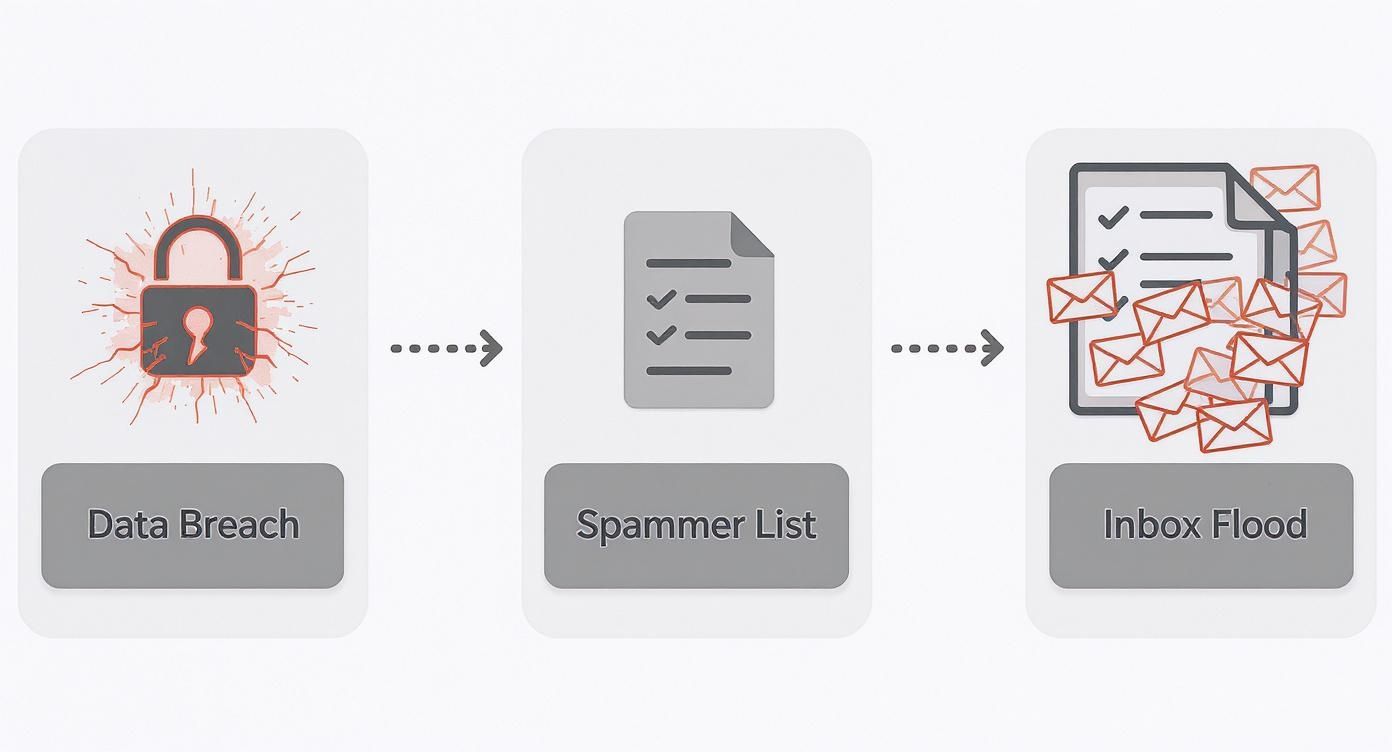
As you can see, once your address is out there, it gets bought, sold, and passed around, leading to that never-ending flood of junk. This is precisely why automated filters are your best line of defense.
Creating Your First Powerful Filter
Let's start with a real-world example. We've all seen those spammy emails with subject lines screaming "Limited Time Offer!" or "Claim Your Prize Now!" Instead of letting them hit your inbox and then deleting them, you can build a rule to stop them at the door.
Here’s a simple but incredibly effective approach:
- Spot the Patterns: Look for the common, spammy phrases you see over and over. Think "exclusive deal," "risk-free," or "final notice."
- Build the Rule: Go into your email settings and find the "Filters" or "Rules" section. Create a new one that looks for your chosen keywords in either the subject line or the body of the email.
- Set the Action: This is the most important part. Tell the filter what to do with any email that matches. The best option? "Delete it" or "Move to Trash."
Just one rule like this can catch dozens of unwanted emails a week before you even know they arrived. It's a small change that massively improves your email privacy by keeping the garbage separate from your important mail.
A well-crafted set of rules acts like a bouncer for your inbox. It doesn't just block known troublemakers; it actively screens new arrivals based on the specific characteristics you've identified as unwanted.
Go Beyond Deleting with Advanced Filtering
Filters aren't just for deleting junk. They're also fantastic for organizing your inbox and clearing out the low-priority clutter that isn't technically spam but still gets in the way.
I'm talking about all those newsletters and promotional emails you signed up for. You might want to read them eventually, but they don't need to be front-and-center.
For instance, you could create a rule that finds any email from a sender like "@promotions.store.com" and automatically moves it to a dedicated folder called "Shopping Deals." Your main inbox stays clean for what matters, and the deals are waiting for you when you're ready to look.
As you build more of these rules, you're not just fighting spam—you're creating a smarter, more efficient email system. For those who want to take their defenses even further, we’ve put together a detailed review of the top 8 best email spam filters to protect your inbox in 2025. These small, proactive steps put you back in charge.
Build a Fortress Around Your Email Address
While smart filters are great for cleaning up the mess that’s already there, the best long-term strategy is preventing your email address from landing on spam lists in the first place. This means shifting from a reactive cleanup crew to a proactive guard, turning your inbox from an open-door target into a locked-down fortress through better email privacy practices.
Think of your primary email address like your home address. You wouldn't hand it out to every stranger you meet, yet we do it online all the time for newsletters, one-off purchases, or free Wi-Fi.
This is exactly what spammers and data brokers are counting on. Each time you enter your real address into a website’s database, you increase the odds of it being scooped up in a data breach or sold off to the highest bidder.
Embrace the Power of Email Aliases
One of the smartest moves you can make is to start using email aliases or disposable addresses. These are essentially unique, forwardable email addresses that funnel messages into your real inbox without ever revealing your actual address.
Let’s say you're signing up for a new online store. Instead of giving them your.name@email.com, you could create a specific alias like newstore.signup@yourdomain.com.
The benefits here are immediate and powerful:
- Privacy: The store never learns your real email address, keeping it out of their marketing databases.
- Control: If that alias starts getting flooded with spam, you know exactly who leaked or sold your information. You can then just delete the alias, and the spam instantly stops.
This approach gives you surgical control over who can reach you and a dead-simple way to cut off spammers at the source. For a much deeper dive, check out our ultimate guide to using an email alias service to see just how easy this is to implement.
Bolster Your Core Account Security
Protecting your address is only half the battle. You have to secure the account itself. A compromised email account is a treasure trove for criminals, handing them the keys to password resets, financial accounts, and personal conversations.
Securing your email is no longer just about convenience—it's about protecting your entire digital identity. A single weak point can give attackers the keys to your financial, social, and professional life.
Two-factor authentication (2FA) is an absolute must. It adds a critical layer of defense by requiring a second form of verification—like a code sent to your phone—before anyone can log in from an unrecognized device. This one step can block the vast majority of automated hacking attempts.
And the threat is very real. Criminals send an estimated 3.4 billion phishing emails every single day, with many designed specifically to trick you into giving up your login details. In fact, phishing is the starting point for around 36% of all data breaches. Truly fortifying your inbox also means thinking about the bigger picture, like securing your Apple ID across all devices to prevent back-door access through linked services.
Upgrade to a Secure Hosted Email Platform
If you’ve set up all the right filters, locked down your account, and are still losing the war against spam, it’s probably time to change the battlefield. Let's be honest: free email services aren't truly free. Their business model often involves your data. To really get ahead of the junk and reclaim your email privacy, the single most effective move you can make is switching to a dedicated, privacy-focused hosted email platform.
Services like ProtonMail, Fastmail, and our own Typewire are built differently from the ground up. Their product isn't your data; it's a secure, private email experience. This fundamental shift in philosophy makes all the difference in protecting you from a flood of unwanted and malicious messages.
The Privacy-First Advantage
The real power of a private hosted email platform lies in their proactive, aggressive security. These platforms are built for people who demand maximum control, and they deliver tools that go far beyond what you'll find in a standard, free inbox.
This has never been more important. Spam isn't just poorly written scams anymore. Sophisticated, AI-crafted phishing emails now make up nearly 82% of all phishing campaigns. This has led to a jaw-dropping 1,265% surge in AI-driven phishing attacks. Even the big players are feeling the heat; Microsoft reports a 47% rise in attacks that bypass its native defenses. You can dig into more of these trends over at AgainstData.com.
Privacy-focused providers meet this challenge with a multi-layered defense.
- Smarter Spam Filtering: They use powerful, proprietary algorithms that are just better at spotting and quarantining sophisticated junk.
- End-to-End Encryption: Many offer this as a standard feature, meaning no one can read your emails—not even the provider.
- Built-in Alias Management: We've already talked about how great aliases are. The best private hosts build this feature right in, so you can create disposable addresses on the fly without any hassle.
Switching to a privacy-focused email provider is like moving from a crowded apartment building to a private, gated home. You get dedicated security, better infrastructure, and the peace of mind that comes with it.
Comparing Free vs Privacy-Focused Email Providers
The difference becomes clear when you compare the features side-by-side. Free services cover the basics, but paid, private services are built for email security from the ground up.
| Feature | Free Services (e.g., Gmail, Outlook) | Privacy-Focused Services (e.g., ProtonMail) |
|---|---|---|
| Business Model | Ad-supported, data collection for personalization | User subscriptions, no data monetization |
| Standard Spam Filtering | Good, but reactive to mass-market spam | Advanced, proactive filtering for sophisticated and targeted threats |
| End-to-End Encryption | Not standard; requires third-party plugins | Often built-in as a core feature |
| Email Alias Creation | Limited or requires manual workarounds (e.g., the "+" trick) | Seamless, integrated tools for creating and managing multiple aliases |
| Domain-Level Security | Available but often requires technical setup on custom domains | Simplified setup and management of SPF, DKIM, and DMARC for custom domains |
| Customer Support | Limited to community forums and help articles | Dedicated, expert human support |
Ultimately, free services are designed for convenience, while privacy-focused services are engineered for protection.
Defending Your Domain at the Source
When you pair a custom domain with a hosted email platform, you unlock a whole new level of security that stops spammers who forge email addresses—one of their favorite tricks. These are technical standards that work behind the scenes to prove an email is actually from who it says it's from.
Here’s a quick, non-technical rundown of how they work:
- SPF (Sender Policy Framework): Think of this as a bouncer at the club door. It's a public list that tells the world which servers are allowed to send email for your domain. If a message shows up from somewhere else, it gets flagged.
- DKIM (DomainKeys Identified Mail): This is like a tamper-proof wax seal on a letter. It adds a unique digital signature to your emails, so the receiving server can verify nothing was changed along the way.
- DMARC (Domain-based Message Authentication, Reporting & Conformance): DMARC is the rulebook. It tells other servers exactly what to do with emails that fail the SPF or DKIM checks—either send them to spam or reject them completely.
It sounds technical, but a good hosted provider does all the heavy lifting for you. They make it simple to implement these standards and effectively slam the door on email impersonation. If you're ready to explore your options, our guide on the 7 best private email providers for security in 2025 is a great place to start.
Safely Navigating the Unsubscribe Button
We've all been there, staring at an "unsubscribe" link and wondering if it's a trap. Is clicking it going to stop the emails, or will it just tell a spammer, "Hey, this one's a live one!" and open the floodgates? It’s a genuine concern, and it’s why a blanket "just unsubscribe" policy doesn't really work.
The real skill is learning to tell the difference between a legitimate marketing email and a malicious one. Reputable companies have to let you opt out, but clicking a link in a phishing email is just asking for trouble.
Knowing when to click and when to ignore is a core part of protecting your email privacy.
When It’s Safe to Click Unsubscribe
Legitimate marketing emails might clog up your inbox, but they operate under strict rules. For example, the CAN-SPAM Act requires businesses to provide a clear way to opt out. They don't mess around with this, because penalties for non-compliance can reach up to $53,088 per email. That's a huge incentive for established brands to play by the rules.
So, when can you feel confident clicking that link?
- It’s a brand you know: Think about newsletters you actually signed up for, stores you've bought from, or services you use. If you recognize the sender, it's almost always safe.
- The email looks professional and includes contact info: Legitimate companies are also required to include a valid physical mailing address in their emails.
- The link itself seems right: Before you click, just hover your mouse over the unsubscribe link. Your browser or email client will show you the destination URL. Does it point to the company’s actual domain? If so, you're good to go.
When to Hit the Spam Button Instead
For everything else—the bizarre, the unexpected, the "too-good-to-be-true" offers—your best move is to mark it as spam and block the sender. Don't even think about unsubscribing. Any interaction with a malicious email, including clicking a link, is valuable feedback for them. You're essentially confirming your email address is active, which makes it a more valuable target for them and other spammers they sell lists to.
A legitimate unsubscribe link takes you off a list. A malicious one confirms your existence to a criminal. If there’s any doubt at all, always play it safe: mark as spam and block.
Watch out for these red flags that scream "don't click":
- Emails from senders you’ve never heard of.
- Messages riddled with typos, bad grammar, or urgent, threatening language.
- Any email where that unsubscribe link points to a sketchy, misspelled, or completely unrelated website.
This isn't about being paranoid; it's about smart email security. By telling the safe unsubscribe requests from the dangerous ones, you take away one of the spammers' most effective tools and get one step closer to a cleaner inbox.
Common Questions About Stopping Spam
Even with the best game plan, you're bound to have some nagging questions when you're deep in the trenches fighting off spam. Getting good answers can be the difference between reclaiming your inbox and just giving up. Let’s clear up a few of the most common ones.
Why Am I Suddenly Getting So Much Spam?
This is a classic. You're going about your week, and suddenly your inbox is a disaster zone. Most of the time, this points to a data breach. It's not your fault; a service you signed up for got hacked, and your email address ended up on a list sold to spammers. This is a direct violation of your email privacy and underscores the importance of choosing services that prioritize data protection.
Are Paid Email Services Really Better at Stopping Spam?
Another big question is whether it's worth paying for email. The short answer is yes, they're almost always better. Free email is great, but the business model often relies on analyzing your data for advertising purposes.
Privacy-focused hosted email platforms like Typewire have a completely different mission. Their product is the secure, spam-free inbox. This means they pour resources into advanced, proactive filtering technology that free services just can't match. They're built from the ground up to protect you.
How Effective Are Spam Filters, Really?
It’s easy to get cynical and wonder if spam filters actually work when junk still slips through. The truth is, they're incredibly effective, blocking the overwhelming majority of spam. But it's an ongoing cat-and-mouse game. Spammers are always finding new ways to get around filters, sometimes using AI to make their emails look more legitimate.
That’s why you can't rely on just one thing. Think of it as a layered defense. Your provider’s filter is your frontline, but your own actions—using aliases, reporting spam, and practicing good security hygiene—create a much tougher barrier. No single tool is a magic bullet.
Unsubscribing vs. Blocking: The Final Word
And finally, the big one: should you unsubscribe, or just hit the spam button? As we touched on earlier, it all depends on who sent the email.
- Legitimate Companies: If it’s a newsletter from a brand you actually bought something from, go ahead and unsubscribe. Reputable businesses have to comply with anti-spam laws and will honor your request. It’s safe and it works.
- Suspicious Senders: For anything that looks even slightly off, never click unsubscribe. That link is often a trick to confirm your email address is real and active. Once you click, you're just inviting more spam. Mark it as spam and block the sender. You'll teach your filter a valuable lesson and cut them off for good.
Ready to move from a cluttered inbox to a secure, private communication hub? Typewire offers advanced anti-spam protection, seamless alias management, and a commitment to your data privacy. Start your free trial today and experience the peace of mind that comes with a truly secure email platform. Learn more at Typewire.com.