

Disabling email tracking starts with understanding the threat to your email privacy, since the most common methods are designed to be completely invisible. The single most effective thing you can do is block remote images in your email client's settings. This simple switch is a powerful act of digital self-defence, stopping tracking pixels from loading and reporting your activity back to the sender.
Understanding the Hidden Trackers in Your Emails
Every time you open an email, there's a good chance your privacy is being compromised. This isn't paranoia; it's a standard, widespread practice in digital marketing that poses a real threat to your email security. Senders embed tiny, invisible trackers into their messages to gather intel on your behaviour, turning your private inbox into a source of marketing data.
The most popular trick is to use a tiny, transparent image, often just 1×1 pixel in size, sometimes called a "spy pixel." This microscopic image is hosted on a remote server. When you open the email, your email client automatically sends a request to that server to download the image. That request is all it takes—it signals the server that you've opened the message, compromising your email privacy.
What Data Is Being Collected?
This seemingly innocent process reveals a surprising amount of information about you, posing a significant security risk. The request to load that single pixel automatically bundles up and sends several key pieces of your data back to the sender, including:
- Your IP Address: This gives away your approximate geographical location, sometimes narrowing it down to your city.
- Device and Operating System: Marketers can see if you're reading on an iPhone, an Android tablet, or a Windows laptop.
- The Exact Time of Opening: This tells them precisely when you're most active and engaged with your email.
- The Email Client Used: They learn whether you prefer using Gmail, Apple Mail, or Outlook to manage your inbox.
And it doesn't stop with pixels. Senders also use tracked links, which look normal but actually redirect you through a special tracking server before landing you at the final destination. This tells them exactly which links you clicked and when. All this information is stitched together to build a detailed profile of your habits and interests, which is a fundamental part of modern data mining. To learn more about this, you can explore our detailed guide on what is data mining and how it impacts your email privacy.
The Weakness of Pixel Tracking
The good news is that email tracking's greatest strength—its reliance on loading remote images—is also its biggest weakness from a security standpoint. If the tracking pixel never loads, no data can be sent back. It's that simple. According to Litmus's email client market share analysis, even the ability to identify which email client you use depends entirely on images being displayed. This highlights a critical vulnerability: blocking images breaks the tracking chain and preserves your privacy.
Beyond just the visible pixels, your IP address is a key ingredient in many tracking methods. You can delve deeper into understanding how to prevent IP address tracking to really shore up your overall digital security.
For Canadians, this is especially relevant. With an inbox placement rate hitting 90%, more emails with these trackers successfully land in front of their targets, which makes taking proactive email privacy measures all the more important.
How to Block Trackers in Gmail, Outlook, and Apple Mail
You don’t have to switch email providers to significantly improve your email privacy. The single most powerful step you can take is to stop your email client from loading images automatically. This one change instantly neutralizes the most common form of email tracking: the spy pixel.
It’s a surprisingly simple fix for a serious privacy issue. Most tracking tools hide a tiny, invisible image in the email. When your inbox loads that image, it sends a signal back to the sender’s server, confirming you opened the message. If you prevent images from loading by default, that pixel never gets called, and your activity stays private.
This diagram breaks down exactly how the tracking process compromises your privacy and where you can interrupt it.
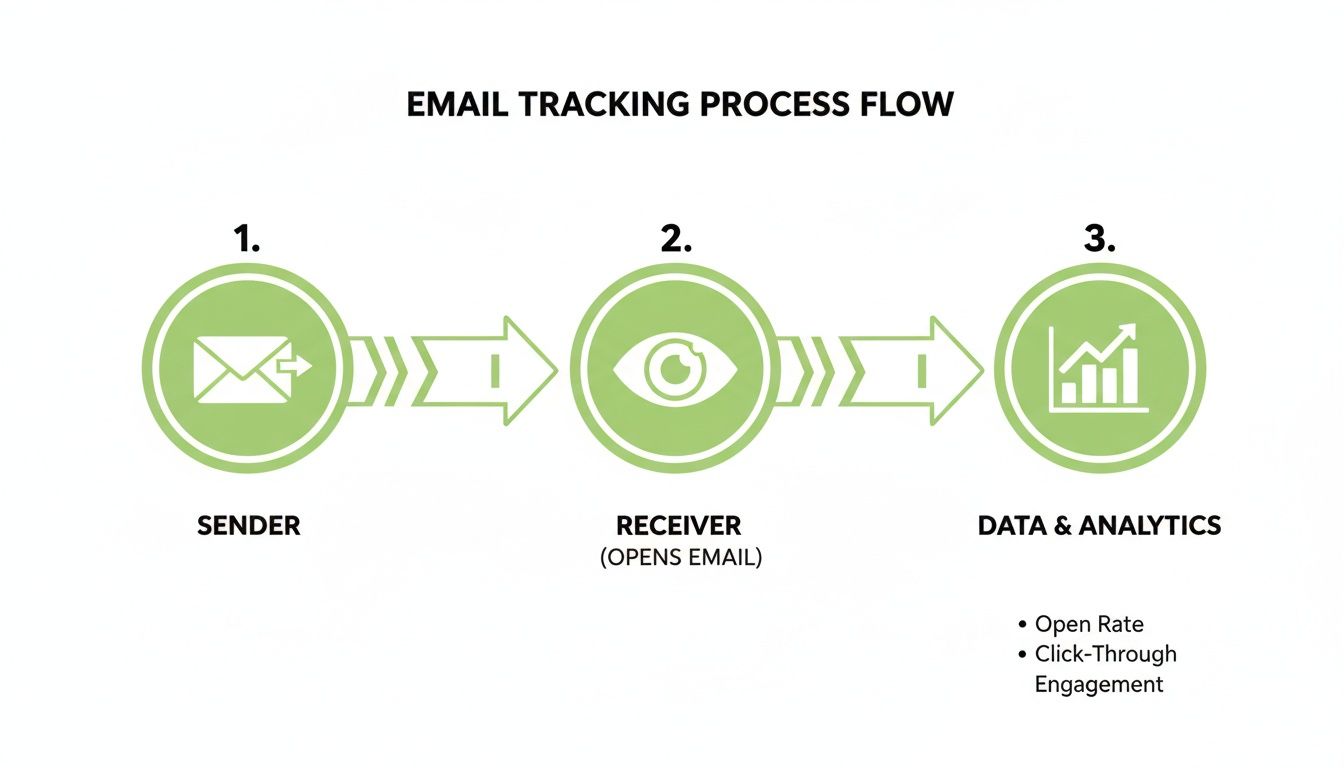
As you can see, blocking the image download at your end breaks the entire data collection chain, safeguarding your information.
Adjusting Your Gmail Settings
Given its massive user base, Gmail is a prime target for marketers and their tracking tools. Fortunately, enhancing your email security is straightforward on any device.
On the Web:
- Find the gear icon in the top-right corner and click See all settings.
- In the General tab, scroll down until you see the Images section.
- Switch the setting to Ask before displaying external images.
- Don't forget to scroll to the very bottom and hit Save Changes.
On Mobile (iOS & Android):
- Open up the Gmail app and tap the menu icon (the three horizontal lines).
- Go into Settings, then choose the email account you want to adjust.
- Tap on Images and select Ask before displaying external images (also disables dynamic email).
Securing Your Apple Mail Inbox
Apple has made significant strides in email privacy, and its Mail Privacy Protection is a powerful feature. However, taking manual control over images provides an even stronger layer of security.
On macOS:
- With the Mail app open, head to Mail > Settings (or Preferences) in the menu bar.
- Click over to the Privacy tab.
- You’ll want to make sure Protect Mail Activity is checked. If you want more direct control, you can uncheck this and instead tick the box for Block All Remote Content.
On iOS/iPadOS:
- Jump into the Settings app on your iPhone or iPad.
- Scroll to find Mail, tap it, and then go into Privacy Protection.
- Just toggle on Protect Mail Activity. This feature is designed to hide your IP address and load remote content in a way that doesn't reveal your private information.
Configuring Microsoft Outlook
Whether you’re using the desktop software or the web version, Outlook provides clear options for managing external content and enhancing your email security.
On Outlook Desktop (Windows & Mac):
- Navigate to File > Options > Trust Center > Trust Center Settings.
- From there, choose Automatic Download.
- The key is to check the box for Don't download pictures automatically in standard HTML email messages or RSS items.
On Outlook on the Web:
- Click the settings gear icon, then choose View all Outlook settings.
- Go to General > Privacy and data.
- Look for the External images heading and select Always use the Outlook service to load images. This routes images through Microsoft’s servers first, adding a crucial layer of email privacy between you and the sender.
Taking these few simple steps in your email client of choice puts you back in control of your digital privacy. For anyone on Outlook, it’s also a good idea to check out other security settings. We cover more of them in our complete guide to securing emails in Outlook.
Using Browser Extensions for Stronger Protection
Tweaking your email client’s settings is a great first step, but it primarily solves one part of the privacy problem: tracking pixels. If you’re serious about your email security, browser extensions are your next line of defence. Think of them as a dedicated security detail for your webmail, offering a powerful layer of protection that spots and disarms a much wider range of surveillance techniques.
These add-ons aren't just content blockers. They actively scan your incoming emails for hidden trackers, clean up links by stripping out tracking codes, and provide real-time alerts showing you exactly who is attempting to monitor you. It’s a shift from being a passive target to an active defender of your email privacy.
Top Extensions for Email Privacy
There are several excellent extensions built specifically to bolster your security when using web-based email like Gmail or Outlook.com. Installation is typically a painless, one-click process from your browser's official extension store.
Here are a few of the best for protecting your email privacy:
- Ugly Email: This open-source extension is refreshingly simple. Its primary function is to identify and flag emails containing tracking pixels. It places a small eye icon next to the subject line, so you know which messages are spying on you before you even open them.
- Trocker: Taking things a step further, Trocker doesn't just detect trackers—it actively stops them from loading. It also provides a dashboard with a history of all blocked trackers, so you can easily identify which senders are the worst privacy offenders.
- PixelBlock: A favourite among Gmail users, PixelBlock silently neutralizes tracking attempts without disrupting your email layout. When it blocks a tracker, it adds a small red eye icon beside the sender's name to confirm your privacy is protected.
What makes these tools so effective is that they operate right where the tracking happens—inside your web browser. By intercepting the code that phones home to tracking servers, they offer a degree of security that your email client’s built-in settings alone cannot provide.
The biggest eye-opener with these extensions is the sheer visibility they give you. Nothing drives home the need for better email privacy quite like seeing a notification that a "trusted" newsletter just tried to pinpoint your location.
Comparing Email Tracking Protection Methods
To determine the best approach for your security needs, it helps to see how different methods stack up. Client settings are fundamental, but extensions and secure hosted email platforms provide more comprehensive coverage.
| Method | Primary Protection | Effectiveness | Best For |
|---|---|---|---|
| Email Client Settings | Blocks remote images/pixels | Moderate | Basic, universal protection against pixel tracking. A necessary first step. |
| Browser Extensions | Blocks pixels & strips tracking links | High | Webmail users (Gmail, Outlook.com) who want detailed, real-time security alerts. |
| Privacy-Focused Email | Server-side image proxying | Very High | Users prioritizing email privacy by design and wanting protection on all devices. |
| VPNs | Masks your IP address | Partial | Hiding your true location, but doesn't stop open/click tracking itself. |
This table shows there's no single magic bullet. A layered security approach—combining client-side settings with a good browser extension or a secure email platform—is the most practical and effective strategy.
Understanding Extension Alerts and Data
Once you have an extension running, you'll usually see a small icon appear in your browser's toolbar. Clicking on it often reveals a wealth of security information, like how many trackers were blocked or which companies are trying to monitor you. This data is invaluable for learning how to disable email tracking effectively.
Getting comfortable with these alerts helps you make smarter choices about your email privacy. For instance, if you notice a particular company consistently uses invasive trackers, you might decide to unsubscribe or filter their messages to junk, putting you firmly back in control of your inbox security.
Advanced Email Security for Your Business
When you're running a business, tackling email tracking transcends personal privacy. It becomes a critical component of your overall email security strategy, essential for maintaining client trust and upholding corporate responsibility.
While your team can block images on their devices, a truly effective strategy must be unified across the entire organization. Relying on individual settings is a security risk. This means shifting your defences from individual endpoints to the email server itself, a core principle of robust IT security.
By implementing stronger controls at the mail server level, you adopt a proactive security posture. Trackers are neutralized before they can even land in an employee's inbox, creating a solid, consistent security baseline for everyone.
Server-Side Controls and Policies
As an IT administrator, one of the most powerful moves you can make is to configure your mail server to block all external images by default. A great way to do this is by implementing a strict Content Security Policy (CSP) for your email environment. A CSP dictates which resources (like images or scripts) are safe to load, effectively stopping tracking pixels from compromising your company's data.
Another highly effective technique is to use an email gateway to sanitize all incoming messages. These security gateways can be configured to:
- Strip tracking parameters from URLs, disarming tracked links.
- Proxy all images through a secure company server, severing the direct connection between your employee's device and the sender's tracking server.
- Block emails from known marketing platforms notorious for invasive tracking.
For any business building its defence plan, understanding broader email security best practices is essential, and these server-side controls are a cornerstone of that strategy.
The Importance of Canadian Data Residency
For any organization operating in Canada, the conversation about disabling email tracking is intrinsically linked to compliance and data sovereignty. Choosing a hosted email platform with Canadian data residency offers a significant strategic advantage. It ensures all your email data—including sensitive metadata—is stored and handled within Canada, under our strong privacy laws.
This approach isolates your corporate communications from foreign ad-tech ecosystems, where data may be analyzed or monetized under different legal frameworks. It is a direct response to growing client and regulatory expectations for responsible data stewardship and robust email security.
This strategy aligns with a wider national trend. The federal government’s 2023–2026 Data Strategy emphasizes responsible data use, setting a clear precedent for both public and private sectors to minimize the collection of unnecessary behavioural data—which is precisely what email tracking is.
Because of this, more Canadian IT administrators are locking down their servers with stricter security policies and deliberately choosing hosted email platforms with local data centres. Ultimately, a centralized, server-managed approach to disabling email tracking protects your organization, builds client trust, and fortifies your security posture against modern threats.
Choosing a Privacy-First Hosted Email Platform
Tinkering with settings and installing extensions are solid defensive tactics, but they require constant vigilance. For a more comprehensive and effortless solution, the best choice is to switch to a hosted email platform built for privacy from the ground up. This move fundamentally changes your security posture, making robust email privacy the default, not an add-on.
These secure email platforms are engineered to neutralize threats automatically, so you're protected without having to remember a single setting. All the heavy lifting for your email security happens behind the scenes, ensuring your privacy is always active.
Automatic and Effortless Protection
The core strength of a privacy-first hosted email platform lies in how it handles remote content. Instead of forcing you to manually block images, these services do it for you at the server level. All incoming images are routed through a secure proxy, which strips them of any tracking data long before they reach your device.
Here’s what that means for your security and privacy:
- Tracking pixels are completely defanged. Senders have no idea when, where, or if you opened their email.
- Your IP address stays hidden. The proxy acts as a privacy buffer, so your location and device details are never exposed.
- Zero configuration is required. This protection is active on every single device you use—web, desktop, or mobile—the moment you sign up.
For anyone serious about disabling email tracking, this kind of automated, server-side defence offered by a secure hosted email platform is the gold standard.
Beyond Tracking Pixels: A Comprehensive Security Shield
True email security is about more than just blocking invisible pixels. The best privacy-focused hosted email platforms provide a layered defence. A critical feature to look for is zero-access encryption, which guarantees that not even your email provider can read your messages. Your data is encrypted before it leaves your device and can only be decrypted by you.
Another crucial factor, especially for Canadians, is data residency. Opting for a provider that hosts its servers in Canada means your data is protected by strong Canadian privacy laws like PIPEDA. This is a strategic security decision to keep your private communications out of foreign jurisdictions and away from invasive ad-tech giants.
In Canada, we rely heavily on digital communication. While Canada’s Anti-Spam Legislation (CASL) sets rules for commercial messages, it does little to stop invisible tracking pixels. With a reported 53% of small businesses using email to find new customers, you can bet that tracking is widespread. This makes a privacy-centric hosted email platform your most reliable line of defence. For a deeper dive, Constant Contact has some interesting statistics on how businesses are using email marketing.
By combining automatic tracker blocking, zero-access encryption, and local data hosting, a privacy-first hosted email platform creates a secure fortress around your inbox. It’s the definitive choice for anyone who believes their private conversations should stay that way.
To find the right service for your needs, check out our in-depth comparison of secure email hosting services, where we break down the features of the top providers.
Common Questions About Email Tracking
Even after you've secured your email to block trackers, a few questions often arise. Understanding the finer points of these privacy measures clarifies why they’re so crucial for your email security.
Let's walk through some of the most common queries.
Will Blocking Images Break My Emails?
For the most part, no. The text in your emails will remain perfectly readable. The main difference you'll notice is that heavily designed marketing newsletters might look sparse without their images.
It's a small price to pay for a significant boost in email privacy. And when you need to see an image, every client offers a simple, one-click option to load images for that specific message, giving you control.
Can Senders Tell I’ve Blocked Their Trackers?
They won't get a notification that you've blocked their tracker. From their perspective, it will simply look like you never opened the email. This renders their tracking data completely unreliable, which is the primary goal for protecting your privacy.
You're effectively breaking their surveillance system. Just remember that tracked links are different. If you click a link in the email, they will still know you did, but your 'open' activity remains private.
The real win here isn't just hiding one action. It's about dismantling the entire data collection system that builds a profile of your online habits without your consent, which is a major victory for email security.
Does a VPN Stop Email Tracking?
A VPN is an excellent tool for overall online privacy, but it doesn't stop email tracking by itself. It effectively hides your real IP address and location, so if a tracking pixel loads, it sends back the VPN server's details instead of yours.
However, the sender still gets confirmation that the email was opened and when. To truly stop open tracking and ensure email privacy, you must prevent the pixel from loading. This means either blocking remote images manually or using a privacy-first hosted email platform that handles it automatically.
Are There Any Downsides to Disabling Trackers?
The main trade-off is visual. Emails heavy on graphics might look plain until you choose to load the images. Also, "read receipt" features that rely on tracking pixels will no longer function, as the confirmation signal is blocked.
Honestly, these are minor compromises when weighed against the benefit of stopping countless companies from spying on your inbox. Opting for a privacy-first hosted email platform like Typewire often solves even these issues by routing images through a secure proxy, providing both top-tier security and a seamless user experience.
Ready to take back control of your inbox with a solution that blocks trackers by default? Typewire offers private, secure email hosted in Canada, with zero-access encryption and no ads. Start your free trial and experience an inbox built for privacy at https://typewire.com.