Why Email Archiving is Non-Negotiable in 2025
In today's data-driven landscape, managing business communications extends far beyond the inbox. Regulatory compliance, legal discovery (eDiscovery), and the need for a secure, searchable record of all correspondence have transformed robust email archiving into an essential business function, not an optional extra. A simple backup isn't sufficient; true archiving creates a tamper-proof, indexed, and readily accessible repository of every message. This protects your organization from legal risks, boosts operational efficiency, and preserves invaluable corporate knowledge.
But with countless providers on the market, selecting the right platform can be challenging. This comprehensive guide cuts through the noise to evaluate the top 10 email archiving solutions for 2025. We will move beyond generic feature lists to provide actionable insights, comparing everything from compliance support and eDiscovery tools to deployment models and integration capabilities. We'll detail their unique strengths, target audiences, and specific implementation scenarios. Our goal is to help you identify the solution that aligns perfectly with your organization's specific compliance needs, technical ecosystem, and budget, ensuring your communications are secure, searchable, and always compliant.
1. Microsoft 365 Archiving: The Integrated Powerhouse
For organizations already embedded in the Microsoft ecosystem, the native archiving solution within Microsoft 365 is one of the most compelling and cost-effective email archiving solutions available. It integrates directly into Exchange Online and the Microsoft Purview compliance portal, offering a seamless experience for both administrators and end-users. The core benefit is its deep, native integration, which eliminates the need for complex third-party connectors and provides a single, unified management console.
This unified approach allows IT teams to manage retention, eDiscovery, and legal holds right alongside other critical Microsoft services. For example, global giants like Maersk and KPMG leverage this solution to handle compliance and eDiscovery across tens of thousands of employees. Similarly, the City of London Corporation uses it to meet stringent public sector compliance requirements, demonstrating its scalability and robustness.
Key Features and Implementation Tips
The strength of Microsoft 365 Archiving lies in its powerful, built-in capabilities designed for enterprise-level governance. These features help organizations manage data lifecycles effectively and respond to legal or regulatory requests with precision.
This quick reference summary box highlights the standout features of Microsoft 365's archiving capabilities.
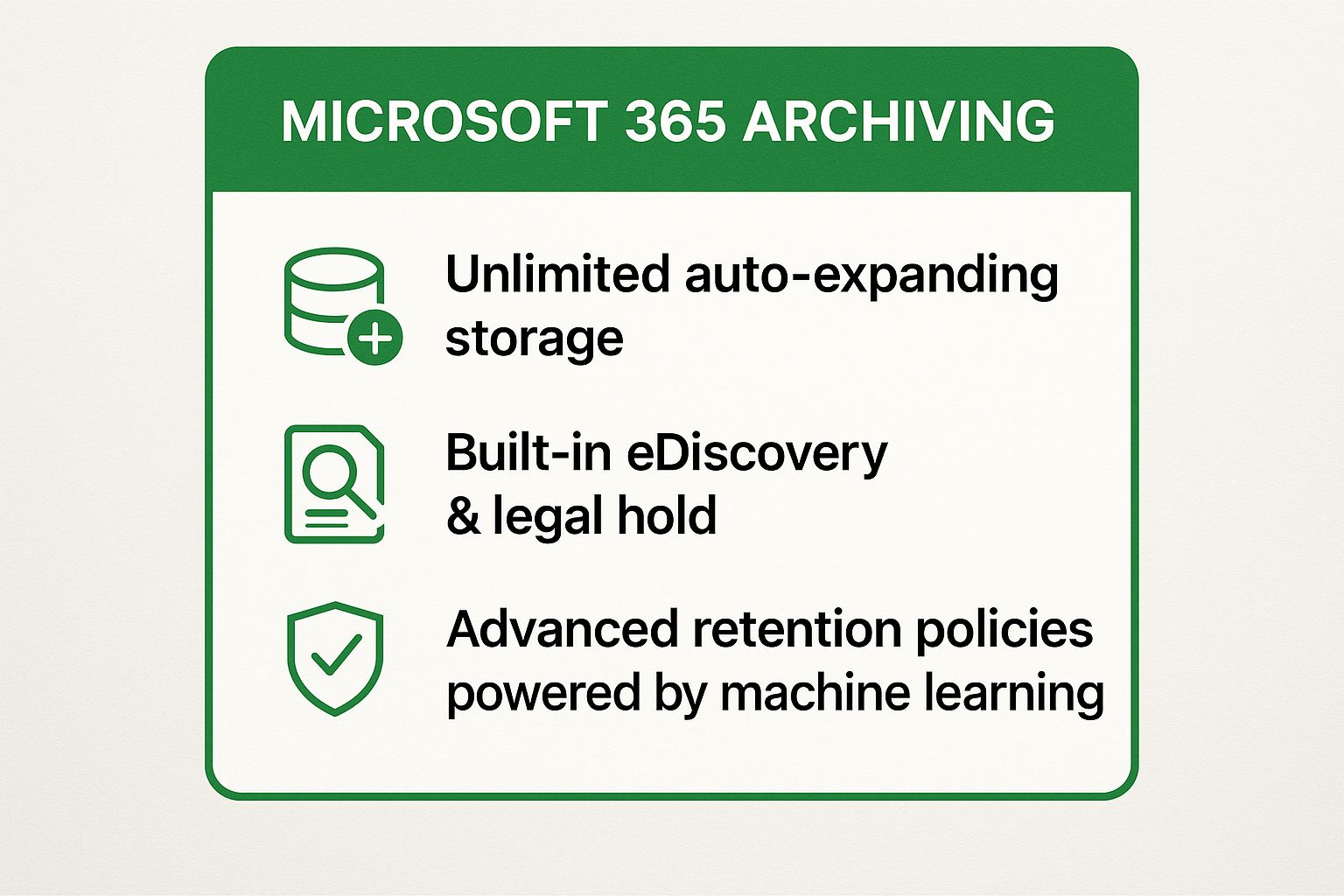
These integrated tools empower organizations to automate data governance and streamline compliance without leaving their primary productivity suite. To maximize its value, IT administrators should configure auto-expanding archives early to prevent mailbox size limitations and consistently apply retention labels across the organization. It's also crucial to train users on accessing their archived emails through the Outlook Online Archive feature to ensure a smooth transition.
2. Barracuda Message Archiver: The Versatile Appliance
For organizations seeking deployment flexibility and robust, all-in-one functionality, the Barracuda Message Archiver stands out as one of the most versatile email archiving solutions. Available as a physical appliance, a virtual appliance, or a cloud-based service, it offers comprehensive long-term storage, granular compliance management, and powerful eDiscovery capabilities. Its primary advantage is providing a dedicated, high-performance archiving environment that can be deployed on-premises for maximum control or in the cloud for scalability, catering to diverse IT strategies.
This flexibility makes it a top choice for industries with stringent data residency and compliance needs. For instance, the global law firm Baker McKenzie leverages Barracuda to navigate complex multi-jurisdictional compliance, while Scripps Health relies on it to meet strict HIPAA requirements. Similarly, financial services firm Edward Jones deploys the solution to ensure compliance with demanding SEC regulations, showcasing its adaptability across highly regulated sectors.
Key Features and Implementation Tips
The strength of the Barracuda Message Archiver is its federated search capability and comprehensive policy management, which simplify the governance of email data regardless of its source. These features ensure organizations can enforce retention rules consistently and respond to discovery requests quickly and accurately.
These tools provide a centralized platform for managing email lifecycles and meeting regulatory obligations. For a successful deployment, it is critical to size the storage appropriately by analyzing current and projected email volume growth. Administrators should also configure all retention policies before initiating the archive process to prevent operational confusion. Finally, training IT staff on advanced search techniques is essential for handling eDiscovery requests efficiently, and regularly testing backup procedures is vital for disaster recovery preparedness.
3. Mimecast Email Archive: The Unified Security and Compliance Guardian
Mimecast stands out among email archiving solutions by integrating robust security, business continuity, and archiving into a single, cloud-native platform. This unified approach simplifies management by eliminating the need to juggle separate vendors for threat protection and data retention. Organizations gain a holistic view of their email environment, from inbound threats to long-term storage, all managed through a central console. This design is particularly effective for industries with stringent regulatory demands.
For instance, global giant Airbus leverages Mimecast for comprehensive email security and archiving, while Shire Pharmaceuticals deployed it to ensure compliance with strict pharmaceutical industry regulations. The University of Cambridge also uses the platform to manage its vast academic email ecosystem, highlighting its scalability and reliability in diverse, high-stakes environments.
Key Features and Implementation Tips
The core strength of Mimecast lies in its layered security architecture combined with a perpetually stored, indexed archive. Its features are engineered to protect against advanced threats while ensuring data is always available for compliance and eDiscovery. This synergy between security and archiving is a key differentiator. Learn more about the importance of sending secure emails.
To maximize the platform's value, administrators should configure automated retention policies based on content classification to enforce corporate governance systematically. It is also beneficial to leverage the unified platform to streamline email management workflows, reducing administrative overhead. For key personnel, using the dedicated mobile app provides secure, on-the-go access to their personal archives, which is crucial for maintaining productivity during legal or operational inquiries. Integrating Mimecast with your existing security tools can create an even more comprehensive defense posture.
4. Google Vault (Google Workspace)
For businesses operating within the Google Workspace ecosystem, Google Vault offers a powerful and deeply integrated approach to data governance and eDiscovery. As one of the premier native email archiving solutions, Vault is designed to manage, retain, search, and export an organization's data from core Google services, including Gmail. Its primary advantage is the seamless connection to the Google Workspace environment, which eliminates the need for third-party tools and centralizes administrative control.
This integration simplifies compliance and legal processes, allowing organizations to manage data holds and retention policies directly from the Google Admin console. For example, global brands like Spotify and Colgate-Palmolive use Vault to maintain enterprise-wide data governance and meet international compliance standards. Similarly, Nielsen Holdings leverages its capabilities to adhere to strict media industry regulations, proving its effectiveness in complex legal environments.
Key Features and Implementation Tips
Google Vault's value is rooted in its robust, built-in features for information governance and eDiscovery, enabling businesses to manage the entire data lifecycle and respond efficiently to legal inquiries. It provides a comprehensive toolkit for retaining, holding, searching, and exporting user data from Gmail, Google Drive, and other supported services.
These capabilities are essential for organizations that need to preserve electronic information for legal or regulatory reasons. To effectively implement Vault, administrators should configure retention rules immediately upon deploying Google Workspace to ensure no data is lost. It is also critical to train legal teams on how to use Vault’s search operators and export functions. For granular control, use organizational units (OUs) to apply distinct retention policies to different departments and regularly audit these policies to ensure they align with evolving compliance requirements. Understanding regional data laws is also key; you can explore the principles of data sovereignty to better manage global compliance.
5. Proofpoint Enterprise Archive: Security-First Compliance
Proofpoint Enterprise Archive stands out as a security-centric platform among email archiving solutions, designed for organizations facing complex regulatory and litigation risks. It delivers a cloud-based, infinitely scalable archive that not only stores email but also provides advanced supervision and eDiscovery capabilities. Its primary advantage is the integration with Proofpoint’s broader security ecosystem, creating a unified defense against threats while ensuring data is immutably preserved and easily searchable for compliance audits.
This security-first approach is why it's trusted in high-stakes industries. For example, investment bank Goldman Sachs relies on Proofpoint for stringent financial compliance, while pharmaceutical leader Novartis uses it to meet global regulatory requirements for data retention. Similarly, technology company VMware deployed it for robust enterprise email governance, showcasing its ability to manage massive data volumes while maintaining strict security protocols.
Key Features and Implementation Tips
The power of Proofpoint Enterprise Archive comes from its granular control and sophisticated analytics, which help organizations manage risk proactively. These features are built to streamline compliance workflows and reduce the burden of legal discovery, making it a critical tool for legal and IT teams alike.
These capabilities ensure that organizations can not only store data securely but also actively monitor communications to enforce corporate policy and prevent compliance violations. To achieve a successful deployment, it is highly recommended to engage professional services for the initial setup and configuration to align the system with specific compliance needs. Organizations should develop clear governance policies before implementation and regularly utilize the analytics dashboards for ongoing compliance monitoring and reporting.
6. Global Relay Archive: The Compliance Specialist
For organizations operating in highly regulated industries like finance, healthcare, or government, Global Relay Archive stands out as one of the most specialized email archiving solutions. It is purpose-built to address complex compliance, supervision, and eDiscovery challenges. The core value of Global Relay lies in its deep understanding of regulatory frameworks, offering a robust platform that goes beyond simple storage to actively support stringent oversight requirements. This focus on compliance makes it a go-to choice for firms that cannot afford any missteps in regulatory adherence.
This specialized approach is why financial giants like Morgan Stanley and the Canadian Imperial Bank of Commerce rely on Global Relay to manage compliance for investment banking and financial regulations. Similarly, hedge funds such as Renaissance Technologies have deployed it to meet strict SEC and FINRA requirements, demonstrating its capability to handle the most demanding regulatory landscapes.
Key Features and Implementation Tips
Global Relay Archive's strength is its comprehensive suite of tools designed specifically for compliance officers and legal teams. These features ensure that all communications are captured, preserved immutably, and are easily searchable for audits, supervision, and legal proceedings, providing an unparalleled level of control and security.
To maximize its effectiveness, organizations should leverage the included compliance expertise offered by Global Relay during the implementation phase. It is critical to configure supervision rules and lexicons that directly map to specific regulatory mandates, such as those from FINRA or the FCA. Training compliance officers on the platform's advanced search, case management, and review capabilities is essential for unlocking its full potential. Finally, regularly updating policies within the system ensures that the archive remains aligned with evolving regulations.
7. Commvault Complete Data Protection: The Unified Data Guardian
For enterprises seeking a holistic data management strategy, Commvault Complete Data Protection stands out by integrating powerful email archiving solutions directly into a comprehensive backup and recovery platform. Instead of treating email archiving as a standalone task, Commvault unifies it with overall information governance, allowing administrators to manage email data alongside other critical business information from a single console. This approach simplifies operations and enhances data visibility across the entire organization.
The platform's strength is its ability to manage vast, complex data environments. For instance, automotive giant BMW leverages Commvault for its global data management needs, while healthcare provider Kaiser Permanente relies on it for robust data protection and compliance. These examples highlight Commvault's capacity to deliver scalable, enterprise-grade archiving and information management, making it a trusted choice for organizations with stringent data governance requirements.
Key Features and Implementation Tips
Commvault excels by providing a unified policy engine that applies retention, eDiscovery, and legal hold rules across all managed data, including emails. This centralizes control and ensures consistent compliance, which is critical for heavily regulated industries. Its advanced indexing and search capabilities allow for rapid data retrieval, a crucial feature for legal and internal investigations.
To get the most out of the platform, administrators should leverage its global deduplication features from the outset to significantly reduce storage costs and optimize performance. It is also beneficial to integrate the email archiving processes with existing backup and disaster recovery workflows to create a seamless data lifecycle management system. Furthermore, using its AI-powered classification can automate the application of retention policies, reducing manual effort and minimizing human error. Planning for comprehensive administrator training and certification is key to unlocking the platform's full potential and ensuring a successful deployment.
8. ArcTitan Email Archiving: Streamlined for Simplicity
For small to medium-sized businesses needing straightforward compliance without enterprise-level complexity, ArcTitan from TitanHQ offers one of the most accessible email archiving solutions on the market. It is a dedicated, cloud-based platform designed for simplicity and cost-effectiveness, providing essential archiving features that are easy to set up and manage. The primary benefit is its focus on core functionality, which allows SMBs to achieve regulatory compliance and secure their email data without needing a large IT team.
This streamlined approach has made it a popular choice for organizations that require fundamental archiving capabilities. For instance, small law firms use ArcTitan to meet basic email compliance and eDiscovery needs efficiently. Similarly, regional accounting firms implement it to fulfill professional services requirements, and growing technology startups deploy it to enforce email retention policies from an early stage, ensuring data is managed correctly as they scale.
Key Features and Implementation Tips
ArcTitan's strength is its user-friendly interface and rapid deployment, making robust email archiving achievable for businesses with limited resources. It strips away overly complex features in favor of a clean, functional, and secure environment that prioritizes ease of use and quick data retrieval.
These core capabilities allow organizations to protect their most critical communication channel with minimal administrative overhead. To get the most from ArcTitan, administrators should focus on establishing essential retention policies rather than getting lost in complex configurations. It is also vital to train users on its intuitive web-based archive access early in the deployment process to ensure smooth adoption. Finally, regularly monitor storage usage to plan for future needs, and be prepared to consider more advanced solutions if the organization's compliance requirements significantly expand over time.
9. MailStore Server: The GDPR-Compliant Specialist
For organizations prioritizing data sovereignty and strict compliance, particularly under European regulations, MailStore Server stands out as one of the most trusted email archiving solutions. Engineered in Germany, it offers a robust on-premises solution designed with GDPR and stringent privacy standards at its core. Its main advantage is providing businesses with complete control over their archived data, ensuring that sensitive information remains within their own infrastructure.
This approach is highly valued in regulated industries. For instance, numerous European municipalities and German healthcare organizations leverage MailStore to meet public sector compliance and protect sensitive patient data. Additionally, the MailStore Service Provider Edition (SPE) empowers IT service providers to offer hosted email archiving, demonstrating its flexibility.
Key Features and Implementation Tips
The strength of MailStore lies in its comprehensive feature set built for security, compliance, and user accessibility. It ensures that all emails are stored securely in a central, tamper-proof archive, facilitating both long-term preservation and rapid search capabilities for audits or legal discovery.
This quick reference summary box highlights the standout features of MailStore's archiving capabilities.
These specialized features enable businesses to meet complex legal requirements while empowering users with easy access to their own archived emails. For optimal implementation, administrators should fully leverage the built-in GDPR compliance features, such as defining specific retention policies and managing user access rights. A key tip for user adoption is deploying the MailStore Outlook Add-in, which provides a seamless experience directly within the user's familiar email client. Finally, configuring the advanced compression and deduplication settings is crucial for optimizing storage utilization and reducing hardware costs over time.
10. Veritas Enterprise Vault: The Enterprise-Grade Governance Veteran
Veritas Enterprise Vault is a mature and powerful platform recognized as one of the most comprehensive email archiving solutions for large enterprises with complex information governance needs. With a legacy stretching back decades, originally under Symantec, it offers an on-premises or hybrid approach to managing massive volumes of data, not just from email but also from file shares, SharePoint, and other sources. Its core strength is its deep, policy-driven control over data retention, classification, and disposition, making it a go-to for highly regulated industries.
This level of granular control is why global law firms rely on Enterprise Vault for managing complex eDiscovery cases and why many Fortune 500 companies deploy it to enforce strict, multi-layered information governance policies. Similarly, large government agencies leverage its robust records management capabilities to meet stringent, long-term archival and compliance mandates, showcasing its ability to handle immense scale and complexity.
Key Features and Implementation Tips
Enterprise Vault's power comes from its extensive customization and powerful policy engine, which allows organizations to address sophisticated compliance and legal requirements with precision. These features are designed for deep integration into complex IT environments.
- Centralized Policy Management: Create and enforce detailed retention, deletion, and access policies across multiple data sources from a single console.
- Advanced eDiscovery: Utilize features like journaling, advanced search, and case management tools to streamline legal discovery processes.
- Flexible Deployment: Choose between on-premises, cloud, or hybrid deployment models to fit your organization's infrastructure strategy.
- Comprehensive Data Source Support: Archive data beyond email, including from Microsoft Teams, SharePoint, file servers, and social media.
These capabilities empower organizations to build a truly holistic information governance framework. To succeed with Enterprise Vault, invest significant time in planning and architecture design before implementation. Leverage the extensive policy engine to automate complex retention schedules, and ensure both administrators and end-users receive thorough training to maximize adoption and proper use.
Email Archiving Solutions Feature Comparison
| Solution | Implementation Complexity 🔄 | Resource Requirements ⚡ | Expected Outcomes 📊 | Ideal Use Cases 💡 | Key Advantages ⭐ |
|---|---|---|---|---|---|
| Microsoft 365 Archiving | Moderate – Cloud-based SaaS, subscription required | Low to moderate – leverages existing MS365 infrastructure | Reliable compliance, scalable storage with machine learning retention | Organizations in Microsoft ecosystem, compliance-focused | Seamless MS integration, cost-effective, user-friendly |
| Barracuda Message Archiver | High – On-premises or hybrid setup; technical expertise needed | High – hardware, maintenance, skilled IT staff | Tamper-proof long-term storage, strong security and compliance | Security-focused archiving, multi-platform environments | Tamper-proof archive, flexible deployment, robust search |
| Mimecast Email Archive | Moderate to high – cloud SaaS, some advanced licensing | Moderate – cloud resource and licensing costs | Unified email security and archiving, continuity during outages | Organizations needing combined security & archiving | Integrated security, scalable cloud, intuitive UI |
| Google Vault (Google Workspace) | Low – native Google integration, simple admin | Low – no extra storage cost, part of Google Workspace | Fast search, litigation hold, retention across Google apps | Google Workspace-only users, cost-conscious | Seamless Google integration, fast search, simple admin |
| Proofpoint Enterprise Archive | High – complex setup, specialized training required | High – infrastructure and skilled admins | Enterprise-grade compliance with advanced analytics | Large enterprises with complex governance needs | Scalability, advanced analytics, flexible policies |
| Global Relay Archive | Moderate to high – cloud-based, compliance focused | Moderate to high – compliance consulting and specialized features | Comprehensive compliance and supervision for regulated industries | Highly regulated sectors like finance and healthcare | Regulatory compliance, multi-channel archiving, expert support |
| Commvault Complete Data Protection | High – complex unified platform deployment | High – IT resources for backup and archiving | Unified backup and archiving with AI classification | Enterprises needing combined data backup and archiving | Unified data management, storage optimization, scalability |
| ArcTitan Email Archiving | Low – easy cloud deployment, simple setup | Low – minimal IT resources needed | Basic archiving with reliable cloud access and retention | Small to medium businesses with basic compliance needs | Cost-effective, quick implementation, easy management |
| MailStore Server/SPE | Moderate – on-premises or service provider hosted | Moderate – admin resources, flexible licensing | GDPR-compliant archiving focused on European regulations | European organizations with strong data protection demands | GDPR focus, German engineering, flexible deployment |
| Veritas Enterprise Vault | High – complex, legacy architecture, specialized expertise | High – infrastructure investment and ongoing management | Mature, customizable archiving with extensive governance | Large enterprises with complex retention and audit needs | Proven, customizable, deep integration, enterprise scalability |
Making Your Final Decision: A Strategic Checklist
Selecting the right email archiving solution is a foundational decision that extends far beyond simply storing old messages. As we've explored with leading platforms like Microsoft 365, Mimecast, and Proofpoint, your choice directly impacts your organization's legal defensibility, operational agility, and long-term data security posture. The journey from evaluating options to making a final, confident decision requires a structured approach that aligns technology with your specific business context. A misstep can lead to compliance failures or an inefficient system, while the right choice becomes a strategic asset.
To crystallize your thinking and move forward, this final checklist consolidates the critical decision points discussed throughout this article. Use these steps to navigate the complexities and ensure your chosen solution is a perfect fit.
Your Actionable Decision Framework
Before signing a contract, methodically work through these four strategic pillars. This process will help you look past marketing claims and focus on the practical realities of implementation and ownership.
-
Define Your Primary Driver (Your 'Why'): What is the number one problem you need to solve? Is it adhering to strict regulatory requirements like HIPAA, FINRA, or GDPR? Perhaps your main goal is to streamline eDiscovery and reduce the time and cost associated with litigation requests. Or maybe your on-premises email server is buckling under the weight of massive mailboxes, making storage optimization and performance your key concern. Clearly identifying your primary driver, whether it's compliance, legal readiness, storage management, or knowledge retention, will instantly clarify which features, like immutability or advanced search, are non-negotiable.
-
Assess Your Existing IT Ecosystem: The best email archiving solutions do not exist in a vacuum; they must integrate seamlessly with your current infrastructure. Are you deeply embedded in the Microsoft 365 or Google Workspace environments? A native tool like Microsoft Purview or Google Vault offers the path of least resistance. However, if you operate a hybrid setup or require more granular control and security features, a third-party specialist like Barracuda or Global Relay might provide superior functionality. For organizations prioritizing absolute data privacy and control, pairing a dedicated archiver with a secure, private email host is the ultimate strategy for end-to-end data sovereignty.
-
Calculate the True Total Cost of Ownership (TCO): Look beyond the per-user, per-month subscription fee. A comprehensive TCO analysis includes potential hidden costs. Factor in data migration fees for ingesting legacy PST files, charges for professional implementation and training services, and the ongoing administrative hours your IT team will dedicate to managing the system. An on-premises solution like Veritas Enterprise Vault may appear cost-effective initially but can carry significant hardware, maintenance, and personnel costs that make a cloud-based service like ArcTitan more economical over a three-to-five-year period.
-
Plan for Implementation and Data Migration: How will you get your historical data into the new system without disrupting operations or compromising data integrity? Evaluate each vendor’s migration tools and professional services offerings. Ask specific questions: Do they have experience migrating from your current system? What is the process for handling massive PST archives, and what is the typical timeline? A smooth, well-supported migration is crucial for ensuring day-one user adoption and maintaining a complete, auditable chain of custody for your critical email data.
By meticulously applying this strategic checklist to the detailed information provided on each solution, you can move from a broad list of contenders to a single, optimal choice. This deliberate process ensures you select one of the market's best email archiving solutions that not only solves today's challenges but also scales to safeguard your organization's most valuable communication records for years to come.
While a robust archiving solution protects your data history, the security of your day-to-day communications is equally critical. Typewire offers a private, ad-free email experience with advanced spam filtering and no tracking, ensuring your active conversations remain secure and confidential. Secure your communications at the source by exploring Typewire today.