Author: williamwhite

  • Complete Guide to Email Security Protocols: TLS, Authentication & Encryption

    Complete Guide to Email Security Protocols: TLS, Authentication & Encryption

    Why Your Email Needs Protection (And What Happens When It Doesn’t)
    Screenshot from https://en.wikipedia.org/wiki/Email_security

    Think about sending sensitive financial information through the mail. Without a secure envelope, it’s like writing it on a postcard for everyone to see. This is the inherent vulnerability that cybercriminals exploit. A compromised email account can be a gateway to identity theft, financial losses, and reputational damage.

    The Real Cost of Insecurity

    The consequences of weak email security aren’t theoretical. The 2019 phishing attack on Riviera Beach, Florida demonstrates this clearly: a single phishing email resulted in a $600,000 ransom payment. Beyond direct financial hits, there’s long-term reputational damage. When customer data is compromised due to lax security, trust evaporates, impacting future business and potentially leading to expensive legal battles.

    Why Traditional Email Falls Short

    Traditional email systems weren’t designed with today’s cyber threats in mind. Often, they lack basic security features needed to protect sensitive data. The growing demand for email security solutions speaks volumes: valued at $18.5 billion in 2024, the market is projected to reach $24 billion by 2030 (4.4% CAGR).

    Moving Beyond Assumptions

    Many organizations operate under a false sense of security. Some think antivirus software is enough, failing to realize many email attacks are highly targeted. Others assume employees are too smart to fall for phishing scams, underestimating the sophistication of these tactics.

    Implementing secure email protocols isn’t just a technical chore – it’s a crucial strategic move protecting your reputation, customer relationships, and financial future.

    Understanding Email Security Layers

    Email security isn’t about one single tool, but a combination of protocols and practices working together. Think of it like a castle: walls, a moat, and guards provide multiple layers of defense. Email security works the same way.

    The three essential layers:

    1. Transport Security (TLS): Protects email as it travels between servers
    2. Authentication (SPF, DKIM, DMARC): Verifies sender identity and prevents spoofing
    3. End-to-End Encryption (S/MIME, PGP): Ensures only intended recipients can read messages

    Each layer serves a distinct purpose. Let’s explore how they work together.

    Transport Layer Security: Building Your Email’s Protective Shield
    Screenshot from https://en.wikipedia.org/wiki/Transport_Layer_Security

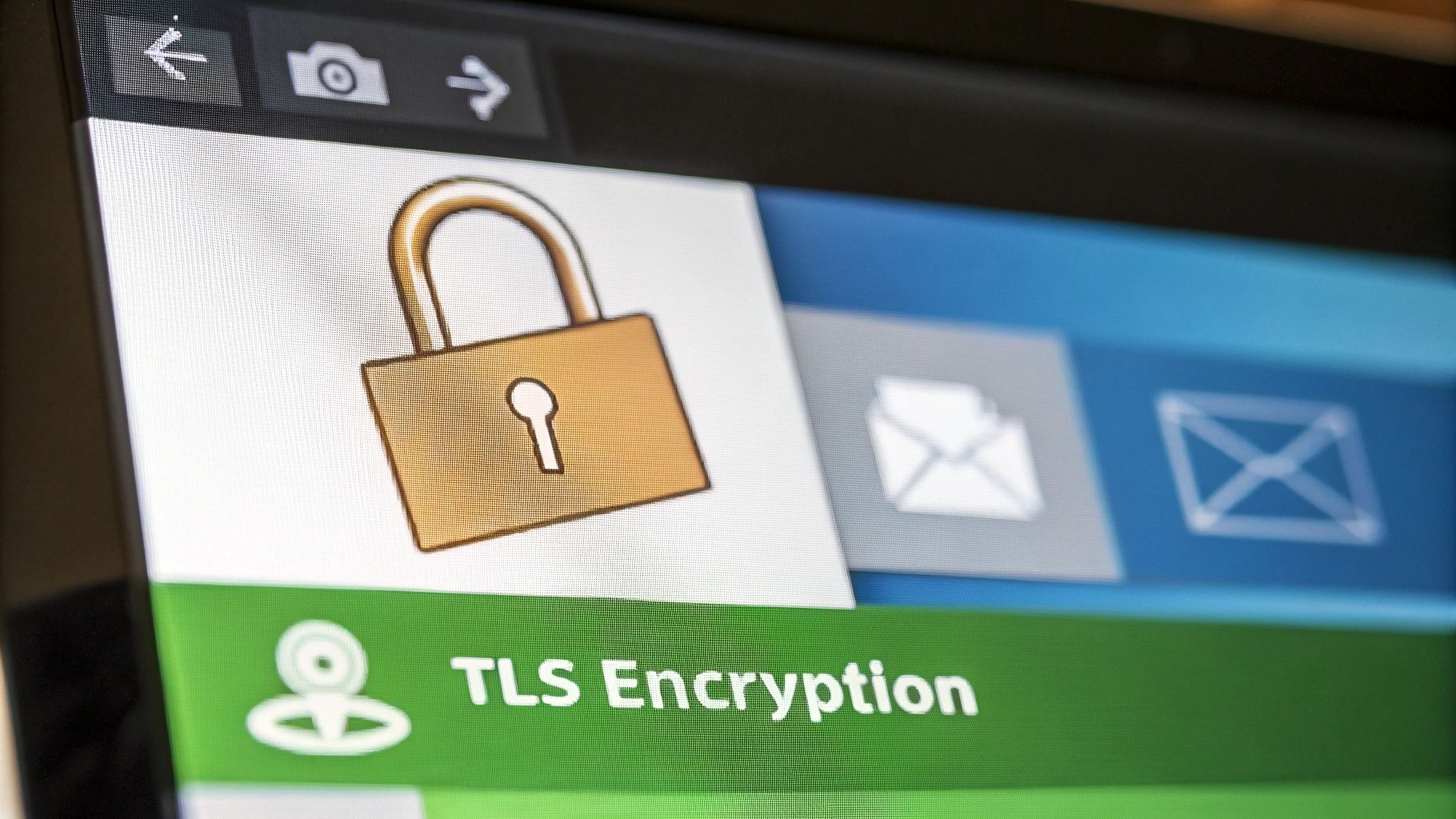
    If you send an email without TLS, it’s like sending a postcard – anyone handling it can read the message. TLS transforms your email from that exposed postcard into a sealed, secure letter.

    The TLS Handshake: A Secure Introduction

    TLS works like a secret knock. It’s how both sides of an email exchange verify each other’s identity before sharing information. This “handshake” is a series of back-and-forth communications between your email program and the receiving server, establishing a secure, encrypted connection.

    When you send email through Gmail, your email client starts this handshake with Google’s servers. This process ensures both parties are who they claim to be and agree on how they’ll encrypt the email.

    Spotting TLS in Action

    You can see TLS working through tell-tale signs: a padlock icon in your browser’s address bar and “https://” at the beginning of the web address (the ‘s’ means ‘secure’).

    But seeing a padlock isn’t the whole story. For strong security, you need to know which TLS version is being used. Older versions (TLS 1.0 and 1.1) have known weaknesses. Modern email services use TLS 1.2 or 1.3 for optimal protection.

    TLS VersionSecurity LevelAdoption RateKey FeaturesEmail Compatibility
    TLS 1.0LowVery Low (Deprecated)Weak ciphers, known vulnerabilitiesLimited, not recommended
    TLS 1.1LowLow (Deprecated)Improved ciphers, but still vulnerableLimited, not recommended
    TLS 1.2HighHighStrong ciphers, widely supportedExcellent
    TLS 1.3Very HighIncreasingMost secure, improved performanceExcellent, becoming the standard

    TLS as the Foundation

    TLS isn’t just one piece of the email security puzzle – it’s the foundation. Even if you’re using other security measures like S/MIME or PGP, TLS is still critical. Think of it as a secure armored truck carrying a valuable package. Even if the package inside is well-protected, you still need that secure truck to safely reach its destination.

    Email Authentication: Proving Your Messages Are Really From You
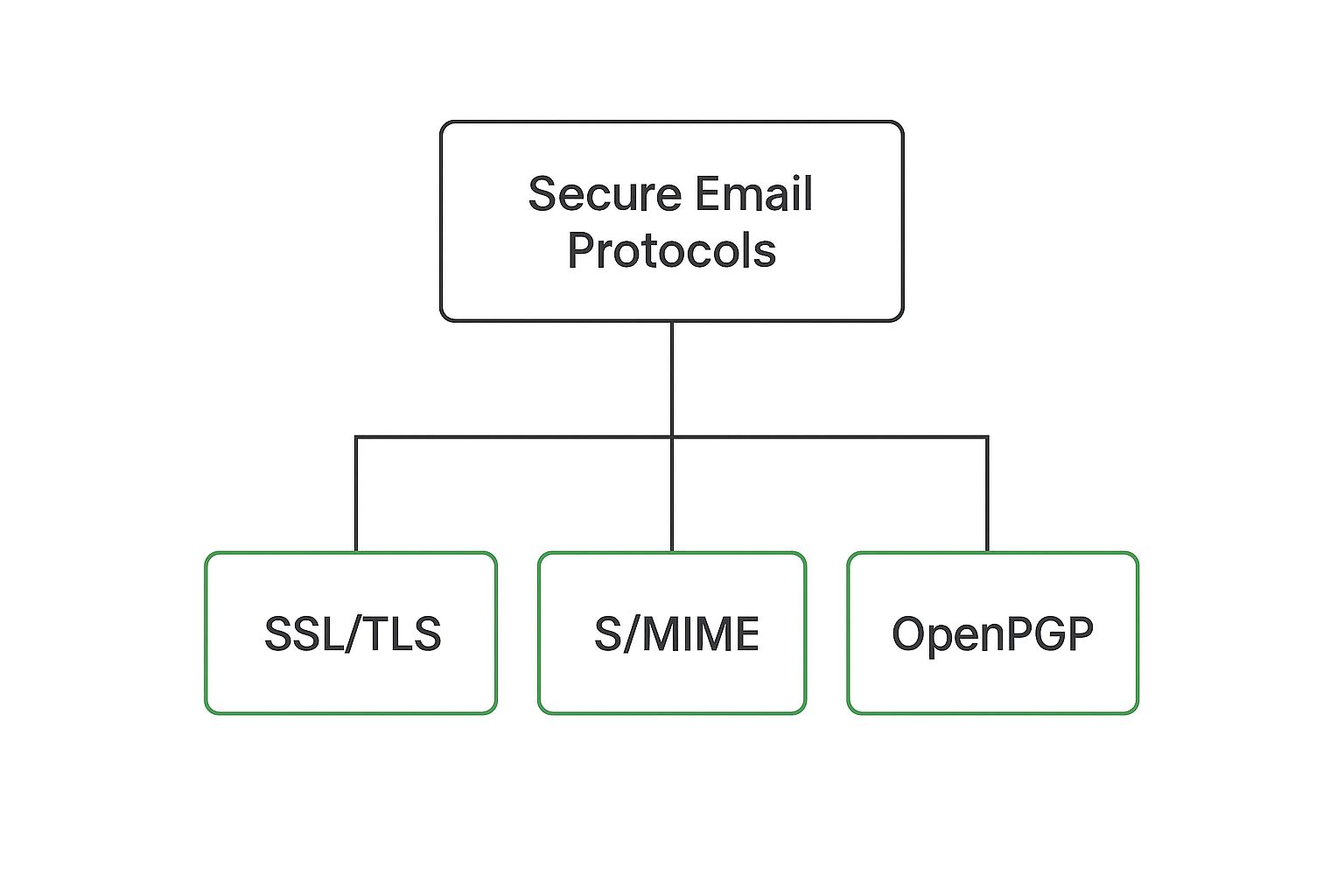
    Infographic about secure email protocols

    While TLS protects email in transit, authentication protocols verify that messages actually come from the claimed sender. This prevents spoofing attacks where criminals impersonate your domain.

    The Authentication Trio: SPF, DKIM, and DMARC

    Imagine arriving at a secure building requiring multiple forms of ID. Email authentication uses a similar approach:

    SPF (Sender Policy Framework): Like a guest list at a party. Tells email servers which mail servers are permitted to send messages on behalf of your domain.

    DKIM (DomainKeys Identified Mail): Like a unique, unforgeable signature. Cryptographically signs outgoing emails, verifying their origin and that they haven’t been tampered with.

    DMARC (Domain-based Message Authentication, Reporting & Conformance): The enforcer. Instructs receiving email servers on how to handle emails that fail SPF and DKIM checks – reject, quarantine, or monitor.

    Implementation Reality

    Setting up these protocols requires technical expertise and coordination between IT, marketing, and security teams. Phishing remains a serious threat with nearly 9 million attacks reported globally in 2023. While DMARC adoption is increasing, only about 33.4% of websites have a valid DMARC record (though this saw an 11% increase in 2024). For a deeper look at phishing trends, you can explore these phishing statistics.

    Email Authentication Protcol Comparison

    Protocol Primary Function Implementation Complexity Effectiveness
    SPF Authorizes sending servers Medium Good (when combined)
    DKIM Verifies message integrity Medium-High Good (when combined)
    DMARC Enforces authentication policies High Excellent (requires SPF/DKIM)

    For comprehensive guidance on implementing email authentication protocols, see our detailed guide: How to Authenticate Email: Real-World Setup Guide

    This specialized resource covers SPF record configuration, DKIM key management, DMARC implementation strategies, troubleshooting common issues, and maintaining authentication for long-term success.

    End-to-End Encryption: S/MIME vs. PGP in the Real World
    Screenshot from https://en.wikipedia.org/wiki/S/MIME

    If TLS is like securing the delivery truck, end-to-end encryption is like placing the valuable package inside a locked box. Only the recipient has the key.

    Key Management: The Heart of the Matter

    S/MIME: Uses a centralized, certificate-based system. A trusted Certificate Authority (CA) issues digital certificates, like a company issuing employee ID cards. This simplifies key management, especially for larger organizations.

    PGP: Uses a decentralized, web-of-trust model – like exchanging keys directly with people you trust. This offers flexibility but can become complex as your network grows.

    The volume of daily emails (about 333.2 billion in 2022) underscores the importance of robust email security. With roughly 90% of data breaches stemming from phishing and similar tactics, strong email security is critical.

    Usability: The Adoption Hurdle

    Encryption is only effective if it’s used. Usability determines whether a secure email protocol is adopted.

    S/MIME: Generally easier for users. Once a certificate is installed, encryption and decryption happen automatically. This centralized nature makes it popular for corporations. Managing individual keys for thousands of employees would be a logistical nightmare – S/MIME simplifies this.

    PGP: Flexibility comes with complexity. Users must grasp key generation, exchange, and management – a potential barrier for non-technical users. However, the decentralized approach appeals to individuals and organizations prioritizing privacy. Journalists, activists, and whistleblowers often use PGP to protect communications.

    Choosing the Right Protocol

    Your choice depends on needs and priorities:

    Choose S/MIME if you:

    • Manage a large organization requiring centralized control
    • Need automatic encryption for all users
    • Require corporate compliance and easy administration
    • Want streamlined deployment

    Choose PGP if you:

    • Prioritize maximum privacy and decentralization
    • Have technical users comfortable with key management
    • Need flexibility in trust relationships
    • Work in journalism, activism, or privacy-critical fields

    Your Practical Roadmap to Implementation Success

    Implementing secure email protocols can feel overwhelming, but with a solid plan, it’s entirely manageable and brings significant value.

    Phased Rollouts: Minimizing Disruption

    Think about renovating your house all at once – overwhelming, right? A phased rollout helps avoid major disruption. Start with a small pilot group, test new protocols, find issues, and fine-tune your approach before going company-wide.

    Example progression:

    1. Phase 1: Implement TLS 1.2+ and SPF for marketing team
    2. Phase 2: Add DKIM once SPF is stable
    3. Phase 3: Implement DMARC with monitoring policy
    4. Phase 4: Consider end-to-end encryption (S/MIME) for sensitive communications

    Getting Buy-In: From Leadership to End Users

    Successful email security relies on everyone being on board. Explain importance to leadership focusing on concrete risks: data breach costs, regulatory compliance needs, and protecting sensitive data. For end-users, highlight practical benefits like less spam and fewer phishing attacks.

    Measuring Success: The Metrics That Matter

    Track key metrics to know if your email security is working:

    • Email deliverability rates
    • SPF, DKIM, and DMARC pass rates
    • Number of reported phishing attempts
    • Authentication failure rates
    • User adoption of encryption tools

    Regular monitoring helps spot problems and measure effectiveness.

    Troubleshooting: Practical Guides for Common Issues

    Be prepared for common problems: emails not arriving, authentication failures, or user confusion. Create easy-to-follow troubleshooting guides and offer support resources. Proactive support means fixing problems quickly and efficiently.

    Choosing the Right Path: Tailoring Your Approach

    One size doesn’t fit all. The best approach depends on your organization’s specific needs and resources.

    Small startups: Focus on basics – TLS, SPF, and DKIM Medium businesses: Add DMARC and consider S/MIME for sensitive departments Large enterprises: Comprehensive implementation with end-to-end encryption and advanced authentication

    Consider your budget, team’s technical skills, and risk tolerance when choosing your path forward.

    Private Hosting: Taking Control of Your Email Security

    Choosing the right security protocols is important, but you also need the right environment. Think of it like building a house: you can have the strongest locks and top-notch alarm system, but if the foundation is shaky, your security is at risk. Secure email protocols are your locks and alarms, but private hosting is the solid foundation.

    Enhanced Security Compliance and Customization

    Private hosting lets you tailor email security to fit specific needs. This is especially important for industries with strict regulations like healthcare (HIPAA) or finance.

    With private hosting, you’re in control, implementing exact protocols and configurations needed to meet standards – something often impossible with shared hosting. For example, a healthcare provider can configure their server to enforce S/MIME encryption for all internal messages. A financial institution could implement specific DMARC policies to defend against sophisticated phishing attacks.

    Improved Privacy Controls and Data Ownership

    With private hosting, you own your email data. Unlike large email providers that might scan emails for advertising or data analysis, private hosting platforms prioritize your privacy. No ads, no tracking, no data mining – your conversations stay private.

    Private hosting also lets you choose where your data lives: your own data center, specific geographic locations, or even on-premises servers. This is essential for organizations with strict data residency requirements.

    Advanced Security Features and Flexibility

    Private hosting platforms can implement advanced security measures not readily available with shared hosting: intrusion detection systems, advanced spam filtering, and real-time malware scanning.

    You also get more flexibility configuring email protocols. For example, you can customize TLS settings to use the strongest encryption and disable older, less secure versions. You can implement custom DKIM signing policies to improve email authentication. This level of customization is vital for organizations requiring tight control over email security.

    Balancing Convenience and Control

    While private hosting offers significant security benefits, there are trade-offs. Managing a private email server requires technical know-how and resources – definitely more involved than using a standard email service. You need to weigh increased control benefits against added management responsibility.

    Building an Email Security Strategy That Evolves

    Email security isn’t something you set up once and forget about. It’s like tending a garden – you need to water, weed, and adjust to changing weather. Your email security needs regular care and attention to stay effective against emerging threats.

    Adapting to the Ever-Changing Threat Landscape

    The cybersecurity world constantly changes. New phishing tricks, sneaky malware, and AI-powered attacks emerge regularly. Your email security must be flexible and ready to adapt.

    Set up a regular security assessment routine – like a health check-up for your email system. This involves reviewing current security measures, spotting potential weaknesses, and updating defenses. For example, if you’re using an older TLS version, upgrade to the latest version for stronger protection.

    The Power of Threat Intelligence

    Staying ahead of digital threats requires solid threat intelligence. This means gathering information about current and future cyber threats – like having a weather forecast for the digital world.

    Look for sources providing practical information like specific software vulnerabilities or new attack methods. Some organizations share threat intelligence with each other, working together to defend against common enemies.

    Monitoring and Response: The Dynamic Duo

    Setting up secure email protocols is essential, but not the whole story. You need to monitor email traffic for suspicious activity: unusual patterns, sudden increases in spam, or phishing attempts.

    Effective monitoring means having the right tools and processes. Some organizations use automated systems to scan emails for known threats, while others have security experts manually review suspicious messages.

    When a threat is detected, act fast: block suspicious emails, quarantine infected attachments, or temporarily shut down affected accounts. Have a clear incident response plan so you know exactly what to do when something goes wrong.

    Building a Future-Proof Email Security Posture

    A resilient email security strategy takes a holistic approach. It’s not just about having the newest software – it’s about creating a security-conscious culture throughout your organization. This means educating employees about best practices, encouraging them to report suspicious activity, and building shared responsibility for protecting company data.

    Emerging considerations:

    • AI-Driven Security: Consider using AI-driven security tools that use machine learning to detect and block malicious emails, even brand new ones
    • Quantum Computing: While quantum computers could potentially break current encryption methods, they also open doors to new quantum-resistant encryption. Organizations should stay informed about these developments
    • Zero Trust Architecture: Implementing zero trust principles means never automatically trusting any request, even from inside your network

    By following these strategies, you can build an email security system that protects you today and prepares you for tomorrow’s challenges. This proactive approach helps keep email communications confidential, secure, and resilient against ever-evolving threats.


    Ready to take control of your email security? Explore Typewire’s secure private email hosting platform and see how it can protect your communications. Start your free 7-day trial at https://typewire.com.

  • How to Start Email: Effective Openings in 60 Seconds

    How to Start Email: Effective Openings in 60 Seconds

    The Real Story Behind Email Success (And Why Most Fail)

    Let's be honest, nobody likes receiving robotic, templated emails. They feel impersonal and often end up straight in the trash. I've chatted with tons of executives and communication pros, and the consensus is clear: building a genuine connection with your audience is way more effective than relying on generic formalities. Think about your own inbox – how often do you actually respond to something that feels mass-produced?

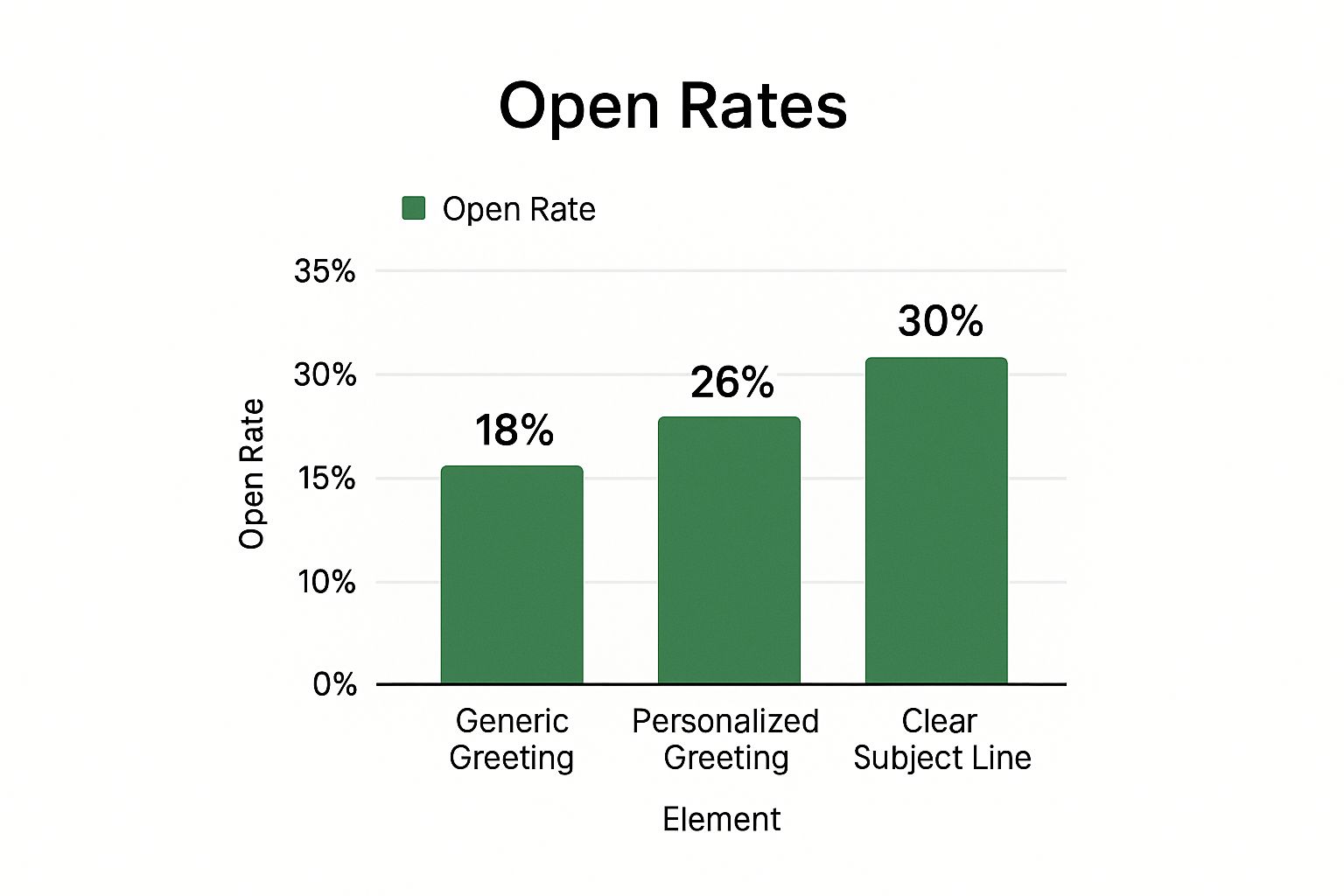
    Infographic about how to start email

    This infographic shows how different email elements impact open rates. Notice how a personalized greeting significantly outperforms a generic one? Even with a clear subject line, that personal touch makes a huge difference. It proves that making your emails feel relevant from the very first line is key.

    This isn't just a hunch; it's backed by hard data. With the sheer volume of emails flying around these days, knowing how to write an effective email is more critical than ever. Think about it: in 2022, there were over 4.258 billion active email users worldwide. That number is expected to climb to almost 4.89 billion by 2027! And with 99% of users checking their inbox every single day (some even multiple times!), cutting through the clutter is a real challenge. Discover more insights about email usage. So, how do you make your email stand out and actually get a response? By treating the recipient like a human being. Your email isn't just a message; it's a chance to connect.

    Let's take a look at how different opening styles can affect your email response rates. The table below summarizes some real-world patterns I've observed.

    Email Response Patterns by Opening Style
    Opening Type Average Response Rate Time to Response
    Formal/Generic Low (often <10%) Slow
    Personalized/Casual Moderate to High (20-50% or more) Faster
    Direct/Benefit-Driven Moderate (15-30%) Varies

    As you can see, a personalized and casual approach often yields the best results in terms of both response rate and speed. However, choosing the right opening really depends on the context and your relationship with the recipient. A formal tone might be more appropriate for initial contact with a large corporation, while a direct approach can work well for sales emails. The key takeaway? Tailor your opening to the specific situation and always keep the human on the other end in mind.

    Subject Lines That Actually Get Your Emails Opened

    Let's be honest, generic subject lines are snooze-worthy. Nobody wants their carefully crafted email to end up lost in the digital abyss of an overflowing inbox. So how do you craft compelling openers that actually get clicked? Think about it: when you're sifting through your own emails, what makes you open one? It's that spark of relevance and a touch of intrigue, right?

    Take a look at this typical Gmail inbox screenshot. See how the subject lines are the first thing you see? They're your one shot to make a great first impression. If your subject line doesn't grab attention, your email is probably heading straight for the unread pile.

    Experienced email marketers understand the psychology behind open rates. They know that clarity and curiosity are the dynamic duo of a successful subject line. A vague subject like "Checking In" tells the recipient nothing. Instead, try something laser-focused like "Following up on our Project X conversation." See the difference? It gives context, sets expectations, and boosts your chances of getting noticed.

    Adding a dash of intrigue can also work wonders. Think about posing a question, hinting at valuable info, or presenting a mini-challenge in your subject line. Instead of "Marketing Report," try "3 Surprising Insights from This Month's Marketing Report." This piques interest without resorting to cheesy clickbait.

    But hold up! While curiosity is key, never sacrifice clarity. Your subject line must accurately reflect your email's content. Misleading subject lines might get opens, but they'll also damage your credibility and annoy your recipients. Find that sweet spot between intrigue and accuracy – a subject line that grabs attention and delivers on its promise. That's the magic formula.

    Opening Lines That Create Instant Connection

    Image illustrating connection

    That very first sentence after your "Hi" or "Hello" is absolutely key to writing effective emails. It really does set the tone for everything that follows, deciding whether you'll build a genuine connection or just sound like a robot. Let's ditch the generic pleasantries and dive into what actually makes an opening line memorable.

    Think about it – you wouldn’t walk into a meeting and just launch straight into your agenda. You’d start with a greeting and a bit of friendly chat, right? Email is the same. Your opening line is like a digital handshake. It’s how you show someone you value their time and attention.

    Avoiding the Generic and Embracing the Genuine

    Let's be honest, "I hope this email finds you well" has got to go. It’s polite, sure, but it’s also totally impersonal. Try connecting with something specific instead. Did you meet at a conference? Mention it! "It was great connecting with you at [Conference Name] last week" instantly personalizes the interaction and brings back a shared memory.

    Even if you haven't met someone before, you can still make it personal. Referencing a recent blog post they wrote or a project they’re working on shows you’ve done your homework. This shows genuine interest and starts the email on a positive note.

    Matching Your Opening to the Context

    Knowing how to start an email really depends on why you’re writing. A cold outreach email needs a different approach than a follow-up or a message to a team member. Imagine emailing a potential client. Leading with a clear benefit, such as "I've helped similar companies like yours increase sales by 20%," can be incredibly effective.

    But that same approach would probably feel too aggressive for a casual check-in. In that scenario, something more personal like "I was just thinking about our last conversation and wanted to share…" feels much more appropriate. It’s all about reading the room (digitally, of course!). Consider your relationship with the person you’re emailing and adjust your opening accordingly. That little bit of nuance can go a long way in building trust.

    Building Context Without Losing Your Reader

    Context and email communication

    Writing emails that are clear and concise can be tricky. How do you give enough background information without making the email too long? It's a common problem – we’ve all received emails that left us confused about the main point.

    The secret to starting an email effectively and keeping it clear is understanding your audience and how complex your message is. Great communicators know how to give just the right amount of information to keep the reader engaged without overwhelming them. This all boils down to carefully setting the context.

    The Art of Concise Storytelling

    Think about explaining a project update. Instead of including every single detail, lead with the main point. What’s the most important takeaway for your reader? For instance, "We smashed our Q3 sales target!" Now that grabs attention.

    Then, give just enough context to back up that headline. "This was thanks to the successful launch of Campaign A, which generated a 15% increase in leads." See how that works? Key message first, supporting details second. Strong start, strong finish.

    Referencing Previous Conversations and Introducing New People

    Referring back to earlier conversations or introducing new people takes a bit of skill. For ongoing threads, a simple "As we discussed last week," or "Following up on our call," is usually perfect. When it’s a new topic or new people are involved, a quick intro is crucial. Something like, "I'd like to introduce John from the marketing team. He'll be leading this project," clears up any confusion and makes sure everyone's in the loop.

    Context also changes based on who you’re emailing. Close colleagues need less background than clients or external partners. Adapt your approach accordingly. Over-explaining can bore your team, while under-explaining can confuse clients. You might also be interested in: Read also: How to Stop Email Tracking

    Let's talk about how to tailor your context based on your relationship with the recipient. Understanding this is key to writing truly effective emails.

    To illustrate this, take a look at the table below:

    Context Strategies by Relationship Depth

    Relationship Level Context Depth Recommended Approach Example Framework
    Close Colleague Minimal Briefly mention relevant details, assume shared knowledge. "Quick update on the X project…"
    Acquaintance/Collaborator Moderate Provide key background information, refresh shared context. "Following up on our last meeting regarding X…"
    Client/External Partner High Clearly outline all necessary details, anticipate questions. "Here's a summary of project X, including…"

    As you can see, adjusting your context to the reader makes your communication clearer and more efficient. It shows you respect their time and increases the chance of your message having real impact.

    Knowing how to adjust your communication – giving just the right amount of context – is what makes an email truly great. It respects the reader's time and helps your message truly resonate. The aim isn't just to be understood, it’s to be impossible to ignore.

    Making Your Purpose Impossible to Ignore

    Let's be honest, nobody wants to wade through a rambling email. Clarity is king, especially in the professional world. When you're sending an email, getting straight to the point is essential. Your recipients shouldn't have to guess what you want. But there’s a fine line between being direct and being a jerk. So how do you strike that balance?

    Framing Your Requests Like a Pro

    Ever noticed how effective communicators, like top executives or consultants, phrase their requests? They often lead with the value proposition. Instead of barking, "I need this report by Friday," they might say, "Having this report by Friday would allow us to finalize the proposal and potentially close the deal with Acme Corp." See the difference? It frames the request as a win-win, making it more persuasive and less demanding.

    This works for sharing information too. Think about what's relevant to the person you're emailing. Instead of a generic "Here's the updated project plan," try something like, "This updated project plan addresses the timeline and resource allocation concerns you brought up in our last meeting." It shows you're not just sending stuff out blindly; you're actually considering their needs.

    Diplomacy and Directness: A Balancing Act

    Mastering the email opening is all about balancing directness with diplomacy. You want to be clear without sounding pushy. This is especially crucial with sensitive requests or when communicating across cultures.

    For example, let's say you need to chase a late payment. Instead of pointing fingers with a curt "You haven't paid yet," try a more tactful approach: "Just checking in on invoice #1234. Let me know if you have any questions or need anything from my end." It gets the message across professionally while keeping things friendly.

    For more practical email advice, you might find this helpful: Check out our guide on top email management tips.

    Adapting to Context and Hierarchy

    Effective email communication also means understanding context. Cultural norms, company hierarchies, and the sensitivity of the topic all play a role. Some cultures value directness, while others prefer a more subtle approach. Similarly, you wouldn’t email your CEO the same way you email your teammate.

    Take a look at some of the business emails you’ve received that had high response rates. What did they do well? Analyzing effective communication can help you refine your own approach. The goal is always to make your purpose clear, no matter the circumstance. It’s not just about starting an email; it's about starting a productive conversation.

    Adapting Your Style for Maximum Impact

    Generic emails just don't cut it. Think about it – how often do you actually engage with a bland, impersonal message? Not often, right? The people who truly nail email communication understand that context is king. They tailor their style to the recipient and the situation. Knowing how to start an email effectively depends entirely on this.

    Let's talk about reading the room, but digitally. Imagine congratulating a colleague via email versus addressing a sensitive client issue. The tone, the formality, even the opening line would be worlds apart. This is where emotional intelligence plays a surprisingly big role in email. It's all about picking up on the subtle cues and adjusting your style accordingly.

    For example, emailing a teammate about a project? A quick "Hey [Name], Quick update on Project X…" is perfect. But picture emailing a potential client. A more formal, benefit-driven "Dear [Name], I'm writing to you today because I've helped similar companies like yours achieve X…" hits the mark much better.

    The real trick is to adapt without losing your authentic voice. You don't want to become a chameleon, changing your personality with every email. Think about how you communicate in person. You talk to your best friend differently than you talk to your boss, right? But you're still you.

    This is where practice makes perfect. The more you write, the easier it becomes to handle different situations and strike a balance between professional polish and genuine connection. Play around with different opening lines, tones, and levels of formality. See what works best for your audience.

    Sometimes, you'll face tricky email scenarios – that awkward follow-up, a difficult conversation, or a high-stakes communication. These call for a little finesse. Let's say you're following up on a proposal that's gone unanswered. Instead of a blunt "Just checking in on the proposal," try a more understanding approach: "I understand you’re busy, but I wanted to follow up on the proposal I sent last week. I'm happy to answer any questions or discuss how we can tailor our services to your needs." This shows empathy while gently reminding them of your proposal. Master these nuances, and you’ll transform your email game.

    Your Complete Email Opening Toolkit

    Email opening toolkit

    Alright, let's bring all this together. Consider this your email opening starter kit, ready to go. No more staring at a blank inbox, wondering how to kick things off. This isn’t about rigid templates, it’s about having a flexible approach you can tailor to any situation.

    Key Principles For Effective Email Communication

    • Relevance: Make your words matter. Show the recipient why this email is important to them, not just you.

    • Clarity: Get to the point. No one wants to decipher a cryptic message. Your time is precious, and so is theirs.

    • Authenticity: Inject some personality! Generic emails get lost in the noise. Let your genuine self shine through.

    • Respect: Value the recipient's time. Keep it short, sweet, and to the point.

    For example, ditch the tired "I hope this finds you well." Instead, try something like, "I was really impressed with the project you just wrapped up on X," or "I saw you shared that article on Y – great insights!" This instantly personalizes things and shows you're actually paying attention.

    Putting It Into Practice

    This toolkit will help you write emails that actually resonate. I've used these strategies myself and seen a real difference in how people respond. It’s all about building real connections, one email at a time. Something else you might find useful is understanding a bit more about the tech side of things: Learn more about email authentication. Knowing how email security works goes hand-in-hand with communicating effectively.

    Speaking of security, are you ready to experience truly secure and private email? Start your free trial with Typewire today! Take control of your communications and breathe easier knowing your emails are protected.