Author: williamwhite

  • What Is a Secure Email and Why Is It Crucial for Your Privacy?

    What Is a Secure Email and Why Is It Crucial for Your Privacy?

    So, what exactly is a secure email? Think of your standard email—like the one you probably use every day—as a postcard. Anyone who gets their hands on it during its journey from you to the recipient can read what's written on it. This lack of email privacy is the default for most services.

    A secure email, on the other hand, is like a secret message tucked inside a sealed, tamper-proof envelope, which is then placed inside a locked box. It uses end-to-end encryption to ensure that only you and the person you're sending it to can ever access the contents. No one else—not your hosted email platform, not hackers, not government agencies—can decipher it. This is the foundation of true email security.

    Understanding What Makes an Email Secure

    True email security isn't about a single feature; it's a holistic approach to email privacy, built on technologies designed to protect your data from every angle.

    While services like Gmail and Yahoo have improved account security, they don't protect the content of your emails from their own systems. These companies often scan your messages to gather data for targeted advertising, making your personal information a commodity. Your email privacy is secondary to their business model.

    Secure hosted email platforms operate on a completely different model called zero-knowledge. This means the provider builds its system so they have no technical way to access your encrypted messages, even if they were legally compelled to. Your data remains yours, and yours alone, ensuring the highest level of email security and privacy.

    The Growing Need for Email Privacy

    The demand for genuine email privacy is no longer a niche concern—it's exploding. We're seeing a massive spike in security threats, with some reports indicating a staggering 569% increase in phishing emails alone.

    This has fueled huge growth in the email security market, which was valued at USD 4.68 billion and is projected to more than double to USD 10.68 billion by 2032.

    Secure email isn’t just for spies or tech experts; it's a practical tool for anyone who believes their private conversations should remain private. From business contracts to personal health information, encryption ensures your sensitive data stays yours alone.

    Standard Email vs. Secure Email At a Glance

    To really see the difference, it helps to put them side-by-side. The gap in email privacy and security between a standard service and a dedicated secure hosted email platform is significant.

    Feature Standard Email (e.g., Free Gmail, Yahoo) Secure Email (e.g., Proton Mail, Tutanota)
    Message Encryption Encrypted in transit (TLS), but readable on servers. End-to-end encrypted; unreadable on servers.
    Provider Access Provider can read/scan email content. Provider cannot access email content (zero-knowledge).
    User Privacy User data is often collected for advertising. No data collection for ads; privacy is the core business.
    Anonymity Often requires personal info (like a phone number) to sign up. Allows anonymous sign-up, no personal data required.
    Authentication Basic password protection, 2FA is optional. Strong password policies and mandatory 2FA are common.

    As you can see, the fundamental approach to your privacy and data is what truly sets them apart.

    One non-negotiable feature for any service claiming strong email security is a robust authentication process. This means going beyond just a password. Implementing methods like two-factor authentication (2FA) is essential, as it adds a critical second layer of defense to protect your account from unauthorized access.

    How Encryption Creates True Email Privacy

    The secret sauce behind any truly secure hosted email platform is encryption. At its core, encryption is just a way of scrambling your message so it looks like gibberish to anyone who isn't supposed to see it. Only the intended recipient has the special key to unscramble it, turning the gibberish back into your original message.

    But here's the catch: not all encryption provides the same level of email privacy. The kind that big providers like Gmail and Outlook use is called Transport Layer Security (TLS). Think of TLS as an armored truck. It protects your email while it's traveling from their server to your recipient's server. The problem? Once the truck arrives, the "postal workers" (the email providers) can open and read the contents.

    The Gold Standard: End-to-End Encryption

    For real, bulletproof email privacy, you need something much stronger. That something is End-to-End Encryption (E2EE).

    With E2EE, your message is locked up before it ever leaves your computer or phone. Only your recipient has the unique key to unlock it. This means no one in the middle—not your ISP, not snoops, and not even the hosted email platform itself—can get a peek.

    The whole point of E2EE is beautifully simple: only you and the person you're talking to can ever see what's being said. The platform you're using to send the message is completely blind to its content.

    This diagram gives you a bird's-eye view of how this process keeps the communication channel locked down from sender to receiver.

    As you can see, the message stays encrypted for the entire journey. No third party can ever access the original, readable "plaintext." If you're curious to dig a little deeper, we have a guide that explains what end-to-end encryption is in simple terms.

    Protecting Stored Emails with Zero Knowledge

    Okay, so E2EE protects your emails while they're flying across the internet. But what about all those messages just sitting in your inbox? That's where another critical concept for email security comes into play: zero-knowledge encryption.

    A zero-knowledge approach means the hosted email platform has zero knowledge of the data they're storing for you. Your emails are encrypted on their servers, and the key to unlock them is something only you have. Even if a hacker managed to break into their data centers, all they'd find is a useless pile of scrambled data.

    This is what really sets a genuinely secure hosted email platform apart. With the constant threat of phishing, data breaches, and ransomware, it's no surprise this technology is booming. The email encryption market was recently valued at around USD 9.3 billion and is projected to skyrocket to USD 23.33 billion by 2030.

    Essential Features of Secure Hosted Email Platforms

    While end-to-end encryption is the star of the show, it's far from the only thing that makes a hosted email platform truly secure. A genuinely private communication platform is built with multiple layers of protection, each one designed to plug a different potential hole in your email security.

    Think of it like securing a house. That fancy, unpickable lock on the front door is your encryption. But you also need sturdy windows, a reliable alarm system, and a good fence. In the same way, a top-tier secure hosted email platform reinforces its core encryption with a whole suite of other essential security and privacy tools.

    Beyond the Message Itself

    One of the most overlooked aspects of email privacy is metadata. This is the data about your email—who sent it, who received it, the subject line, and the timestamp. Many standard email services might encrypt the message body but leave this metadata completely exposed, basically creating a detailed map of your communications for anyone to see.

    A quality secure provider goes the extra mile to protect or strip this metadata, making sure that even the context of your conversations stays private. After all, just knowing who you’re talking to, and when, can be incredibly revealing.

    Another absolute must-have is strong account security. At a minimum, this means Two-Factor Authentication (2FA), which requires a second form of verification besides your password. This one simple step makes it exponentially harder for someone to break into your account, even if they somehow manage to get your password.

    Where Your Data Lives Matters

    Believe it or not, the physical location of a hosted email platform's servers plays a massive role in your email privacy. The country where the data is stored determines which laws—and which government agencies—have authority over it.

    This is exactly why so many leading secure email services are based in countries with strong privacy laws, like Switzerland or Germany. These legal frameworks act as another shield against government surveillance and broad data requests, offering protections that just don't exist in other parts of the world.

    Choosing a provider based in a privacy-friendly jurisdiction is like choosing to build your secure vault in a country known for its impenetrable bank security. The local laws become an extra layer of defense for your data.

    Hallmarks of a Trustworthy Provider

    Finally, a few key characteristics can tell you a lot about a provider's real commitment to your privacy and security. These are often the make-or-break details when you're choosing a hosted email platform you plan to stick with. We dive even deeper into these factors in our comprehensive guide to secure email hosting.

    Here are a few things to keep an eye out for:

    • Anonymous Signup: The option to create an account without handing over personal info like your name or phone number.
    • Open-Source Code: When a company makes its code public, it allows independent security experts to poke around and look for vulnerabilities. It’s a powerful sign of transparency and trust.
    • Self-Destructing Emails: This feature lets you set an expiration timer on a message. Once the timer runs out, the email is gone for good from the recipient's inbox, giving you total control.

    When you bring all these features together, they transform a simple email service into a true private communication tool. You get the peace of mind that comes from knowing your conversations are protected from every possible angle.

    A Look at the Top Secure Email Providers

    Picking a secure email provider isn't about finding a single "best" one. It's more about finding the hosted email platform that clicks with your own needs and your personal take on privacy. Now that we’ve covered the core features, let's see how some of the top names in the game actually put them to use.

    This comparison isn't meant to crown a winner. The goal is to show you the different paths these providers take, so you can make a smart choice for yourself. We'll zero in on two of the most respected services out there: Proton Mail and Tutanota.

    Philosophies and Key Differentiators

    Both Proton Mail and Tutanota are built on a bedrock of zero-knowledge, end-to-end encryption. That's non-negotiable. But the way they build their email security models on top of that foundation is where things get interesting, and those differences shape the user experience.

    Proton Mail, for instance, operates out of Switzerland, a country legendary for its strict privacy laws. It uses PGP (Pretty Good Privacy) for its encryption, which is an open, time-tested standard that has been vetted by security experts for decades. This reliance on a proven protocol often resonates with people who want maximum transparency.

    Here’s a glimpse of Proton Mail's interface. They've clearly worked hard to make it feel familiar, like any other email client, but with powerful security running just beneath the surface.

    This user-friendly approach is a big deal. It makes it much easier for anyone to switch to a secure hosted email platform without feeling like they need a degree in cryptography.

    Comparing Core Features

    When you're trying to figure out what is a secure email provider that works for you, the little details can make all the difference. For a deeper dive, check out our complete list of the 12 best secure email providers for privacy in 2025.

    But for now, let's see how these two stack up.

    The decision often boils down to a trade-off. Do you want a provider using an established encryption standard like PGP, or one that encrypts more of your data but with a proprietary protocol? There's no right answer—it all depends on what you prioritize.

    This table offers a clear, side-by-side view to help you weigh the options based on what matters most to you.

    Comparison of Popular Secure Email Providers

    Here’s a quick feature-by-feature comparison of leading secure email services. Use this to see how different platforms approach privacy and security, helping you choose the right one for your needs.

    Provider Key Security Feature Server Jurisdiction Free Plan Limitations Best For
    Proton Mail PGP-based E2EE, open-source code, and strong physical server security. Switzerland 500 MB storage, 150 messages per day. Users who value a proven encryption standard and a user-friendly interface.
    Tutanota Custom E2EE protocol that also encrypts subject lines and calendars. Germany 1 GB storage, limited search functionality. Users seeking to encrypt more than just the email body, including calendar events.

    Ultimately, both Proton Mail and Tutanota offer a massive email security upgrade over standard services like Gmail or Outlook. The "better" choice is simply the one that aligns with your specific threat model and feature requirements.

    Why You Need Secure Email in the Real World

    It's easy to get lost in the technical talk of encryption protocols and security features. But the real reason secure email matters isn't the technology itself—it's what it protects in our day-to-day lives. It’s for anyone who believes that a private conversation should actually stay private, a core tenet of email privacy.

    Think about a freelance lawyer discussing a sensitive case with a client. Using a standard email provider is like having that conversation on a park bench, where anyone can overhear. A secure hosted email platform acts like a private, soundproof office, digitally upholding that client-attorney privilege and protecting crucial documents from being intercepted.

    Or picture a journalist communicating with an anonymous source. The source's safety, and sometimes their very life, hinges on their identity remaining a secret. End-to-end encryption creates a secure channel that prevents anyone—including the hosted email platform—from connecting the source to the reporter. It’s a fundamental tool for accountability and speaking truth to power.

    Protecting Your Most Personal Information

    The need for real email privacy isn't just for professionals. Consider all the incredibly personal information we share with family and trusted contacts every single day.

    • Financial Records: Sending bank statements, tax forms, or mortgage applications.
    • Medical Information: Sharing a diagnosis with a loved one or forwarding medical records to a new doctor.
    • Personal Identity: Emailing copies of passports, driver's licenses, or other sensitive IDs.

    With a standard email service, this information is often scanned, analyzed, and stored on servers indefinitely, making it a goldmine for data brokers and a prime target for hackers. Secure email puts a digital lock on those conversations, ensuring you're the only one with the key.

    Secure email isn’t an extreme measure for the paranoid; it’s a practical necessity for modern life. It’s the digital equivalent of having a private conversation behind a closed door rather than on a public stage.

    Meeting Professional and Legal Standards

    In many fields, secure communication isn't just a best practice—it's a legal requirement. Professionals in healthcare, finance, and law operate under strict data protection regulations. For instance, those in healthcare must navigate complex rules to protect patient data, which is often outlined in resources like a HIPAA compliance audit checklist.

    This need for compliance is a huge reason why secure communication tools are booming. The market for email encryption software was valued at USD 3.82 billion and is projected to skyrocket to USD 14.09 billion by 2034. That explosive growth is driven by businesses needing to protect themselves from costly data breaches and meet legal mandates.

    Ultimately, choosing a secure hosted email platform is about taking back control of your digital privacy, one message at a time.

    Your Questions About Secure Email, Answered

    When you start digging into secure email, a few questions always pop up. It's totally normal. Let's clear the air on some of the most common ones so you can feel confident about upgrading your email privacy.

    Isn't My Gmail Account Already Secure?

    For casual, everyday stuff, Gmail does a pretty good job of keeping hackers out of your account. It uses something called TLS encryption, which is like putting your email in an armored truck when it travels from one server to another. It's safe on the road.

    The catch? This isn't end-to-end encryption. Once the "truck" arrives at Google's servers, they hold the keys. This means Google can still see your email content to power things like targeted ads and those handy smart replies. So, while your account has security features, the content lacks true email privacy from the company running the service. If you need a guarantee that no one but you and your recipient can read a message, you need a dedicated secure hosted email platform.

    Think of it this way: standard email providers often see your data as the product. A secure email provider sees your privacy as the product.

    Can I Send a Secure Email to Someone Who Uses Gmail?

    Absolutely. This is a must-have feature for any good secure hosted email platform. You can send a fully encrypted message to anyone, even if they're on a standard platform like Gmail or Yahoo.

    Here’s how it works: Instead of the email showing up in their inbox like usual, your friend gets a notification with a secure link. Clicking that link takes them to a private, encrypted webpage. To open it, they'll need a password that you've shared with them separately (over a text or phone call, for instance). They can then read your message and reply right there on the secure page, keeping the whole conversation locked down.

    Do I Really Have to Pay for a Secure Email Account?

    Nope, not necessarily! The good news is that many of the best secure hosted email platforms have fantastic free plans that are perfect for personal use. These free accounts almost always include the most important feature—end-to-end encryption—so your conversations are private right from the start.

    So what's the catch? Free plans usually come with some limits, like less storage space or a cap on how many emails you can send per day. If you need more, paid plans offer bigger storage, the option to use your own custom domain name, and other powerful features designed for businesses or power users.

    Is It a Big Hassle to Switch to a Secure Email Provider?

    It's way easier than you might think. Today's secure hosted email platforms are built to be user-friendly. They have clean web interfaces and slick mobile apps that feel just as intuitive as what you're used to. Many even have tools to help you import contacts and old emails to make the move seamless.

    The only real "work" is letting your contacts know you have a new, more private email address. That small, one-time effort is a tiny price to pay for taking back control of your digital conversations for good.


    Ready to take control of your inbox? Typewire offers a secure, private email hosting platform designed for individuals and businesses who value their privacy. With no ads, no tracking, and zero data mining, your communications remain yours alone. Start your free 7-day trial and experience true email privacy today.
  • How to Stop Receiving Spam and Reclaim Your Inbox

    How to Stop Receiving Spam and Reclaim Your Inbox

    To truly stop spam, you need to think in layers. It's about combining the tools your email provider already gives you, like spam filters, with smarter email security habits, like using aliases for new sign-ups. For those who want the ultimate defense, moving to a secure, hosted email platform is the final piece of the email privacy puzzle. This mix of reactive tools and proactive strategies is how you take back control of your inbox for good.

    Why Your Inbox Is Such a Prime Target

    Think of your email address as a digital front door. It’s a direct line to you, which makes it an incredibly valuable commodity for everyone from aggressive marketers to outright criminals. Every time you subscribe to a newsletter, create an online account, or leave your email on a public forum, you're essentially handing out keys to that door. For spammers, your inbox represents a low-cost, high-reward playground, putting both your email privacy and security at risk.

    This isn't just a minor annoyance; the scale of the problem is massive. By 2025, spam is expected to account for a staggering 45% of all daily email traffic worldwide. That boils down to an estimated 14.5 billion spam messages flooding the internet every single day. For the average person, that could mean sorting through over 1,800 unwanted emails a year. No wonder keeping a clean inbox feels like a full-time job. You can dig deeper into these email spam statistics and their impact to see the full picture.

    How Did They Get My Email Anyway?

    Spammers are resourceful, and they have several well-worn methods for getting their hands on your email address, often without you even realizing it. Knowing how your email gets out there is the first step to improving your email security.

    • Data Breaches: This is the big one. A company you've trusted with your information gets hacked, and suddenly your email, passwords, and other personal details are for sale on the dark web.
    • Public Postings: Ever listed your email on a personal blog, a social media bio, or a forum? Automated bots, called scrapers, constantly crawl the web looking for exactly that. They harvest these addresses and add them to massive spam lists.
    • Shady Sign-Up Forms: Some websites, especially "free" services, compromise your email privacy by selling your data to marketing companies. Your email address is the price of admission.
    • Brute-Force Guessing: It can be as simple as spammers using software to generate millions of common email combinations (think jane.doe@domain.com or sales@company.com) and firing away.

    The Many Faces of Spam

    Not all spam is the same. Some of it is just annoying clutter from a pushy company, but other types can be genuinely dangerous, putting your personal information and financial security at risk.

    Before we dive into the solutions, it's helpful to know what you're up against. Here’s a quick rundown of the most common spam types and the real dangers they pose to your email security.

    Common Spam Types and Their Hidden Dangers

    Spam Type Primary Goal Key Risk
    Phishing Steal sensitive information Identity theft, financial loss, account takeover
    Malware/Viruses Infect your device Data theft, ransomware, device damage
    Scams & Hoaxes Deceive you into sending money Direct financial loss
    Unsolicited Ads Sell you a product or service Annoyance, potential links to malicious sites
    Spoofing Impersonate a trusted contact Tricking you into sharing information or funds

    Recognizing these different threats is crucial. An aggressive marketing email is just a nuisance you can block and delete. But a phishing email disguised as a notice from your bank is a serious security threat that demands a different response.

    The most dangerous spam doesn't just want to sell you something—it wants to trick you. Phishing attacks are expertly designed to look like they're from your bank, a delivery service, or another trusted company, all in an effort to steal your logins and financial details.

    Once you can spot the difference between junk and a genuine threat, you're in a much better position to build an effective defense and keep your inbox safe.

    Your Email Provider's Built-In Tools Are Your First Line of Defense

    Image

    Before you even think about third-party apps, take a look at the powerful tools you already have. Hosted email platforms like Gmail and Outlook spend a fortune on smart, AI-powered systems to catch junk mail. Your job is to give those systems a helping hand to enhance your email security.

    Just deleting a spam email doesn't accomplish much. The single most important thing you can do is smash that "Mark as Spam" or "Report Junk" button. This does way more than just hide the message; it sends a powerful signal back to your provider. Every time you report something, you're training their algorithm to get better at spotting similar security threats in the future—not just for you, but for everyone.

    Get Proactive With Filters and Rules

    Marking spam is great for cleaning up what’s already arrived, but filters and rules let you take control before the mess even happens. Think of them as your personal bouncers for your inbox, deciding who gets in and where they go. This is a core part of maintaining your email security.

    You can set up rules that automatically manage your mail based on almost any criteria you can think of.

    Here are a few practical ideas to get you started:

    • Block by Sender: If a specific address just won't quit, create a rule to send everything from them straight to the trash.
    • Filter by Keywords: Sick of seeing "Limited Time Offer" or "You've Been Selected"? Set up a filter that looks for those phrases in the subject line and automatically deletes them or moves them to a folder you can check later.
    • Block an Entire Domain: Can't get off a company's mailing list no matter how many times you unsubscribe? Block their entire domain (like @annoyingcompany.com) to stop them for good.

    A few well-crafted filters can seriously cut down on your daily inbox cleanup, often by up to 80%. It might take a few minutes to set them up, but you'll save yourself hours of manual sorting and frustration down the line.

    Fine-Tuning Your Spam Defenses

    The goal here is to build a defense that adapts as spammers change their tactics. Most people never dive into their email settings, but there's a ton of control hiding in there. If you want a deeper dive, you can learn more about how spam filtering protects your email security and privacy.

    The real magic happens when you combine your provider's smart technology with your own common sense.

    Build These Inbox Habits:

    1. Check Your Spam Folder (Occasionally): Once a week, take a quick 30-second scan of your spam folder. You're looking for "false positives"—legitimate emails that got caught by mistake. Rescuing them helps train the filter to be more accurate.
    2. Make an "Unsubscribe" Filter: Instead of dealing with every newsletter, create a rule that finds the word "unsubscribe" in the email body. Have it automatically archive these messages or stash them in a "Promotions" folder to read later.
    3. Use the Block Button: The "Block Sender" feature is your best friend for repeat offenders. Don't be shy about using it.

    By actively using these tools, you stop being a passive target for spam and become the active guardian of your own inbox.

    Go on the Offensive for Ultimate Email Privacy

    Image

    When the usual filters and blocklists just can't keep up, it's time to change the game entirely. The best defense is a good offense, and in the war against spam, that means making your primary email address a closely guarded secret.

    Think about it: the single most effective way to stop receiving spam is to prevent your real address from getting into the wrong hands in the first place. This requires a shift in mindset—from reacting to junk mail to proactively building a wall of email privacy between your inbox and the outside world. This is where tools like email aliases and disposable addresses become your secret weapon.

    Create Aliases for Every Service

    An email alias is simply a forwarding address. It looks and acts like a real email, but any message sent to it is quietly routed to your main inbox. I like to think of them as unique keys for every service I sign up for—they all open the same door, but I know exactly which key was used.

    For instance, if I'm signing up for a new social media site, I won't use my real email. Instead, I'll create something like socialnetwork.2024@mydomain.com. If that specific address ever starts getting flooded with junk, I know exactly which company either sold my data or had a security breach.

    The real power here is the control it gives you. You can just delete the compromised alias, instantly cutting off the spam source without touching your main account or disrupting any other services. It's surgical.

    Adopting this strategy is a massive leap forward for your email privacy. By giving each service its own unique address, you effectively quarantine any potential data leaks. Spammers might get an address from a hacked database, but it’s a dead-end one they can't use elsewhere. To get a deeper dive, check out the ultimate guide to an email alias service to see how you can set this up.

    Use the "Plus Addressing" Trick

    If you don't use a dedicated alias service, there's a clever built-in feature in many hosted email platforms like Gmail and Outlook called plus addressing. It lets you generate unique, trackable variations of your email address instantly, right on the spot.

    It's incredibly simple. You just add a + sign and any word after your username but before the @ symbol.

    • Signing up for a store's loyalty card? Use yourname+thestore@email.com.
    • Subscribing to a newsletter? Try yourname+techreads@email.com.
    • Downloading a one-time file? Make it yourname+whitepaper@email.com.

    All mail sent to these addresses will still land in your primary inbox. The magic is that you can see exactly which address it was sent to. This makes it dead simple to create a filter that automatically archives, labels, or deletes messages sent to yourname+thestore@email.com, especially if they start sending you unrelated junk. You've caught the source red-handed.

    Bring in the Privacy Specialists

    For the highest level of control and anonymity, dedicated services like SimpleLogin or AnonAddy are the way to go. These platforms are built specifically for this purpose, letting you generate unlimited random, anonymous aliases that forward to your real email.

    Here's why they are so powerful:

    • Complete Anonymity: Your real email address is never exposed to any website or service.
    • One-Click Kill Switch: An alias getting spammed? Just flip a switch and it's gone. No more emails from that source.
    • Reply in Disguise: You can even reply to forwarded emails, and the service sends it through the alias, keeping your true address hidden.

    When you start using these advanced tactics, you're no longer just playing defense. You stop being a janitor for your inbox and become the architect of a fortress that keeps spam from ever reaching your door.

    Upgrade to a Secure Hosted Email Platform

    If you're truly fed up with the endless tide of junk mail, the most powerful move you can make is to switch to a secure, privacy-first hosted email platform. It’s a game-changer for your email security and privacy.

    Free email services are convenient, but there's a trade-off. Their business often revolves around collecting data for advertising purposes. A secure email host, on the other hand, operates on a totally different principle: you're the customer, not the product they're selling to advertisers.

    This isn't just a philosophical difference—it directly impacts your inbox security. Providers like ProtonMail and Tutanota are built from the ground up for privacy. They have zero incentive to scan your emails for ad-targeting keywords, which means their systems are entirely focused on identifying and blocking security threats. The result is just plain better spam filtering.

    Why Secure Platforms Are So Good at Blocking Spam

    The magic is in their architecture. Many of these services use what’s called a zero-access architecture, a fancy term that means even the provider can't read your emails. They are physically incapable of decrypting them. This creates a powerful shield against sophisticated spam that tries to sneak past filters by analyzing your email content.

    They also rely heavily on end-to-end encryption, scrambling your messages from the moment you hit "send" until your recipient opens them. While that's mainly a privacy feature, it builds a much more secure environment overall. Spammers thrive on exploiting the weaknesses of huge, mass-market platforms, so a hardened ecosystem is naturally less appealing to them.

    If you're curious about which service might be right for you, we have a detailed breakdown of the top 7 best email providers for privacy in 2025 that’s worth a look.

    When you choose a platform that makes privacy the default setting, you're getting more than just tools. You're joining an entire ecosystem designed to be hostile to spammers and data miners right from the start.

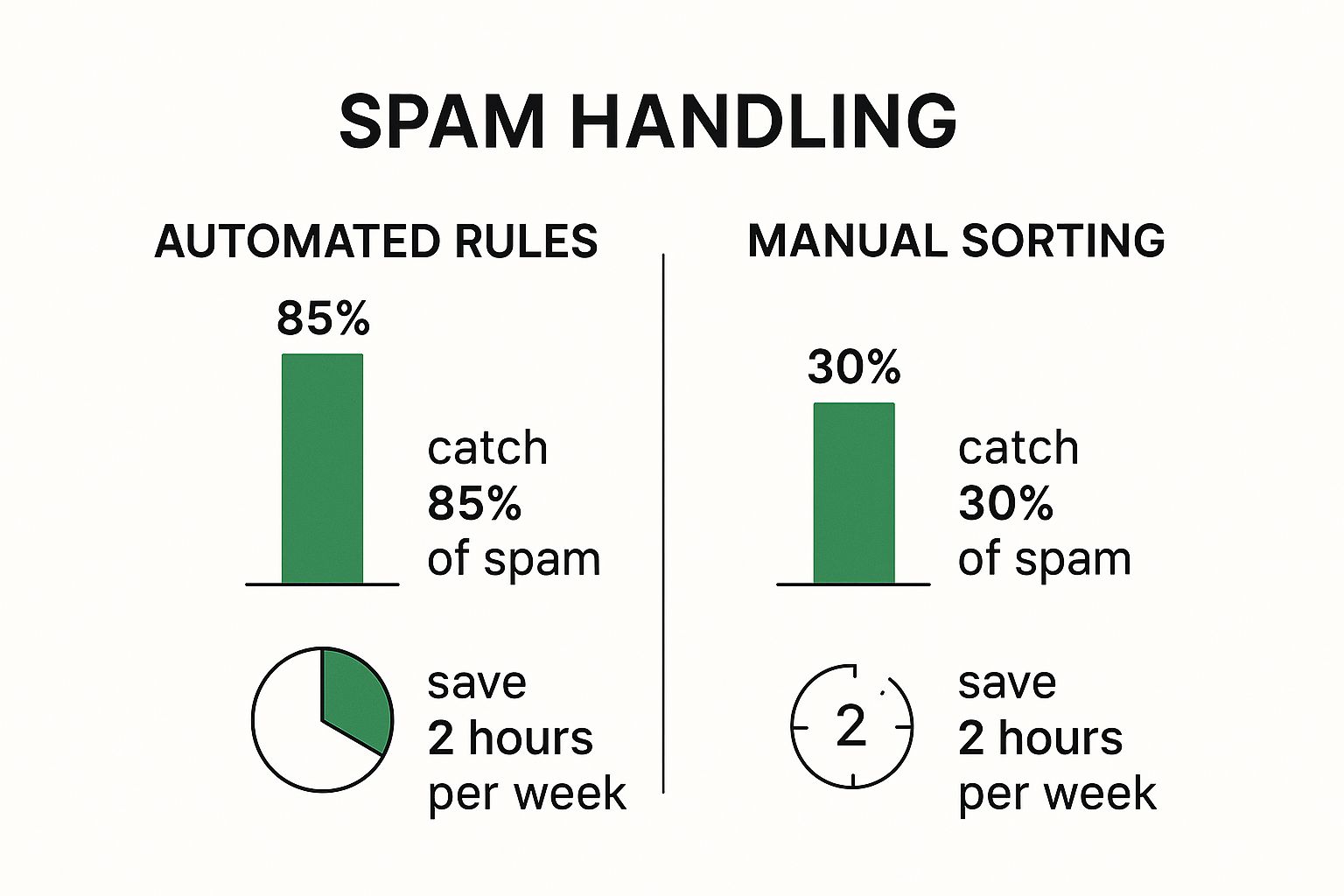
    This visual shows just how much more effective automated filtering—a core strength of secure platforms—is compared to sorting junk mail by hand.

    Image

    As you can see, letting a robust system do the work isn't just more accurate; it frees up a surprising amount of your time every single week.

    The table below breaks down the key differences you can expect.

    Comparing Standard vs Secure Email Providers

    While free services are a great starting point, a secure, paid provider offers a fundamentally different level of protection and privacy.

    Feature Standard Providers (e.g., Gmail) Secure Providers (e.g., ProtonMail)
    Primary Business Model Ad-supported, based on user data analysis Subscription-based, focused on user privacy and security
    Spam Filtering Focus General-purpose, balances filtering with ad-related data needs Aggressive and security-focused, no conflicting ad business interests
    Encryption Encrypts data in transit, but provider can access emails End-to-end encryption and zero-access architecture by default
    Data Privacy Emails are often scanned to personalize ads and other services Your emails are never scanned or shared with third parties for marketing
    Account Security Standard 2FA and security options Advanced features like hardware key support and anonymous signup options
    Cost Free (with data as the "payment") Paid subscription (typically a few dollars per month)

    Ultimately, the choice comes down to what you value most. A secure provider is an investment in a more private and less cluttered digital life.

    Making the Switch for Good

    I get it—moving to a new email address can feel like a major project. But think of it as the final, decisive step toward permanently stopping junk mail. These hosted email services are built for people who are serious about reclaiming their privacy and finally getting a quiet inbox.

    Here’s what you get when you upgrade:

    • Best-in-Class Spam Filtering: Their algorithms are purely focused on security, so they catch the nasty, sophisticated junk that slips through other filters.
    • An End to Data Mining: Your personal conversations stay personal. No scanning, no selling to advertisers.
    • A Fortress of Security: Features like end-to-end encryption protect you from far more than just annoying spam.

    Free services offer a fence. A dedicated secure email host gives you a fortress. It's a small investment for a much cleaner, safer, and more private online experience.

    Adopting Habits That Keep Your Inbox Clean

    Image

    Even the most sophisticated email security platform can't save an email address that’s shared carelessly across the web. While technology gives us a powerful shield, it's our daily online habits that truly harden our defenses against the constant onslaught of spam. Think of it as the final, crucial layer in your strategy to reclaim your inbox.

    The single most important habit to learn is this: never click "unsubscribe" on an email you already know is spam. Legitimate companies are required to honor those requests, but spammers see that link as a golden opportunity. Clicking it simply confirms your email address is active and that a real person is on the other end, which often invites even more junk mail.

    Cultivating Mindful Online Behavior

    Protecting your primary email address starts with being more deliberate and skeptical about where you share it. Before you type it into any sign-up form, take a moment to consider your email privacy.

    A classic trick you'll see everywhere is the pre-checked marketing box. When you're creating a new account or making a purchase, hunt for those little boxes that automatically opt you into newsletters and promotional materials. Making a habit of unchecking them every single time is a small effort that prevents a massive amount of future clutter.

    Phishing, a particularly nasty type of spam, is a global menace. An estimated 3.4 billion phishing emails are sent every single day. For businesses, the fallout from a successful attack is immense, costing an average of $4.88 million per data breach. Being hyper-vigilant about what you click is your best defense. You can dig into the latest phishing statistics and trends to really grasp the scale of the problem.

    Strengthening Your Account Security

    Your email account is the master key to your digital life. It’s tied to your banking, social media, and countless other services. Protecting it isn't just about stopping annoying spam—it's about securing your entire online identity. This is where basic security hygiene becomes absolutely non-negotiable.

    Here are a couple of essential practices you should implement right now:

    • Use Strong, Unique Passwords: Reusing passwords is one of the biggest security mistakes you can make. Get a good password manager to create and store long, complex, and unique passwords for every single account you own. That way, if one site gets breached, your email remains locked down.

    • Enable Two-Factor Authentication (2FA): This is arguably the most effective security measure you can take. 2FA adds a second verification step, like a code sent to your phone, before granting access. It’s a simple move that effectively slams the door on anyone who has managed to steal your password.

    Adopting these habits does more than just filter out noise. It transforms your inbox from an easy target into a fortified space, making it dramatically harder for spammers and cybercriminals to get through.

    Answering Your Top Questions About Stopping Spam

    Even after setting up the best defenses, you'll still have questions pop up. It's just the nature of the beast. Let's tackle some of the most common ones I hear, so you can handle those tricky situations with confidence.

    Should I Click Unsubscribe on Spam Emails?

    This is the million-dollar question, and the answer is… it depends. If the email is from a legitimate business you know—like a retailer you bought something from or a newsletter you actually remember subscribing to—then yes, the unsubscribe link is your friend. They are legally required to honor it.

    But for anything that looks even remotely like junk, a phishing attempt, or just a sender you've never heard of? Do not click "unsubscribe." Hitting that link often does the opposite of what you want. It's like raising your hand in a crowd of spammers and shouting, "Hey, this email address is active!" This just confirms your address is real, making it more valuable to them and other data brokers.

    My rule of thumb is simple: If you don't recognize it, don't risk it. Just mark it as spam and let your email provider take it from there.

    Why Am I Suddenly Getting So Much Spam?

    It's unsettling when your inbox goes from a gentle stream to a raging flood of junk overnight. This usually happens for a few key reasons. Most of the time, your email was probably scooped up in a recent data breach from a service you use, compromising your email security.

    Another common culprit is signing up for a new app or website that quietly sells your data to marketing partners. And sometimes, it's just bad luck—your email might have been scraped from a public website by a bot or even just guessed by a spammer's algorithm. A quick check on a site like Have I Been Pwned can often tell you if you've been part of a known breach.

    Can I Report Spam to Make a Difference?

    Yes, you can, and you absolutely should. The single most powerful thing you can do is hit that "Mark as Spam" or "Report Junk" button in your email app. This isn't just about cleaning up your own inbox. It sends valuable intel back to your email provider, helping them train their filters to catch similar junk for everyone. You’re contributing to better email security for all users of that platform.

    For the really nasty stuff, like phishing scams trying to steal your info, you can go a step further. Forwarding the email to dedicated anti-cybercrime groups helps them track and shut down these operations. In the U.S., you can forward them to the Anti-Phishing Working Group at reportphishing@apwg.org or the FTC at spam@uce.gov.

    Is It Possible to Get Rid of Spam Forever?

    I'd love to say yes, but the honest answer is no. Getting rid of 100% of spam forever is pretty much impossible. Spammers are relentless and are always inventing new ways to slip past the defenses we put up.

    The realistic goal isn't a completely sterile inbox, but one that is secure, manageable, and overwhelmingly clean. By using the strategies in this guide—from smart filtering and email aliases to a truly secure email provider—you can slash incoming spam by over 99%. And remember, this fight isn't just limited to email. To truly protect your focus, it's worth exploring effective ways to block unwanted phone calls as well.


    Ready for an inbox that’s secure, private, and finally free from spam and ads? Typewire offers a premium email experience built on privacy from the ground up. With advanced anti-spam protection, no tracking, and zero data mining, you can take back control of your communications. Explore our secure email hosting and start your 7-day free trial today at https://typewire.com.