Category: Uncategorized

  • How to Set Up Custom Email Domain: Your Complete Guide

    How to Set Up Custom Email Domain: Your Complete Guide

    Why Custom Email Domains Transform Your Business Credibility

    Custom Email Domain

    Let's be honest, using a generic email like yourbusiness@gmail.com doesn't exactly project a professional image. It can make your business seem small, or even like a hobby. In the competitive business world, first impressions matter, and your email address is often that initial touchpoint with potential clients. A custom email domain, such as info@yourbusiness.com, immediately elevates your brand and shows you're serious in a way generic addresses just can't. This seemingly minor change can have a big impact on how clients see you.

    Imagine getting a proposal from a consultant using a Hotmail address. Would they carry the same weight as a competitor using a branded email? Probably not. A custom domain signals stability and investment in your business. It tells people you’re not here today, gone tomorrow. This sense of permanence builds trust and confidence in your brand.

    Customers are more likely to see you as legitimate and dependable when you contact them from a professional email address. It's a sign you're invested in your business and take your communication seriously.

    A custom domain also reinforces your brand identity. Every email becomes a subtle reminder of your brand name and website. It's a consistent branding touchpoint that strengthens your professional image with every interaction. This consistent branding builds familiarity and helps you stand out. It's a small but effective way to keep your business top-of-mind for clients and prospects. For a deeper dive into this, check out this article: Email With Custom Domain: Boost Your Business Credibility.

    To illustrate the impact of a custom domain, let's look at some data.

    Industry reports from 2024 indicate that custom email domains correlate with nearly 60% higher customer trust compared to generic emails. And service providers have seen custom domain setups increase by about 15% year-over-year since 2020. Discover more insights. These numbers highlight the real difference a custom domain can make to your credibility and how customers perceive you. In a world where trust is king, a professional email can be the reason a potential client chooses you over someone else. Switching to a custom domain is an investment that pays off in trust, brand recognition, and ultimately, growth.

    Let’s look at a direct comparison to make it even clearer.

    I've put together a table to highlight the key differences between generic and custom email addresses in terms of trust, response rates, and perceived professionalism:

    Generic vs Custom Email: Trust and Engagement Comparison

    Email Type Customer Trust Level Response Rate Perceived Professionalism
    Generic (e.g., @gmail.com) Lower Lower Less Professional
    Custom (e.g., @yourbusiness.com) Higher (nearly 60% higher) Higher More Professional

    As you can see, a custom email address significantly boosts your business credibility across the board. While a generic email might be fine for personal use, investing in a custom domain is crucial for building a strong and trustworthy brand image for your business. It's a small change with a big impact.

    Finding Your Perfect Domain and Email Hosting Match

    Domain and Hosting

    Picking a domain name and email hosting is kind of like finding the right apartment. You're not just looking for a place to crash for a weekend; you need something that fits your lifestyle, budget, and long-term plans. There are tons of options out there, and making the wrong choice can lead to some serious headaches down the line.

    Picking the right domain is your first step. Think of it as your online street address. You want something memorable, easy to spell, and relevant to what you do. Then there's the actual email hosting—where your digital mail gets delivered. Security, storage, and features are all key factors to consider here. You need a provider you can trust with your important communications. Setting this all up involves buying your domain (usually $10 to $50 annually) and linking it to your chosen email host. Thankfully, providers like Google Workspace and Microsoft 365 have helpful guides to make the process pretty straightforward. In fact, over 90% of new businesses manage to get their custom email up and running within a day! For more insights on this, check out this interesting article.

    Beyond the Basics: Features and Functionality

    Now, let's talk about features. It's easy to get caught up in flashy marketing, but what do you really need for your day-to-day work? A shared calendar? Large file attachments? Collaboration tools? Think about your current workflow and how email integrates into that.

    Don't forget about the future, either. As your business grows, your email needs will likely change. Pick a provider that can scale with you and adapt to those evolving requirements. If you're in a field with strict privacy regulations, this article on HIPAA compliant email hosting might be useful.

    And while those introductory offers can be tempting, make sure you look at the long-term cost. What’s the price after that initial discount period expires? Are there hidden fees for extra storage or users? Sometimes, paying a bit more upfront for a provider with better security and support can actually save you money (and stress) down the road.

    The Unsung Heroes: Reliability and Support

    Lastly, something people often overlook: reliability and customer support. What happens when things go wrong (because let's be honest, they sometimes do)? A provider with solid uptime and responsive support can be a lifesaver. Look for 24/7 support with various ways to reach them—phone, email, or even live chat. A quick response time and helpful support staff can make a world of difference. Choosing the right domain and email hosting is an investment in your business. Take your time, do your research, and you’ll be set for success.

    Mastering DNS Records Without the Technical Headaches

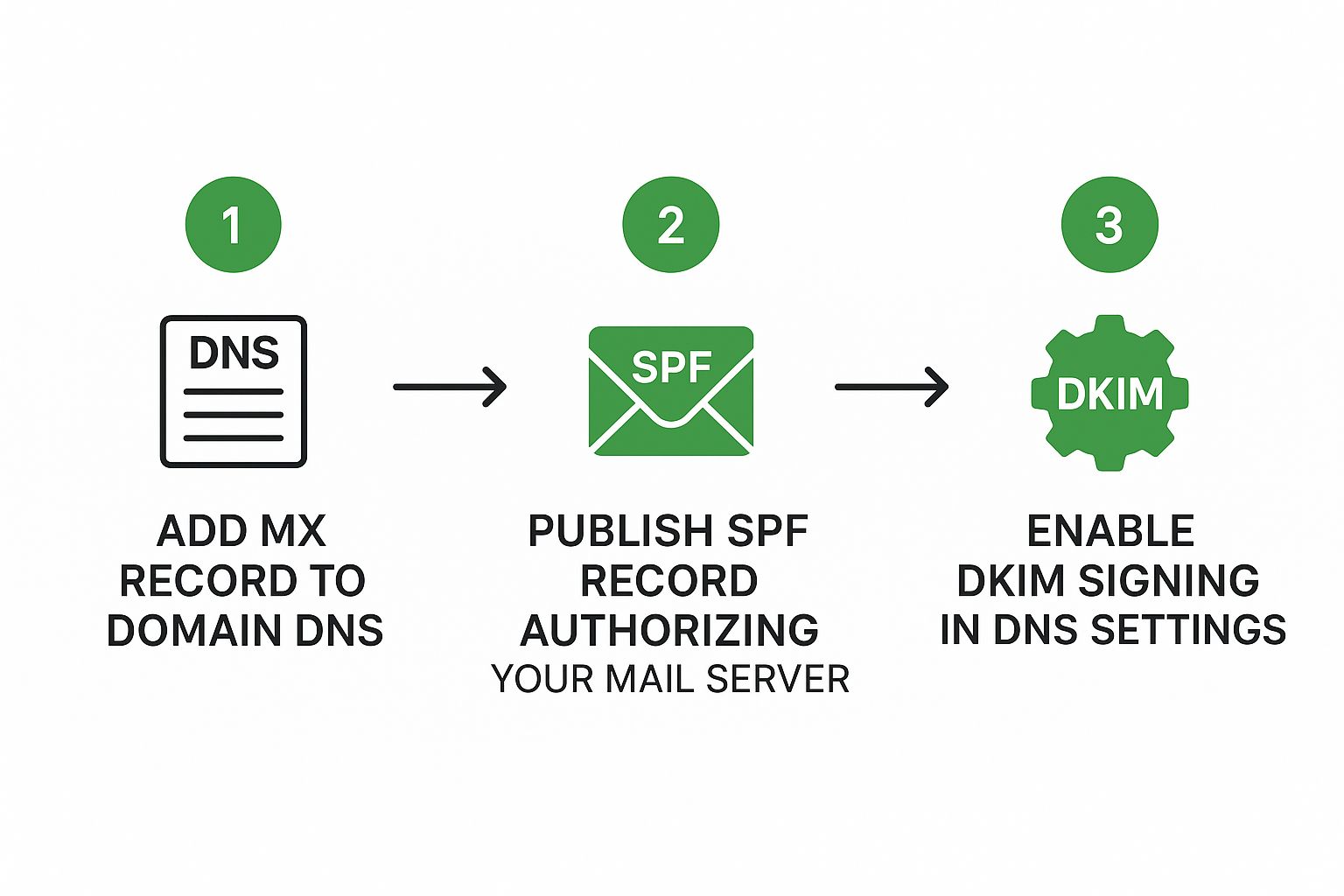
    Infographic about how to set up custom email domain

    This infographic neatly lays out the three main steps for setting up your custom email domain: adding the MX record, publishing the SPF record, and enabling DKIM signing. Each step builds on the previous one, creating a secure and reliable email system. It’s like building a well-oiled postal service, just for your domain! The infographic shows how straightforward the process can be.

    Let’s break down these crucial DNS records. They’re essentially the instruction manual for your email, telling the internet where to send your messages and how to verify they're legitimate. The most important record is the MX record (Mail Exchange). This tells other mail servers where your email server lives, so they know where to deliver your messages. Think of it as the address on an envelope – crucial for delivery!

    The SPF record (Sender Policy Framework) acts like a security guard. It tells the internet which servers are allowed to send emails on your behalf. This helps prevent email spoofing, where spammers try to send messages that look like they’re from you. A strong SPF record is like a bouncer at a club, keeping the unwanted out. And considering that over 85% of companies with custom domains use security features like SPF and DKIM (according to 2023 security market research), it's clearly important. For a deeper dive into email security, check out this helpful article.

    Screenshot from https://www.cloudflare.com/learning/dns/dns-records/
    This screenshot shows the different types of DNS records, each with its own important job in managing internet traffic and ensuring things run smoothly. It highlights the importance of getting these settings right.

    Finally, there's DKIM (DomainKeys Identified Mail). This adds a digital signature to your outgoing emails, verifying they haven’t been tampered with. It’s like a tamper-proof seal, confirming your message arrived intact. This gives email providers more confidence that your emails are genuine, helping keep them out of the spam folder.

    Getting these records configured correctly is essential for a professional online presence. You want your emails landing in inboxes, not spam folders, so they can actually reach your audience and build trust. A secure and reliable email setup is a cornerstone of good business communication, freeing you up to focus on what really matters: growing your business and connecting with your customers.

    Getting Your Email Client Working Seamlessly

    Email Client Setup

    Okay, the DNS configuration is all squared away. Now comes the rewarding part: ensuring your email works precisely where you need it. This is where setting up your custom email domain truly shines. Whether you're a dedicated Outlook user, an Apple Mail aficionado, or firmly in the Gmail camp, this is about achieving a smooth, integrated experience. Think of it as settling into that perfectly furnished apartment—now it's time to make it feel like home.

    IMAP vs. POP3: Choosing the Right Protocol

    One of the initial choices you'll face is deciding between IMAP and POP3. These are the communication methods your email client uses to interact with the server. Selecting the appropriate one is paramount for an efficient workflow.

    IMAP is akin to having a real-time view of your inbox. Any changes made on one device instantly appear on all your other devices. Deleted an email on your phone? It vanishes from your desktop too. This is the standard operating procedure for most contemporary email platforms and generally the preferred option for seamless synchronization across devices.

    POP3, conversely, is more like downloading your mail. Once it's on your device, it effectively becomes a local copy. Any modifications you make won't be reflected on the server. This can result in a disorganized, fragmented setup. Unless you have a very compelling reason to use POP3, I'd advise sticking with IMAP. Believe me, I've learned this the hard way!

    Optimal Settings and Troubleshooting Tips

    For a truly seamless experience, using the correct settings is crucial. Most email services provide tailored configurations for various email clients. Don't hesitate to delve into their help documentation—you might be surprised at how useful it can be.

    To simplify things, here's a quick reference table for common email clients:

    To help you out, I've put together a handy table:

    Email Client Configuration Settings Quick Reference

    Email Client IMAP Settings SMTP Settings Security Type
    Outlook (Refer to your provider's documentation) (Refer to your provider's documentation) SSL/TLS
    Apple Mail (Refer to your provider's documentation) (Refer to your provider's documentation) SSL/TLS
    Gmail (Refer to your provider's documentation) (Refer to your provider's documentation) SSL/TLS

    This table gives you a starting point, but always double-check your provider's specific instructions.

    Even with flawless instructions, occasional hiccups can occur. Don't worry! The most frequent culprits are typos in the server names or port numbers. Meticulously double-check everything, ensuring those settings match exactly what your provider specifies.

    Mobile Configuration and Syncing Strategies

    In our increasingly mobile world, keeping your email synchronized across devices is essential. The good news is, most modern email clients handle this automatically with IMAP. Simply input the same server settings on your phone and tablet as your desktop, and you're all set.

    Having everything in sync empowers you to stay on top of your inbox wherever you are. This is incredibly useful for managing communication on the go and never missing an important message.

    With your email client properly configured, you're ready to connect with your contacts professionally. Remember, using the right protocol and precise settings are the cornerstones of a seamless email experience. This sets the stage for impactful communication, letting you focus on nurturing relationships and expanding your business.

    Ensuring Your Emails Actually Reach Their Destination

    You’ve configured your custom email domain on Typewire—fantastic! But setting things up is just the first step. Now, you need to make sure your emails don't disappear into the internet ether. Think of it like this: you've addressed the envelope perfectly, but you still need the postal service to cooperate.

    So, how do you ensure your messages land safely in the inbox?

    Testing Your Setup: Playing Email Detective

    Start by sending a test email to yourself and a handful of friends. Use a mix of email providers like Gmail, Yahoo, and Outlook to mimic real-world conditions. This helps you spot problems early. Check if the emails arrive on time, look right, and—most importantly—don’t get trapped in spam folders. It's like a test drive for your email system.

    Next, dive into authentication. This process confirms that your emails are truly coming from you, which builds trust with email providers. There are plenty of free online tools to analyze your email headers and break down your authentication setup. You’re looking for SPF, DKIM, and DMARC records. These are like digital signatures that vouch for your email's legitimacy. Want a deeper dive into email authentication? Check out this handy guide: How to Authenticate Email: Real-World Setup Guide That Works.

    Warming Up Your Domain: A Gradual Approach

    If your domain is brand new, ease into it. Imagine suddenly blasting out thousands of emails—email providers might get a little suspicious. It's like showing up in a new town and immediately trying to run for mayor. Instead, gradually increase your sending volume over a few weeks. This “warm-up” period lets providers recognize you as a legitimate sender, building trust and boosting your sender reputation.

    Deliverability Metrics: The Real Measures of Success

    Now, let’s talk deliverability. This is about more than just sending emails; it’s about making sure they reach the inbox, not the spam folder. Your bounce rate (the percentage of undelivered emails) and spam complaint rate are your key performance indicators. A high bounce rate might point to problems with your email list or server configuration. A high spam complaint rate? That’s a red flag that could land you on a blacklist. These metrics are like your email's vital signs—telling you if your messages are getting through. Did you know over 70% of marketing professionals find custom email domains improve deliverability? And personalized, domain-branded emails see a 26% higher open rate than generic addresses. For more eye-opening email stats, take a look at this: email statistics.

    Long-Term Monitoring and Adjustments

    Managing your email domain isn’t a one-and-done deal; it's an ongoing process. Regularly monitor your deliverability metrics. If you see red flags like rising bounce rates or spam complaints, it's time to troubleshoot. Maybe your email list needs a cleanup, or your server configuration needs tweaking. Think of it like tending a garden—regular care keeps things flourishing.

    Solving Problems and Keeping Everything Running Smoothly

    Setting up a custom email domain is usually a pretty straightforward process, but let's be honest, sometimes it can feel like you're wrestling an octopus. Even if you've done this a dozen times, weird little hiccups can still pop up. So, let's talk about some common issues, how to fix them, and how to keep your email humming along smoothly.

    Troubleshooting Common Email Headaches

    Occasionally, you might run into bouncing emails, authentication errors, or the dreaded spam filter. These are usually pretty easy to fix, even if they seem intimidating at first.

    • Bouncing Emails: Ever send a letter that gets returned to you? That's a bounced email. It usually means the address is wrong, the recipient's inbox is full, or there's a problem on their server. Double-check the address and try again a bit later. If it still bounces, the issue might be on their end.

    • Authentication Errors: Think of this as your email getting flagged by a security guard. It often happens because your SPF, DKIM, or DMARC records aren't quite right. Double-check your DNS settings in your domain registrar (like GoDaddy or Namecheap) and make sure they match what your email provider wants.

    • Emails Landing in Spam: This one's a pain. Spam filters are like overly zealous bouncers at a club. Your sender reputation, the words you use in your email, and your authentication all play a role. Build up a good reputation by slowly increasing the number of emails you send, avoid spammy words (like "free money!"), and make sure those authentication records are spot-on.

    This screenshot shows the Google Workspace Admin console. It's mission control for your email. From here, you manage users and settings, so it's definitely worth getting to know your provider's equivalent. Being familiar with this interface will save you a ton of time when troubleshooting.

    Maintaining Your Email System: The Long-Term View

    Once your custom domain is set up, a little regular maintenance goes a long way. It's like changing the oil in your car – it keeps things running smoothly and prevents bigger problems.

    • Security Updates: Just like any software, your email server and client software need regular security updates. Think of these as reinforcing the locks on your doors. Keeping your software current is key to staying safe.

    • Backups: Imagine losing all your email! Backups are your safety net. If anything goes wrong, you can restore your messages and breathe a sigh of relief. Most providers offer some form of backup, so check your options.

    • Monitoring: Keep an eye on how your email is performing. Watch things like deliverability rates and bounces. Think of this as checking the gauges on your car's dashboard. Catching potential problems early can save you from a major headache later on.

    A custom email domain is a real investment in your professional image. By tackling these troubleshooting and maintenance points, you’ll ensure your email stays secure and keeps your brand looking sharp. Ready to give it a try? Typewire offers a free trial, so you can experience the benefits of a secure, custom email platform firsthand.

  • Top 12 Email Filtering Solutions for Enhanced Inbox Security

    Top 12 Email Filtering Solutions for Enhanced Inbox Security

    Take Back Control of Your Inbox: A Guide to Powerful Email Filtering

    Tired of endless spam, phishing attacks, and unwanted clutter clogging your inbox? Effective email filtering is critical for individuals and businesses alike. This guide provides in-depth reviews of 12 powerful email filtering solutions, going beyond simple marketing copy. We'll explore each tool's strengths and weaknesses based on extensive usage, offering clear guidance to help you choose the right fit.

    This comprehensive resource examines the essential features, pricing tiers, pros, cons, and ideal use cases for each solution. Whether you're a privacy-focused individual, a small business owner, or an IT administrator, this listicle will equip you to make an informed decision. We'll cut through the noise and provide actionable insights to reclaim your inbox and improve your productivity.

    This guide delves into the following email filtering solutions:

    1. Typewire
    2. SpamTitan Email Security
    3. Proofpoint Email Protection
    4. Mimecast Secure Email Gateway
    5. Barracuda Email Security Gateway
    6. Cisco Secure Email (IronPort)
    7. Microsoft Defender for Office 365
    8. Avanan Cloud Email Security
    9. Trustifi Email Security
    10. Libraesva Email Security
    11. Sophos Email Appliance
    12. Trend Micro Email Security

    From robust enterprise-grade platforms to user-friendly solutions for individuals, we cover a wide range of options to address diverse needs. You'll gain practical insights to effectively combat spam, malware, and phishing attempts while streamlining your email workflow. Stop wasting time sifting through junk – discover the perfect email filtering solution to take back control of your inbox.

    1. Typewire

    Typewire distinguishes itself as a privacy-focused email filtering solution by prioritizing data security and user control. It's built for individuals and businesses who value ad-free, no-tracking email hosting. This platform offers a refreshing alternative to mainstream providers that often prioritize data mining and advertising over user privacy. Typewire shines in its commitment to keeping your data yours.

    Typewire

    Key Features and Benefits

    Typewire's core strength lies in its robust privacy features. Data is hosted in privately owned Canadian data centers, avoiding third-party cloud services. This provides an extra layer of security and control. Advanced anti-spam and virus filtering keeps your inbox clean and focused. The intuitive web interface, available in light and dark modes, makes email management straightforward. Migration from platforms like Gmail and Outlook is reportedly seamless.

    Pricing and Plans

    Typewire offers flexible pricing tiers, including free, basic, and premium options. This caters to individual users and teams with varying needs. While tiered pricing offers flexibility, specific costs require a visit to their website. This minor inconvenience is outweighed by the transparency of no hidden fees. A 7-day free trial allows risk-free exploration of the platform's features.

    Pros and Cons

    Pros:

    • Complete privacy with zero ads, tracking, or data mining.
    • Secure data storage in privately owned Canadian data centers.
    • Advanced anti-spam and virus protection.
    • Flexible pricing plans.
    • User-friendly interface with light/dark modes.

    Cons:

    • Specific pricing details require visiting the website.
    • Limited to email hosting; lacks broader collaboration tools.

    Implementation and Use Cases

    Typewire is ideal for privacy-conscious individuals and businesses seeking secure email hosting. Its custom domain support makes it suitable for professional use. The advanced filtering makes it an excellent email filtering solution for those overwhelmed by spam. While it excels in secure communication, its focus on email may limit its appeal for users requiring integrated collaboration tools.

    Final Thoughts

    Typewire provides a compelling solution for those prioritizing privacy and control in their email communications. Its robust security features, coupled with an intuitive interface, make it a strong contender in the realm of email filtering solutions. Check out their website for a deeper dive into their offerings: https://typewire.com

    2. SpamTitan Email Security

    SpamTitan Email Security offers a robust defense against spam, phishing attacks, malware, and other email-borne threats. It's designed for organizations seeking comprehensive protection without complex setup or management. This solution excels in its ability to block malicious emails before they reach users' inboxes, minimizing disruptions and enhancing productivity. For a comprehensive comparison of various email filtering solutions, you can Learn more about….

    SpamTitan Email Security

    Key Features and Benefits

    SpamTitan's strength lies in its multi-layered approach to email security. Advanced spam and virus filtering, powered by real-time blacklist monitoring, ensures high threat detection rates. The platform's phishing and malware protection actively identifies and quarantines suspicious emails. Seamless integration with Office 365 and Google Workspace simplifies deployment for organizations using these platforms.

    Pricing and Plans

    SpamTitan offers various pricing tiers based on user count, making it adaptable for small to medium-sized businesses. Specific pricing details are available on their website. This approach allows for tailored solutions to match specific organizational needs and budgets.

    Pros and Cons

    Pros:

    • High spam detection rate.
    • Easy deployment and management.
    • Cost-effective for SMBs.
    • Integrates with Office 365 and Google Workspace.

    Cons:

    • Limited advanced threat protection features, especially when compared to enterprise-grade solutions. This might necessitate supplemental security measures for organizations with high-security requirements.

    Implementation and Use Cases

    SpamTitan is ideal for small to medium-sized businesses seeking a straightforward yet effective email filtering solution. Its ease of deployment and user-friendly interface minimize administrative overhead. The platform's robust filtering capabilities make it suitable for organizations dealing with high volumes of email traffic.

    Final Thoughts

    SpamTitan offers a practical and efficient email filtering solution, balancing comprehensive protection with ease of use. Its focus on core email security features makes it a strong choice for organizations prioritizing simplicity and affordability. Check out their website for a deeper dive into their offerings: https://expertinsights.com/insights/the-top-email-anti-spam-filtering-solutions/?utm_source=openai

    3. Proofpoint Email Protection

    Proofpoint Email Protection stands out as a comprehensive email security solution designed for businesses seeking robust protection against advanced threats. It goes beyond basic spam filtering by incorporating dynamic reputation analysis and advanced threat intelligence. This makes it a powerful tool for organizations prioritizing email security and data protection. Proofpoint focuses on safeguarding corporate email systems from phishing, malware, and other sophisticated attacks.

    Proofpoint Email Protection

    Key Features and Benefits

    Proofpoint's strength lies in its multi-layered approach to email security. Advanced filtering techniques, including URL and attachment sandboxing, effectively identify and neutralize malicious content. Dynamic reputation analysis assesses the trustworthiness of incoming emails in real-time. This proactive approach significantly reduces the risk of phishing attacks and malware infections. The platform also offers robust Data Loss Prevention (DLP) capabilities.

    Pricing and Plans

    Proofpoint offers various pricing tiers based on the specific features and level of protection required. Detailed pricing information is typically obtained through contacting their sales team. This allows for customized solutions tailored to individual business needs. While specific costs aren't readily available, the investment reflects the comprehensive nature of the platform's security features.

    Pros and Cons

    Pros:

    • Comprehensive protection against sophisticated email threats.
    • High accuracy in threat detection through advanced technologies.
    • User-friendly interface for managing security policies and reports.
    • Detailed threat intelligence and reporting provide valuable insights.

    Cons:

    • Higher cost compared to some competitors, potentially limiting accessibility for smaller businesses.

    Implementation and Use Cases

    Proofpoint is ideal for businesses of all sizes, particularly those in regulated industries with stringent security requirements. Its advanced threat protection makes it well-suited for organizations handling sensitive data. The platform's scalability allows it to adapt to growing business needs. It's a valuable email filtering solution for companies seeking to enhance their overall security posture.

    Final Thoughts

    Proofpoint Email Protection offers a powerful defense against the evolving landscape of email threats. While the investment may be higher, the comprehensive protection and advanced features justify the cost for businesses prioritizing robust email security. For more detailed information and specific pricing, visit their website: https://preventiveapproach.com/top-anti-phishing-solutions/?utm_source=openai

    4. Mimecast Secure Email Gateway

    Mimecast offers a comprehensive suite of email security and management tools, going beyond basic filtering. It provides robust protection against spam, phishing, malware, and other email-borne threats. This makes it a strong choice for businesses prioritizing a secure and reliable email environment. Mimecast also offers archiving and continuity services, ensuring access to emails even during outages.

    Mimecast Secure Email Gateway

    Key Features and Benefits

    Mimecast's strength lies in its integrated approach to email security. Its URL and attachment protection scans for malicious links and files, preventing them from reaching your inbox. Impersonation detection helps identify and block emails from spoofed senders. The platform also provides user awareness training, educating employees about phishing and other threats.

    Pricing and Plans

    Mimecast offers various plans tailored to different business sizes and needs. Specific pricing details are available on their website or through a sales consultation. This tailored approach allows for customized solutions, but can make quick price comparisons challenging.

    Pros and Cons

    Pros:

    • All-in-one solution for email security and management.
    • Comprehensive threat protection including spam, phishing, and malware.
    • Reliable performance and uptime.
    • Archiving and continuity services for uninterrupted email access.

    Cons:

    • Can have a steeper learning curve for new users due to its extensive features.
    • Pricing requires direct contact, making quick comparisons difficult.

    Implementation and Use Cases

    Mimecast is ideal for businesses of all sizes looking for a robust email security solution. Its comprehensive features make it suitable for organizations with strict compliance requirements. The archiving and continuity features are valuable for businesses requiring uninterrupted email access. It's a powerful email filtering solution, but requires some initial investment in training and setup.

    Final Thoughts

    Mimecast provides a powerful and comprehensive solution for email security and management. While it may present a learning curve initially, its robust features and reliable performance make it a valuable asset for businesses prioritizing email security. For a deeper dive into their specific offerings, visit their website: https://preventiveapproach.com/top-anti-phishing-solutions/?utm_source=openai

    5. Barracuda Email Security Gateway

    Barracuda Email Security Gateway offers a robust defense against various email-borne threats, including phishing attacks, malware, and spam. It provides both cloud-based and on-premises deployment options, making it adaptable to different business needs and IT infrastructures. This flexibility allows organizations to choose the solution that best fits their existing setup and security requirements. For those concerned about increasingly sophisticated phishing attempts, Barracuda offers a vital layer of protection.

    Barracuda Email Security Gateway

    Key Features and Benefits

    Barracuda's real-time threat protection utilizes advanced filtering techniques to identify and quarantine malicious emails before they reach user inboxes. Email encryption and data loss prevention (DLP) features help safeguard sensitive information. Outbound filtering prevents data leaks by monitoring outgoing emails for confidential data. The platform boasts a user-friendly management interface, simplifying administration and policy configuration. Integration with Microsoft Sentinel enhances security for Office 365 users. If you're interested in stopping unwanted emails, learn more about how to achieve that.

    Pricing and Plans

    Barracuda offers various pricing tiers based on features, user count, and deployment model. Detailed pricing information is available on their website or through contacting their sales team. This personalized approach ensures businesses receive a tailored solution that matches their budget and requirements.

    Pros and Cons

    Pros:

    • Comprehensive protection against a broad spectrum of email threats.
    • Automated incident response and remediation capabilities.
    • Seamless integration with Office 365 via Microsoft Sentinel.
    • Flexible deployment options (cloud-based or on-premises).
    • User-friendly management interface.

    Cons:

    • Primarily caters to small and midsized businesses. Larger enterprises may require more extensive solutions.

    Implementation and Use Cases

    Barracuda Email Security Gateway is well-suited for small to medium-sized businesses seeking comprehensive email security. Its flexible deployment options make it adaptable to various IT environments. The user-friendly interface simplifies administration and policy management. While ideal for smaller businesses, larger organizations might find its scalability limited.

    Final Thoughts

    Barracuda presents a robust email filtering solution, especially for businesses seeking comprehensive protection against diverse email threats. Its automated incident response and flexible deployment options are notable advantages. Check out their website for a deeper dive into their specific offerings: https://preventiveapproach.com/top-anti-phishing-solutions/?utm_source=openai

    6. Cisco Secure Email (IronPort)

    Cisco Secure Email (formerly IronPort) offers enterprise-grade email security, moving beyond basic filtering to encompass advanced threat protection, data loss prevention, and encryption. This makes it a robust solution for organizations prioritizing comprehensive email security. It's particularly well-suited for mid-sized to large businesses with complex security needs.

    Cisco Secure Email (IronPort)

    Key Features and Benefits

    Cisco Secure Email leverages machine learning and Cisco Talos threat intelligence for real-time protection against evolving threats. Features include advanced anti-phishing, anti-malware, and ransomware protection. Data loss prevention and email encryption enhance compliance and data security. Comprehensive reporting and analytics provide valuable insights into email traffic and security posture.

    Pricing and Plans

    Cisco offers tiered pricing based on user count and features. Specific pricing requires contacting Cisco directly. This enterprise-focused approach often involves tailored solutions and custom quotes. It’s best to consult with their sales team for detailed pricing information relevant to your organization's size and needs.

    Pros and Cons

    Pros:

    • Robust email security features including encryption and data loss prevention.
    • Effective malware and ransomware protection through advanced sandboxing.
    • Integration with the broader Cisco security ecosystem.
    • Real-time threat intelligence updates from Cisco Talos.

    Cons:

    • Complex deployment and management can be challenging for smaller IT teams.
    • Pricing is not readily available and often requires custom quotes.

    Implementation and Use Cases

    Cisco Secure Email is best suited for organizations with dedicated IT resources and a strong emphasis on email security. Its advanced features make it ideal for industries with strict regulatory compliance requirements, such as finance and healthcare. Integrating it with other Cisco security products provides a unified security posture.

    Final Thoughts

    Cisco Secure Email (IronPort) is a powerful email filtering solution that delivers enterprise-grade protection. Its advanced threat intelligence and robust security features make it a valuable asset for organizations seeking comprehensive email security. Visit the Cisco website to learn more and request a quote.

    7. Microsoft Defender for Office 365

    Microsoft Defender for Office 365 is a cloud-based email filtering solution that bolsters the built-in security of the Microsoft 365 email platform. It provides advanced protection against sophisticated email threats, such as phishing and business email compromise. This makes it a valuable tool for organizations already invested in the Microsoft ecosystem. For a deeper understanding of email security protocols and their role in safeguarding your communications, you might find this guide helpful: Learn more about secure email protocols.

    Key Features and Benefits

    Defender for Office 365 uses AI-powered threat detection to identify and block malicious emails in real-time. Its anti-phishing policies help protect against fraudulent emails attempting to steal credentials. Anti-malware capabilities scan attachments and links for known threats. Real-time reporting and investigation tools provide administrators with insights into detected threats and allow for swift response and remediation.

    Pricing and Plans

    Defender for Office 365 is available as an add-on to existing Microsoft 365 subscriptions. Different tiers offer varying levels of protection and features. Some advanced functionalities may require higher-tier plans. This tiered approach provides flexibility, but detailed pricing information requires checking the Microsoft website.

    Pros and Cons

    Pros:

    • Seamless integration with existing Microsoft 365 environments.
    • Centralized administration and policy management.
    • AI-powered threat detection for proactive protection.
    • Comprehensive reporting and investigation tools.

    Cons:

    • Advanced features often necessitate higher-tier subscriptions.
    • Can be complex to configure for users unfamiliar with Microsoft 365 administration.

    Implementation and Use Cases

    Implementing Defender for Office 365 is relatively straightforward for organizations already using Microsoft 365. It integrates directly into the existing infrastructure. This makes it an ideal email filtering solution for businesses seeking enhanced security without significant disruption. It's particularly beneficial for organizations dealing with sensitive data and requiring robust protection against advanced email threats.

    Final Thoughts

    Microsoft Defender for Office 365 offers a powerful set of email filtering capabilities tightly integrated with the Microsoft 365 suite. While some advanced features require additional investment, it's a robust solution for organizations seeking comprehensive email security within their existing Microsoft environment. Visit the Microsoft website for detailed pricing and plan options.

    8. Avanan Cloud Email Security

    Avanan Cloud Email Security stands out for its API-based approach to email filtering. It integrates directly with platforms like Microsoft 365 and Google Workspace, offering an additional layer of security beyond built-in features. This makes it an ideal email filtering solution for organizations already invested in these ecosystems, seeking enhanced protection against evolving threats. Avanan leverages machine learning to analyze email patterns and identify malicious activity, including phishing, business email compromise (BEC), and malware.

    Avanan Cloud Email Security

    Key Features and Benefits

    Avanan's strength lies in its machine learning capabilities. It analyzes email content, sender reputation, and other factors to identify and block threats with high accuracy. URL rewriting and sandboxing provide proactive protection against malicious links and attachments. The platform also extends its security umbrella to collaboration tools like Slack and Teams, addressing the growing risk of communication-based attacks across multiple platforms.

    Pricing and Plans

    Avanan's pricing is not readily available on their website. Potential users need to contact their sales team for a customized quote. This lack of transparent pricing can be a drawback for some. However, it also suggests a focus on tailored solutions based on specific organizational needs.

    Pros and Cons

    Pros:

    • Highly accurate threat detection through machine learning.
    • Comprehensive protection across email and collaboration platforms.
    • Cloud-based deployment simplifies management and scalability.
    • API integration streamlines deployment within existing ecosystems.

    Cons:

    • Pricing information requires contacting sales, hindering quick comparisons.
    • Advanced features may require additional licensing costs.

    Implementation and Use Cases

    Avanan is best suited for organizations heavily reliant on Microsoft 365 or Google Workspace. Its API-based integration minimizes disruption to existing workflows. Companies concerned about advanced threats like phishing and BEC will benefit from its machine learning-driven detection capabilities. It's a powerful email filtering solution for security-conscious businesses seeking enhanced protection beyond basic filtering.

    Final Thoughts

    Avanan offers a robust, cloud-based email security solution. It distinguishes itself through API integration and machine learning. While the lack of transparent pricing can be a hurdle, the comprehensive protection and scalability make it a worthwhile option for organizations prioritizing advanced email security. For a deeper dive into their offerings and pricing details, visit their website: https://www.avanan.com/

    9. Trustifi Email Security

    Trustifi Email Security offers a robust, cloud-based email filtering solution focusing on inbound threat protection. It scans emails directly within the inbox, enabling fast and accurate remediation against spam, malware, and phishing attempts. This real-time approach distinguishes Trustifi from solutions that rely solely on pre-inbox filtering. It provides an added layer of defense against evolving threats.

    Trustifi Email Security

    Key Features and Benefits

    Trustifi's InboundShield provides comprehensive email scanning. Real-time threat detection alerts users to potentially malicious emails with clear warnings. An email safety scoring system helps users quickly assess risk. User reporting tools empower individuals to flag suspicious emails, further enhancing threat intelligence. Customizable admin policies allow organizations to tailor security settings.

    Pricing and Plans

    While specific pricing details aren't readily available, Trustifi offers tiered plans catering to different needs. Advanced features likely reside in higher-tier plans. Contacting Trustifi directly is recommended for precise pricing information based on your organization's requirements.

    Pros and Cons

    Pros:

    • Highly effective against sophisticated threats like phishing and business email compromise.
    • Real-time detection and user warnings for malicious emails.
    • Easy deployment and management.

    Cons:

    • Advanced features may require higher-tier plans.
    • Specific pricing requires contacting Trustifi.

    Implementation and Use Cases

    Trustifi is ideal for organizations needing robust protection against advanced email threats. Its ease of deployment makes it suitable for businesses of all sizes. The real-time scanning and user warnings are particularly beneficial for training employees to identify and avoid phishing attacks.

    Final Thoughts

    Trustifi Email Security offers a powerful email filtering solution for organizations prioritizing real-time threat detection and remediation. Its focus on inbound protection, coupled with user empowerment and customizable policies, makes it a valuable tool in the fight against email-borne threats. Check out their website for a deeper dive into their offerings: https://expertinsights.com/insights/the-top-email-anti-spam-filtering-solutions/?utm_source=openai

    10. Libraesva Email Security

    Libraesva Email Security stands out as a robust email filtering solution designed for businesses reliant on cloud-based email platforms like Microsoft 365 and Google Workspace. It provides advanced protection against various email threats, including spam, phishing, malware, and ransomware. This multi-layered approach to security, filtering at both the Gateway and API levels, makes it a compelling choice for organizations prioritizing comprehensive email protection.

    Key Features and Benefits

    Libraesva offers a suite of powerful features. These include a Threat Remediation function for swift response to identified threats. Spoofing protection is ensured through SPF, DKIM, and DMARC authentication. The QuickSand sandbox defense analyzes suspicious attachments in a safe environment, preventing malware from reaching your inbox. Time-of-click URL protection further safeguards against malicious links. An integrated dashboard provides comprehensive data on email attacks, allowing for proactive threat management.

    Pricing and Plans

    Specific pricing details for Libraesva Email Security are not readily available on their website. Potential users are encouraged to contact them directly for tailored quotes based on their organization's needs. While this lack of transparent pricing may be a minor drawback, it suggests a focus on customized solutions rather than one-size-fits-all plans.

    Pros and Cons

    Pros:

    • Easy deployment and customization.
    • Comprehensive protection against various email threats.
    • Supports easy integration with SIEM systems and other applications.

    Cons:

    • Advanced features may require additional plans. Pricing details require direct contact.

    Implementation and Use Cases

    Libraesva is ideally suited for businesses using Microsoft 365 or Google Workspace. Its comprehensive security features make it a strong choice for organizations handling sensitive data and requiring robust email protection. The integrated dashboard and reporting capabilities provide valuable insights for IT security teams.

    Final Thoughts

    Libraesva Email Security offers a powerful and comprehensive email filtering solution. Its focus on cloud-based platforms and advanced threat protection makes it a valuable asset for businesses prioritizing email security. For a deeper understanding of their offerings and specific pricing, visit their website: https://expertinsights.com/insights/the-top-email-anti-spam-filtering-solutions/?utm_source=openai

    11. Sophos Email Appliance

    Sophos Email Appliance offers robust email security for businesses seeking comprehensive protection against evolving threats. It combines advanced threat protection with a simplified management interface. This makes it suitable for organizations of all sizes wanting to enhance their email security posture without complex configurations. Sophos emphasizes proactive threat detection and response, going beyond basic spam filtering.

    Sophos Email Appliance

    Key Features and Benefits

    Sophos uses deep learning and continuously updated rule sets to combat ransomware, phishing, malware, and spam. Automatic outbreak detection and response isolates threats rapidly. Policy-based email encryption ensures secure communication. The browser-based management interface simplifies administration. Seamless integration with Microsoft Exchange, Office 365, and Google Workspace streamlines deployment.

    Pricing and Plans

    Sophos Email Appliance requires an upfront hardware investment and an ongoing subscription for software and support. Pricing varies based on the appliance model and user count. Contacting Sophos directly is necessary for detailed pricing information. This appliance-based approach may present a higher initial cost than cloud-based solutions. However, it offers greater control over your email security infrastructure.

    Pros and Cons

    Pros:

    • Comprehensive protection against malware and ransomware.
    • Effective automatic outbreak detection and response.
    • Simple management interface.

    Cons:

    • Requires upfront investment and ongoing subscription costs.
    • Hardware-based solution may require dedicated IT resources.

    Implementation and Use Cases

    Sophos Email Appliance is best suited for businesses prioritizing comprehensive on-premises email security. Organizations with strict compliance requirements or sensitive data benefit from its advanced threat protection capabilities. Integrating the appliance into existing email infrastructure requires some technical expertise. However, the streamlined management interface simplifies ongoing administration.

    Final Thoughts

    Sophos Email Appliance delivers robust email filtering solutions for businesses seeking enhanced security. Its proactive threat detection and simplified management make it a strong contender for organizations looking beyond basic spam filtering. Visit their website for more information: https://saasft.com/the-15-most-effective-email-anti-spam-solutions-of-2023-a-comprehensive-review/?utm_source=openai

    12. Trend Micro Email Security

    Trend Micro Email Security positions itself as a comprehensive email protection solution powered by AI and machine learning. It aims to detect and mitigate advanced threats, including spam, phishing, and more sophisticated attacks. This makes it a compelling option for businesses concerned about evolving email security risks. It promises robust protection beyond basic filtering.

    Key Features and Benefits

    Trend Micro's strength lies in its AI-driven threat detection. This allows it to identify and block emerging threats that traditional rule-based systems might miss. Features like anti-spam and anti-phishing filtering provide a fundamental layer of protection. The platform also offers advanced threat protection, data loss prevention, and email encryption for enhanced security.

    Pricing and Plans

    Trend Micro offers various pricing tiers based on the features and level of protection required. Specific pricing details are available on their website or through contacting their sales team. This premium pricing model reflects the comprehensive nature of its security suite. Businesses should evaluate their specific needs and budget to determine the appropriate plan.

    Pros and Cons

    Pros:

    • Effective protection against advanced email threats.
    • Comprehensive feature set covering various security needs.
    • User-friendly interface for easy management.

    Cons:

    • Premium pricing may be a barrier for some businesses.

    Implementation and Use Cases

    Trend Micro Email Security is best suited for businesses that require robust email protection against sophisticated threats. Its comprehensive features make it ideal for organizations handling sensitive data. The user-friendly interface simplifies management for IT administrators. While effective, the premium pricing may make it less suitable for smaller businesses with limited budgets.

    Final Thoughts

    Trend Micro Email Security offers a powerful email filtering solution for businesses prioritizing advanced threat protection. Its AI-powered detection and comprehensive features provide a strong defense against evolving email security risks. For a deeper look at their offerings and specific pricing, visit their website: https://about.uledger.net/post/top-10-email-security-2024?utm_source=openai

    Email Filtering Solutions: Feature Comparison of Top 12 Tools

    Solution Core Features / Security User Experience / Quality ★★★★☆ Value Proposition 💰 Target Audience 👥 Unique Selling Points ✨ Price Points 💰
    🏆 Typewire Private hosting, no ads/tracking, anti-spam/virus Fast, intuitive web UI, light/dark modes Flexible plans: Free to Premium Privacy-conscious individuals & teams Fully private Canadian data centers, no 3rd-party clouds Free / Basic / Premium (transparent)
    SpamTitan Email Security Spam/phishing/malware filtering, blacklist monitoring Easy deployment, detailed reporting Cost-effective for SMBs SMBs needing email security Real-time blacklist monitoring Mid-range
    Proofpoint Email Protection Phishing detection, sandboxing, DLP, threat intel High accuracy, user-friendly Comprehensive protection Enterprises Dynamic reputation analysis, DLP Higher cost
    Mimecast Secure Email Gateway Anti-spam/phishing, archiving, continuity Reliable performance All-in-one email security Medium to large businesses Continuity & archiving, user awareness training Mid to high
    Barracuda Email Security Gateway Threat protection, encryption, DLP User-friendly management Automated incident response SMBs Cloud/on-prem deployment options Mid-range
    Cisco Secure Email (IronPort) Threat protection, encryption, malware sandboxing Integration with Cisco ecosystem Enterprise-grade protection Mid to large organizations Cisco Talos threat intelligence Higher cost
    Microsoft Defender for Office 365 AI threat detection, phishing/malware policies Easy setup for MS 365 users Extends native MS email protection Microsoft 365 customers Deep Microsoft 365 integration Varies (required plans)
    Avanan Cloud Email Security ML-driven analysis, collaboration app security Cloud-based flexible deployment Covers email + collaboration apps Cloud workspace users API-based, multi-app protection Mid to high
    Trustifi Email Security Inbox scanning, real-time threat detection Easy to deploy Fast, accurate phishing remediation SMBs & enterprises In-inbox threat scan & user warnings Mid-range
    Libraesva Email Security Sandbox, spoofing protection, URL/time-of-click defense Easy deployment, customizable Gateway & API filtering Cloud email platforms SIEM integration Mid to high
    Sophos Email Appliance ML threat protection, automated outbreak response Simple management interface Strong malware/ransomware defense SMB to enterprise Appliance-based security Upfront + subscription
    Trend Micro Email Security AI threat detection, DLP, encryption User-friendly Advanced threat detection Enterprises & SMBs Comprehensive AI-powered protection Premium pricing

    Securing Your Digital Future: Choosing the Right Email Filtering Solution

    This exploration of leading email filtering solutions has provided a comprehensive overview of the tools available to combat spam, phishing attempts, and other email-borne threats. From established players like Mimecast and Proofpoint to emerging solutions like Trustifi and Typewire, each option offers a unique set of features and capabilities designed to address specific needs. Choosing the right solution depends on carefully evaluating your organization's requirements and priorities.

    Key Takeaways and Implementation Considerations

    Several key themes emerged throughout this review. Advanced threat protection, including detection of zero-day exploits and malware, is no longer a luxury but a necessity. Integration with existing security infrastructure and cloud platforms is crucial for seamless deployment and management. User experience and ease of administration should also be top considerations, as complex solutions can hinder productivity.

    • Scalability: As your organization grows, your email filtering solution must scale accordingly. Consider solutions that offer flexible pricing tiers and can adapt to increasing email volumes.
    • Customization: Generic email filters can fall short. Look for solutions that allow for granular control over filtering rules, policies, and reporting.
    • Support: Reliable technical support can make all the difference when encountering issues or needing assistance with configuration.

    Making the Right Choice for Your Needs

    The "best" email filtering solution is the one that aligns with your specific circumstances. Small businesses may prioritize simplicity and affordability, while large enterprises require robust security and advanced features. Consider the following factors when making your decision:

    1. Budget: Email filtering solutions range in price from free basic plans to enterprise-level subscriptions. Define your budget early in the process.
    2. Technical Expertise: Some solutions require significant technical expertise to implement and manage effectively. Assess your team's capabilities.
    3. Integration: Ensure compatibility with your existing email infrastructure, CRM, and other business applications.
    4. User Adoption: Choose a solution that is intuitive and easy for users to adopt, minimizing disruptions to workflow.

    Practical Next Steps: From Evaluation to Implementation

    Choosing an email filtering solution is an investment in your digital future. Take the time to thoroughly evaluate the available options. Leverage free trials and demos to get a feel for the interface and functionality. Consult with your IT team or security professionals to discuss specific requirements and concerns. Strategic implementation is equally important. Carefully configure settings, provide training to users, and monitor performance to optimize effectiveness.

    Email filtering solutions are constantly evolving to meet the changing threat landscape. Staying informed about the latest advancements and best practices is crucial. By proactively addressing email security, you can protect your organization from costly data breaches, maintain a clean and efficient inbox, and empower your team to communicate with confidence. Choosing the right email filtering solution isn't just a technical decision; it's a strategic imperative.

    For a seamless and secure email experience tailored to your needs, consider exploring Typewire. Typewire offers robust email filtering and advanced security features, all while respecting user privacy. Learn more and start your free trial today at Typewire.