Category: Uncategorized

  • Data Loss Prevention Email: Real-World Setup Guide

    Data Loss Prevention Email: Real-World Setup Guide

    Why Your Email Is Hemorrhaging Sensitive Data Right Now

    Screenshot from https://en.wikipedia.org/wiki/Data_loss_prevention_software

    This screenshot gives you a glimpse into the world of Data Loss Prevention (DLP) software. Notice how it tackles data in motion, data at rest, and data in use – covering all the bases. The focus on regular expressions and fingerprinting highlights how these tools analyze data for potential leaks. It’s a complex issue, and this image shows why a multi-layered approach is necessary.

    Let's be honest, email is often the chink in your company's armor. I've chatted with tons of IT professionals, and they all agree: it's a major vulnerability. Think about it: a misdirected email, a confidential attachment sent to the wrong person, or even a disgruntled employee. These aren't just scary stories; they happen. And they can cause massive data breaches. Every day, a flood of sensitive information – financial data, customer details, strategic plans – flows through your email system. It’s a tempting target for hackers and a PR nightmare just waiting to explode.

    The Real Cost of Inaction

    Ignoring email data loss prevention isn’t just an IT problem; it's a business disaster. Data breaches can shatter your reputation, destroy customer trust, and result in eye-watering fines. A single HIPAA violation, for instance, can cost tens of thousands of dollars per record! Add in the potential legal battles and reputational damage, and the cost of doing nothing becomes crystal clear. With the rise of remote work and cloud-based email, the attack surface is bigger than ever, making robust email DLP even more crucial.

    Compliance Demands Email DLP

    Keeping up with regulations like GDPR, CCPA, and HIPAA isn't optional; it’s the law. These regulations demand specific controls to protect sensitive data, and email DLP is a core requirement. These aren't gentle suggestions; they're legally binding rules with serious consequences for non-compliance. Without strong email DLP, your organization is wide open to legal and financial trouble. The global Email Data Loss Prevention (DLP) market is predicted to explode to USD 5.76 billion in the near future, up from USD 2.21 billion in 2025. This tells you everything you need to know about how important email security has become. Discover more insights on the DLP market here.

    Investing in email data loss prevention isn't just about protecting data; it's about protecting your company’s future. Proactive email security reduces risk, builds trust, and ensures long-term stability. In the next sections, we'll get into the nitty-gritty of building, implementing, and managing a successful email DLP strategy.

    Building Your Email DLP Strategy From The Ground Up

    Forget the generic stuff. Let's talk real-world email Data Loss Prevention (DLP). From my conversations with IT leaders across various companies, the key differentiator between successful DLP and costly failures comes down to one thing: planning. It's not about the fanciest tools, it's about understanding your organization's specific needs and building a strategy that actually works. That means really understanding your email ecosystem, pinpointing your risks, and setting achievable goals.

    Understanding Your Data Landscape

    First things first, you need to know what you're trying to protect. A thorough data discovery process is non-negotiable. This goes beyond simply knowing what data you have. You need to understand where it resides within your email system and how it moves around. Imagine mapping an underground river – you need to find its source, follow its path, and understand where it eventually flows. This deep understanding is the backbone of your entire DLP strategy.

    Identifying Your Risk Fingerprint

    Every organization has its own unique risk profile. A small startup faces very different challenges compared to a Fortune 500 company. Think about industry regulations, the types of data you handle, even your company culture – all these factors play a role in your vulnerability to email data breaches. Figuring out your organization's specific risk fingerprint is essential for crafting laser-focused DLP policies. As a starting point, you might find our guide on email security policy templates helpful.

    Setting Realistic Timelines and Priorities

    Implementing email DLP isn't a quick fix, it's a journey. Expect a few bumps along the way – technical hiccups, user resistance, the works. Set realistic timelines that account for these potential challenges. Prioritize which data types need immediate protection. Start small, tackle your biggest vulnerabilities, and gradually expand your DLP coverage. It's far better to have a focused, well-executed DLP system than a sprawling, unfinished one.

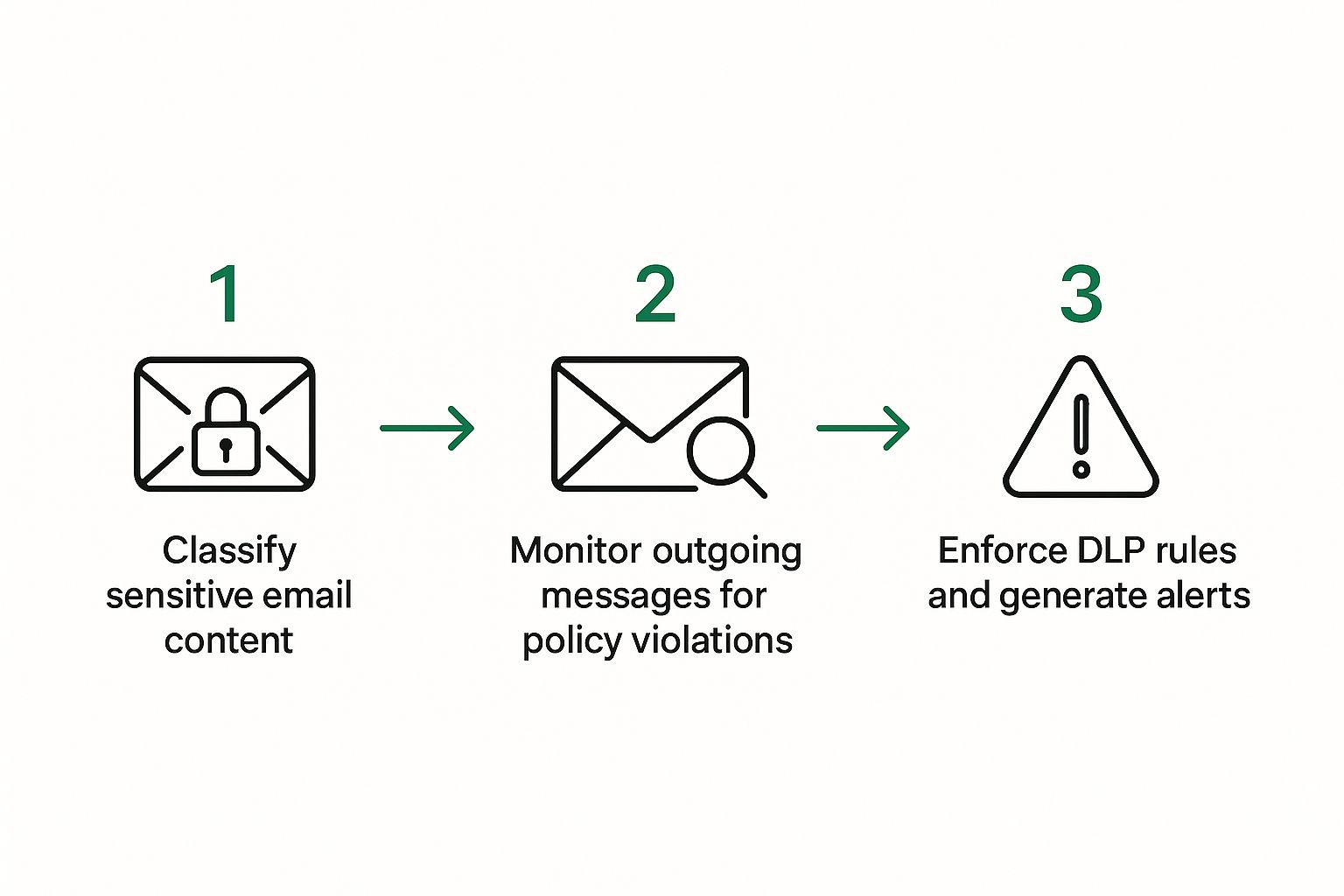
    The following infographic visualizes the core process of email data loss prevention, from classifying sensitive content to enforcing DLP rules.

    Infographic about data loss prevention email

    As the infographic shows, effective email DLP is a cyclical process of classifying, monitoring, and enforcing. Each step informs the next, creating a continuous feedback loop. This dynamic approach lets your DLP system adapt to evolving threats and user behavior.

    It’s interesting to note the discrepancy in security spending. While cloud security gets a large chunk of the budget (26.7% of organizations), dedicated email DLP lags behind at only 3.9%. Even less is allocated to monitoring and training, even though human error is a major factor in breaches. Learn more about data loss statistics here. Building a solid email DLP strategy requires thoughtful planning, realistic priorities, and a clear-eyed understanding of the potential challenges. This sets the stage for successful implementation and long-term data protection.

    To help you visualize how different organizations approach DLP, I've put together this table:

    Email DLP Planning Priorities by Organization Size: A comparison of implementation priorities and timelines for different organization sizes

    Organization Size Primary Focus Timeline Budget Allocation Success Metrics
    Small Business (1-50 employees) Protecting customer data and intellectual property Short-term (3-6 months) Limited, often integrated with other security tools Reduced data breaches, improved regulatory compliance
    Mid-Sized Business (50-500 employees) Balancing data protection with user productivity Mid-term (6-12 months) Moderate, dedicated DLP tools considered Decreased incident response times, enhanced data visibility
    Enterprise (500+ employees) Comprehensive data protection across all channels Long-term (12+ months) Substantial, multi-layered DLP solutions implemented Minimized data exfiltration, robust compliance posture

    This table highlights the different priorities and timelines for organizations of varying sizes. Smaller businesses often focus on immediate protection of critical data, while larger enterprises prioritize comprehensive, long-term solutions. Regardless of size, setting clear success metrics is essential to measure the effectiveness of your DLP strategy.

    Crafting Email DLP Policies That Users Won't Sabotage

    Screenshot from https://www.microsoft.com/en-us/microsoft-365/business/microsoft-purview

    This screenshot shows Microsoft Purview, a platform for data governance and compliance. Notice how it emphasizes data discovery, classification, and protection. These are the cornerstones of any solid data loss prevention strategy. Microsoft gets it: email security is just one piece of a much larger puzzle.

    So, how do you actually build email DLP policies that your users won't completely hate? I've seen firsthand how DLP rollouts can become a user experience nightmare. The trick is to protect your data without killing productivity.

    Gradual Rollout: The Gentle Approach

    Think of it like this: you wouldn’t slam on the brakes while driving, right? Same goes for email DLP. Don't just drop a huge policy change on your users without warning. Instead, start with a monitoring phase. This gives you a chance to peek under the hood and see what kind of email traffic you're dealing with before you start blocking anything. It helps you spot trends, tweak your detection rules, and prepare your users for what's coming.

    It's all about setting expectations and smoothing the transition.

    Targeting Data Types: Prioritize and Protect

    Let’s be honest, not all data is equal. Some information is way more sensitive than others. Think credit card numbers, social security numbers, and healthcare data. These need the strongest protection. Design specific detection rules targeted at these critical data types. Regular expressions, for example, are your secret weapon for finding structured data.

    Focus your efforts where they matter most.

    The False Positive Dance: Minimize and Manage

    False positives. The bane of any DLP system. They’re like a car alarm that keeps going off for no reason. Too many, and your users will start ignoring all alerts. The solution? Contextual analysis and machine learning. A credit card number in an email about an online purchase is probably fine. That same number in an email to a personal account? Red flag. Consider a tiered approach – let the low-risk false positives slide and concentrate on the ones that really matter.

    Real-World Example: Typewire and Keyword Matching

    Platforms like Typewire give you tons of flexibility with DLP policy configuration. Say you want to prevent accidental sharing of client contracts. Set up a policy that scans outgoing emails for keywords like “confidential,” “contract,” or internal project code names. You can then decide what happens next: alert the sender, quarantine the email for review, or block it completely. It's all about granular control. Just watch out for keyword stuffing – you don’t want to create false negatives.

    Pitfalls to Avoid: Don't Let These Sink Your DLP

    There are a few classic DLP blunders to avoid. Overly restrictive policies will frustrate your users and encourage them to find workarounds. Ignoring user feedback creates resentment and a culture of non-compliance. And neglecting maintenance can lead to poor performance and missed threats. Think of your DLP system like a garden – it needs constant tending. It's no surprise that the DLP market, including email DLP, is expected to grow from $1.24 billion in 2019 to $3.5 billion by 2025. This shows just how important data protection is becoming. Discover more insights about DLP market growth.

    By focusing on these key areas, you can create email DLP policies that are both effective and user-friendly. Remember, the goal is security, not a lockdown. Up next, we’ll cover the crucial step of testing your email DLP policies.

    Testing Your Email DLP Like Your Business Depends On It

    Testing your email Data Loss Prevention (DLP) setup isn't just a checkbox exercise; it's about making sure your defenses hold up in the real world. From my experience deploying these systems, I can tell you that seemingly small issues can snowball into big problems if they're not caught early. Let's talk about building a testing strategy that catches everything, from the obvious gaps to the sneaky little vulnerabilities.

    Creating Realistic Test Scenarios

    Generic test cases? Forget about them. Your tests should mirror how email actually flows through your organization. Think about the types of files your teams send, who they send them to, and what's in the message body. If your sales team regularly sends proposals with pricing, your test emails should include similar attachments. If developers share code snippets, incorporate those too. Mimicking real-world email traffic is the key to uncovering hidden DLP flaws.

    If you use a platform like Typewire you can actually send test emails through your system in a safe environment. This lets you experiment without worrying about impacting real users or production systems. I highly recommend using a dedicated testing environment if you have one available.

    Building a Safe Testing Ground

    Don't test your DLP policies on live email. That's like having a fire drill during an actual fire – chaotic and risky. A separate testing environment, or sandbox, that mirrors your production setup but is completely isolated, is essential. This allows you to experiment freely without jeopardizing real data or disrupting business operations.

    Validating Functionality and User Experience

    Testing isn't just about whether the system works; it’s about how well it works. Does it stop inappropriate emails effectively? Are the alerts clear and informative? Do users understand what they're seeing? Put yourself in their shoes. Test the entire experience, from sending a test email to receiving a notification. This helps you smooth out any rough edges and make the system user-friendly.

    Edge Case Testing: Pushing the Boundaries

    Testing the basics is easy. The real test lies in those tricky edge cases. What happens if someone tries to sneak a sensitive file through a compressed archive? Or tries to bypass the system by slightly changing keywords? Probing these scenarios ensures your DLP can withstand sophisticated attempts to circumvent it. This proactive approach prevents future headaches. If you're looking to improve your overall email security, you might find our guide on email authentication helpful.

    Policy Validation Across User Groups

    Different teams handle different types of data. A marketing person deals with different information than someone in finance. Test your DLP policies across all relevant user groups to make sure they’re effective and don’t accidentally block legitimate communications. Targeted testing prevents unintended consequences.

    Seamless Integration Verification

    Your email DLP needs to integrate smoothly with your existing email setup. Test that integration thoroughly. Ensure emails flow correctly, alerts go to the right people, and quarantine functions operate as expected. End-to-end testing confirms that your DLP fits seamlessly into your workflow.

    Before diving into specific examples, let's take a look at a summary of key testing scenarios. The following table outlines what you should test, how to test it, and what to expect.

    Email DLP Testing Scenarios and Expected Outcomes: A comprehensive testing checklist with scenarios, methods, and success criteria

    Test Scenario Testing Method Expected Outcome Common Issues Resolution Steps
    Sending an email containing sensitive data (e.g., credit card number) Send a test email with the sensitive data to a test account within the testing environment. Email is blocked or quarantined, and an alert is generated. False negatives (email not detected), incorrect alert recipient. Adjust detection rules, verify alert configuration.
    Sending an email with a sensitive file attachment (e.g., confidential contract) Attach a test file containing sensitive information to a test email. Email is blocked or quarantined, and an alert is generated. False negatives (attachment not scanned), issues with file type recognition. Verify file scanning settings, add specific file types to the policy.
    Sending a misdirected email (e.g., internal email sent to an external address) Send a test email to an external email address. Email is blocked or flagged for review, and an alert is generated. False positives (legitimate external communication blocked). Refine recipient rules, add exceptions for specific external domains.
    Attempting to bypass the system (e.g., using keyword variations or misspellings) Send test emails with slight variations of sensitive keywords or misspellings. Email is still detected and blocked or quarantined. System fails to recognize variations, leading to false negatives. Implement fuzzy matching or regular expressions to catch variations.

    As you can see from the table above, comprehensive testing is crucial for identifying and resolving potential issues before they impact your organization.

    Building Confidence Through Testing

    Thorough testing gives you confidence that your email DLP will do its job when it counts. By simulating realistic scenarios, validating functionality and user experience, and pushing the system to its limits with edge case testing, you protect your organization’s sensitive data. This proactive approach transforms your DLP from a basic precaution into a robust shield against data loss. It’s not just about checking boxes, it's about building a fortress around your sensitive information.

    Winning Hearts And Minds: Making Users Your DLP Allies

    Let’s be honest, most people think email Data Loss Prevention (DLP) is a pain. They imagine blocked emails, constant alerts, and the feeling of being watched. I’ve seen this resistance firsthand, and it can really throw a wrench in your DLP plans. But what if you could change that perception and make your users DLP champions? It’s absolutely doable.

    Organizations are showing that focusing on education, feedback, and a positive approach to policy violations can create a culture where data protection is welcomed, not resented.

    Communicating Value: Speaking Their Language

    The secret sauce is explaining why email DLP matters in a way that clicks with different groups. For executives, it's about protecting profits and avoiding expensive data breaches. For employees, it's about safeguarding their own reputations and the company's future.

    Adjust your message for each audience, highlighting the specific benefits they care about. For example, instead of talking about "compliance," talk about preventing the kind of data breaches that make headlines and ruin reputations.

    Training That Transforms: Beyond Checkboxes

    DLP training shouldn't be a boring, tick-the-box exercise. Make it engaging and real. Use real-world examples to show the fallout from data leaks. Simulate phishing attacks to demonstrate how easily sensitive data can be stolen.

    Offer practical advice on handling confidential information securely. The more relevant the training, the more it will resonate. I've personally found that interactive sessions with real-world scenarios are far more effective than dry presentations.

    Feedback Loops: Turning Frustrations into Improvements

    Your users are the boots-on-the-ground for your email DLP system. They see the glitches, the false positives, the parts of the policy that just don't make sense. Use that valuable insight!

    Create easy ways for them to share feedback. A simple online form, regular feedback sessions, or even an anonymous suggestion box can do wonders. This not only improves your DLP, but it also makes users feel heard and valued.

    Addressing Violations: Coaching, Not Policing

    When someone breaks the rules, focus on education and coaching, not punishment. Most violations are unintentional. Treat them as learning opportunities. Explain why the policy exists and how to avoid making the same mistake again.

    This builds trust and fosters compliance far more effectively than harsh enforcement. In my experience, a quick, friendly explanation often does the trick.

    Escalation Procedures: A Sensible Approach

    Of course, not every violation is an accident. You need clear escalation procedures for deliberate or repeated breaches. But even then, aim for fairness and transparency.

    Explain the consequences and give employees a chance to share their side of the story. A consistent, reasonable approach builds confidence in the system and helps prevent future problems.

    Creating a culture of data protection takes time and effort. But it’s worth it. When users understand the value of email DLP and feel like they’re part of the solution, they become your greatest asset in protecting sensitive information.

    It’s about creating a workplace where data protection is second nature, not something forced from the top down. This shift in mindset is essential for long-term DLP success. It's not about turning users into security gurus; it's about making them aware, involved, and invested in protecting the data that keeps your organization going. Remember, security is everyone's responsibility.

    Keeping Your Email DLP Sharp: Monitoring That Matters

    Image description

    Setting up your email data loss prevention (DLP) system is just the first step. Real, long-term success? It's all about keeping an eye on things and tweaking your setup over time. I’ve seen this firsthand talking with IT teams who manage these systems day in and day out. They've taught me a lot about what really works.

    Beyond Simple Alert Tallies: Meaningful Metrics

    Just counting alerts is like trying to understand a book by counting the pages. The raw number doesn’t give you the real story. What you need are metrics that actually tell you something. For example, what's the ratio of true positives to false positives? This tells you how accurately your system is picking out real threats. What kinds of data are being flagged most often? That helps you find your weak spots. And finally, how much sensitive data is actually leaving your organization? That’s the bottom line that shows the real impact of your DLP.

    These insights are gold.

    Actionable Intelligence: Building Effective Dashboards

    Data without context is just noise. Build dashboards that turn that raw data into something you can use. Visualize trends over time, see where problems keep popping up, and figure out what needs to be improved. A good dashboard should show you, at a glance, what’s working and what needs attention. Maybe you see a sudden spike in alerts from a specific department – that could mean you need some targeted training there or maybe a policy adjustment.

    Preventing Performance Decay: Maintenance Routines

    DLP isn’t a “set it and forget it” kind of thing. It needs regular maintenance to keep it running smoothly. Schedule routine checks of your system's hardware and software. Regularly review and update your DLP policies to reflect changes in your organization's data landscape and emerging threats. It’s like a car – regular tune-ups keep it running at its best.

    This means keeping an eye on your system’s resource utilization – make sure it can handle your email volume. And, crucially, stay up-to-date on the latest security threats and update your detection rules accordingly.

    Adapting to Change: Evolving Your DLP Strategy

    Your organization changes, and your DLP needs to change with it. As your business grows, the data you handle changes. New data types pop up, and new threats emerge. Your DLP policies need to adapt to these shifts. Review and update your rules regularly to make sure they're still effective. For instance, if you start handling healthcare data, you’ll need to incorporate HIPAA compliance into your email DLP. For an added layer of security, check out our guide on the top benefits of encrypted email.

    Proactive Risk Management: Leveraging Analytics

    Don’t wait for a breach to happen. Use analytics to spot potential risks before they become problems. Analyze email traffic patterns to find anything unusual that might suggest someone’s trying to steal data. Monitor user behavior for anomalies that could point to insider threats. This proactive approach lets you fix vulnerabilities before anyone can exploit them. For example, a sudden increase in emails with sensitive data being sent outside of business hours? That’s a red flag that deserves a closer look.

    Optimization and Capacity Planning: Scaling Your DLP

    As your data grows, your DLP needs to grow with it. Plan for the future and make sure your system can handle increasing email volume. This might mean upgrading hardware, tweaking software configurations, or implementing load balancing. Thinking ahead prevents bottlenecks and ensures your DLP can keep up with your organization’s growth.

    By focusing on these key areas, you can make sure your email DLP is a strong defense for your sensitive data. It’s not just about setting up a system that works today, but one that continues to provide value as your organization evolves. Email DLP isn’t a one-time project; it's an ongoing process of monitoring, optimization, and adaptation.

    Your Email DLP Success Blueprint

    Alright, let's talk about turning that daunting email DLP project into a win you can actually manage. Think of this as your practical roadmap to email data loss prevention success. This isn't some generic, off-the-shelf guide; it's a blueprint packed with clear next steps, realistic timelines, and strategies I've seen work firsthand, no matter what kind of organization you're in.

    Milestones That Signal Success

    Implementing email DLP is kind of like building a house. You wouldn't start with the roof, right? There's a definite order to things. These milestones are your progress markers, giving you that "Okay, we're on track" feeling:

    • Initial Data Discovery Complete: You know exactly what sensitive data you have and where it lives in your email environment. It’s like having a detailed blueprint before you break ground.

    • Key Policies Deployed and Tested: Your core DLP policies for your most critical data are up and running and thoroughly tested. Think of this as laying a solid foundation.

    • User Training Rolled Out: Everyone understands the why behind email DLP and how to use the system without pulling their hair out. It's like giving everyone a tour of their new home and showing them how everything works.

    • Positive Feedback Loop Established: Users give you valuable feedback, which helps you refine the system and catch those tricky edge cases that always seem to pop up. This is where you fine-tune everything for maximum comfort and efficiency.

    These milestones give you a framework for checking your progress and making sure your email DLP rollout is a success.

    Red Flags Demanding Immediate Attention

    Just like any project, there are warning signs that things might be heading south. Watch out for these red flags:

    • High False Positive Rate: Too many false alarms make people tune out, which means real threats can slip through unnoticed. It's like a smoke detector that goes off every time you make toast—eventually, you'll just start ignoring it.

    • User Resistance: If people feel like DLP is getting in the way of their work, they’ll find ways around it. It’s like a poorly designed kitchen—if it's not functional, people won't use it as intended.

    • Lack of Management Support: DLP needs buy-in from the top down. Without it, the project can lose steam and fall apart. It's like trying to build a house without the proper permits or funding.

    • Ignoring Metrics: If you’re not tracking the right metrics, you’re essentially working in the dark. This is like building a house without measuring anything – you could end up with crooked walls and doors that don't fit.

    Addressing these red flags early on prevents small issues from turning into major headaches down the road.

    Long-Term Strategies for Maximizing Your DLP Investment

    Email DLP isn't a set-it-and-forget-it kind of thing. It’s an ongoing process. These long-term strategies will help you get the most bang for your buck:

    • Regular Policy Reviews: Your organization changes, and your DLP policies need to keep up. Regular reviews and updates are key to staying ahead of new threats and the ever-changing data landscape.

    • Ongoing User Training: Refresher courses and targeted training keep everyone engaged and in the know. This is especially important as new people join the team and policies are updated.

    • Leverage Automation: Automating routine tasks like policy updates and reports frees up your team to focus on more strategic work. Think efficiency!

    • Stay Informed: The threat landscape is constantly evolving. Staying up-to-date on the latest developments and best practices keeps your email DLP effective and relevant.

    These ongoing efforts will keep your DLP system a strong, adaptable defense for your sensitive information.

    Building In-House Expertise: Reducing Dependence on Consultants

    While outside consultants can be helpful, having in-house expertise is key for long-term success. Here’s how to build that up:

    • Targeted Training: Give your team the knowledge and skills they need to manage and maintain your email DLP system like pros. This reduces your reliance on expensive consultants over time.

    • Knowledge Sharing: Internal documentation, wikis, and forums are great ways to encourage knowledge sharing and collaboration within your team.

    • Mentorship Programs: Pairing experienced team members with newer ones can speed up learning and build a deeper understanding of your DLP system.

    Developing in-house expertise creates a self-sufficient team ready to tackle any DLP challenge that comes their way. It also keeps you nimble and adaptable so you can react quickly to changing business needs.

    Think of your email DLP journey as a continuous improvement project. Regularly assess how your system is performing, address any gaps, and embrace new technologies and strategies to stay ahead of the curve. This proactive approach ensures your DLP system remains a valuable asset in protecting your sensitive information.

    Ready to boost your email security and take control of your data? Explore Typewire's secure email hosting platform today!

  • How to Authenticate Email: Real-World Setup Guide That Works

    How to Authenticate Email: Real-World Setup Guide That Works

    Why Email Authentication Became Make-or-Break for Business

    Imagine your email inbox is a popular nightclub. Without a bouncer checking IDs, anyone could stroll in, pretend to be someone they’re not, and cause trouble. Email authentication is that vigilant bouncer for your inbox, verifying sender identity before emails are allowed “in.”

    Traditional email, without authentication, is surprisingly easy to exploit – like a costume party where anyone can forge an email address and impersonate someone else. Between 2015 and 2017, email security breaches exposed 886.5 million records worldwide. This makes email a prime target for bad actors looking to steal data or spread harmful software.

    Email authentication isn’t just a technicality; it’s your frontline defense against online fraud. By implementing proper authentication protocols, you significantly lower the risk of falling victim to these attacks, safeguarding both your data and the trust your customers have in you.

    The Foundation: SMTP Authentication

    Before diving into domain authentication protocols, it’s essential to understand SMTP authentication – your digital ID badge for sending email. When your email client (like Outlook or Apple Mail) connects to send a message, SMTP authentication requires it to prove identity with a username and password before the server agrees to send anything.

    Why SMTP Authentication Exists

    Early internet was built on trust. The original SMTP had no password verification. Mail servers were “open relays” – blindly accepting and forwarding any email. By 1998, 55% of mail servers were still open relays, which spammers exploited to flood inboxes while remaining anonymous.

    SMTP authentication introduced the missing verification step: servers now require login credentials before sending email. Combined with dedicated port 587 (for authenticated client connections), this nearly wiped out open relays – dropping vulnerable servers from 55% in 1998 to less than 1% by 2002.

    Modern Authentication with OAuth 2.0

    While password-based authentication was a massive step up, it has one weakness: passwords must be sent with every connection. Modern Authentication, built on OAuth 2.0, is the new standard using token-based systems instead.

    How it works: Think of it like a digital valet key. When an app needs your email, it sends you to your email provider to sign in securely. Once you approve, the provider issues a temporary access token – the app never sees your password.

    Benefits: Enables seamless MFA, provides granular access control, and reduces password exposure. Microsoft is phasing out SMTP Basic Authentication entirely by September 2025, requiring OAuth 2.0.

    Why Email Authentication Became Make-or-Break for Business

    This isn’t just about missing a few messages – it directly affects your bottom line. Important emails mysteriously disappearing into spam folders or phishing emails pretending to be your company damage your brand’s reputation and cost real money.

    The online world is changing. Email providers like Gmail and Outlook are responding with tighter security, suspicious of emails that aren’t authenticated. If you aren’t actively authenticating your emails, you’re letting spam filters and phishers control your domain.

    The Numbers Tell the Story

    The global email industry saw dramatic changes in 2024-2025:

    • Business Email Compromise (BEC) attacks made up 73% of reported cyber incidents in 2024
    • Nearly 54% of email senders have now implemented DMARC
    • The PCI Security Standards Council is pushing for DMARC adoption as essential

    For more on BEC attacks, take a look at these stats: Discover more insights into BEC statistics.

    Stricter authentication isn’t a passing trend – it’s a permanent change in how we do business online. Proper email authentication isn’t a technical extra anymore; it’s absolutely essential. It’s the difference between a secure online presence and risking real damage to your business.

    Making Sense of SPF, DKIM, and DMARC Without the Jargon

    Think of your email security like securing your office – multiple locks are better than one. These three protocols work together like a well-coordinated security team, each playing a distinct role.

    Email Authentication Analogy

    SPF: Your Front-Line Security (The Sender’s Flight Manifest)

    Sender Policy Framework (SPF) is like the airline’s passenger manifest or the security guard at the front desk checking IDs. It lists the approved mail servers allowed to send email on behalf of your specific domain.

    When an email arrives, the recipient’s server checks this “manifest.” If the sending server isn’t listed, the email might be flagged as suspicious. This stops unauthorized senders from using your domain for spam or phishing (called “spoofing”).

    Why it matters: Imagine how much damage could be done if someone spoofed your company’s email address. Lost trust, phishing scams – it’s not a pretty picture.

    DKIM: The Tamper-Proof Seal

    DomainKeys Identified Mail (DKIM) is like a tamper-evident seal on medicine or your luggage. It digitally signs your outgoing messages, verifying that the message hasn’t been altered in transit.

    A broken signature upon arrival suggests tampering, warning the recipient that something might be wrong. This protects your brand reputation by preventing malicious modifications like changing payment details or injecting nasty links.

    Why it matters: Customer trust is everything, and DKIM helps you maintain it by guaranteeing message integrity.

    DMARC: The Security Orchestrator (Airport Security Chief)

    Domain-based Message Authentication, Reporting & Conformance (DMARC) is the security coordinator, the one in charge. It tells the recipient’s server what to do if SPF or DKIM checks fail.

    You can instruct the server to reject suspicious emails, quarantine them (like holding a suspicious passenger), or simply monitor them. DMARC also sends valuable reports back to you, showing who is sending emails on behalf of your domain – both legitimate and not.

    Why it matters: DMARC provides crucial oversight and control, helping uncover hidden security issues or misconfigurations you weren’t aware of.

    Email Authentication Protocols Comparison

    Protocol Primary Function What It Prevents Limitation
    SPF Verifies authorized sending servers Domain spoofing Doesn’t verify message content
    DKIM Verifies message hasn’t been tampered Message modification Doesn’t verify sending server
    DMARC Coordinates SPF/DKIM and enforces policies Unauthorized email usage Requires SPF and DKIM to be effective

    To truly lock down your email security, you need all three protocols working together. They’re like layers of security, each playing a distinct role. Just having one or two is like having a great lock on the front door but leaving a window open.

    SPF Records That Actually Protect Your Domain

    SPF records can be tricky. Many businesses create SPF records that either block their own legitimate emails or leave security holes.

    Common SPF Mistakes

    Forgetting other services: If your marketing team uses Mailchimp or another platform, you must include them in your SPF record. Otherwise, their emails get blocked.

    The 10-lookup limit: SPF records check a chain of DNS records. If your SPF record needs more than 10 lookups, the check fails – even for legitimate senders. This happens when using multiple include mechanisms. Use a and mx sparingly; rely on include for third-party services.

    Building a Solid SPF Record

    Example for a business using your email platform plus Mailchimp:

    v=spf1 include:youremailserver.com include:servers.mcsv.net -all

    The -all tells receiving servers to reject any emails not authorized by the includes. For complex setups with multiple services, you’ll need to carefully manage lookups to stay under the 10-lookup limit.

    Testing Is Essential

    Test your SPF record using online tools like MXToolbox before going live. Find the right balance between security and deliverability – a poorly configured SPF record can be worse than none at all.

    DKIM Setup: Your Email’s Digital Fingerprint

    DKIM gives your emails a unique digital fingerprint, verifying they’re genuinely from you and haven’t been tampered with.

    SPF Record Analogy

    The Public-Private Key System

    DKIM uses two keys: Your private key (guarded secret) creates a signature for outgoing emails. Your public key (published in DNS) lets receiving servers verify that signature. If the signature matches, the email is authenticated.

    Implementation

    Most email platforms automate DKIM key generation. You’ll receive a public key to add to your DNS records, allowing receiving servers to verify your email signatures. Incorrect DNS records cause authentication failures – get this right.

    Key Rotation and Troubleshooting

    Refresh DKIM keys regularly for security. Many platforms offer automated rotation.

    Common issues:

    • Key mismatch: Public key in DNS doesn’t match private key (often happens during rotation if DNS isn’t updated)
    • Signature tampering: Email content altered after signing

    Regular monitoring and testing ensure DKIM authentication works properly.

    DMARC Implementation: Your Email Security Control Center

    DKIM Analogy

    DMARC brings all authentication efforts together using a measured, data-driven approach that protects your domain without blocking legitimate emails.

    Gradual DMARC Rollout Strategy

    Start with monitoring to understand email traffic before enforcing policies. Gradually increase protection levels based on data, ensuring security without disrupting legitimate emails.

    Understanding DMARC Reports: Your Email Security Map

    DMARC reports show which emails pass or fail SPF and DKIM checks. This helps you identify legitimate senders you might have missed, spot potential phishing attempts, and fine-tune your SPF and DKIM settings. Many companies discover forgotten marketing tools sending emails without proper authentication through these reports.

    Setting the Right DMARC Policy: Finding Your Balance

    Once you understand your email traffic through DMARC reports, you can configure your DMARC policy. This tells receiving servers how to handle emails that fail authentication.

    Recommended progression:

    Phase Policy Duration Actions Success Criteria
    1: Monitoring p=none 2-4 weeks Collect reports, identify all senders Complete sender inventory
    2: Soft Enforcement p=quarantine at 10% 2-4 weeks Monitor quarantine impact, adjust SPF/DKIM <1% legitimate mail quarantined
    3: Increased Enforcement p=quarantine at 100% 4-8 weeks Continue monitoring and adjusting Minimal false positives
    4: Full Protection p=reject Ongoing Monitor reports, maintain configuration High authentication pass rate

    Choose a policy that fits your needs and risk tolerance. Too aggressive, and you might block legitimate emails, impacting your business.

    Avoiding Common DMARC Pitfalls

    Implementing “reject” too early: This can backfire, blocking legitimate emails and frustrating customers. I’ve seen it happen firsthand, causing unnecessary disruption.

    Misinterpreting DMARC reports: This can lead to incorrect configuration changes that create more problems than they solve.

    DMARC isn’t a one-time fix – it’s an ongoing process of building a sustainable email authentication strategy that adapts with your business.

    Beyond Authentication: Business Benefits

    Email authentication transforms your email system into a valuable business asset beyond security.

    Improved Deliverability: Messages land in inboxes, not spam folders.

    Reputation Protection: Cybercriminals can’t impersonate your domain, protecting your brand and customer trust.

    Compliance: Demonstrates robust security for regulated sectors, often prerequisite for meeting industry standards.

    Competitive Edge: Security-focused businesses attract security-aware clients.

    Financial Advantage: Implementation costs far less than breach damage. Organizations typically see 95-98% deliverability (up from 70-80%), spam complaints drop below 0.1%, and brand impersonation attempts decrease 80-90% within 3-6 months.

    Real-World Impact: Success and Failure

    Email authentication is frontline business defense with tangible outcomes.

    • Success: Organizations implementing strong authentication see dramatic security improvements. Companies constantly bombarded by phishing found that DMARC implementation caused fraudulent emails reaching employees to plummet, resulting in fewer breaches, reduced financial losses, and increased productivity.
    • Failure: The 2004 AOL breach demonstrated consequences of weak authentication. An employee stole 92 million customer accounts (email addresses, credit card information), selling data to spammers who unleashed billions of unsolicited emails. The damage – financial loss and reputational harm – could have been significantly reduced with proper authentication protocols.

    These cases underscore that robust email authentication isn’t optional – it’s essential for protecting sensitive data and preserving customer trust.

    Advanced Email Security: Beyond Basic Authentication

    SPF, DKIM, and DMARC provide the foundation, but additional security layers strengthen your defenses.

    Multi-Factor Authentication (MFA)

    MFA adds a critical second layer. Even if someone steals your password, they can’t access your account without the second factor (code from your phone or authenticator app). The global MFA market is expected to hit $17.76 billion by 2025, with 95% of employees preferring software-based MFA for its ease of use.

    Emerging Technologies

    • Biometrics: Fingerprint scanning and facial recognition add another security layer
    • WebAuthn: Paving the way for a passwordless future
    • Advanced Threat Detection: AI-powered tools analyze email traffic for phishing, malware, and suspicious patterns
    • Incident Response Plans: Clear procedures for handling security breaches minimize damage and speed recovery

    Maintaining Your Email Authentication for Long-Term Success

    Email authentication requires ongoing maintenance to remain effective.

    Monitoring and Regular Reviews

    Proactive monitoring: Tools like MXToolbox constantly monitor authentication status, alerting you to issues before they impact deliverability.

    Quarterly reviews: Regularly review SPF, DKIM, and DMARC settings to ensure they align with current email practices. More frequent reviews may be needed if your email environment changes rapidly.

    Handling Business Changes

    Significant changes (mergers, rebrandings, platform migrations) require extra attention. These transitions impact sending sources, domains, and infrastructure. Careful planning protects email deliverability during transitions.

    Documentation and Training

    Document your setup thoroughly: configurations, policies, troubleshooting steps. Train your team on authentication management. This ensures email security remains strong through personnel changes.

    Future-Proofing Your Strategy

    Stay Informed: Email security constantly evolves. Follow industry news and security updates to address vulnerabilities proactively.

    Emerging Trends:

    • AI: Attackers use AI for sophisticated phishing; defenders use AI to identify and block threats
    • New Methods: Protocols are constantly refined. Microsoft’s retirement of Basic Authentication for SMTP signals the shift toward more secure options like OAuth

    Be proactive – don’t wait for breaches to expose weaknesses. Regular security posture assessments and necessary improvements save time, money, and resources long-term.

    Understanding the Full Authentication Picture

    Email authentication actually involves two distinct layers that work together:

    Layer 1 – SMTP Authentication (Client to Server): When you send an email, your email client must authenticate to your mail server with credentials. This proves you’re authorized to send mail through that server. Uses port 587 with STARTTLS encryption.

    Layer 2 – Domain Authentication (SPF, DKIM, DMARC): When your email arrives at the recipient’s server, these protocols verify that the message genuinely came from your domain and wasn’t forged. This protects your domain reputation and prevents spoofing.

    You need both layers for comprehensive email security. SMTP authentication protects outgoing mail at the individual account level. SPF, DKIM, and DMARC protect your domain’s reputation at the ecosystem level.

    Troubleshooting Common Authentication Issues

    Even with perfect setup, authentication errors can stop your workflow. Most problems stem from simple misconfigurations that are easy to fix.

    “Authentication Failed” Messages

    The classic error is almost always a typo. Double-check your username and password – they’re case-sensitive. If credentials are definitely correct, the server may have temporarily locked your account after several failed login attempts (a security feature preventing brute-force attacks).

    Connection and Security Errors

    Incorrect server settings – specifically port and encryption method – trigger connection timeouts or security warnings.

    Quick checklist:

    • Port: Use port 587 with STARTTLS encryption (industry standard). Port 25 is for server-to-server communication only and will be blocked for client use.
    • Encryption Method: Configure SSL/TLS or STARTTLS. Never use “None” – sending credentials without encryption is a major security risk.
    • Server Address: Verify the exact server name (e.g., smtp.yourprovider.com) – a simple typo prevents connection.

    OAuth 2.0 Migration Issues

    If using Modern Authentication and experiencing problems:

    • Ensure your email client supports OAuth 2.0
    • Check that app-specific passwords are configured correctly
    • Verify MFA is set up properly if required
    • Confirm your organization hasn’t disabled legacy authentication prematurely

    Frequently Asked Questions

    Is SMTP Authentication the Same as SPF or DKIM?

    No. They work together but solve different problems:

    • SMTP Authentication: Like showing your ID at the post office counter. Proves to your mail server that you have permission to send mail through their system. Protects your specific account from unauthorized use.
    • SPF and DKIM: Like the official postmark and seal on an envelope. When your email arrives, the receiving server checks these to confirm the message genuinely came from your domain and wasn’t forged. They verify your domain’s identity to the world.

    You need both for comprehensive security: one authenticates the user, the others authenticate the domain.

    Can I Use SMTP Authentication on Any Port?

    Technically yes, but you absolutely shouldn’t. Using the wrong port defeats security purposes.

    Port 587: Industry standard for sending email from clients. Uses STARTTLS to upgrade to encrypted connection.

    Port 465: Secure alternative that wraps the entire connection in SSL/TLS from the start.

    Port 25: Strictly for server-to-server communication. Most providers block it for client use to stop spam bots.

    Stick with port 587 for reliable, secure sending.

    What Happens If I Don’t Use SMTP Authentication?

    Your emails won’t get sent. Modern mail servers reject unauthenticated mail on sight – it’s their primary defense against spam hijacking.

    If you stumble upon an old “open relay” that lets you send without authentication, avoid it. Using it will torpedo your sender reputation, get your IP blacklisted, and make you part of the spam problem.


    Start your free trial with Typewire and experience the benefits of secure and private email hosting.