When your team works remotely, the digital platforms you use aren't just for convenience anymore. They've become the new office floor, the hallway, and the conference room all rolled into one. This makes the tools you choose—and how secure they are—absolutely critical to your business operations, especially when it comes to email privacy and security.
Keeping Your Remote Team's Conversations Private
As more and more businesses operate with distributed teams, the way we talk and share information has completely changed. That shift, however, has also created new weak spots for security. Picking the right communication tools, particularly a secure hosted email platform, is no longer an IT decision; it's a core business strategy that directly impacts how well you protect your data and respect your team's privacy. Email security has to be the starting point.
This isn't a small corner of the market, either. The global demand for these tools has pushed their value to around USD 35.76 billion. Cloud-based options, especially hosted email platforms, are dominating the scene, making up about 65% of that market because they're just so easy to access and scale up.
Start with Secure Email Hosting
Instant messaging and video calls get a lot of attention, but let's be honest: hosted email is still the main artery for sensitive business information. Think about it—contracts, private client details, and internal strategy documents all live in your inbox. That makes email a huge, flashing target for cyberattacks. A breach isn't just a workflow hiccup; it can lead to devastating financial loss and ruin your reputation. Strong email privacy isn't a luxury; it's a necessity.
Think of your communication toolkit as a digital fortress. Secure email is the main gate—if it’s weak, the entire fortress is at risk, no matter how strong the other walls are.
To really nail this, you need a solid grasp of the essential security, privacy, and compliance considerations for communication platforms. This knowledge is the foundation you'll build your entire email security strategy on.
Building a Foundation of Trust
This guide is designed to be a clear roadmap for leaders who need to protect their team's data from breaches and privacy violations without bogging everyone down. We're going to skip the generic advice and focus on actionable steps for implementing better email security and choosing the right hosted email platform.
The end goal? To help you make smart, secure decisions that build a culture of trust and responsibility. This isn't just about picking the right software; it's about creating a resilient organization where email privacy is the default.
Why Email Security Is Your First Line of Defense
Think about sending your company's most sensitive financial reports or client contracts on the back of a postcard. Anyone who gets their hands on it could read every single word. That’s pretty much what you're doing when you use unencrypted email, which is why a weak hosted email platform can be such a huge liability in your remote communication setup.
For a distributed team, email is more than just a messaging tool—it's the official record. It’s where big decisions get documented and private information flies back and forth every day. Naturally, this makes it a massive target for cybercriminals. A single, well-crafted phishing attack can be all it takes to compromise your entire network, and the fallout can be catastrophic.
The Real-World Risks of Insecure Email
Brushing off email privacy isn't just a small oversight; it's a huge business risk. The consequences of just one breach can send shockwaves through your entire organization, with damage that can linger for years. When sensitive information gets intercepted, the initial financial hit is often just the tip of the iceberg.
The hit to your reputation can be even worse. How can clients and partners trust you to protect their data if you can't protect your own? They'll take their business elsewhere, leaving you with a tarnished brand. A 2023 report drove this point home, revealing that the average cost of a data breach has climbed to $4.45 million. That number alone should tell you everything you need to know about being proactive with email security.
These dangers are even greater for remote teams, where people are often working from less-secure home networks. Without the digital fortress of a corporate office, every team member is a potential gateway for an attack. This is why a secure hosted email platform isn't just an IT problem—it's a cornerstone of any smart remote work strategy.
Understanding Foundational Security Features
To truly protect your team, you have to go beyond just telling everyone to use strong passwords. You need stronger defenses built right into your hosted email platform. Two features, in particular, are the absolute bedrock of modern email security: end-to-end encryption and two-factor authentication.
End-to-End Encryption (E2EE) is the digital equivalent of sealing that postcard in a locked metal box. Only you and your intended recipient have the key. No one in between—not even your email provider—can peek inside. This guarantees your message stays completely private from the moment you hit "send" until it's read.
With E2EE, your private conversations are mathematically secured, making them unreadable to anyone except the people they are meant for. This is the gold standard for email privacy.
Two-Factor Authentication (2FA) adds a second, critical layer of security to the login process. It’s like needing both a key and a one-time passcode to get into your house. Even if a thief manages to steal your key (your password), they’re still stuck on the porch without that unique code, which is usually sent directly to your phone.
Here’s why these two features are completely non-negotiable for any hosted email platform:
- Phishing Protection: 2FA makes it exponentially harder for an attacker to take over an account, even if they successfully trick an employee into giving up their password.
- Data Interception Defense: E2EE ensures that if an email is ever intercepted in transit, the contents are just a scrambled, unreadable mess.
- Compliance and Trust: Adopting these security measures helps you stay compliant with data protection laws and shows your clients you're serious about protecting their information.
Choosing a hosted email platform without these core protections is like building a brand-new house but forgetting to put locks on the doors. You’re just leaving your most valuable assets out in the open. For any remote team today, prioritizing email security has to be the first step in building a resilient and trustworthy communication system.
How to Choose a Secure Hosted Email Platform
Picking a hosted email provider for your remote team is so much more than an IT decision. It’s a foundational choice about your company's privacy and security. While many services look the same on the surface, how they handle your data behind the scenes can be wildly different. You have to look past the slick marketing to find a platform that genuinely protects your information.
Think of it like choosing a bank. You wouldn't just pick one with a nice lobby and a friendly teller. You'd want to know about their vault, their insurance policies, and their legal protections. The same exact principle applies to your email data—it's one of your most valuable business assets.
Beyond the Inbox Features
The real difference-makers in secure email aren't flashy themes or clever inbox sorting. They're the robust, privacy-first architectures working in the background. When you're vetting hosted email platforms, there are three core concepts you absolutely have to understand: data jurisdiction, zero-knowledge architecture, and comprehensive encryption. Getting these right is how you truly safeguard your team's conversations and ensure email privacy.
First up is data jurisdiction. This simply means asking, "Which country's laws govern my data?" If your provider's servers are in a country with weak privacy laws or invasive surveillance agreements, your sensitive information could be legally accessed without you even knowing. Always lean towards providers in countries with rock-solid data protection regulations, like Switzerland or Germany.
Unreadable to Everyone but You
Next is the big one: zero-knowledge architecture. This is a system designed from the ground up to ensure the service provider has zero access to the data you store with them. Put simply, it means they can't read your emails, even if they wanted to or were legally forced to try.
How does that work? It's all thanks to end-to-end encryption, where the encryption and decryption keys are held only by the users, not the company. Here's a quick test: if a provider can reset your password and grant you access to your inbox, they hold the keys. A true zero-knowledge platform can't do this, which is what makes it such a powerful shield for your email privacy.
This decision tree shows you just how fundamental that concept is.
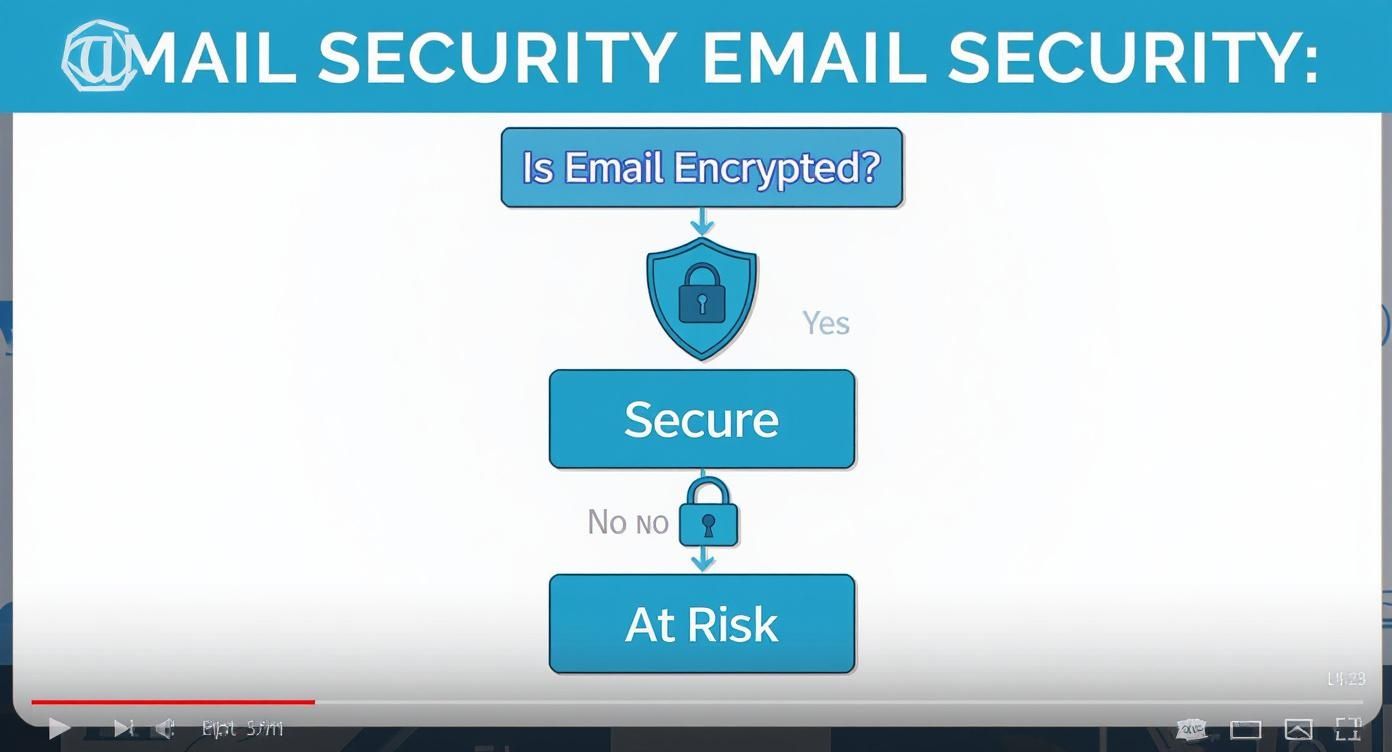
As you can see, encryption isn't just another feature. It's the fork in the road between a secure communication channel and one that leaves your remote team completely exposed.
A Practical Checklist for Evaluation
When you're ready to start comparing hosted email platforms, it helps to have a clear set of questions. Asking the right things cuts through the marketing fluff and reveals a provider's true commitment to email privacy. If you want a head start, exploring the top alternatives to Google Workspace for secure hosted email can offer some great comparisons.
Here are the key questions to ask any potential email provider:
- Data Location and Jurisdiction: Where are your servers physically located? What legal jurisdiction does my data fall under?
- Encryption Standards: Do you use end-to-end encryption by default? Is data encrypted both in transit (while moving) and at rest (when stored)?
- Privacy Policy Transparency: How do you make money? Do you scan or sell anonymized data from user emails?
- Access and Architecture: Can your employees ever access my emails? Do you operate on a zero-knowledge or zero-access model?
- Open Source Verification: Is your encryption protocol open source? Has it been independently audited by security experts?
When you’re weighing your options, this table can help you compare the must-have security features side-by-side.
Key Features of Secure Hosted Email Platforms
| Feature | What It Means for Your Privacy | Why It's Critical for Remote Teams |
|---|---|---|
| End-to-End Encryption | Only the sender and recipient can read the message. The provider cannot decrypt it. | Protects sensitive client data, intellectual property, and internal strategy from being intercepted. |
| Zero-Knowledge Architecture | The provider has no access to your encryption keys and cannot view your data. | Ensures your emails remain private even if the provider is hacked or legally compelled to hand over data. |
| Strong Data Jurisdiction | Servers are located in countries with robust privacy laws (e.g., Switzerland, Germany). | Your data is protected by strong legal frameworks that prioritize individual privacy over surveillance. |
| Open-Source Code | The platform's source code is publicly available for anyone to inspect for vulnerabilities. | Provides verifiable proof that the encryption and security claims are real, not just marketing promises. |
| Two-Factor Authentication (2FA) | Requires a second form of verification (like a code from your phone) to log in. | Adds a critical layer of security to prevent unauthorized access, even if a password is stolen. |
Ultimately, a truly secure hosted email platform gives you control and peace of mind, knowing your communications are locked down.
Choosing a secure email platform is a proactive security measure. It's about building a digital environment where privacy is the default, not an afterthought, protecting your team before a threat ever materializes.
By focusing on these foundational email security principles instead of just surface-level features, you can choose a hosted email platform that acts as a genuine digital fortress for your remote team. This is how you ensure your most important business conversations stay confidential, secure, and entirely under your control.
Building Your Secure Communication Toolkit
Think of your secure hosted email as the heavy-duty, reinforced front door to your digital office. It's an essential first step, but it's not the whole building. To keep everything truly safe, you have to make sure every other communication tool is just as locked down. This means building out an entire ecosystem of tools that all put security first.
A truly resilient remote setup isn’t just about one application; it's a full suite of secure tools that complement your secure hosted email platform. Your team's sensitive data doesn't just sit in one inbox. It flows through messaging apps, video calls, and project management boards. Every time it moves, there's a potential risk, which is why an integrated, security-first approach is so critical.
Expanding Beyond Secure Email
Once you’ve locked down your email, it’s time to look at the other remote team communication tools your team uses every day. The aim here is to build a toolkit where every single piece holds up to the same high standards of privacy and security as your email. You want to eliminate any weak links in your communication chain.
Here are the key categories to focus on when building out your secure ecosystem:
- Encrypted Messaging Apps: For the fast-paced, real-time conversations, you need a messaging platform with end-to-end encryption turned on by default. This makes sure that quick chats and casual file shares are just as private as your most formal emails.
- Private Video Conferencing: Let's be honest, not all video platforms are created equal. You need to find a service that encrypts calls from start to finish, protecting sensitive strategy sessions and client meetings from anyone trying to listen in.
- Secure Project Management Systems: Your projects are packed with valuable intellectual property. A secure system encrypts your data both when it's stored (at rest) and when it's being sent (in transit), protecting your team's most innovative work.
Creating a Seamless and Secure Workflow
The real magic happens when all these secure tools work together. A clunky, disjointed system just creates headaches and often pushes people to use unsanctioned—and insecure—apps just to get the job done. A well-integrated toolkit, with a secure hosted email platform at its core, makes sure that moving data from one platform to another never opens up a security hole.
Picture this: a team is working on a confidential product launch. They use a secure project management tool to map out tasks. For quick questions, they jump into an encrypted chat channel, and when it’s time to share sensitive documents, they use a secure file-sharing service. It's a closed loop where information stays protected every step of the way. If you want to dive deeper, our guide on how to encrypt and share files like a pro breaks down exactly how to set this up.
A truly secure communication strategy isn't about finding one perfect, impenetrable tool. It's about creating an entire environment where every application works together to form a cohesive, multi-layered defense against privacy threats.
The Future of Secure Collaboration
The world of remote collaboration tools is always moving forward. We're seeing artificial intelligence and more immersive tech making teamwork more effective than ever. Modern platforms are now rolling out AI-powered features like real-time transcription, smart scheduling, and even sentiment analysis to help bridge the distance between teammates. You can get a feel for what's coming next by checking out these insights on remote work trends.
This constant evolution makes it even more vital to choose platforms that bake security into their new features from the ground up. The best remote team communication tools are the ones that manage to innovate without ever sacrificing their core promise of privacy. By carefully picking each piece of your toolkit, starting with a foundation of email security, you give your team the freedom to collaborate openly and creatively, knowing their work and conversations are always protected.
Implementing Secure Communication Practices
Even the slickest, most advanced communication tools are only as secure as the people using them. At the end of the day, real security isn't just about software; it’s about building a team culture where everyone sees themselves as the first line of defense. This means setting clear expectations for email privacy, providing training that actually sticks, and making email security a natural part of the daily routine.
The jump to remote work has completely changed the game. With over 32.6 million Americans now working from home and projections showing that 22% to 27.9% of the global workforce will be remote, the old "in-office" communication habits just don't cut it anymore. And the cracks are already showing: 29% of remote workers say they struggle with effective communication, and another 22% report feeling isolated. These aren't just HR problems; they're security risks waiting to happen. For more stats on this shift, check out the rise of remote work on easystaff.io.
Create a Clear Communication Policy
First things first: you need a rulebook for your digital office, with a special focus on your hosted email platform. A formal communication policy does just that, spelling out exactly which tools to use for which conversations, setting expectations for response times, and laying down the law on handling sensitive data.
This policy gets rid of the guesswork and makes sure everyone is operating from the same playbook. Don't just write it and forget it—make it a living document that’s easy for everyone to find and update it as your tools and security needs change.
A solid policy needs to cover:
- Approved Tools: A clear list of the only platforms your team should use for email, messaging, and video calls. No exceptions.
- Data Handling: Firm rules for sharing anything confidential via email, whether it’s client PII or company intellectual property.
- Password Requirements: Unmistakable standards for creating strong passwords for all accounts, especially email, and how often they need to be updated.
Conduct Effective Security Training
A policy is just a piece of paper if your team doesn't understand it or, worse, ignores it. That’s where regular, engaging email security training comes in. Forget boring, technical slideshows. Focus on real-world scenarios your team will actually encounter, like how to spot a convincing phishing email or the right way to secure their home Wi-Fi network.
Good training gives your team the confidence to spot threats and react appropriately. When people understand why a rule exists, they're far more likely to become champions for keeping company data safe.
Security training isn’t a one-and-done event. It’s an ongoing conversation that reinforces a shared sense of responsibility and keeps your team’s skills sharp against new threats.
To truly lock down your remote team's communications, you'll want to dig deeper with a comprehensive guide to remote cybersecurity. Resources like this offer insights that help you build a resilient security posture that goes well beyond just the tools you use.
Implement Secure Access Protocols
Finally, you need to be a gatekeeper. Who has access to what? The principle of least privilege should be your north star here. It’s a simple idea: only give people access to the specific information and systems they absolutely need to do their jobs. Nothing more. This one practice drastically shrinks your company's potential attack surface.
Putting this into action means carefully managing user permissions across all your platforms, especially your hosted email platform. For a more detailed walkthrough, you might find our guide on essential remote work security best practices incredibly helpful.
By combining a strong policy, consistent training, and smart access controls, you can turn your remote team from a potential liability into your greatest security asset.
Fostering a Culture of Privacy and Trust
At the end of the day, securing your communication channels isn't just a tech problem—it's a people problem. The tools are absolutely critical, but they're only as good as the team using them. When everyone understands and actively champions email privacy, that commitment to security becomes a core part of your company's identity.
This privacy-first mindset is more than just an internal policy; it's a powerful competitive edge. When clients know you take email security seriously and treat their data with respect, it builds incredible trust. In a crowded market, that reputation for responsibility can be the very thing that sets you apart, protecting both your client relationships and your bottom line.
Protecting Your Most Valuable Assets
Beyond building client trust, a secure communication strategy is about protecting your own intellectual property. Think about it: your team's brainstorming sessions, strategic plans, and innovative ideas are your most valuable assets. Leaving those conversations on an insecure platform is like leaving the blueprints for your next big product on a park bench.
By intentionally choosing secure remote team communication tools, especially a private hosted email platform, you're creating a digital fortress where creativity and collaboration can actually thrive. This helps build a culture of responsibility, where every single person on the team understands their role in protecting the company’s future.
Investing in secure communication isn't just an IT expense. It's a fundamental business decision that lays the groundwork for long-term success and resilience. It tells your team, your clients, and your industry that you’re building something that lasts.
The Lasting Impact of a Secure Foundation
The path to a truly secure remote work environment starts with one crucial decision: picking the right tools. From that point on, it’s all about weaving strong security habits and ongoing education into the fabric of your daily work. The principles we’ve covered, from choosing a secure hosted email platform to implementing smart team practices, are the building blocks.
Adopting this mindset from the start ensures that as your team grows and your communication needs change, your commitment to email privacy and security can scale right along with them. You won't just be protecting your business from today's threats; you'll be creating an environment where people feel confident and empowered. That's how you enable your team to do their best work—knowing their conversations are private and their contributions are safe.
Frequently Asked Questions
When you're sorting through remote communication tools, a lot of questions pop up, especially around protecting your data. Getting straight answers is the only way to feel confident about the choices you make for your team's digital workspace. Let's tackle some of the most common things people ask about email security and privacy.
These are the essential questions that come up again and again when leaders are trying to lock down their team's communications.
What Is the Biggest Security Risk with Remote Team Communication?
There are plenty of weak spots, but insecure email is hands-down the biggest vulnerability for most companies. Think about it: your email is the central nervous system for everything important—contracts, financial records, and private client information all live there. An unencrypted or poorly secured hosted email platform is like leaving the front door of your office wide open.
This makes email a prime target for phishing scams and data breaches. Because we use it all day, every day, it's easy to get complacent. A single compromised account can become an open book for an attacker, giving them the keys to a kingdom of confidential data. That's why solid email security has to be your first line of defense. It's simply not optional.
Does "End-to-End Encryption" Really Keep My Emails Private?
Yes, absolutely. It's the gold standard for email privacy for a reason. Imagine writing a letter, putting it in a steel lockbox, and sending it off. Only you and your recipient have the key to open it. That’s end-to-end encryption in a nutshell. The moment you click "send," your message gets scrambled into unreadable code, and only the intended reader can unscramble it.
The most important part? Not even your email provider can peek inside. This is often called a "zero-knowledge" approach, and it guarantees your conversations stay completely private. It protects you from everyone—government surveillance, data-hungry tech companies, and even the provider itself.
If you're looking at secure remote team communication tools, especially hosted email platforms, this is a must-have feature.
Why Does Data Jurisdiction Matter for a Hosted Email Platform?
Where your data physically lives determines whose laws protect it. This is data jurisdiction. If your email provider’s servers are sitting in a country with flimsy privacy laws or one that’s part of a mass surveillance alliance, government agencies could legally demand access to your data, often without you even knowing.
On the other hand, choosing a provider headquartered in a country with iron-clad data protection laws—like Switzerland or Germany—is like putting a legal fortress around your team's information. It means your communications are governed by some of the strictest privacy regulations on the planet. This is a critical factor when selecting a hosted email platform.
How Do I Balance Security with Ease of Use?
This is the million-dollar question, but it’s not the trade-off it used to be. The best tools today are designed to make security invisible. The secret is picking platforms, especially for hosted email, where security is the default setting, not something your team has to constantly fiddle with.
For instance, a great secure email service applies end-to-end encryption automatically without you having to do a thing. Here’s how to find that perfect balance:
- Choose Intuitive Tools: Look for a clean, simple interface that doesn't feel clunky.
- Provide Clear Training: Don't just tell your team what to do; explain why email security matters.
- Create Simple Guidelines: Have a straightforward policy for what tool to use for which conversation.
The whole point is to make the most secure option the easiest one for everyone to follow.
Ready to take control of your team's email privacy? Typewire offers a secure, private email hosting platform designed from the ground up to protect your communications. With zero tracking, no ads, and robust encryption, you can collaborate with confidence. Start your free trial today and experience what true email security feels like. Learn more about Typewire's secure email solution.