Want to stop email ads for good? The most effective way is to combine the tools already inside your email client—like unsubscribe and block features—with a few smart habits. Setting up filters to catch promotional emails and using unique email aliases when you sign up for new services can make a massive difference. This layered strategy helps you clean up your current inbox and stop new ads before they even start.
Your Quick Guide to a Cleaner Inbox
It's a familiar feeling: opening your inbox only to be greeted by a wall of promotional offers and newsletters you don't remember signing up for. It's frustrating, but the good news is you have more power here than you think. You don't need fancy, complicated software to reclaim your inbox. It all starts with using the tools you already have.
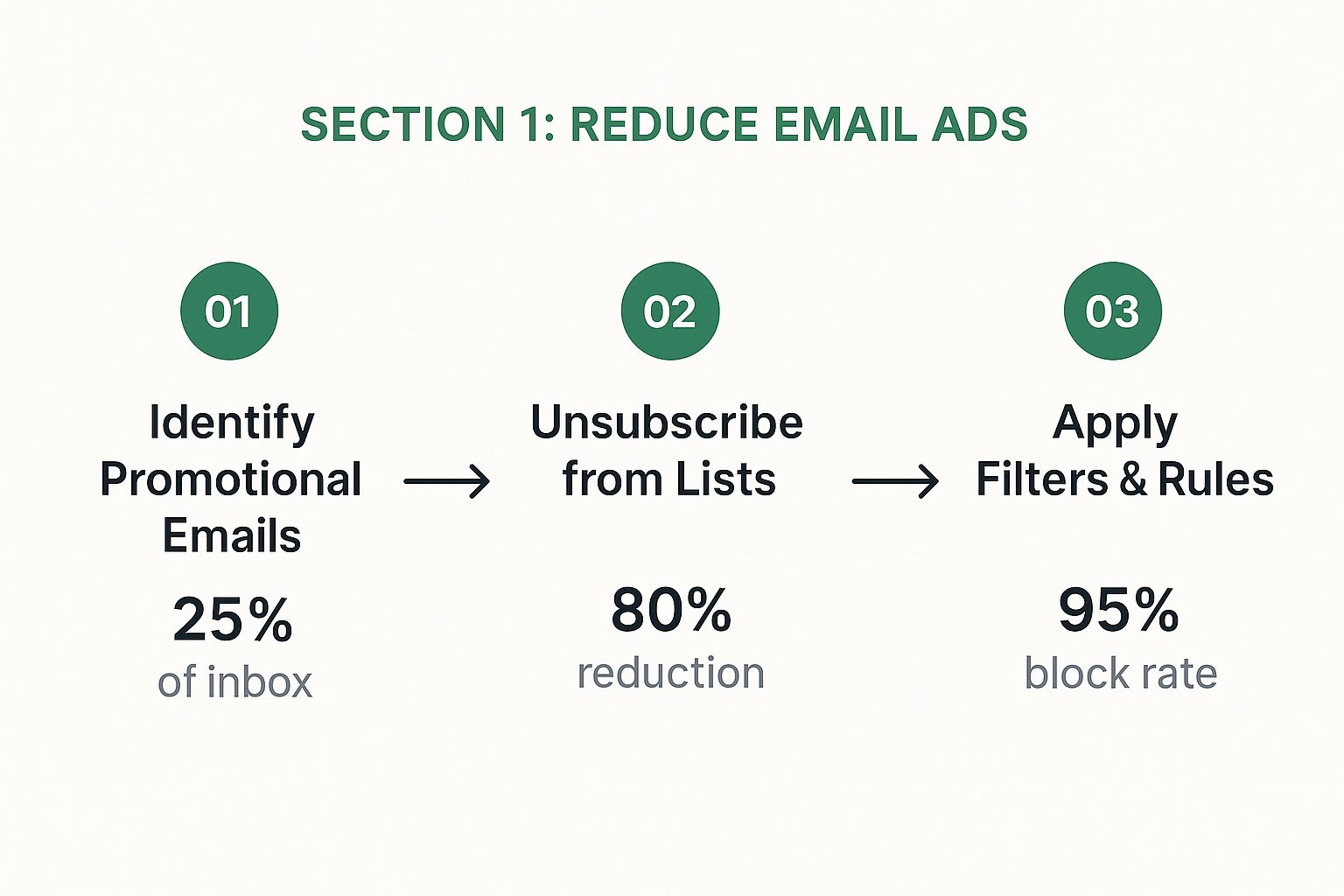
The whole strategy really boils down to a simple, three-part process that tackles both the ads already sitting in your inbox and the ones that will try to get in tomorrow.
This diagram breaks down the basic steps for stopping email ads and keeping things clean long-term.
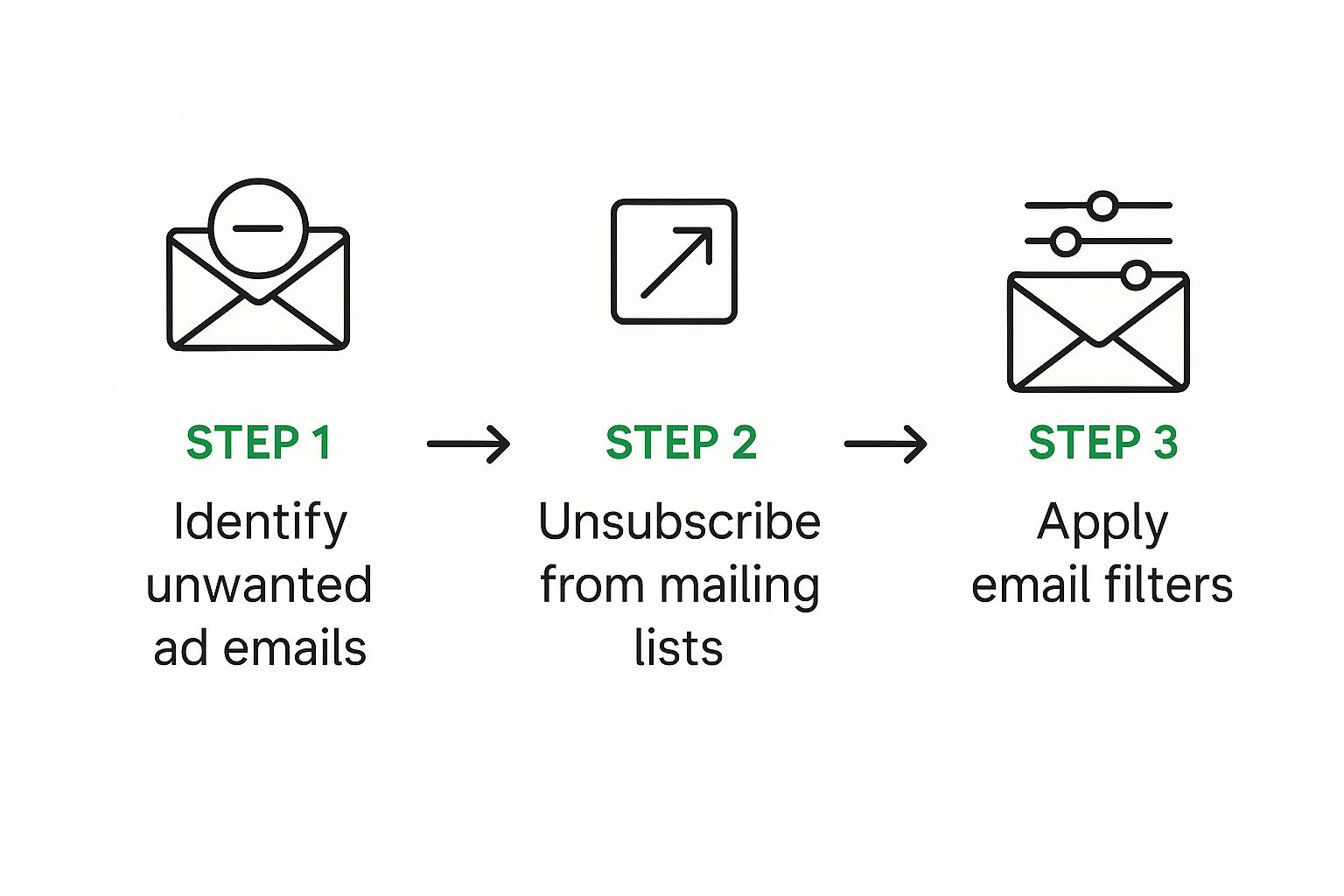
As you can see, a simple cycle of identifying unwanted mail, unsubscribing from it, and filtering what’s left creates a powerful system for managing your inbox.
To put it simply, there are really three main ways to approach this problem. Each has its place, and using them together is what gets you the best results.
Three Core Methods to Stop Email Ads
| Method | Best For | Effectiveness Level |
|---|---|---|
| Unsubscribe/Block | Removing yourself from legitimate, but unwanted, marketing lists and newsletters. | High (for legitimate senders) |
| Filters & Rules | Automatically sorting or deleting recurring promotional emails based on keywords or sender. | Medium to High |
| Email Aliases | Preventing spam from the start by using disposable email addresses for new sign-ups. | Very High |
By combining these methods, you create a robust defense that not only cleans up your current mess but also prevents future clutter. It's all about being proactive.
The Right You Have to Unsubscribe
That "unsubscribe" link at the bottom of marketing emails isn't just a polite suggestion—in many countries, it's the law. In the United States, for example, the CAN-SPAM Act of 2003 set clear rules for commercial email. It requires marketers to give you a straightforward way to opt out of their messages.
This law is a big deal because it means every legitimate commercial email must provide a way for you to say "no more." You can find more details on these email marketing laws over on Optinmonster.com.
Key Takeaway: Unsubscribing is your first and most powerful line of defense. Legitimate companies are legally required to honor your request, making it one of the most effective ways to get off their lists for good.
The CAN-SPAM Act gives you, the user, real power by setting clear rules for businesses, with the unsubscribe link being the most crucial requirement. When you pair this legal right with the practical steps in this guide, you’ll build a solid defense against a cluttered inbox.
Master Your Inbox with the Tools You Already Have
Often, the best way to win the battle for a clean inbox is to use the weapons already in your arsenal. Your email client—whether it’s Gmail, Outlook, or Yahoo—comes packed with powerful, built-in features that are designed to put you back in control. It's time to move beyond just hitting "unsubscribe" and learn how these tools can turn a chaotic inbox into a streamlined command center.
This really starts with a shift in your mindset. Instead of just reacting and deleting unwanted ads every day, you can build an active defense system that works for you 24/7. This means getting smart with filters, blocking senders who won't take a hint, and properly reporting spam to teach your email service what you actually consider junk.
The Power of Proactive Filtering
Think of filters as your personal inbox security guards. They analyze incoming mail based on rules you create and then take immediate action—deleting it, archiving it, or shuffling it off to a specific folder. This automates the whole cleanup process, saving you from dealing with the same junk mail over and over again.
Let's say you're constantly getting bombarded with offers from a clothing store that always uses phrases like "flash sale" or "limited time offer." Instead of trying to unsubscribe from dozens of their different marketing lists, you can create a single, powerful filter to catch them all.
Here's a real-world example in Gmail:
- Click the settings gear icon and go to "See all settings."
- Head over to the "Filters and Blocked Addresses" tab.
- Click "Create a new filter."
- In the "Has the words" field, you could type something like:
"flash sale" OR "24-hour sale" OR "doorbuster" - Click "Create filter" and then choose what you want to happen, like "Skip the Inbox (Archive it)" or even just "Delete it."
And just like that, any email containing those phrases will be dealt with automatically. You won't even see them. This is how you stop email ads right at the gate.
Blocking Senders The Right Way
We've all been there. You unsubscribe, but the emails keep coming. Maybe the sender ignores your request or uses shady tactics to keep you on their list. This is exactly when the Block Sender feature becomes your best friend. Blocking is a much more direct action that tells your email provider, "I never want to see a message from this address again."
In most email clients, blocking is dead simple. Just open the email you want to get rid of, find the "three dots" menu (or a similar option), and select "Block [Sender Name]."
Blocking is the digital equivalent of putting up a "No Trespassing" sign. It sends a clear message to your email client that this source is unwelcome, and future emails from them will almost always go straight to spam.
It's crucial to know the difference between blocking and unsubscribing. Unsubscribing is a request you send to the marketer. Blocking is a command you give to your email provider. For legitimate businesses, unsubscribing usually does the trick. For those persistent or sketchy senders, blocking is the way to go.
Making the Spam Report Work for You
That "Report Spam" button does a lot more than just move an email to your spam folder. It's a critical piece of feedback. When you report an email as spam, you’re helping your email provider's algorithm get smarter about identifying similar unwanted messages in the future. This doesn't just improve your own inbox; it helps protect millions of other users, too.
This collective intelligence is what makes services like Gmail and Outlook so good at catching the most obvious junk mail. By reporting spam, you're doing your part to create a smarter, cleaner email ecosystem for everyone. It’s a tiny action with a massive impact.
For a deeper dive into handling the most aggressive junk mail, check out our detailed guide on how to block spam emails and reclaim your inbox.
Platform-Specific Tips for Major Email Clients
While the core ideas are universal, the exact steps can differ a bit depending on your email service. Let's break down how to use these techniques in the big three.
For Gmail Users:
Gmail's filtering system is incredibly powerful. You can create filters based on the sender, subject, specific keywords, and even the size of an attachment.
- Pro Tip: Use the main search bar to test your filter criteria before you create the rule. For example, search for
from:(*@*.some-store.com)to find all emails from that company's domain, then use that exact query to build your filter.
For Outlook Users:
In the Outlook world, filters are called "Rules." You can find them by going to Settings > Mail > Rules.
- Pro Tip: Outlook lets you create multi-step rules. You could set up a rule that moves a newsletter to a "Read Later" folder, marks it as read, and flags it for follow-up, all in one shot. It’s perfect for organizing content you actually want but don't need to see immediately.
For Yahoo Mail Users:
Yahoo's filters are straightforward and very effective for basic sorting. You'll find them under Settings > More Settings > Filters.
- Pro Tip: Yahoo gives you up to 500 filters, which is more than enough room to build a comprehensive system for managing all that incoming ad traffic.
Email marketing is still a massive channel for businesses, with a staggering 4.59 billion users worldwide. But engagement gets a whole lot better when people feel in control of their inbox. With 41.6% of emails now being opened on mobile devices, having easy, mobile-friendly ways to block ads and unsubscribe is more critical than ever.
By mastering these built-in tools, you can completely change your relationship with your inbox. It stops being a source of daily stress and becomes the well-organized tool it was meant to be. Seriously, taking an hour to set up a few smart filters can save you countless hours of manual cleanup down the road. It’s a small investment in your digital peace of mind.
Advanced Tactics for When Ads Just Won't Quit
Sometimes, unsubscribing and setting up filters just doesn't cut it. You’ve blocked senders, reported spam, and done everything right, yet certain ads keep crawling back into your inbox. It’s frustrating.
When the usual tricks fail, it’s time to stop playing defense and go on the offense. These next-level tactics are for dealing with the most stubborn marketers—the ones who seem to ignore the rules. It all starts with being smarter about how you share your email address in the first place.
Use Email Aliases to Pinpoint and Block Sources
One of the most effective, yet surprisingly overlooked, weapons in this fight is the email alias. Think of an alias as a unique, disposable version of your real email address. Anything sent to it lands in your main inbox, but you can track exactly where it came from.
The idea is simple. When you sign up for a new service or newsletter, you just add a + and a memorable tag to your email address.
Let’s say your email is alex.miller@gmail.com. If you're signing up for a pizza delivery app, you could use: alex.miller+pizzadeals@gmail.com.
This one small change gives you two massive advantages:
- You can track the source. If spam starts arriving at
alex.miller+pizzadeals@gmail.com, you know precisely which company sold or leaked your information. The mystery is solved. - You can block with surgical precision. Simply create a rule to automatically trash any email sent to that specific alias. The leak is plugged for good, and your primary email address remains untouched.
This is your secret weapon. It’s a proactive move that helps you identify and cut off spammers at the source, long before they can clutter your main inbox.
By creating a unique alias for every service, you build a digital tripwire system. The moment a company misuses your information, you'll know who it was and can instantly revoke their access to your inbox.
You’re no longer guessing where the junk mail is coming from; you have a clear trail leading directly back to the culprit. It's a critical step if you want to know how to stop email ads permanently. For a deeper dive into managing unwanted messages, our guide on how to block unwanted emails and reclaim your inbox has even more strategies.
Look Into Third-Party Unsubscription Services
If you're dealing with years of digital baggage, the thought of unsubscribing from hundreds of lists one by one is exhausting. This is where third-party unsubscription services can be a lifesaver. These tools scan your inbox, find all your mailing list subscriptions, and bundle them into a single dashboard for easy, one-click removal.
They can save you a ton of time, turning hours of tedious work into a few simple clicks. But there’s a major trade-off you need to be aware of.
The Privacy Catch
For these services to work, you have to grant them full access to your email account. That means giving them permission to read and manage your emails. Before you even think about signing up, you absolutely must read their privacy policy.
Ask yourself these questions:
- How do they make money? If the service is free, there's a good chance they're selling anonymized data from your inbox to marketers.
- What data do they collect? Do they store copies of your emails or just sender information?
- How strong is their security? What are they doing to protect your login credentials and the sensitive information in your inbox?
While plenty of reputable services are out there, handing over the keys to your inbox is a big deal. Your email contains everything from bank statements to personal conversations, so proceed with caution.
This principle of safeguarding your personal contact information goes beyond email. The same protective mindset is essential for your phone, as detailed in this ultimate guide to blocking spam calls on iPhone.
It's All About a Proactive Mindset
Ultimately, winning the war against persistent ads comes down to shifting your mindset. Instead of just reacting to spam after it arrives, you need to take steps to prevent it from ever being sent to you in the first place.
Start treating your email address like the valuable piece of personal information it is. Be selective about who gets it. By using aliases, carefully vetting any third-party tools, and staying a little skeptical, you can build a powerful defense that even the most aggressive advertisers can't break through.
The Only Real Way to Get an Ad-Free Inbox
So far, we’ve been talking about ways to fight back against the never-ending stream of ads cluttering your inbox. These tricks are great for tidying up a free account, but they're really just treating the symptoms, not the root cause.
The hard truth is, with services like Gmail or Yahoo Mail, you aren't the customer—you're the product. Their entire business model revolves around analyzing your inbox, tracking what you do online, and selling that access to advertisers. It’s a trade-off billions of us make for a "free" service. But what if you could sidestep that trade-off entirely?
Shifting to a Privacy-First Mindset
The most effective way to stop email ads for good is to change the very foundation of how you do email. This means moving from a free, ad-supported provider to a premium, ad-free hosting service. It’s a fundamental shift from being the product to being a valued customer.
When you pay for an email service, the whole dynamic flips. A provider like Typewire doesn’t need to scan your emails for keywords or track your online shopping habits. Their business is built on your subscription fee, plain and simple. Your privacy isn't just a bullet point on a features list; it's their core promise.
This isn't just about getting rid of a few annoying banner ads. It's about taking a firm stand for your own digital privacy.
What an Ad-Free Service Really Gives You
Choosing a premium email service is an investment in a cleaner, quieter, and more secure digital life. The perks go way beyond just a tidy interface. You're paying for a fundamentally different—and better—experience.
- Zero Ads, Ever: This one’s obvious. Your inbox is just for your conversations, with no sponsored promotions or visual clutter getting in the way.
- No Data Mining: Premium services have zero financial reason to analyze your personal data. Your conversations, receipts, and private documents stay private.
- Tighter Security: Paid providers often invest more heavily in their security infrastructure, giving you things like advanced anti-spam and virus protection right out of the box.
- Real Human Support: When you’re a paying customer, you get access to actual support teams who are there to help, not just an automated FAQ page.
Think of it like choosing Netflix over broadcast TV. You pay a small fee to get rid of the constant commercial interruptions and take back control. The same exact principle applies to your inbox.
Switching to a paid email provider isn't just buying a service; you're buying back your privacy. It's the only guaranteed way to stop your personal data from being sold off to advertisers.
Comparing Free vs. Paid Email Models
The difference between an ad-supported and an ad-free email service is night and day. While free services are incredibly accessible, that access comes at the hidden cost of your privacy and focus. Let's look at what you really gain when you make the switch.
Free Ad-Supported Email vs. Premium Ad-Free Email
| Feature | Free Services (Gmail, Yahoo) | Premium Services (Typewire) |
|---|---|---|
| Business Model | Sells targeted advertising based on user data. | Sells private email hosting via subscription. |
| Primary Goal | Maximize advertiser revenue. | Maximize user privacy and security. |
| Inbox Content | Mix of personal emails and targeted ads. | Contains only your personal communications. |
| Data Privacy | Scans emails to personalize ads and services. | Never scans, shares, or sells your data. |
| User Support | Typically limited to online forums and AI bots. | Direct access to human support teams. |
| Custom Domains | Often a paid add-on with limitations. | Included as a core feature for personalization. |
As you can see, the entire philosophy is different. Free services are built to serve advertisers, while premium services are built to serve you. This distinction is everything if you're serious about creating a truly private communication channel.
Is a Premium Email Service Right for You?
Making the jump is a big decision, but it's probably the right one if any of these sound familiar:
- You're genuinely concerned about how big tech companies are using your personal data.
- You run a small business or work for yourself and need a professional email address on your own domain.
- You're just plain tired of the daily fight against spam and want an inbox that's clean by default.
- You value being able to talk to a real person when you run into a technical issue.
Ultimately, choosing a premium service is about reclaiming ownership of your digital identity. It ensures that your most personal online space remains truly yours, free from the prying eyes of advertisers and data brokers. It’s the final and most powerful step you can take to stop email ads for good.
Common Mistakes People Make When Cleaning Up Their Inbox
When you’re on a mission to get your inbox to zero, it's surprisingly easy to trip up and make things worse. I've seen it happen time and again—people take well-intentioned steps that actually invite more spam or create serious security holes.
Knowing what not to do is just as important as knowing the right moves. Let’s walk through some of the most common blunders so you can sidestep them completely.
The Temptation to Reply to Spam
One of the biggest mistakes is replying to obvious spam. It feels so good to fire back a "REMOVE ME" or "UNSUBSCRIBE" message, but you're actually giving the spammers exactly what they want.
Any kind of reply, even an angry one, is a goldmine for them. It confirms your email address is active and that a real person is on the other end. Suddenly, your address becomes more valuable on the lists they sell. Just mark it as spam and delete it. No engagement necessary.
Clicking Suspicious Links (Especially "Unsubscribe")
This one is tricky. Legitimate companies are required by law to include a working unsubscribe link, but scammers love to use fake ones as bait.
A fake "unsubscribe" link can be a gateway to a phishing site designed to swipe your passwords or drop malware onto your computer. Before you click, always hover your mouse over the link to see the actual destination URL. If it looks sketchy, it probably is.
If an email feels off—the logo is fuzzy, the grammar is weird, or the sender's address is a mess of random characters—trust your gut. Don't click anything. The risk just isn't worth it. For a deeper dive on this, check out our easy tips to stop junk emails and reclaim your inbox.
Overlooking Basic Account Security
Another huge oversight is using a weak or recycled password for your email account. Your inbox is the central hub of your digital life, and if a hacker gets in, the damage goes far beyond them just reading your messages.
They can use your account to blast spam to all your contacts, which can ruin your reputation and even get your email address blacklisted.
Here’s a quick security checklist:
- Use a strong password. Make it a long mix of uppercase letters, lowercase letters, numbers, and symbols.
- Don't reuse passwords. Your email password should be unique—used for your email and nothing else.
- Turn on two-factor authentication (2FA). This is non-negotiable. It adds an extra layer of security that requires a code from your phone to log in, stopping most hackers in their tracks.
Common Questions About Ditching Email Ads
Even with the best strategies in place, a few questions always come up. Let's tackle some of the most common ones I hear from people trying to reclaim their inboxes for good.
Why Do I Still Get Spam After Hitting "Unsubscribe"?
It's a classic, frustrating scenario: you diligently click "unsubscribe" and a week later, another email from the same company pops up. What gives? There are usually two culprits behind this.
First, some shady marketers just flat-out ignore your request. They know the consequences are minimal, so they keep blasting away.
The second, and more common reason, is that your email address was sold. You might have unsubscribed from one company's list, but your address could still be on dozens of others that bought your data from the same source. This is exactly why using unique email aliases is a game-changer—it lets you track down who sold you out.
Are Those "Mass Unsubscribe" Tools Safe?
The promise of a third-party tool that unsubscribes you from everything at once is tempting. While many of these services work as advertised and can save you a ton of time, they come with a hefty privacy cost.
To do their job, you have to grant these apps full access to your inbox. That means they can read, and often analyze, all your emails.
Before you give any app that kind of access, dig into its privacy policy. If the service is free, there's a good chance they're paying the bills by selling anonymized data from your emails to marketing companies—the very people you're trying to avoid.
It's a classic trade-off: convenience versus privacy. Always think carefully before connecting a third-party service to your email account.
Will Creating a Bunch of Filters Slow My Email Down?
This is a valid worry, but thankfully, it's one you can put to rest. Modern email providers like Gmail, Outlook, and Yahoo Mail are built on massive, powerful systems. They're designed to handle way more than you can throw at them.
Whether you have 10 filters or 500, your email client processes them in the blink of an eye as new messages arrive. You won't notice a difference in speed. So, feel free to get as granular as you want with your filters—go ahead and build the automated, clean inbox of your dreams. Your email service can take it.
Ready to skip the filters and fixes for an inbox that's clean and private from day one? Typewire provides secure, ad-free email hosting built around your privacy—no data mining, ever. See what a truly private inbox feels like with a free trial.