
Last updated: 21 September 2026
A secure email gateway is a checkpoint that filters incoming and outgoing mail, and whether you need one depends on how much email-borne risk your business can absorb. In Canada alone, the Spam Reporting Centre received over 208,083 complaints between October 1, 2024 and March 31, 2025, which works out to about 8,003 complaints per week.
If you're running a small business, you probably already know the feeling. A fake invoice lands in accounts payable. A staff member gets a message that looks like Microsoft 365. Someone forwards sensitive client details to a personal mailbox because it feels convenient in the moment.
That's the core job of an email security gateway. It doesn't just move mail from one place to another. It stands in the path, checks what's coming in and what's going out, and makes a decision before the message reaches a person or leaves your environment.
It functions as a practical control, not a magic shield. It can cut down phishing, malware, spam, and policy mistakes. It can also create new operational questions, especially when the gateway itself becomes part of your attack surface.
What a Secure Email Gateway Actually Is
A secure email gateway is a filtering checkpoint that sits between the public internet and your mail system. If you use Microsoft 365, Google Workspace, or a private mail host, the gateway sits in front of that service and inspects messages before delivery. In plain language, it's the trained receptionist in your digital mailroom.
When people hear “gateway,” they often think it's just a router for email. It isn't. The “gateway” part means mail passes through it. The “secure” part means it actively checks, filters, quarantines, blocks, or flags messages instead of just passing them along.
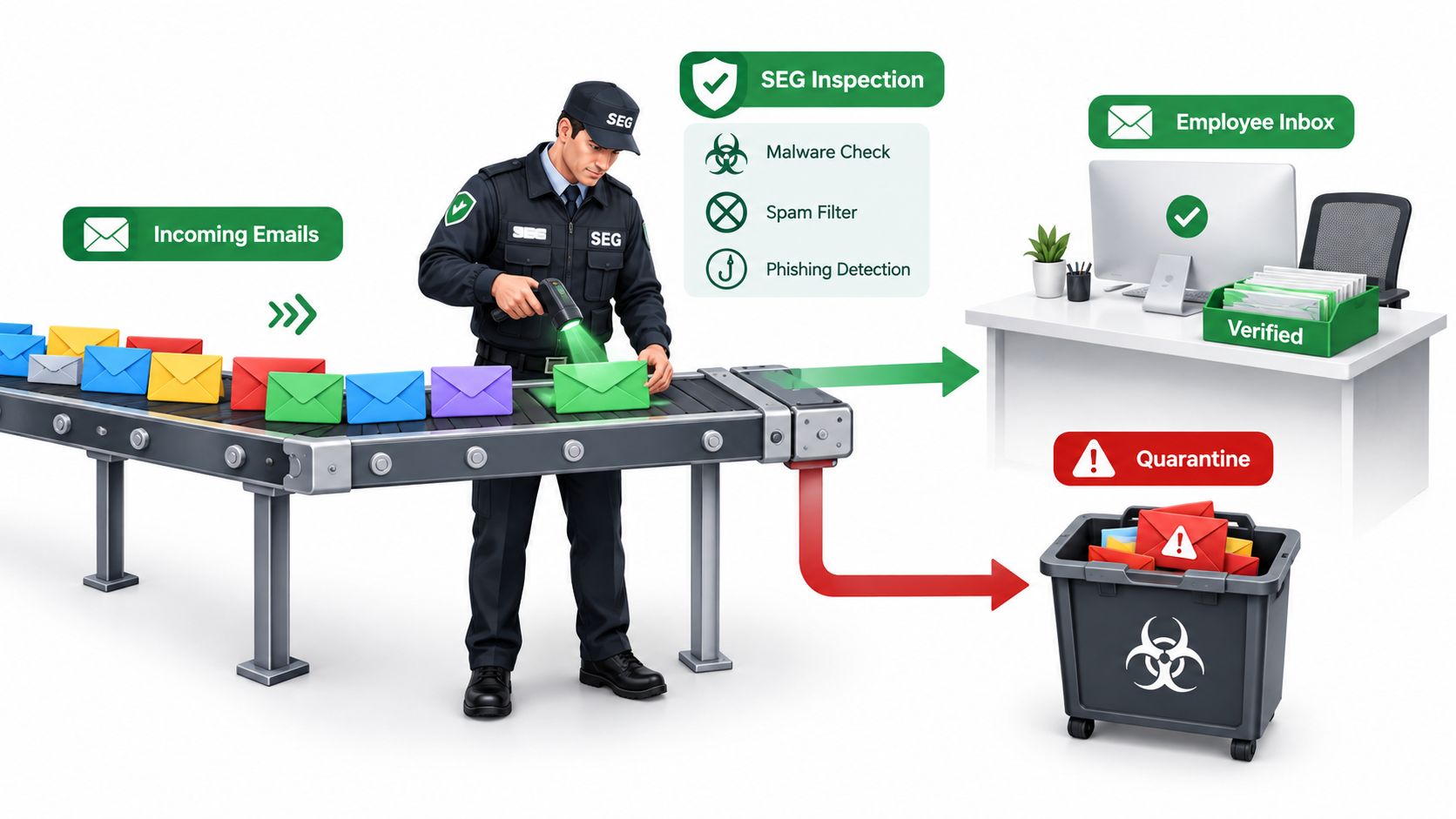
Where the gateway sits in email flow
A normal mail path looks something like this. A sender's mail server hands off a message using SMTP, which stands for Simple Mail Transfer Protocol. Your domain's mail route then points that message to the gateway first, and only after inspection does the message continue to the final inbox.
Once the message is accepted, your staff usually read it through IMAP, or Internet Message Access Protocol, in Outlook, Apple Mail, Thunderbird, or a mobile app. The user doesn't need to see the gateway. They just notice fewer junk messages, fewer risky attachments, and clearer warnings when something looks off.
Practical rule: If a message never reaches the inbox, your staff never has to make a judgement call about it.
Why this matters in real life
Many small businesses assume “email security” means endpoint antivirus or whatever Microsoft or Google already includes. That helps, but it's only part of the picture. A gateway gives you a dedicated inspection layer before human beings click, download, reply, or forward.
The Canadian Centre for Cyber Security describes email security gateways as points that scrutinise and filter out malware, spam, and phishing attempts in its email security best practices guidance. That framing matters because it treats the gateway as a core defensive layer, not just an optional extra.
How an Email Security Gateway Filters Mail
A good email filtering gateway doesn't rely on one clever trick. It uses layers. One check looks at who is connecting. Another checks whether the sender is authentic. Then content inspection and file analysis add more context before the message is released, flagged, or quarantined.
The four main filtering stages
| Stage | What It Checks | What It Catches |
|---|---|---|
| Connection filtering | The sending server and connection behaviour | Known bad senders, abusive mail sources, obvious junk before full delivery |
| Reputation and authentication | SPF, DKIM, and DMARC records, plus sender reputation | Domain spoofing, forged sender claims, some impersonation attempts |
| Content inspection | Subject lines, headers, links, body text, attachment types | Spam, phishing patterns, suspicious URLs, risky attachments |
| Sandboxing | Files opened in an isolated environment | Malware that looks harmless until it runs |
Connection filtering happens first. If a mail server has a poor reputation or behaves like a spam source, the gateway can reject or slow it down before reading much content. That saves time and reduces load.
Authentication checks come next. SPF, DKIM, and DMARC help answer a simple question. Is this sender really who they claim to be? They don't stop every scam, but they make domain spoofing harder and give the gateway stronger signals.
Why layered checks beat a single filter
Content inspection looks deeper. The gateway can examine headers, wording, embedded links, and attachment types. A fake payroll notice or government message might pass one check, but fail another because the writing pattern, sender mismatch, or URL destination looks wrong.
Sandboxing is the last line in this pipeline. If a file seems suspicious but not clearly malicious, the gateway can open it in an isolated environment and watch what it does. If the “invoice PDF” behaves like malware, the gateway can stop it before it reaches an employee.
A common example in this market is an impersonation lure. The federal complaint data shows common reported categories include government impersonation, extortion scams, private company impersonation, employment scams, and bank impersonation in the CRTC reporting period summary. That's why layered inspection matters. One fake message pretending to be a tax authority or payroll provider can slip past a simple spam check but still get caught by authentication, header analysis, link review, or attachment controls.
If you want a simpler primer on the first layer in this stack, our guide to what spam filtering is and how it protects email security is a useful companion.
Threats an SEG Is Built to Catch
Enterprises don't buy a gateway because they love infrastructure diagrams. They buy one because inbox problems keep interrupting work. The threats are familiar, but they don't always look dramatic when they arrive.
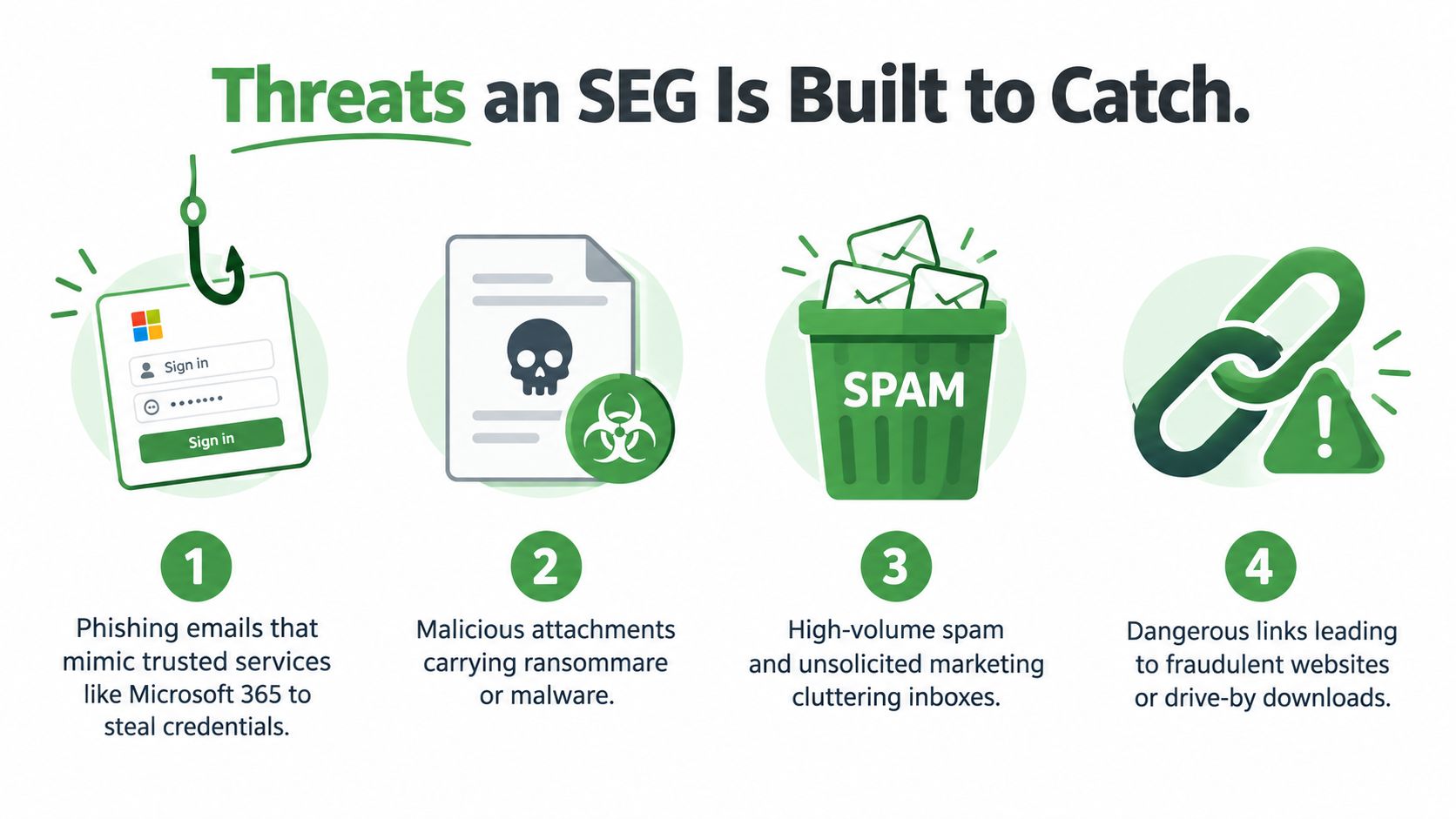
Phishing that looks ordinary
A staff member gets an email that says their Microsoft 365 session expired. The branding looks close enough. The button leads to a fake sign-in page, and the user types in their password without much thought.
That's a phishing attack. The gateway's job is to spot the sender mismatch, the suspicious URL, or the deceptive wording before that message ever reaches the inbox.
A phishing email rarely looks “hacky.” It usually looks routine.
Attachments that hide the real payload
Another common situation starts with a message that appears to be a supplier invoice or scanned document. The file may be disguised as a PDF or office document. Once opened, it can trigger a malware download or push the user into enabling risky content.
Attachment inspection and sandboxing matter. A file that looks boring to a human can still behave dangerously when opened in an isolated test environment.
You can see a broader walkthrough of these patterns in our article on email security threats and how to defend against them.
Here's a short visual explainer that shows how these threats typically move through the inbox:
Spam floods and quiet data leaks
Spam sounds less serious, but it still causes real damage. When sales or support inboxes fill up with junk, staff can miss a real quote request or a customer reply. The business cost comes from distraction, delay, and buried messages.
The quieter risk is outbound mail. An employee might forward a client list, contract, or payroll file to a personal Gmail account to “finish work later.” An SEG can apply outbound rules and flag or block that move before sensitive data leaves your environment.
SEG Versus Built-In Email Security
Built-in cloud filtering has improved a lot. Microsoft 365 and Google Workspace already catch a fair amount of obvious junk, known malicious attachments, and low-effort phishing. For many very small teams, that baseline may be enough for a while.
The gap appears when attacks become more targeted. Business email compromise, vendor impersonation, subtle domain spoofing, and outbound policy enforcement often need more focused controls. That's where a dedicated email gateway adds value.
What the default tools usually do well
| Capability | Built-In (M365 / Workspace) | With SEG Added |
|---|---|---|
| Basic spam filtering | Usually included and effective against common junk | Adds policy tuning and deeper inspection options |
| Known malicious attachments | Usually included | Adds stronger detonation, quarantine, and routing controls |
| Basic phishing detection | Usually included | Adds impersonation analysis and more granular policy handling |
| Outbound policy controls | Limited to moderate, depending on plan | Usually stronger and easier to tailor |
| Advanced mail flow visibility | Basic admin views | More detailed tracking, quarantine, and enforcement options |
| Extra compliance control | Varies by plan and setup | Often easier to centralise and document |
Why this matters for layered defence
We don't see this as an either-or choice. Your cloud provider gives you the floor. A secure email gateway raises the ceiling.
That matters most when your team handles invoice approvals, password resets, wire instructions, customer records, or regulated information by email. In those cases, “good enough by default” may not match your real exposure.
Built-in filtering reduces noise. A gateway gives you policy control.
There's also an operational angle people miss. The gateway can inspect both inbound and outbound traffic in one place. That gives admins one control point for quarantine, reporting, routing, and enforcement instead of scattered rules across multiple tools.
Do Small Businesses Really Need an SEG
The honest answer is maybe. Some small businesses absolutely should have one. Others can stay safe enough with strong defaults, good user training, and a tighter mail setup.
A better question is this. What would happen if one employee clicked the wrong link, approved the wrong payment, or emailed the wrong file? If that answer makes you uneasy, you may already know where this is going.
Signs you probably should add one
Payment instructions travel by email. If invoices, EFT details, or vendor changes arrive through inboxes, impersonation risk is high.
Your staff click first and verify later. That's common in busy offices. A gateway reduces the number of judgement calls humans need to make.
You hold client or employee personal information. Once sensitive data moves through email, filtering and outbound controls become more important.
You send commercial email under CASL rules. Outbound mail policies, evidence retention, and sender controls start to matter more.
You've had a close call already. A spoofed invoice or fake login page is often the warning shot.
Signs you may not need one yet
A very small team using one cloud suite, with low mail volume and no payment workflow in email, may be fine with built-in protection for now. That's especially true if you've enabled strong authentication, keep software updated, and review unusual requests by phone or another channel.
You also don't have to run an appliance yourself to get the benefit. A hosted or managed option can make more sense than buying hardware and patching it in-house.
The federal anti-spam and privacy environment also shifts the discussion beyond just junk mail. The CASL program notes that over 90% of phishing attacks begin with email, and 98% of complaints were submitted by email in the CRTC's September 2025 publication. For a small business, that makes email a risk channel worth treating seriously, even if your company is not large.
Deployment Options and Alternatives
Once you decide an SEG makes sense, the next question is operational. Do you want to run it yourself, rent it as a service, or have someone else manage the whole thing?
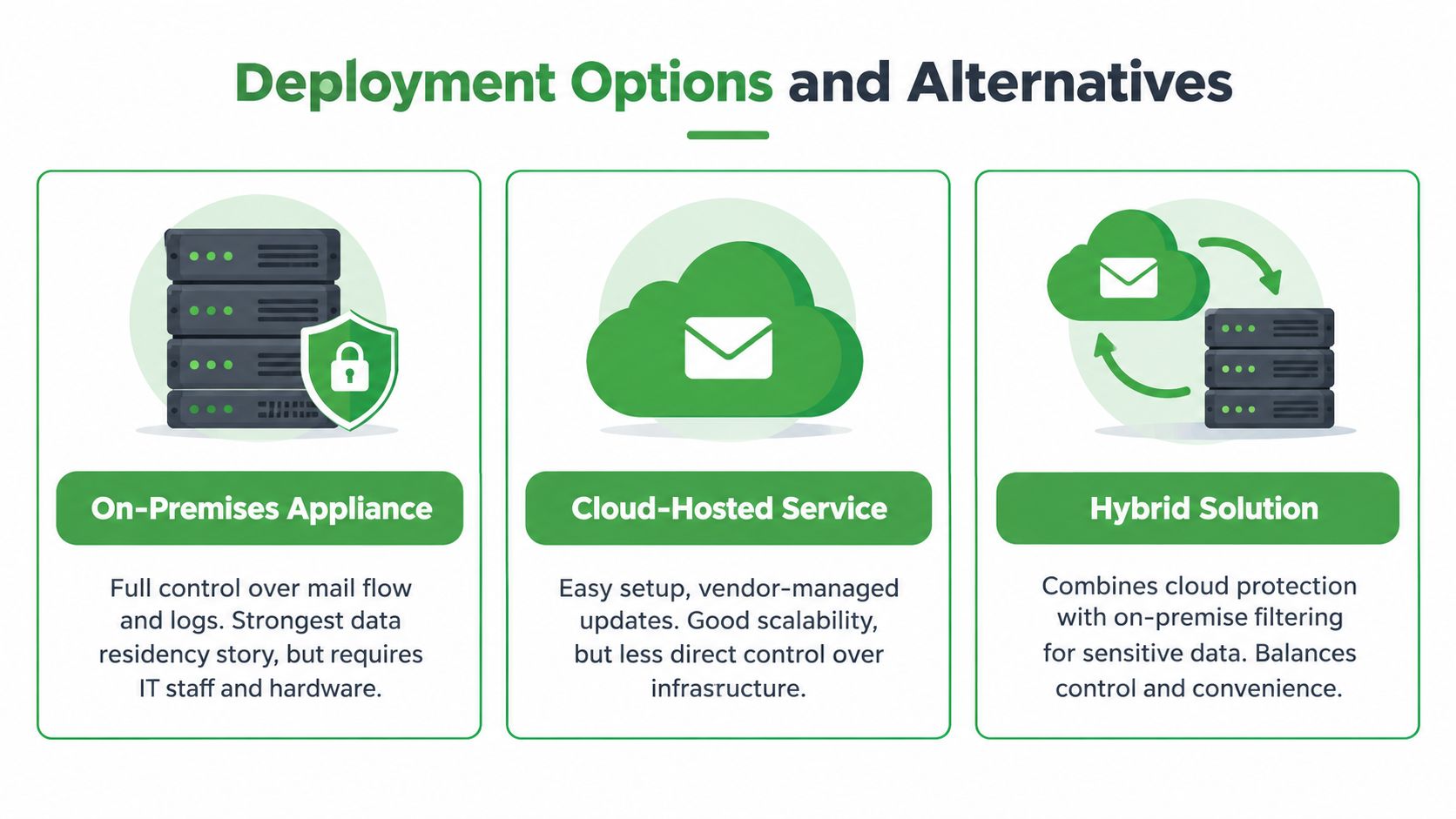
On-premises, cloud-hosted, and managed
On-premises appliance gives you the most direct control over mail flow, logs, and system access. If you care about where data sits and who touches the box, this model appeals. The trade-off is upkeep. Someone has to patch it, monitor it, and respond when something breaks.
Cloud-hosted SEG is easier to roll out. The vendor runs the filtering stack, updates the service, and scales capacity as your mail volume changes. You give up some direct control because your mail passes through their infrastructure.
Managed SEG sits in the middle from the customer's point of view. You still consume it as a service, but a provider tunes policies, reviews reports, and handles much of the care and feeding. It costs more, but it also reduces admin burden.
Newer alternatives that may fit better
Not every modern tool sits directly in front of your inbox. Some products use API-based access after delivery. They scan delivered messages, hunt for suspicious behaviour, and can pull bad mail back out of user inboxes later. That's useful, but it's not the same as blocking at the gate.
Premium add-ons inside Microsoft 365 or Google Workspace can also improve default filtering. For some teams, those add-ons are simpler than adding a separate gateway. The downside is that you may get less control over data handling, vendor jurisdiction, and outbound policy depth.
One practical option in this category is a private hosted provider that includes mail filtering as part of the service. Typewire, for example, provides hosted email with anti-spam, phishing detection, virus filtering, custom domains on paid plans, and infrastructure operated in Vancouver rather than on third-party clouds. The outcome is simple. You avoid running your own gateway stack while still keeping mail handling under a domestic operator.
If you don't want to become an appliance administrator, don't buy an appliance just because the spec sheet looks powerful.
Privacy and Data Residency in Canada
The privacy question changes gateway decisions more than many buyers expect. An SEG often sees message content, sender details, attachments, and logs. That means the vendor's jurisdiction matters, not just the filter quality.
A US-hosted provider may still do a solid technical job. But if your mail is processed or stored outside Canada, you need to think about cross-border access, legal requests, and whether that exposure fits your business.
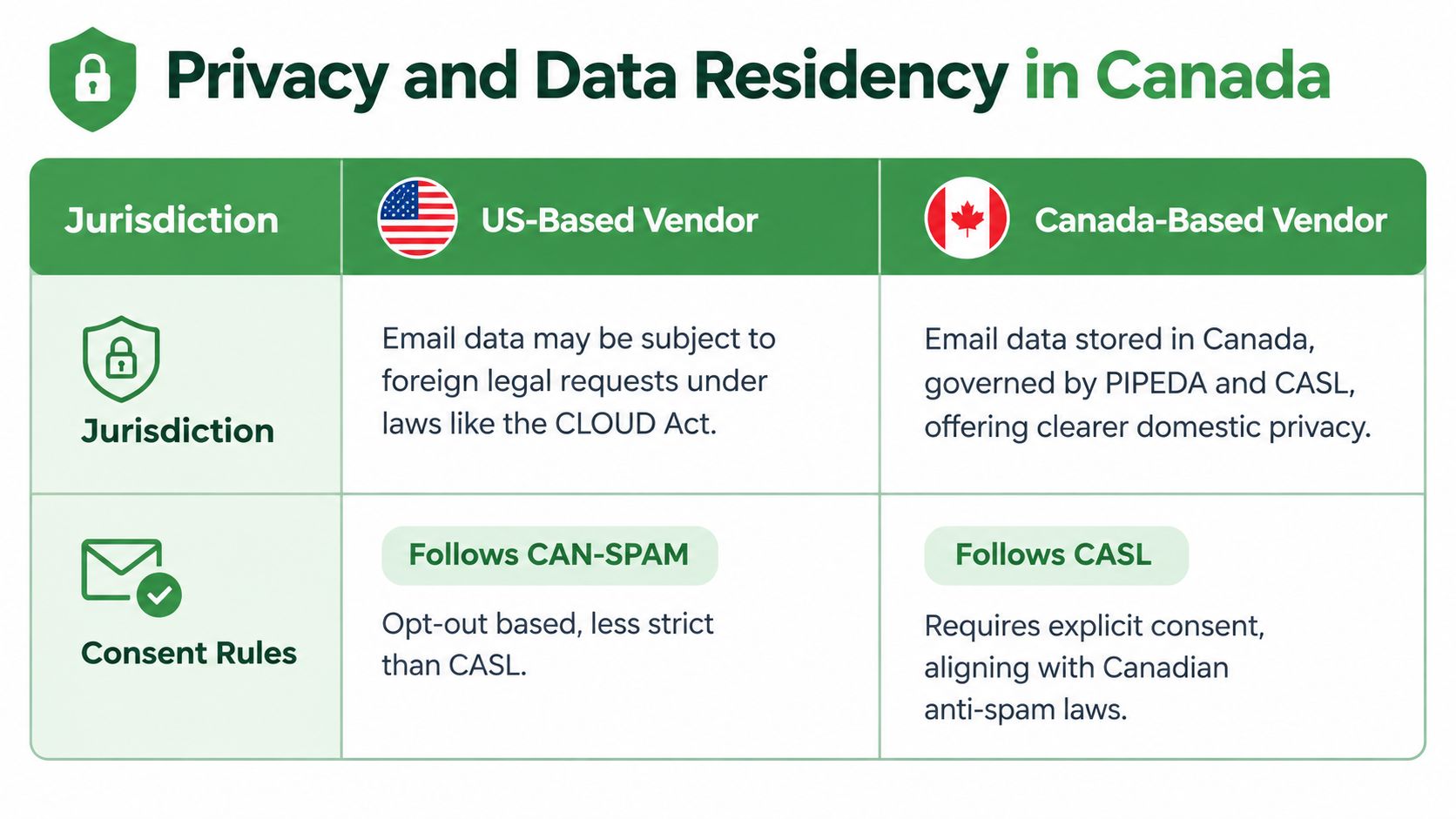
What PIPEDA means for email handling
PIPEDA is the federal private-sector privacy law that sets ground rules for how businesses collect, use, and disclose personal information in commercial activity, according to the Office of the Privacy Commissioner's PIPEDA overview. It is built around 10 fair information principles, including accountability, consent, safeguards, openness, and limiting retention.
The Privacy Commissioner also says PIPEDA applies across the country except where provinces have substantially similar private-sector laws, namely Québec, British Columbia, and Alberta, and it also applies to personal data that moves across provincial or national borders in commercial transactions, as explained in the businesses and personal information guidance. That's why data residency isn't just a preference issue. It affects how you assess vendor risk.
If you want a deeper look at this side of the decision, our guide on data residency requirements for secure hosted email goes further into the trade-offs.
CASL and the gateway's outbound role
Email security isn't only about inbound threats. CASL and privacy rules also affect how organisations handle addresses, consent, and commercial messages. The Privacy Commissioner's anti-spam guidance says that, with very limited exceptions, address harvesting is prohibited, and organisations must obtain informed consent to collect and use electronic addresses, even when those addresses come from a third-party supplier, in the CASL compliance help for businesses guide.
That matters because an SEG can support outbound controls, logging, and policy checks around how mail leaves your organisation. If your vendor is outside your preferred jurisdiction, you're also trusting that provider with a view into message metadata and, in many cases, message content.
There's one more wrinkle. The gateway itself can become an attack surface. A reported September 2026 Cisco zero-day showed how a crafted email could lead to root access on affected appliances, which sharpens the question from “does the gateway block phishing?” to “how do we patch, isolate, and monitor the gateway itself?” as discussed in this report on the Cisco Secure Email Gateway vulnerability.
Evaluating Vendors and Next Steps
Once you start comparing vendors, the feature grid can get noisy fast. We'd keep your evaluation grounded in five things. Threat coverage, deployment fit, privacy handling, admin usability, and total cost.
Questions worth asking before a demo
Threat coverage. Ask how the service handles phishing, spoofing, malware, spam, and outbound data loss controls.
Deployment fit. Confirm whether it works as cloud-hosted, on-premises, API-based, or fully managed.
Mail platform integration. Check how it works with Microsoft 365, Google Workspace, or your current host.
Admin workflow. Look at quarantine review, reporting, user release controls, and policy editing.
Vendor security. Ask how the admin console is protected and how the provider secures the gateway itself.
Practical rollout steps
A calm rollout usually works better than a hard cutover. Map your current mail flow first. Then decide where filtering should happen, who reviews quarantine, and what outbound rules matter most.
A staged approach helps. Start in monitoring or audit mode if the product supports it. Review what would have been blocked, tune the rules, then enforce more aggressively once you trust the signal quality.
The best gateway policy is the one your staff can live with and your admins can actually maintain.
You'll also want straight answers to a few contract questions. Where is mail processed and stored? What logs are kept, and for how long? What happens to retained data when the contract ends? Is support available from staff who understand your compliance needs and your business hours?
If you only do one thing today, do this:
Map your current mail path. Know where messages enter, where they're stored, and who can inspect them.
List your biggest email risks. Payment fraud, login theft, spam overload, or outbound data leaks.
Shortlist two vendors. Ask each one the same operational and privacy questions so you can compare fairly.
Frequently Asked Questions
What's the difference between a secure email gateway and built-in email security?
Built-in security from Microsoft 365 or Google Workspace filters common threats. A dedicated gateway adds policy control, deeper inspection, and outbound data protection in one place. For small businesses handling payment instructions, client data, or sensitive information by email, a gateway often provides stronger protection.
Do I need a secure email gateway if I'm using Microsoft 365 or Google Workspace?
Not always. If your team is small, mail volume is low, and you don't send payment or sensitive data through email, built-in filtering may be enough. If your team handles invoices, password resets, or client information by email, or if you've had a close call with a spoofed message, a gateway adds meaningful protection.
Where does the email gateway sit in my mail system?
The gateway sits between the public internet and your mail server. Incoming messages pass through the gateway first for inspection, then continue to your inbox. Outgoing mail can also be filtered. Your staff see it as fewer junk messages and fewer risky attachments — they don't see the gateway itself.
Can I run a gateway myself, or should I use a hosted service?
You have three main options: run an appliance in-house (maximum control, but you maintain it), use a cloud-hosted gateway (easier rollout, less upkeep), or use a managed service (vendor handles tuning and monitoring). For small teams without dedicated IT staff, a hosted or managed option usually makes more sense.
Does a secure email gateway protect my data privacy under PIPEDA?
The gateway's privacy impact depends on where your mail is processed and stored. A US-hosted gateway may filter well but leaves your data subject to US access. A Canadian-hosted option keeps processing and storage under PIPEDA jurisdiction, which matters if you handle sensitive business or personal information.
What happens if the email gateway itself gets compromised?
Like any internet-facing system, gateways need regular patching and monitoring. A hosted or managed service reduces your patch burden. If you run your own appliance, you need to treat it like critical infrastructure, with updates, security monitoring, and isolation from other systems.
If you want hosted email with filtering, privacy, and domestic data handling in one place, we offer that at Typewire. Our service is built for people and small businesses that want email processed in Canada, custom domains on paid plans, and security controls without taking on the burden of running their own gateway stack.