That sinking feeling when a crucial email vanishes is universal. But before you panic, take a breath. The message is almost always recoverable and probably just sitting in a folder like your Trash, Deleted Items, or Archive.
This is your immediate action plan. We'll walk through the simplest and most common recovery spots first to help you find that missing message fast.
Your First Line of Defense: The Obvious Places
When an email disappears, it's easy to assume the worst. In my experience, though, it's rarely gone for good—it's just misplaced. Before you jump into more complex recovery methods, a quick, methodical check of the most likely locations can often solve the problem in minutes.
The key is knowing where to look and understanding the difference between how your email provider handles deleted versus archived messages.
With roughly 4.6 billion people sending over 376 billion emails every day, it's no surprise that accidental deletions and misplaced messages are a daily occurrence. You can dig deeper into these email trends and the importance of recovery on Virfice.com. Thankfully, most email services are built with this in mind, providing safety nets to catch these common mistakes.
Check Your Trash and Archive Folders
Always start with the Trash (or Deleted Items) folder. It’s the most common culprit. In platforms like Gmail, Outlook, and Yahoo Mail, this is where messages go to sit for a while before they're gone for good.
For instance, say you accidentally deleted a flight confirmation. Just navigate to the Trash, find the email, and use the "Move to Inbox" option. It's a simple fix for a common slip-up.
Next, check your Archive. Archiving is a fantastic way to clean up your inbox without permanently deleting anything, but it’s also a frequent reason people think they've lost an email. If that project update from your colleague seems to have vanished, there's a good chance it was just archived by mistake.
In Gmail, the "Archive" isn't a separate folder you can browse; archived messages simply live in your "All Mail" folder, minus the Inbox label. It's a small but important distinction.
A quick reference guide to how long major email services keep your deleted emails before they are permanently removed.
Standard Email Recovery Timeframes by Provider
| Email Provider | Trash/Deleted Items Folder Retention Period | Archive Folder Retention Period |
|---|---|---|
| Gmail | 30 days | Indefinite (until manually deleted) |
| Microsoft Outlook | 30 days | Indefinite (until manually deleted) |
| Yahoo Mail | 7 days (default, can be changed) | Indefinite (until manually deleted) |
As you can see, the clock is ticking on items in your Trash, so it's always best to check there first. Archived emails, on the other hand, are generally safe until you decide to remove them yourself.
Pro Tip: Is the email missing on your computer but visible on your phone? The issue might be with your local email client (like the Outlook desktop app). Sometimes, sync issues can prevent a message from appearing on one device even if it's perfectly safe on the server. Always double-check by logging into your email through a web browser.
This infographic breaks down why emails typically go missing, which can give you a better idea of what might have happened.
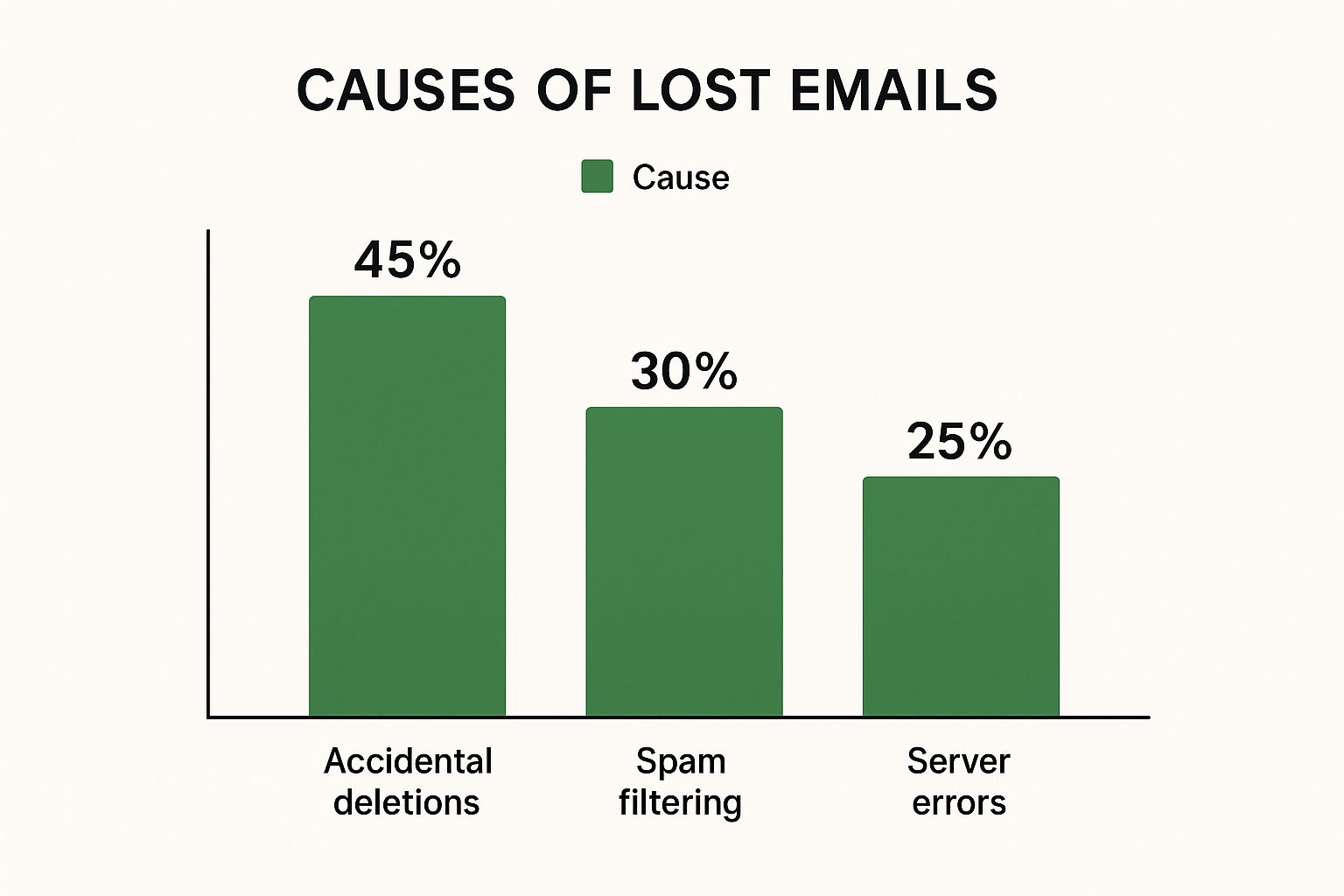
The data is pretty clear: user error is by far the leading cause. That just reinforces why it’s so important to check these common spots before assuming there's a bigger technical problem.
Digging Deeper for Permanently Deleted Emails

Alright, so you’ve scoured the Trash and Archive folders, and that critical email is still missing. This is the point where most people throw in the towel, but don't give up just yet. When an email seems to be gone for good, it’s time to roll up your sleeves and move past the basic checks.
Often, an email isn't truly "lost" but just incredibly well-hidden. It could be buried under a mountain of other messages or accidentally zapped into an obscure folder by a filter you set up ages ago and forgot about. This is where a more surgical search becomes your best tool.
Master Advanced Search Operators
Simply typing a keyword into the search bar is a shot in the dark. To find what you’re looking for, you need to use advanced search operators. These are essentially little commands that give your email provider precise, non-negotiable instructions.
Think of it as giving a specific order instead of a vague suggestion. If you're hunting for an invoice from a specific vendor sent sometime last year, a generic search will likely just give you a headache.
Here are a few practical examples you can adapt right now:
- Find emails from a specific person in a date range: In Gmail, try
from:jane.doe before:2023/01/01 after:2022/12/01. This immediately zeroes in on messages from Jane sent only in December 2022. - Locate emails with specific attachments: Looking for that PDF contract? A search like
has:attachment filename:pdfis your best friend. It instantly weeds out every email that doesn't have a PDF attached. - Uncover misfiled messages: Sometimes an email gets moved by mistake. A search for
in:anywhere "project phoenix proposal"forces a search of every single corner of your account, including Spam and Trash.
Learning these operators can be the difference between finding a "deleted" email and losing it forever.
I once helped a client find a "lost" six-figure contract that an automated rule had silently filtered into a folder named "Subscriptions." The culprit was a keyword in the sender's email signature. A simple
in:anywheresearch located it in less than ten seconds.
Check Your Provider’s Recovery Tools
Some email services have their own last-ditch recovery options. These are usually designed for very specific situations, like if your account was hacked and a bad actor deleted your messages.
For instance, Gmail offers a Message Recovery Tool. It's no silver bullet, but it can sometimes bring back emails that were permanently deleted within a very short window. The key is to act fast—the longer you wait, the lower your chances of a successful recovery. You'll usually find these tools tucked away in the help or support sections of your email service.
Inspect Local Data Files
If you use a desktop email client like Microsoft Outlook or Apple Mail, you have another card to play. These programs often keep a local copy of your emails on your computer's hard drive in data files like PST (for Outlook) or MBOX (for Apple Mail).
Even if an email was deleted from the server, a copy might still be lingering in these local files, especially if the app wasn't synced right at the moment of deletion. You can search these files directly or use your computer’s built-in search to hunt for keywords from the missing email.
Of course, having to go through all these steps really highlights how fragile it is to rely only on your email provider. A proactive approach is always the better strategy. To build a system that protects your emails before they vanish, check out our real-world guide to data loss prevention.
Understanding Why Emails Vanish
Before you can recover a lost email, you have to play detective. Why did it disappear in the first place? While we all jump to "I must have deleted it," the real culprit is often sneakier, hiding in your email settings, a glitch between your devices, or even a security breach. Figuring out the why is the first step to preventing it from happening again.
One of the most common reasons I see is a simple, forgotten email rule. You might have set up a filter ages ago to automatically shuttle messages with words like "promotion" or "unsubscribe" into a separate folder. Fast forward six months, and you've completely forgotten about it. Now, important emails are getting swept away without you ever seeing them hit your main inbox.
Unraveling The Causes
Syncing problems are another classic. Ever read an email on your phone, then search for it on your desktop's Outlook or Apple Mail and come up empty? The email isn't truly gone; it's just stuck in limbo. One of your devices hasn't properly synced with the server, creating the frustrating illusion that the message has vanished into thin air.
Then there's the more alarming possibility: a compromised account. When hackers gain access, they aren't just looking to steal your data. They often delete crucial evidence of their presence, like password reset notifications or security alerts, to cover their tracks.
Key Takeaway: An audit of your email rules is a great first step. Check the "Filters and Blocked Addresses" tab in Gmail or the "Rules" section in Outlook. You might be surprised to find an old, aggressive filter that’s causing your emails to go astray.
This security angle is more relevant than ever. Cybercriminals are constantly inventing new ways to exploit email, leading not just to financial scams but also to the intentional deletion of vital communications. The market for business email compromise (BEC) attacks is projected to grow from $1.9 billion to $2.22 billion, a sobering indicator of the rising threat. You can discover more insights about the growth of these BEC threats from The Business Research Company.
These attacks often involve spoofing, deleting, or redirecting messages, which makes having a solid recovery plan absolutely essential. If you even suspect foul play, you need to move fast to lock down your account and start the recovery process. For a deeper look at protecting your inbox, our guide on how to avoid phishing emails is a must-read.
By understanding these potential causes, you're better equipped to not only find what's missing but also to build a stronger defense against future disappearances.
Building a Bulletproof Email Backup Strategy

The best defense against losing an important email is having a game plan before it ever goes missing. Let’s be honest, hoping a lost message is just sitting in your trash folder is a pretty flimsy safety net. It’s like having only one key to your house—if you lose it, you're standing on the porch with no way in.
A real backup strategy is your spare key. It's the proactive system that ensures your critical communications are safe, no matter what happens. Instead of scrambling after a disaster, you can build a system that automatically creates independent copies of your inbox. This protects you from everything—accidental deletions, server meltdowns, or even a hacker wiping your account clean.
Set Up Automated Third-Party Backups
For most people, the gold standard is a dedicated, cloud-to-cloud backup service. These tools are lifesavers. They plug directly into your Gmail or Microsoft Outlook account and create a continuous, separate copy of every single email you send and receive.
Think about it: your entire email history, mirrored in real-time to a secure digital vault that’s completely disconnected from your main account. If a critical project thread gets deleted by mistake, it’s not gone. It’s safe. This hands-off approach is infinitely better than trying to remember to do manual backups, which, let's face it, most of us forget to do.
A third-party backup is your digital insurance policy. You hope you never have to file a claim, but you'll sleep better knowing it’s there. It draws a clear line between a simple mistake and permanent data loss.
The best part? Many of these services offer point-in-time recovery. This means you can rewind your inbox to the exact state it was in before something went wrong, turning a potential catastrophe into a five-minute fix.
Local Archives vs. Cloud Backups
While cloud services are incredibly convenient, creating local archives is another solid tactic. This is a great option if you’re someone who prefers having a physical copy of your data on a drive you control.
| Backup Method | Pros | Cons |
|---|---|---|
| Cloud-to-Cloud Backup | Totally automated, always current, accessible anywhere, and immune to local hardware failure. | Usually involves a subscription fee; you're trusting a third-party's security. |
| Local Archive (PST/MBOX) | You own the physical data, there are no ongoing costs, and it's completely offline and private. | It’s a manual process, vulnerable to drive crashes or theft, and can be cumbersome to manage. |
In my experience, a hybrid strategy is the most resilient. Use an automated cloud service for your day-to-day peace of mind, and supplement it by creating a local archive of your most vital folders once a quarter. This redundancy means no single point of failure can take down your communications.
Of course, a backup strategy is only one piece of the puzzle. Protecting your account from being compromised in the first place is just as critical. To truly secure your inbox, check out our guide on 8 email security best practices to implement now. By pairing smart security habits with a rock-solid backup plan, you can turn your email into a well-defended fortress.
When to Use Third-Party Recovery Tools
So, you’ve dug through the trash folder, deployed every advanced search command you know, and exhausted your email provider's built-in recovery options. Still nothing. It’s that sinking feeling of hitting a digital brick wall. This is precisely the moment to bring in the specialists: third-party recovery tools.
Think of these tools as the data recovery pros you call when standard methods just won't cut it. They’re built for the tough cases, giving you a powerful last-ditch effort to retrieve what’s been lost.
Scenarios Demanding Specialized Software
The most common reason I see people reaching for these tools is a corrupted local data file. If you’re a Microsoft Outlook user, for instance, all your emails live inside a PST file on your computer. When that file gets damaged—whether from a sudden software crash, a hard drive hiccup, or malware—Outlook might simply refuse to open it, leaving you locked out of your own archive. A dedicated recovery tool can often work miracles here, scanning the damaged file, piecing together the intact data, and pulling out your emails.
Another classic case is when emails are permanently deleted from the server. Most email services give you about 30 days to rescue items from the trash, but after that, they're gone for good from their end. A recovery tool can’t reach into your provider’s servers, but it can scan your local hard drive. If a copy existed there, fragments of that data might still be recoverable, even after you've emptied your computer's recycle bin.
A Word of Warning: Your chances of success with these tools are a race against time. The more you use your computer after deleting a file, the higher the odds that new data will be written over the very spot where your lost email used to be. Act fast.
The scale of email today makes accidental loss almost inevitable. The average person gets 100 to 120 emails daily, and with nearly 4.83 billion people using email, that’s a mountain of data. Since 99% of people check their email every single day, losing a crucial message isn't just an inconvenience; it can derail your entire workflow. You can dive deeper into these email usage statistics and their implications over at CloudHQ's blog.
Choosing the Right Recovery Tool
Jumping at the first recovery tool you find on Google can sometimes make things worse. You need to be methodical. Here’s what I look for when evaluating software for a recovery job:
- Compatibility: This is non-negotiable. Does it work with your specific email client, like Outlook or Apple Mail? More importantly, can it handle the file type you need to fix, such as PST for Outlook or MBOX for others?
- Reputation and Reviews: What are other users saying? Look for real-world reviews and case studies. Established tools aren't shy about sharing their success rates.
- User-Friendliness: Data loss is stressful enough. The last thing you want is to wrestle with confusing software. A well-designed tool should have a simple, clear interface that walks you through the process.
- A "Try Before You Buy" Preview: I never recommend a tool that doesn’t offer a free preview. This is critical. It lets you run a scan and see exactly which emails are recoverable before you spend a dime.
Frequently Asked Questions About Email Recovery

Even with the best guides, you're bound to run into some specific questions when you’re in the middle of a stressful email recovery. I've been there. Let's walk through some of the most common ones I hear from people trying to get their messages back.
This isn't just a list of answers; it's a quick-reference guide built from real-world experience. It’s here to help you get unstuck and clarify some of the murkier parts of finding lost emails, whether they disappeared years ago or just yesterday.
Can I Recover Emails Deleted Years Ago?
To be perfectly honest, it’s a long shot without a backup you made at the time. Providers like Gmail and Outlook have a pretty strict policy: once an email is emptied from the Trash folder, it's typically gone for good. That usually happens automatically after about 30 days.
So, what are your options? Realistically, you have two possibilities:
- You might have archived the email instead of deleting it. It's a common mistake! If so, a quick search in your "All Mail" (Gmail) or "Archive" (Outlook) folder should bring it right up.
- You might have a local backup file, like an old Outlook .PST file, stashed on an old computer or an external hard drive somewhere. It’s worth digging around for one if the email is that important.
Outside of those scenarios, getting a years-old email back is nearly impossible. This is probably the single best argument for having a proactive backup plan in place.
How Do I Know if My Emails Were Maliciously Deleted?
If you have a gut feeling that your account was compromised, trust it. You're looking for specific red flags that point to a breach. They're often subtle, but once you know what to look for, they become glaringly obvious.
First, check your account's recent login activity. Do you see IP addresses, devices, or locations you don't recognize? That's your biggest clue. Then, comb through your "Sent" folder for any emails you didn't write. Hackers frequently use compromised accounts to blast out spam or phishing messages to your contacts.
A classic hacker move is to mess with your filters and forwarding rules. They'll often set up a rule to auto-delete security alerts from your provider or silently forward copies of your sensitive emails to an address they control. Always check these settings if you're suspicious.
If you find any of this, your immediate priorities are to change your password and lock down your account by enabling two-factor authentication (2FA).
What Is the Difference Between Archiving and Deleting?
This is a really important concept to grasp because it trips up so many people.
Deleting an email is like putting it in a digital recycling bin. It moves the message to your Trash or Deleted Items folder, which is just a temporary holding zone. After a set time, the provider automatically and permanently erases it.
Archiving, however, is like moving a file from your desk into a filing cabinet. The email is removed from your inbox to keep things tidy, but it’s safely stored away in a folder like "All Mail" or "Archive." Archived messages are kept forever (unless you delete them from there) and are always easy to find with a simple search. It’s the best way to hold onto an email you might need down the road.
Don't wait until you're scrambling to recover from a data disaster. You can protect your communications right now with Typewire, the private email hosting platform that puts you back in control. With end-to-end encryption and a strict no-tracking policy, your data remains yours and yours alone. Start your free 7-day trial of Typewire today!