Good email management isn't just about deleting messages; it's about creating a system that lets you process, organize, and act on emails without feeling overwhelmed. The whole point is to turn your inbox from a source of stress into a tool that actually helps you communicate and get things done. This requires moving beyond a simple "delete or not delete" mindset to build a workflow you can stick with.
Why Your Inbox Feels So Overwhelming
If your inbox feels like a relentless, chaotic mess, you're not alone. It's a universal feeling, and it's a direct result of how we communicate today. There are over 4.6 billion people using email, sending more than 376 billion messages every single day. Without a solid strategy, a disorganized inbox is practically a given.
That flood of information makes handling email effectively a critical skill for staying focused. If you're curious about the numbers, you can find more workplace email statistics and see how other professionals are trying to cope.
But the problem goes deeper than just the sheer number of messages. The real productivity vampires are decision fatigue and context switching. Every single unread email forces a small decision: Delete it? Archive it? Reply now? Forward it? Snooze it? When you multiply that by the dozens or hundreds of emails you get daily, your mental energy is drained before you even touch your real work.
The Real Cost of Digital Clutter
Every time an email notification pops up, it yanks you out of what you were doing. This isn't just a small distraction; it’s a tax on your brain. You lose your flow, and it takes a surprising amount of time to get back into a deep state of focus.
Think about these all-too-common scenarios:
- The Project Manager: Their inbox is a jumble of client feedback, questions from the team, vendor invoices, and endless software notifications. Buried in all that noise is a critical, time-sensitive question from a major stakeholder. It gets missed for hours, causing unnecessary delays and stress.
- The Freelancer: They subscribe to newsletters to stay on top of their industry, but now those subscriptions have taken over. A legitimate, high-value project inquiry from a potential new client gets completely lost between a 20% off coupon and a webinar reminder. That's a real missed opportunity.
Your inbox has become a to-do list that anyone in the world can add to without your permission. Effective email inbox management is the act of taking back control over that list.
This isn't about chasing the myth of a perfectly empty inbox every day. It's about building a system that serves you, not the other way around. The first step is to start seeing email management as a strategic way to reclaim your time and mental clarity. That's how you'll finally transform your relationship with your inbox.
The Four Pillars of Inbox Control

If you're going to truly get a handle on your email, you need a simple framework for every decision. Ditching the habit of reacting to every notification is key. Instead, you filter everything through a powerful, four-part system. I've found that this approach to email inbox management brings lasting order because it's built on concepts that reinforce each other.
Think of these as the pillars holding up a fortress of focus: Triage, Automate, Secure, and Maintain. When you understand the "why" behind each one, the specific tactics become far more effective, helping you build a system that actually sticks.
Triage Your Incoming Mail
Triage is all about making a quick, decisive choice on every single email the moment it lands. The goal here is to touch each message only once. When you open an email, you’re not just reading it—you’re immediately deciding its fate. Does it need a reply? Can you delegate it? Is it something you should archive for later, or is it just junk?
This doesn't mean you have to answer every email right then and there. It's about stopping messages from squatting in your inbox and creating mental clutter. For example, a quick client update can be archived, a question from a teammate can be forwarded to the right person, and a promotional newsletter can be deleted. All of this can happen in seconds.
Your inbox shouldn't be a storage unit. It's a processing station. The goal is to keep things moving, not to let them pile up.
Automate the Repetitive Tasks
The second pillar is Automation. Let’s be honest, a huge chunk of your inbox is filled with predictable, low-value stuff—notifications, receipts, routine updates. Instead of manually dragging these around every single day, you can build a system that does the heavy lifting for you.
This is where smart rules and filters come in. Imagine every receipt from a supplier automatically getting a "Finances" label and skipping your main inbox entirely. Or, you could set up a rule that automatically stars any email coming directly from your boss. This is proactive email inbox management; you’re teaching your email client how to organize itself, which frees you up to focus on the work that actually matters.
Secure Your Digital Space
A massive source of inbox chaos is the junk you never signed up for. The Secure pillar is about being aggressive in protecting your inbox from spam, phishing scams, and unwanted newsletters. These messages aren't just annoying—they’re genuine security risks and a colossal waste of your time.
Services like Typewire put a heavy emphasis on this with advanced anti-spam and virus protection, catching threats before they even have a chance to distract you. By using a secure email platform and being ruthless with the "unsubscribe" and "block sender" buttons, you can drastically shrink the amount of mail you have to deal with in the first place. A secure inbox is a cleaner, safer, and much quieter inbox.
Maintain Your System
Finally, Maintenance is about the small, consistent habits that prevent the chaos from creeping back in. Getting your inbox to zero is one thing; keeping it there is the real challenge. This pillar is all about establishing simple daily or weekly routines to keep things tidy.
This could be a quick 10-minute triage session at the end of each day to clear out new arrivals. Or maybe a Friday afternoon check-in to tweak your automation rules and unsubscribe from a few lists. It also gives you a clear process for getting back on track after a vacation or a particularly brutal week. Maintenance turns email inbox management from a one-time, monumental project into a sustainable, low-effort habit.
To tie it all together, these four pillars provide a comprehensive framework for transforming your relationship with email. They shift the focus from reactive fire-fighting to proactive organization.
The Four Pillars of Inbox Management
| Pillar | Core Action | Key Benefit |
|---|---|---|
| Triage | Making a quick, one-touch decision on every new email. | Prevents inbox pile-up and reduces mental clutter. |
| Automate | Creating rules and filters to sort repetitive emails automatically. | Saves time and mental energy for high-priority tasks. |
| Secure | Aggressively blocking spam, junk, and potential threats. | Creates a safer, cleaner inbox with less noise. |
| Maintain | Performing small, consistent check-ins and clean-ups. | Ensures the system remains effective and sustainable long-term. |
By internalizing and applying these principles, you're not just cleaning your inbox—you're building a reliable, stress-free system that supports your productivity instead of undermining it.
Your Action Plan for Achieving Inbox Zero
Alright, enough with the theory. Let's get our hands dirty and actually do this. This is your one-time reset, the moment you take back control from the digital chaos. The aim here isn't perfection; it's about making a real, noticeable difference and finally getting a clear, manageable inbox.
The Great Archive
First things first, you need to draw a line in the sand. The single most powerful move you can make for instant relief is a bulk archive. Don't worry, this doesn't delete a single thing. It just moves all that old email clutter out of your primary inbox while keeping it completely searchable. Think of it as moving last year's paperwork into the archive room—out of sight, but still accessible.
Jump into your inbox and search for every email received before a specific date. A good, practical cutoff is anything older than 30 days. Once the search pulls them up, select every single one and hit "Archive." In a matter of seconds, you’ve just cleared out potentially thousands of emails that were clouding your focus.
This one move is incredibly freeing. It's proof that you don't need to stare at every old email to get your work done. Your inbox is for what's current and actionable, not a museum of past conversations.
Create Your Core Folder System
With the old noise gone, it's time to build a simple structure for what’s left and what’s coming. I've seen people create dozens of folders, and it never works. A complicated system is a system you'll abandon.
Let's start with just three essential folders (or labels, if you're a Gmail user):
- Action Needed: This is your active to-do list. Emails that require a task or a specific response from you live here.
- Waiting On: For emails where you've passed the baton or are waiting on someone else's reply before you can proceed.
- Reference: This is for information you need to keep but don't have to act on. Think project plans, important documents, or contact info.
This simple setup makes triage fast. Every new email can be sorted in a heartbeat, keeping your main inbox clean and focused. For more ideas on organizing your digital life, check out our guide on the top email management tips to boost your productivity.
An Example of a Smart Filter in Action
Now, let's put automation to work with a real-world example. Say you get daily notification emails from a project management tool. They’re useful, but they’re not urgent, and they constantly break your concentration.
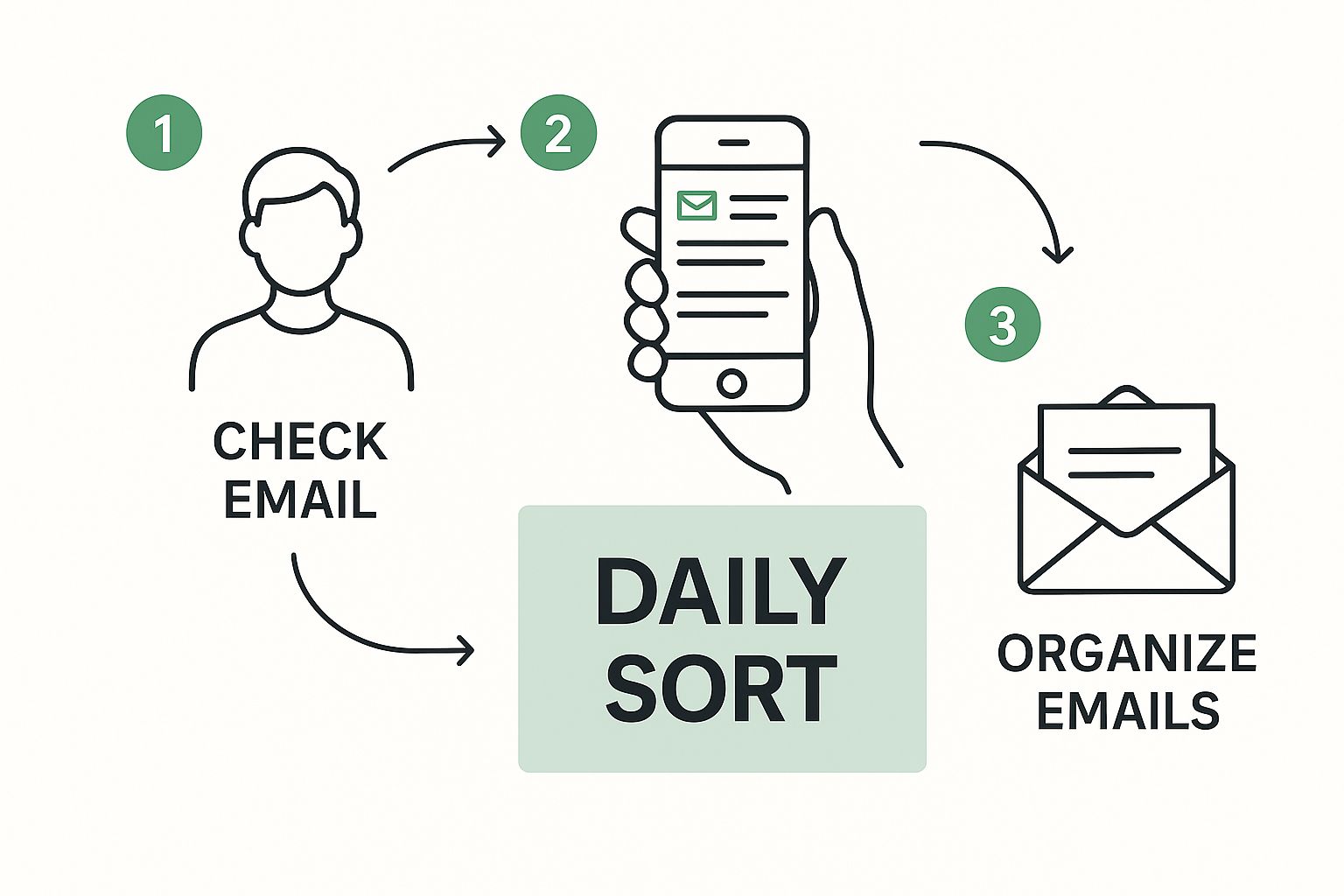
Here's how you'd build a filter to handle them automatically:
- Find one of the emails, maybe from an address like
notifications@yourprojecttool.com. - Use your email client’s “Create filter” or “Create rule” option based on that sender.
- Set up the rule to do two things automatically:
- Skip the Inbox (Archive it)
- Apply the label: "Project Updates"
Just like that, every future notification will bypass your inbox and get filed away neatly. You can then review them all at once when you have a free moment. This is a cornerstone of effective email inbox management.
Putting Your Inbox on Autopilot
Getting your inbox to zero feels great, but the real win is keeping it that way without a ton of manual work. This is where automation becomes your secret weapon. By setting up a few smart rules and filters, you can essentially teach your email client to do the heavy lifting for you.
Instead of constantly reacting to every new message that pops up, you build a proactive system. The goal is to make sure only the emails that genuinely need your immediate attention ever land in your main inbox. Everything else? It gets sorted, labeled, and filed away on its own, ready for you when you have the time.
Automation is what separates actively managing your inbox from simply maintaining it. It frees up your mental bandwidth to focus on the work that actually matters.
Creating Your First Automation Rules
Let's walk through some practical examples you can set up right now. These rules are designed to handle the common types of emails that clog up your inbox but don't require instant action.
Think about these common scenarios:
- Financial Receipts: You get invoices from vendors or payment confirmations from services like Stripe. Instead of dragging them to a folder every time, create a rule that looks for keywords like "invoice," "receipt," or a specific sender (like
receipts@stripe.com). Set it to automatically add a "Finances" label and move the email out of your inbox. - Project Notifications: Updates from tools like Asana, Trello, or Jira are important for context, but they can be a massive distraction. I set up a filter for emails from
notifications@yourprojecttool.comto auto-archive them and apply a "Project Updates" label. I can then review them in a batch later. - Social Media Alerts: Let’s be honest, notifications from LinkedIn or Twitter are rarely urgent. A simple rule can instantly archive any email from these platforms, keeping your primary view clean.
This first layer of automation cuts down on the noise dramatically. If you're also wrestling with messages from multiple accounts, our guide on how to manage multiple email accounts effortlessly has some great strategies that pair perfectly with these automation tips.
Advanced Filtering for High-Priority Messages
Automation isn't just about hiding the less important stuff; it's also incredibly powerful for highlighting critical messages so they never get lost in the shuffle.
Here are a couple of high-impact automations I rely on:
- Star Emails from Your Boss: I have a filter set up for any email that comes directly from my manager's address. The rule's action is to "Star it" or "Mark as Important." This makes their messages pop visually, so I know to look at them first.
- Flag Client Communications: When I'm working with a key client, I create a rule that looks for their company's domain in the sender's email (for instance,
*@keyclient.com). It automatically applies a bright "Client" or "High Priority" label to those messages.
Rules like these transform your inbox from a simple chronological feed into a truly prioritized workspace. You stop being a passive email sorter and become an email strategist, dedicating your attention where it’s actually needed. This is the heart of sustainable email inbox management.
Habits for Long-Term Inbox Success
https://www.youtube.com/embed/HM7dgEF8H60
Getting to inbox zero feels great, but let's be honest—that's the easy part. The real challenge is keeping it that way. An organized inbox that blows up a week later isn't a system; it's a temporary fix. True, lasting email inbox management comes from building a few simple, sustainable habits that actually fit into a busy workday.
You don't need to dedicate hours to policing your email. The secret is focusing on small, consistent actions that stop the clutter before it even has a chance to pile up.
Your inbox is a to-do list that anyone in the world can add to. Your job is to be the curator.
Once you embrace that mindset, everything changes. Email stops being something that just happens to you and becomes a space you actively manage and control. With that philosophy, let's build a maintenance plan that sticks.
Your Daily and Weekly Maintenance Plan
The goal here isn't to add another major task to your plate. It's to make these routines so second nature they feel as automatic as making your morning coffee.
The Daily 15-Minute Triage
Just before you sign off for the day, carve out 15 minutes. Your only objective is to process the new emails that have landed in your inbox. Stick to a "one-touch" rule for everything:
- Archive It: If it’s for reference or doesn't need a reply, get it out of sight.
- Reply Now: Anything that takes less than two minutes to answer? Do it immediately.
- Move It: For tasks that require more thought or time, move them to your dedicated "Action Needed" folder.
- Delete It: Pure junk, old promos, or irrelevant threads? Delete them without hesitation.
This tiny habit is a game-changer. It means you start every morning with a clean slate, not a digital mess from the day before.
The Weekly 5-Minute Filter Check
Every Friday afternoon, take just five minutes to review your email filters and rules. Look for any new, repetitive emails that have started showing up. Maybe you're now getting a weekly project update or a new analytics report. Create a quick rule to automatically file it away. This little check-up keeps your automation system working for you.
What to Do When You Fall Off the Wagon
Look, life happens. You'll go on vacation, get slammed with a project, or just have an off-week. Your inbox will fill up again. Don't panic or throw in the towel. It’s not a sign of failure; it’s a sign you’re human.
Simply run a "mini-reset."
Just like the first time, bulk-archive everything older than one week. Then, run your daily 15-minute triage on what's left. In less than 20 minutes, you're right back to inbox zero. The system is flexible enough to work for you, not the other way around.
Maintaining good email hygiene is a two-way street for both senders and receivers. As global inbox placement rates continue to fall, marketers who don't clean their lists are seeing deliverability rates crater below 30%, which just adds to the noise for everyone. You can find more data in the 2025 email deliverability benchmark report on mill-all.com.
Pairing these habits with solid security is the ultimate defense against clutter and chaos. You can learn about the most common email security threats in our complete defense guide to protect your newly organized inbox.
Answering Your Top Inbox Management Questions
Switching up how you handle your email is a big step, and it's totally normal to have a few questions bubble up. Honestly, working through these early concerns is what makes the new system stick. Let’s walk through some of the most common things people ask when they start this journey.
How Long Does That First Big Cleanup Really Take?
This is the question I hear most, and the answer is… it depends. But don't let that scare you. If you're looking at an inbox with thousands upon thousands of messages, you should probably block out one to two solid hours to get it under control.
The good news? The single most effective move—bulk-archiving everything older than a month—takes just a few minutes. The real work is in creating your initial folder structure and setting up those first crucial filters. Think of it as a one-time setup fee that pays you back in saved time and reduced stress, starting immediately. The goal isn't perfection on day one; it's about creating a clean slate to build better habits.
Your first pass isn't about perfectly filing away every email from 2017. It's about clearing the decks so you can actually focus on what's coming in today.
What If I Accidentally Archive Something Important?
This is a valid fear, but it's one you can easily design your system to prevent. For starters, be selective with your most aggressive automation. I always advise people to only create hard-and-fast rules for predictable, non-urgent stuff—think newsletters, social media notifications, or system alerts. Never automatically file away emails from individual people. That simple distinction cuts your risk way down.
And remember, your email client's search bar is your best friend and safety net.
- Archiving isn't deleting. It's just moving an email from your inbox to a "filed away" cabinet.
- You can instantly find anything with a quick search for the sender or a keyword you remember.
I also recommend doing a quick 5-minute review of your active filters every few weeks. It’s a simple check-in to make sure they’re still working for you and not against you.
Do I Need to Pay for a Special Email App?
For most people starting out, the answer is a firm no. You'd be surprised how much power is already packed into standard clients like Gmail and Outlook. Before you even think about spending money, make it a point to really master the built-in tools—the rules, labels (or folders), and advanced search capabilities are seriously robust.
Once you’ve pushed those native features to their limits and you still feel like you're missing something specific—like a one-click unsubscribe service or a super-advanced sender screener—then you can start looking at paid apps. View them as power-ups for an already solid system, not a substitute for building good habits in the first place.
A truly organized inbox starts with a secure foundation. Typewire offers private, ad-free email hosting that includes advanced anti-spam and virus protection from the get-go. This means you’re starting with a cleaner, safer inbox before you even create your first filter. Learn more at typewire.com.