A cloud security risk assessment is the process of identifying, analyzing, and evaluating potential security threats and vulnerabilities within your hosted email environment. For any business that relies on a hosted email platform for its daily communications, this isn't just a technical exercise—it's the cornerstone of protecting sensitive conversations, ensuring email privacy, and preventing damaging data breaches before they can occur.
Why Assessments Matter for Hosted Email Security
Think of your company's hosted email platform as a digital vault. This vault doesn't just store old messages; it's the primary repository for your most sensitive conversations, contracts, intellectual property, and client data. A cloud security risk assessment is the expert audit of that vault’s locks, alarms, and access procedures, ensuring every potential weakness that could compromise your email privacy is found and fixed.
For any business using a hosted email platform, this process is essential. It moves beyond generic security checklists to uncover the specific vulnerabilities that put your email security and privacy at risk. Without it, you are leaving your most critical communication channel exposed to a growing list of sophisticated threats.
Uncovering Hidden Email Vulnerabilities
A proper risk assessment for your email system dives deep into its architecture, configurations, and the policies governing how data is handled by both your team and your email provider. The objective is to answer critical questions about email privacy and security that a standard scan would miss.
You'll typically dig into areas like:
- Access Control Gaps: Who can access what, and how? This involves identifying user accounts that lack multi-factor authentication (MFA) or possess excessive permissions, making them prime targets for account takeover.
- Data Encryption Standards: Are your emails and attachments protected both in transit and while stored on a server? The assessment verifies that strong, end-to-end encryption is used to prevent unauthorized snooping and uphold email privacy.
- Provider Security Posture: How robust are your email provider's security practices? This involves a critical evaluation of their security measures, data handling policies, and compliance certifications to ensure they meet your standards.
- Misconfiguration Risks: Simple configuration errors are a leading cause of data exposure. An assessment pinpoints these incorrect settings that could accidentally expose sensitive email data or create a backdoor for attackers.
Proactive Defense Against Costly Breaches
The reality is, cloud security is more complex than ever. Companies are adopting cloud services faster than they can secure them, leaving more doors and windows open for attackers. It's a bit shocking, but around 32% of cloud assets are just sitting there neglected, with each one averaging 115 vulnerabilities. This kind of oversight is a huge reason why over 60% of companies faced a public cloud security incident in 2024, according to the 2025 State of Cloud Security Report.
By proactively identifying risks, you shift from a reactive stance—cleaning up after a breach—to a strategic one. This approach not only prevents financial and reputational damage but also builds a foundation of trust with your clients and partners who rely on your ability to protect their information.
Ultimately, a cloud security risk assessment for your hosted email is an investment in business continuity. It ensures your primary communication channel remains secure, private, and trustworthy, allowing you to operate with confidence.
Identifying Critical Threats to Your Hosted Email

Your hosted email account isn't just an inbox—it's a treasure trove of sensitive data and a primary target for cybercriminals. A proper cloud security risk assessment digs deeper than generic threat lists. It’s about methodically dissecting your email ecosystem to find the specific, often hidden, vulnerabilities that could compromise your most vital communications and violate your email privacy.
Think of it as a specialized inspection of your hosted email platform. We're scrutinizing everything from the encryption protecting your data in transit to the security and privacy practices of your email provider. Without this focused lens, your organization is left vulnerable to attacks that standard, off-the-shelf security tools just weren't designed to catch.
Uncovering Phishing and Social Engineering Risks
Despite advanced filtering technologies, cleverly disguised phishing campaigns remain one of the greatest threats to email security. Attackers continuously innovate, crafting convincing emails that manipulate employees into surrendering login credentials or downloading malware. A thorough risk assessment stress-tests your current defenses against these sophisticated, tailored attacks that threaten your entire email platform.
It also shines a spotlight on your team's susceptibility to social engineering. For a comprehensive overview of the latest attack vectors, our complete defense guide to email security threats offers practical advice for fortifying your human firewall. This part of the assessment clarifies whether you need to invest in better user awareness training or implement stricter email handling policies.
Analyzing Access Control and Permission Creep
One of the most insidious risks is "permission creep." Over time, as employees change roles or take on new projects, they tend to accumulate access rights they no longer need. Each of these outdated permissions represents a potential entry point for an attacker to compromise your hosted email accounts.
A thorough cloud risk assessment for your email platform will:
- Audit Active Accounts: Scour the system for dormant accounts or those belonging to former employees that were never deactivated.
- Review Permission Levels: Verify that users have only the minimum access required for their roles, adhering to the principle of least privilege.
- Verify Authentication Strength: Identify any accounts not protected by multi-factor authentication (MFA), a critical defense against account takeovers.
Data Exfiltration and Insider Threats
Not all threats originate externally. A single compromised account or a disgruntled employee can become a conduit for massive data exfiltration, where sensitive emails and files are siphoned out of your system, leading to a major breach of email privacy.
An effective risk assessment doesn't just look for vulnerabilities; it simulates these attack scenarios. It asks the hard question: "If an account was compromised right now, how fast would we detect it and how quickly could we stop the data from leaving?"
This proactive testing helps you build better monitoring and alerting systems to flag suspicious behavior, such as a user suddenly downloading a large volume of attachments or auto-forwarding emails to a personal account.
A major weak point in any cloud service is the poor handling of credentials and API keys. To learn more about protecting them, check out these Secrets Management Best Practices for Secure DevOps. The exposure of these "secrets" can grant an attacker the keys to the kingdom.
The Tenable Cloud Security Risk Report 2025 highlights just how common this is, noting that 29% of workloads have "toxic combinations" of risk—meaning they are publicly exposed, have critical vulnerabilities, and hold high-level privileges.
To give you a clearer picture, this table shows how a risk assessment connects common email threats to specific focus areas.
Common Email Security Threats and Assessment Focus Areas
| Email Security Threat | Assessment Focus Area | Example of a Finding |
|---|---|---|
| Phishing/Spear Phishing | Email filtering rules, user training effectiveness, DMARC/SPF/DKIM records. | DMARC policy is set to 'none', allowing spoofed emails to reach inboxes without being flagged. |
| Account Takeover | Authentication policies, MFA enforcement, password complexity requirements. | 35% of user accounts, including two with admin rights, do not have MFA enabled. |
| Data Exfiltration | Outbound traffic monitoring, data loss prevention (DLP) rules, file-sharing permissions. | No alerts are configured for unusually large attachments being sent to external domains. |
| Ransomware Delivery | Attachment sandboxing, URL scanning, and endpoint protection on user devices. | The email gateway does not scan URLs within attached documents, only in the email body. |
| Insider Threat | User activity logging and monitoring, access control reviews, offboarding procedures. | A formal process for revoking access for terminated employees is not consistently followed. |
As you can see, the goal is to produce concrete, actionable findings that you can use to immediately strengthen your email security and protect your privacy.
How to Conduct an Email Security Risk Assessment
Conducting a security risk assessment on your hosted email platform might sound like a daunting task, but it can be broken down into a logical, four-step process.
Think of it as a comprehensive health check for your organization's most critical communication channel. Following these steps will move you from uncertainty to having a clear, actionable plan to enhance your email security and privacy.
Step 1: Asset Discovery and Mapping
You can't protect what you don't know exists. The first step is to identify and catalog every component of your hosted email ecosystem. This inventory goes far beyond a simple list of user mailboxes.
This discovery phase is the foundation for the entire assessment. Any asset missed here becomes a blind spot that could be exploited later.
Your asset inventory should cover:
- User Accounts: Every active mailbox, including individual users, shared accounts (
info@,support@), and service accounts used by applications for notifications. - Hardware and Devices: All endpoints used to access email, such as company laptops, mobile phones, and tablets.
- Software and Applications: The email clients (Outlook, Apple Mail), mobile apps, and any third-party tools integrated with your email, like marketing automation platforms.
- Data Types: The kinds of sensitive information transmitted via email, including contracts, financial data, personally identifiable information (PII), or trade secrets.
With this complete inventory, you will have a clear picture of what you need to protect.
Step 2: Vulnerability Identification
With a full map of your email assets, it's time to adopt an adversarial mindset. The goal here is to proactively hunt for weaknesses and security gaps in your hosted email platform before a real cybercriminal does. This involves a combination of technical checks and policy reviews.
A great way to get started is with a systematic audit. For a detailed walkthrough, The 7-Point Email Security Audit Checklist provides a fantastic, structured guide for checking your most important security controls.
Key activities in this phase include:
- Checking Authentication Policies: Is every account—especially those with administrative privileges—protected by multi-factor authentication (MFA)? Are your password policies strong and consistently enforced?
- Reviewing Encryption Protocols: Confirm that strong encryption, such as TLS 1.2 or higher, is used to protect emails in transit. Also, verify that your email provider encrypts your data at rest to ensure email privacy.
- Assessing Access Controls: Scrutinize user permissions. Are you adhering to the principle of least privilege, where individuals only have access to the mailboxes and data essential for their jobs?
This step should result in a concrete list of observable weaknesses in your email setup.
Step 3: Risk Analysis and Prioritization
Not all security flaws carry the same weight. A missing patch on a public-facing server is a critical issue; an employee using a slightly older version of an email client is a lower concern. Risk analysis involves evaluating each vulnerability to determine its real-world potential for damage to your email security.
This is the most critical part of the process, as it helps you focus your limited time and resources on the threats that truly matter.
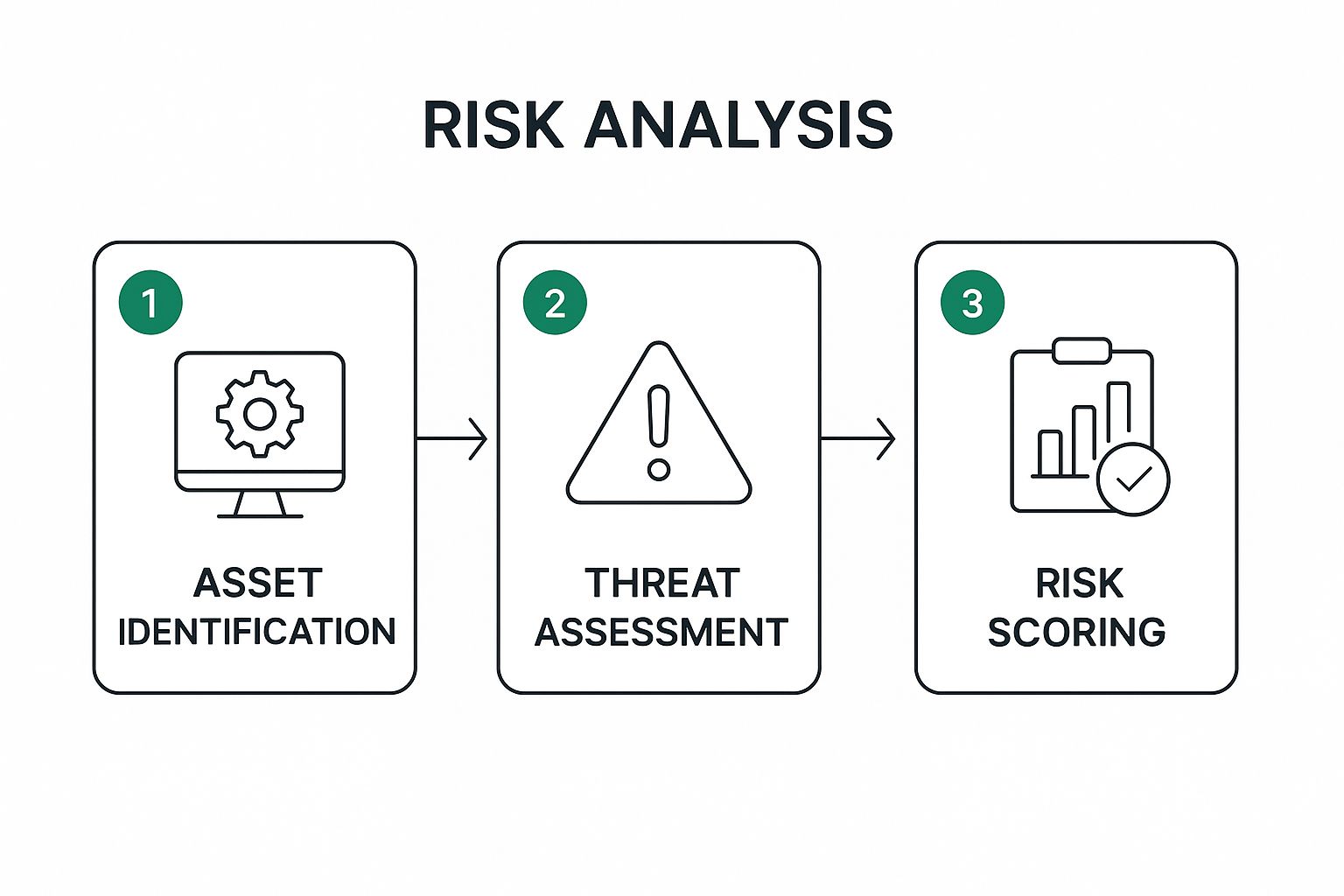
As the infographic illustrates, a structured approach is what transforms a long list of potential problems into a prioritized action plan.
A simple risk matrix is the best way to prioritize. For each vulnerability, score it based on its likelihood (how easy is it to exploit?) and its potential impact (how bad would it be if it happened?). The high-likelihood, high-impact risks shoot straight to the top of your to-do list.
For instance, an administrator account on your email platform without MFA is a classic high-likelihood, high-impact risk. It's an easy target for attackers and could lead to a full compromise of your email system.
Step 4: Mitigation and Remediation Planning
Finally, it's time to turn analysis into action. Using your prioritized risk list, you will build a mitigation plan—a clear roadmap detailing exactly how you will fix each vulnerability. This plan must be practical, with designated owners and realistic deadlines.
Your remediation plan will likely include a mix of technical fixes, policy updates, and team training. Here’s how you might structure it:
- High-Risk Items: Address these immediately. This means enabling MFA everywhere, patching critical vulnerabilities, and revoking unnecessary administrative rights.
- Medium-Risk Items: Schedule these for the near future. This could involve implementing stronger password policies, conducting phishing awareness training, or cleaning up old, unused mailboxes.
- Low-Risk Items: Monitor or formally accept the risk. Sometimes, the cost and effort to fix a minor issue outweigh the potential damage.
By consistently following this four-step cloud security risk assessment, you create a repeatable, effective system for keeping your hosted email secure, protecting your data, and maintaining the privacy of your communications.
Choosing a Secure Hosted Email Provider

After mapping your email security risks, the next step is finding a hosted email provider that actively helps you mitigate them. Not all platforms are created equal; many prioritize convenience over robust security and privacy. This is where applying the principles of a cloud security risk assessment becomes your most valuable tool for making an informed, defensible choice.
Think of it like buying a house. You wouldn't just admire the paint color; you'd hire an inspector to check the foundation, wiring, and plumbing. Similarly, for your email, you must look beyond the user interface and scrutinize the provider's security architecture and privacy policies. It's about asking the right—and sometimes tough—questions to determine how they truly protect your most critical conversations.
Key Questions to Ask Potential Providers
Before signing any contract, you must conduct a mini-assessment on any potential hosted email provider. Their ability (or inability) to answer these questions will reveal their commitment to your data's security and privacy.
A provider that is evasive or cannot provide clear answers is an immediate red flag.
Start your investigation with these non-negotiables:
- Encryption Protocols: How do you protect my data? Specifically, how is it encrypted in transit and at rest? Look for modern, robust standards like TLS 1.2+ for transit and AES-256 for at-rest encryption. Anything less compromises your email privacy.
- Employee Access Controls: Who on your team can access my data, and under what exact circumstances? A truly secure provider operates on a zero-trust model with strict role-based access controls and detailed audit logs tracking all internal access.
- Data Residency and Jurisdiction: Where will my emails be physically stored? The country where the data center is located determines which laws govern your information, which has significant implications for your privacy and potential government access.
- Third-Party Audits and Certifications: Can you prove your security claims? Don't just take their word for it. Request independent verification, such as a SOC 2 Type II report, which provides an objective, third-party assessment of their security controls and operational effectiveness.
These questions form the core of your vendor risk assessment and ensure you select a partner that aligns with your security and privacy standards.
Evaluating Security Features and Policies
Beyond foundational security posture, a hosted email provider must offer specific, tangible features that empower you to defend your accounts. These aren't just nice-to-haves; they are the tools that directly counter the threats identified in your risk assessment.
Think of a provider's security features as layers of defense, like the walls, moat, and guards of a castle. The more layers they have, and the stronger each one is, the safer your organization will be from a whole range of attacks.
For a much deeper look into what sets a truly secure service apart from a standard one, our guide to secure email hosting breaks it all down.
The table below provides a solid framework for comparing providers, focusing on what genuinely matters for keeping your email private and secure.
Evaluating Secure Email Hosting Providers
| Security Feature/Policy | What to Look For | Why It Matters for Email Privacy |
|---|---|---|
| Data Encryption | End-to-end and at-rest encryption using modern standards (e.g., AES-256). | Prevents unauthorized parties, including the provider, from reading your emails and attachments. |
| Multi-Factor Authentication (MFA) | Mandatory MFA enforcement options for all user and admin accounts. | Protects against account takeovers even if passwords are stolen, a common attack vector. |
| Zero-Tracking/No-Ads Policy | A clear, public commitment to never scan email content for advertising or data mining. | Ensures your private conversations are not monetized or analyzed for commercial purposes. |
| Independent Audits (SOC 2) | Recent and recurring SOC 2 Type II audit reports available for review. | Provides objective, third-party proof that the provider's security controls are effective over time. |
| Owned Infrastructure | The provider owns and operates its own servers and data centers. | Reduces reliance on third-party cloud providers (like AWS or Google Cloud), giving them direct control over the physical and network security of your data. |
Using this structured approach elevates your selection process from a simple feature comparison to a genuine risk assessment, ensuring you partner with a provider who values your email privacy and security as much as you do.
Maintaining Continuous Email Security
Completing a cloud security risk assessment for your email isn't the end of the journey; it's the beginning. That initial assessment is a snapshot—a detailed health check of your email security at a single point in time. However, threats are not static. They evolve and find new attack vectors, which means your defenses must adapt continuously.
This is where continuous security becomes critical. It's about shifting from a "one-and-done" audit mindset to fostering an ongoing, vigilant security culture focused on your email platform. The goal is to stay ahead of threats, not just react to them.
Implementing Foundational Security Controls
Your first line of defense is a set of non-negotiable security controls that act as a strong barrier against the most common email-based attacks.
The single most impactful action you can take is to enforce multi-factor authentication (MFA) across your entire email platform. MFA adds a second layer of verification beyond a password, making it incredibly difficult for an attacker to gain access even if they have stolen credentials. It is the closest thing to a silver bullet for preventing account takeovers.
Beyond MFA, disciplined access management is crucial. Permissions tend to accumulate over time as roles change, creating easily overlooked risks.
- Quarterly Access Audits: Regularly review who has access to which mailboxes and shared resources.
- Principle of Least Privilege: This is a simple but powerful concept: grant users only the minimum permissions necessary to perform their jobs. Nothing more.
- Prompt Offboarding: When an employee leaves the company, their access to the email platform must be revoked immediately—not tomorrow, not next week, but now.
These simple housekeeping tasks drastically reduce your attack surface and limit the potential damage an attacker could inflict.
Building a Human Firewall Through Training
All the technology in the world can't protect you if your employees are unprepared. Phishing attacks succeed because they exploit human psychology. This makes ongoing security awareness training an absolute necessity.
Effective training is a continuous program, not a boring, once-a-year presentation.
- Regular Phishing Simulations: Send simulated phishing emails to your team. It's the best way to identify who is vulnerable and provides a perfect teaching moment for those who click.
- Bite-Sized Security Updates: Keep your team informed about new threats and tactics with short, timely updates relevant to their daily email use.
- Clear Reporting Procedures: Make it incredibly simple for anyone to report a suspicious email. When your team knows what to do, they become your most effective threat detectors.
By fostering a security-conscious culture, you empower every team member to become a vigilant defender of the organization's data. This "human firewall" is often the difference between a near-miss and a catastrophic breach.
Developing an Incident Response Plan
Even with the strongest defenses, you must assume that someday, an incident will occur. A well-documented incident response plan for email breaches is not a luxury; it's a necessity. This is your playbook for when things go wrong, ensuring you can respond quickly and effectively to minimize damage.
Your plan must clearly outline the steps for identifying, containing, and recovering from an attack on your email platform. This means knowing exactly how to isolate a compromised account, determine what data was exposed, and communicate effectively with stakeholders.
This is getting harder as more companies adopt multi-cloud strategies. A recent report found that 69% of organizations struggle to apply consistent security controls across different cloud providers. To make matters worse, experts predict that by 2025, a jaw-dropping 99% of cloud security failures will be the customer's fault—usually due to simple misconfigurations. You can explore more about these cloud security statistics to see just how critical vigilance and proper training have become.
A solid plan and constant monitoring are your best defense against these challenges, preventing a minor slip-up from becoming a full-blown crisis.
Frequently Asked Questions About Email Risk Assessments

Diving into a cloud security risk assessment for your company’s email can feel overwhelming, and it's natural to have questions. Getting clear, straightforward answers is the best way to move forward with confidence and secure one of your most critical business tools.
Let’s tackle some of the most common questions we hear from organizations trying to get a handle on the security and privacy of their hosted email platform.
How Often Should We Assess Our Email Security?
This is an excellent question, and the answer isn't a simple "once a year." While an annual review is a good baseline, your email security is a dynamic part of your operations, not a set-it-and-forget-it project.
Think of it like car maintenance. You take it for its scheduled annual service, but you would also have it checked immediately if you heard a strange noise or were about to embark on a long road trip. Your email security deserves the same level of attention.
A full or partial cloud security risk assessment should be triggered by specific events, not just the calendar:
- Major System Changes: Migrating to a new hosted email provider, rolling out a major update, or integrating a new third-party app demands a fresh security review.
- Emerging Threats: When a major, widespread vulnerability affecting email platforms hits the news, you need to assess your specific exposure immediately.
- Organizational Shifts: Mergers, acquisitions, or even a period of rapid hiring can introduce new risks to your email environment.
- After a Security Incident: Following any security breach, no matter how small, a post-mortem assessment is essential to understand what went wrong and prevent it from happening again.
By layering this event-driven approach on top of a regular schedule, you can ensure your defenses keep pace with your business.
Is Our Email Provider Solely Responsible for Security?
This is a very common and dangerous misconception. Your hosted email provider is responsible for securing their infrastructure, but you are always responsible for how you use their service and protect the data within it. This is known as the Shared Responsibility Model.
It’s like renting a high-security storage unit. The facility owner manages the main gates, security cameras, and building alarms. But you are responsible for putting a strong lock on your unit and being careful about who gets a key.
When it comes to email, your provider secures the "cloud," but you must secure what's "in the cloud." They manage the servers and network; you manage user access, data handling policies, and endpoint security.
This shared model means your risk assessment must examine both sides:
- Provider's Responsibilities: Are you reviewing their compliance certifications (like SOC 2), encryption standards, and the physical security of their data centers?
- Your Responsibilities: Are you auditing your user permissions, enforcing multi-factor authentication (MFA), training your team to spot phishing, and securing the devices used to access email?
Assuming your provider has everything covered is a guaranteed way to leave significant security and privacy gaps wide open.
What Is the First Step for a Small Business with Limited Resources?
If you're a small business, the idea of a massive risk assessment can seem daunting. The good news is you don't need a huge budget or a dedicated security team to make a real impact. The key is to start with high-impact, low-cost basics.
Think about securing your home. Before installing a sophisticated alarm system, you start by locking the doors and windows. These simple actions provide the most significant security benefit for the least effort.
Here are the most practical first steps for any small business:
- Enable MFA Everywhere: This is the single most effective action to prevent account takeovers. Make it mandatory for every user, especially administrators. It is almost always a free, built-in feature on modern email platforms.
- Leverage Built-in Security Tools: Most quality hosted email providers offer a suite of security tools. Spend an hour in your admin settings to tune up spam filters, enable basic anti-phishing rules, and configure security alerts.
- Conduct a User Access Review: This doesn't have to be technical. Simply list everyone with access to your email system. For each person, ask: do they still work here, and do they truly need access to every mailbox they can open? Revoke any permissions that are not absolutely necessary.
These three steps form the foundation of good email security. By focusing on them first, even the smallest business can dramatically lower its risk without spending a fortune.
Ready to secure your communications with a provider that puts privacy first? Typewire offers private email hosting built on our own infrastructure, with zero tracking and robust security features designed to protect your data. Start your free 7-day trial and experience true email privacy today.