
Last updated: Nov 9, 2026
Your old university email address is still on your banking profile, your résumé, and the password-reset screen for accounts you barely remember opening. You want to leave the provider, but changing the address feels harder than staying. A custom domain is worth considering when your email has become part of your identity, not just somewhere to receive messages.
So, should you get a custom domain for personal use? Yes, if you want a lasting address and will maintain it. No, if you want email with no administrative work. We'd make this an identity decision first and a privacy decision second.
When Your Personal Email Starts Outgrowing You
Consider a common situation. You've started consulting alongside your regular job, and clients now use the same Gmail address your family has known for years. You'd like something more suitable for contracts, but you don't want another inbox to manage.
The awkward address isn't the main problem. The core issue is how much depends on access to that provider account. Leaving means reviewing contacts, subscriptions, recovery settings, and documents that still carry the old address.
Decide what needs to last
We'd judge the decision on durability, identity, cost, privacy, and failure planning. A polished address is useful, but it shouldn't outweigh your willingness to manage the thing behind it.
Think about the jobs your address already performs. Does it identify you to employers? Does your family rely on it? Would losing access interrupt important correspondence, or would you open another account?
Practical rule: Buy a domain to preserve an identity you value, not to fix an address you merely find embarrassing.
There's also a difference between wanting independence and wanting a new technical hobby. You can pay a mailbox provider to operate the email service. You still need to take responsibility for the domain account and its recovery.
Worth considering: Your address appears on contracts, professional profiles, family accounts, or long-running projects.
Probably unnecessary: You mainly receive casual messages and don't mind changing addresses.
Not a privacy shortcut: You want anonymity but haven't considered registration details or your choice of host.
Our recommendation is straightforward: get one when continuity matters enough to justify ongoing care. Otherwise, choose a trustworthy mailbox provider and leave domain administration out of your life.
What a Custom Domain Actually Is
A custom domain is a name you register through a registrar and keep by renewing it. Registration gives you control over that name while your registration remains valid. It isn't a permanent purchase, and it doesn't automatically include email hosting.
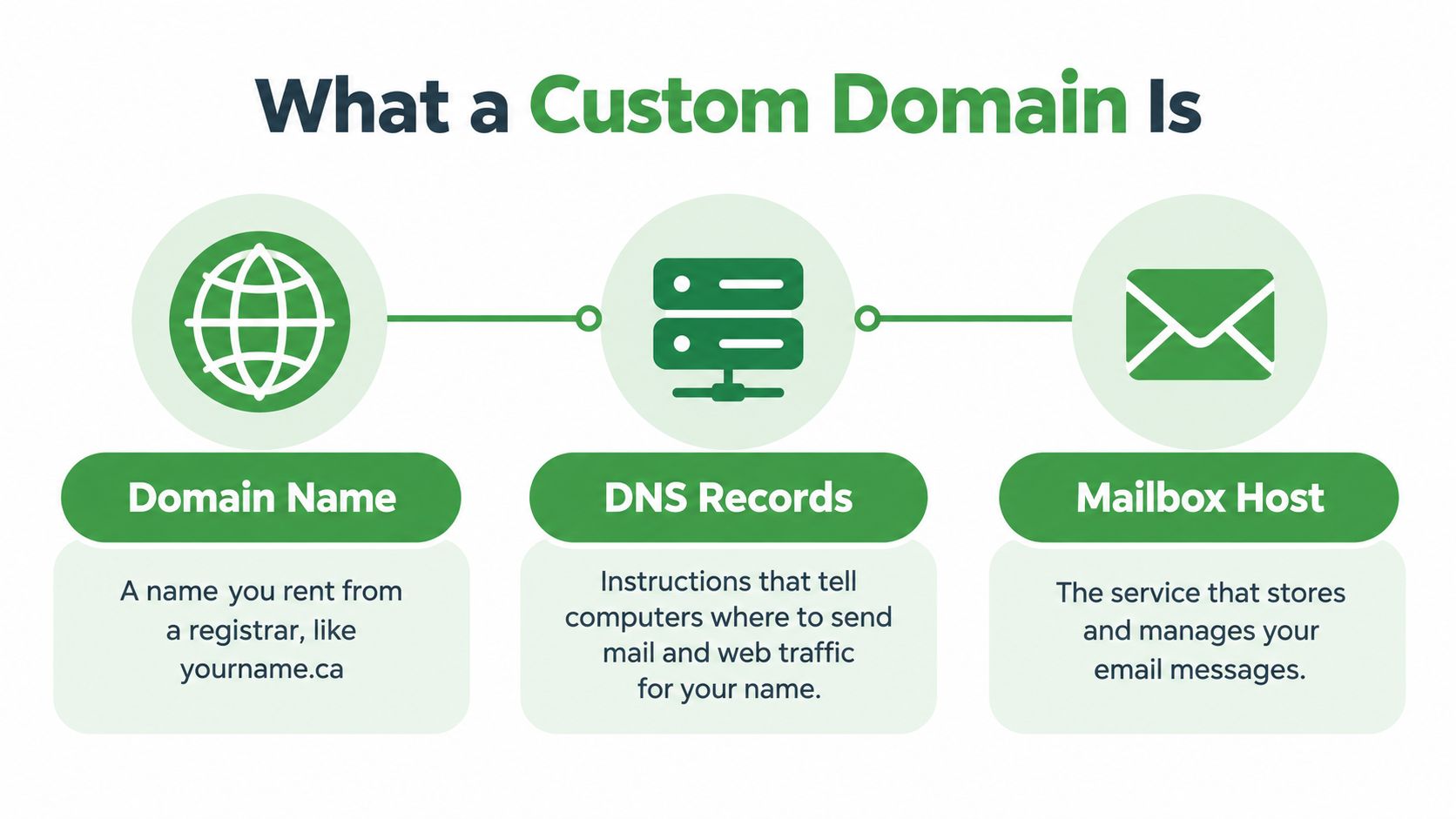
The pieces fit together like this:
Separate the name from the service
Think of the domain as your street address and the mailbox host as your postal service. DNS, the Domain Name System, supplies the directions. Its MX records, short for mail exchanger records, identify the service that receives your email.
An A record serves a different purpose: it connects a name to an internet address, commonly for a website. You don't need to build a website just because you want personalized email. Our guide to domain name registration explains the registration side separately.
The mailbox host stores your messages and handles delivery. When comparing hosts, ask about IMAP, Internet Message Access Protocol, for accessing mail, and SMTP, Simple Mail Transfer Protocol, for sending it. Check the provider's supported apps and export process rather than assuming every setup works alike.
Registrar: Manages your registration and renewal.
DNS service: Holds the instructions for your domain.
Mailbox host: Runs the email service you use.
Choose the suffix deliberately
CIRA administers .ca and requires registrants to meet its Canadian Presence Requirements. Citizens and permanent residents are among the eligible categories; .com generally doesn't require that connection.
Neither ending tells you where your messages live. A .ca address isn't proof of domestic hosting, so check the host's infrastructure, contract, and privacy practices separately. You're choosing a label and a service, not a single package with automatic guarantees.
The Real Reasons People Choose a Custom Domain
A freelance consultant may have an email address printed across years of contracts and proposals. When that person changes mailbox providers, the difficult part isn't choosing a new app. It's keeping clients from replying to an address they no longer control.
Portability is the strongest reason to register a personal domain. You can change the service behind the address without asking everyone to learn a replacement. Existing messages still need a migration plan, but your public identity can stay put.
Professional appearance without pretending to be larger
A personal domain can also make correspondence easier to recognize. That matters when your address appears on invoices, conference biographies, volunteer schedules, or a portfolio. Choose a name you can say aloud without explaining unusual spelling.
For someone in Canada, .ca also communicates a regional connection. Its established use isn’t speculative: CIRA reported more than 3.4 million .ca domains under management at the end of its 2025 fiscal year. That scale doesn't prove you need one, but it shows you aren't adopting an obscure naming system.
Provider rules still apply
Suppose you organize a community event and send an update to a large volunteer list. Gmail says users may encounter a limit after sending to more than 500 recipients in a day or a single message, with sending resuming within 1 to 24 hours, according to its published sending-limit guidance.
A domain doesn't remove those restrictions from the underlying service. It gives you the option to choose another host without replacing the address. It also doesn't turn an ordinary mailbox into a mailing-list platform.
A portable address gives you bargaining power with providers. It doesn't give you permission to send anything to anyone.
If your side project becomes commercial, follow the CRTC's requirements for consent, identification, and an unsubscribe mechanism. Its anti-spam guidance says senders must honour unsubscribe requests within 10 business days.
Buy for continuity first. Treat appearance and provider choice as supporting benefits.
Costs, Responsibilities, and the Stuff Nobody Mentions
The registration fee is the easy part to understand. One registrar lists a .ca registration at $23.95 for one year before applicable GST/HST on its domain pricing page. That's an example, not a market average or a quote for your eventual purchase.
Budget for the mailbox service separately. Compare renewal pricing, taxes, migration assistance, and recovery support rather than judging the whole arrangement by an introductory domain offer.

Authentication needs deliberate maintenance
SPF, Sender Policy Framework, identifies authorized sending services. DKIM, DomainKeys Identified Mail, adds a signature that receiving systems can verify. DMARC, Domain-based Message Authentication, Reporting and Conformance, adds policy and reporting around authentication failures.
These controls work together. Adding records without checking legitimate senders can leave gaps or interfere with mail you want delivered.
Publishing a DMARC policy and enforcing one are different jobs. Start in monitoring mode, review the reports, then tighten the policy once every legitimate sender passes.
Renewal work: Keep payment details current and review expiry notices.
Security work: Protect registrar access and preserve recovery options.
Change work: Recheck authentication when you add or replace a sending service.
Your time belongs in the budget
You don't need to become a mail-server administrator. We'd recommend paying a dedicated host rather than operating a server for an ordinary personal address.
You do need to know which company controls each part of the setup. Save renewal notices, support details, and a record of intentional changes. Our guide to handling an expired domain covers the recovery problem.
If those duties already sound intolerable, listen to that reaction. A provider-issued address may be the more reliable choice for you.
The Privacy Trade-off Nobody Talks About
A custom domain can expose more than it hides. A distinctive surname-based address may make you easier to identify across unrelated services. Registration records, payment information, recovery addresses, DNS details, and mailbox metadata can also connect the domain to you.
That doesn't make registration a bad idea. It means you should separate control from concealment. Moving away from a large provider may suit your privacy goals without making your address anonymous.
Ask what each organization can see
WHOIS-style registration systems and registrar privacy services deserve scrutiny before you pay. Ask what information becomes public, what contact-data protection applies to your registration, and what the registrar retains privately.
This concern isn't marginal. The Office of the Privacy Commissioner's 2024–25 survey of Canadians found that nine in 10 Canadians are concerned about protecting their privacy. Another 78% had refused to give a business information because of privacy concerns.
Those findings establish concern, not proof that a custom domain solves it. The meaningful question is which disclosures your proposed setup reduces, and which new ones it creates.
Privacy checkpoint: Address portability is control over where your email goes. Anonymity is a different objective.
Choose controls that match the risk
Registration privacy: Confirm contact-data handling for the actual suffix you’ll register. CIRA hides individual .ca registrants’ contact details by default, while .com privacy usually depends on your registrar.
Independent recovery: Use a recovery identity outside the domain you're protecting.
Account protection: Enable multi-factor authentication on registrar and DNS access.
Host scrutiny: Ask where messages, backups, and support access are located.
PIPEDA, the Personal Information Protection and Electronic Documents Act, belongs in your provider review, not on a checklist marked complete because the address ends in .ca. Ask the host to explain its applicable obligations and practices.
Likewise, don't assume a domain adds PGP, Pretty Good Privacy, or any other message-encryption system. Authentication and message confidentiality solve different problems. Make the host demonstrate the protections you need.
Matching the Setup to the Person
Your setup should reflect how you use email, not how much configuration an enthusiast can tolerate. We'd make different choices for a private individual, a freelancer, and a household.
Choosing a setup that fits your personal use
| Profile | Best suffix | Host priority | Must-have records |
|---|---|---|---|
| Privacy-conscious individual | .com for a geographically neutral identity, or .ca for a local connection | Clear privacy terms, recovery support, simple export | Host-specified MX, SPF, DKIM, DMARC |
| Freelancer using their own name | .ca for local work, or .com for a broader identity | Dependable delivery, aliases, migration help | MX and authentication covering every legitimate sender |
| Parent creating family addresses | A durable family name in either suffix | Separate accounts, understandable administration, succession support | MX and authentication covering the household's services |
Both suffixes support provider portability. Choose .com for neutrality, not because it offers a special technical ability to move email. Choose .ca when the regional identity fits and you meet the eligibility rules.
Different people need different compromises
For a privacy-conscious individual, we'd start by asking whether a domain is necessary at all. A provider-issued address avoids the registration layer and may meet your needs. If you do register, consider whether using your full name conflicts with the privacy you want.
A freelancer has a clearer reason to proceed. The address can become a durable point of contact across client relationships. Prioritize support and recoverability over decorative features, and check every service that sends invoices or appointment notices.
A family setup needs more thought about people than technology. Don't give everyone a shared mailbox when they need separate identities and private correspondence. Choose a name that won't become awkward when children grow up or household circumstances change.
Before comparing providers such as Proton Mail, iCloud Mail, and a dedicated email-only host, write down your actual requirements. Don't assume an integrated ecosystem is simpler for you, or that more privacy controls automatically mean a better daily experience.
The right choice is the setup you can understand, recover, and keep using.
A Realistic Setup Sequence
Start with the domain account, not the mail app. A working inbox won't help if you can't recover the registration that supports it.
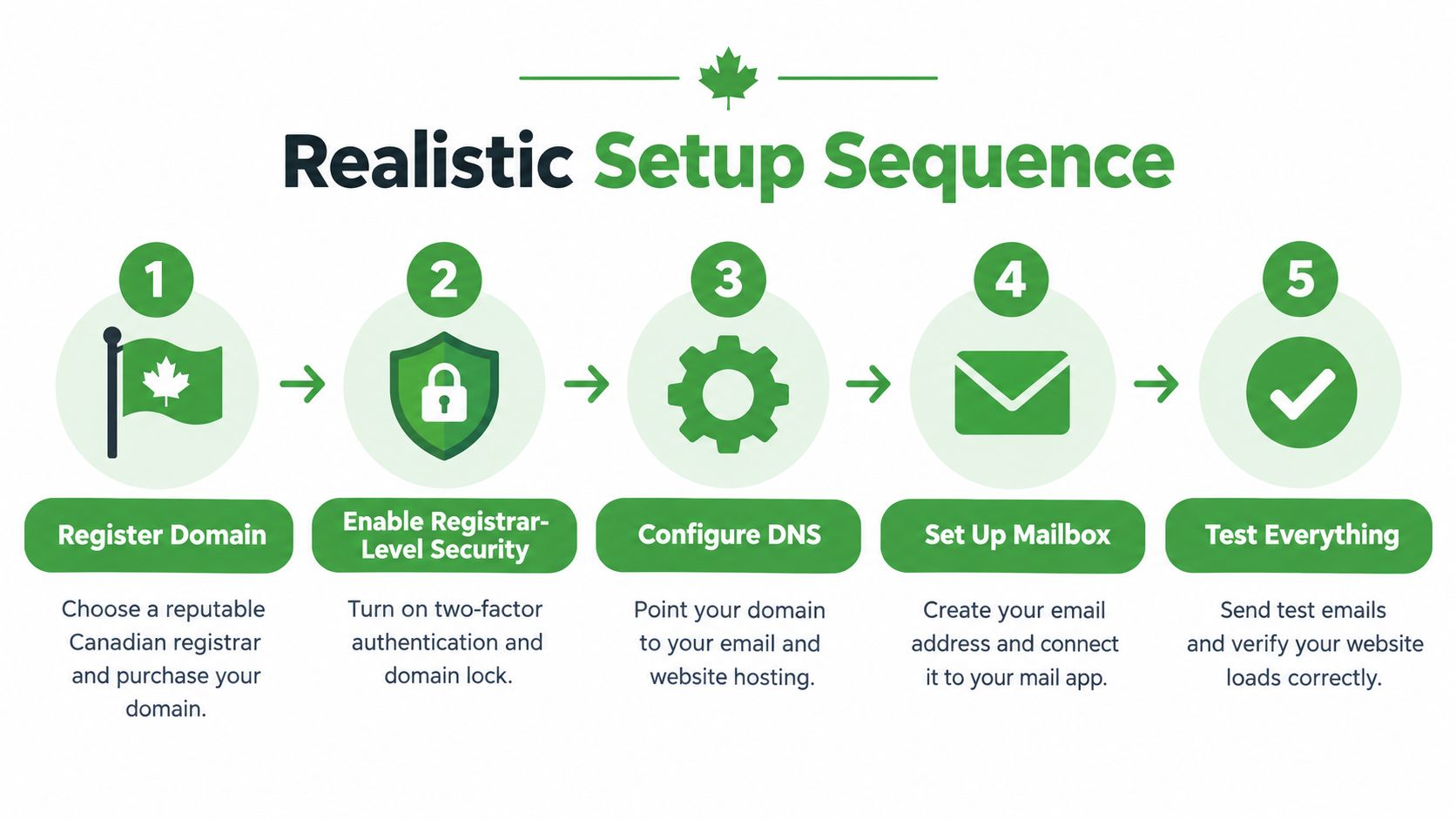
Use this sequence as your operating checklist:
Secure access before changing delivery
Register through a reputable registrar with clear support and recovery procedures. Enable registrar-level multi-factor authentication and registrar lock, plus registry lock where available. Set automatic renewal, add a backup payment method if supported, and keep expiry monitoring independent of the domain.
Next, select a host that supports custom domains and explains where data lives. Our explanation of email hosting can help you separate service responsibilities before committing. When you’re ready to set things up, follow our step-by-step guide to creating a personal email domain.
Prepare the destination: Create mailboxes, aliases, and forwarding rules before directing incoming mail there.
Configure authentication: Add the host's authorized SPF instructions, enable DKIM, and begin DMARC in monitoring mode.
Verify before enforcing: Review legitimate senders before moving DMARC towards quarantine or rejection.
Test the migration and the recovery plan
Before switching an existing domain, lower its TTL, or time to live, which controls how long DNS answers may remain cached. Plan the change with the host, then test incoming mail, outgoing mail, replies, and aliases. Keep the old service available until you've confirmed the transition.
For a visual companion to the setup, use this walkthrough:
Finally, document where the domain is registered and how an authorized person can recover it. Plan for incapacity or death, including how a family member or executor can preserve critical correspondence. Keep sensitive recovery material secure, not in an unprotected shared document.
Don't make the domain's own mailbox its only route back in.
Our Recommendation and Your Next Step
We'd usually recommend a custom domain if you expect to keep the same public address for five years or more. That's our decision rule, not a measured break-even point. The value comes from preserving an identity you'll continue to use.
We wouldn't bother for a disposable inbox, a short-lived project, or someone who refuses to manage renewals. We'd also pause if your main objective is anonymity. A memorable personal domain can work against that goal.
Make the decision before choosing a provider
Use a short checklist rather than shopping by feature count:
Identity: Is this an address you want people to keep?
Responsibility: Will you maintain registration, access, and recovery?
Privacy: Have you checked what the registrar and host can see?
Failure planning: Can someone you trust recover the setup when you can't?
If the answers are clear, register the name and secure the account before planning a staged migration. Don't change every important login immediately. Establish that the new address works, then update critical accounts carefully and record what you've changed.
If you decide against a domain, strengthen the mailbox you already use. Review authentication, recovery details, privacy terms, and export options. Skipping registration doesn't mean you have to ignore those basics.
About our role in the recommendation
We provide private email hosting, so we have a commercial interest in this decision. Our service includes custom-domain support on paid plans, alongside provider-issued addresses for people who don't want a domain. We operate our own infrastructure in Vancouver, BC, rather than relying on a third-party cloud.
Those facts make us an option, not an obligation. The useful outcome is an address and recovery plan you trust, even if you choose another host or keep your current mailbox.
Typewire offers ad-free email, custom-domain support, and hosting entirely in Canada, without tracking or data mining. Start your 7-day free trial and test your everyday mail workflow before moving important accounts.