Author: williamwhite

  • Average Email Deliverability Rate: 2026 Benchmarks

    Average Email Deliverability Rate: 2026 Benchmarks

    Canada's 2026 average email deliverability rate is 89.4%, while the latest Canadian inbox placement figure is 86.7%. A good email deliverability rate usually sits above that local average, but the number only helps when you know whether it measures server acceptance or actual inbox placement.

    That distinction matters because a message can leave your system, reach a receiving server, and still disappear into spam or quarantine. Canadian senders also face a consent problem, not just a technical one. The CRTC recorded 152,603 spam complaints in one half-year period, and lack of consent appeared in 93% of complaints, according to its official complaint statistics. Authentication helps, but SPF, DKIM, and DMARC can't rescue a list built on weak permission.

    What Counts as a Good Deliverability Rate in 2026

    The 2026 Canadian average email deliverability rate is 89.4%, according to EmailTooltester's email deliverability statistics. A separate Canadian benchmark found 86.7% inbox placement, while 5.4% of messages entered spam and 7.9% went missing in that sample (Validity's 2025 benchmark report).

    These figures describe different checkpoints. Deliverability may mean that a receiving server accepted the message, or that the message reached a visible inbox. One number is like a parcel accepted at the building entrance. The other asks whether it reached the right desk. That difference explains why credible reports can produce different averages.

    A practical range for small businesses

    Use the figures as a starting point, not a pass-or-fail certificate:

    • Below 80% inbox placement: Treat this as poor. A large share of your audience is missing the message, even if your platform reports successful delivery.

    • Around the Canadian average: Your programme may be operating normally, but provider mix, list age, and permission records still need review.

    • Above the average: This suggests a healthier position when complaints remain low and consent is documented.

    • Consistently strong placement across providers: This is more useful than one attractive combined score.

    The 89.4% figure represents Canadian marketing email overall. It cannot predict your result across every sector, audience, or mailbox provider. Older contacts, inactive subscribers, and people who did not clearly request your emails can pull placement down.

    Consent matters alongside authentication. SPF, DKIM, and DMARC help receiving systems identify a sender, but they do not make an unwanted message welcome. A technically authenticated campaign can still perform poorly when its list creates complaints or lacks clear permission.

    Practical rule: Compare your provider-level inbox placement with the relevant benchmark, then track your own trend.

    A lower result may reflect stale addresses, unclear consent, sudden volume changes, or weak sender identification rather than a fault with your email service. Rescue begins by separating delivery, deliverability, and inbox placement.

    Delivery vs Deliverability vs Inbox Placement

    Think of email like postal mail. Delivery means the envelope reached the post office serving your recipient. The receiving mail server accepted the message, so your sending platform may mark it as delivered. That result doesn't tell you where the recipient will find it.

    Deliverability describes the broader success of the message. Did the receiving system accept it, defer it, filter it, quarantine it, or reject it? In everyday marketing discussions, people often use deliverability to mean the share of messages that reach a visible inbox, although reporting tools don't always use the term consistently.

    The three measurements

    Measurement What it tells you What it doesn't tell you
    Delivery rate The receiving server accepted the message Whether the message reached the primary inbox
    Deliverability rate The overall ability to reach the recipient successfully Which provider or folder caused the loss
    Inbox placement rate The share found in the primary inbox rather than spam or quarantine Whether recipients read or acted on it

    Inbox placement gives you the clearest view of visibility. A message in spam may count as delivered by your email platform, but it hasn't reached the place most recipients check first. A missing message creates a different problem because you may not see an obvious bounce.

    Open rate adds another layer of uncertainty. Apple Mail Privacy Protection can load tracking pixels without a person opening the message, while image blocking can prevent a genuine open from being recorded. Outlook image caching can also affect how tracking systems interpret activity. As a result, opens may rise or fall independently of inbox placement.

    That doesn't make engagement useless. Clicks, replies, unsubscribes, and complaint signals can help you understand whether your audience values the mail. They shouldn't replace a direct inbox test.

    If you can watch only one number, watch inbox placement, not opens.

    A seed list helps. You send the same campaign to controlled addresses at several providers, then check where each message appears. This doesn't reproduce every recipient's mailbox settings, but it gives you a practical warning before poor placement becomes a pattern.

    Canadian Benchmark Numbers and How They Have Shifted

    Verified sources do not provide a complete year-by-year Canadian timeline for 2023, 2024, 2025, and 2026. The 2023 benchmark recorded a 90% average inbox placement rate, with 3.9% of messages placed in spam and 6.1% going missing (Validity's 2023 Email Deliverability Benchmark).

    The newer 2025 report recorded 86.7% inbox placement, 5.4% spam placement, and 7.9% missing mail. A separate 2026 Canada-focused summary gives an 89.4% average email deliverability rate. These figures describe related, but not necessarily identical, populations and measurements.

    Year Verified Canadian figure What it measures Source context
    2023 90% inbox placement Average inbox placement Validity benchmark
    2025 86.7% inbox placement Overall inbox placement Validity benchmark
    2026 89.4% deliverability Canada-focused average deliverability EmailTooltester summary

    The change should not be treated as a smooth annual trend. Samples, mailbox-provider mixes, and definitions can all move the result. A 2023 inbox-placement figure cannot be compared directly with a 2026 deliverability figure.

    Why the benchmark moves

    Mailbox providers assess several signals at once. Authentication helps prove that a message belongs to your domain, but it cannot repair a list built on weak consent. Recipient engagement, complaints, sending patterns, and message content also influence placement.

    Canadian programmes often perform well when they use double opt-in. The subscriber confirms control of the address, which filters out mistyped or unwanted sign-ups and supports a healthier list, as noted in the 2023 Validity benchmark report.

    Consent also has a trust and compliance dimension in Canada. A technically authenticated message can still produce poor results if recipients did not expect it, ignore it, or report it. CASL enforcement therefore matters to deliverability as well as legal risk, because unwanted mail can create the complaint signals mailbox providers use when judging a sender.

    Provider mix changes the average too. A list weighted toward Gmail may produce a different result from one weighted toward Microsoft mailboxes. Sector, consent process, and audience activity add more variation, so use benchmarks as reference points rather than guarantees.

    For infrastructure context, read this guide to evaluating Canadian email hosting providers. It separates hosting choices from the reputation and consent work your sending programme still requires.

    How Mailbox Providers Affect Your Numbers

    A single deliverability average can conceal a major provider-specific gap. The 2025 Canadian benchmark recorded 94.4% inbox placement at Gmail, 78.9% at Microsoft, 88.6% at Yahoo/AOL, 82.9% at Apple, and 91.8% at Shaw, as reported in Validity's 2025 benchmark report.

    Those figures describe inbox placement, not every possible outcome. The report does not provide verified spam-folder and missing percentages for each provider, so those fields should not be filled with estimates.

    Mailbox provider Inbox placement, Canada, 2025 Spam folder % Missing % What the gap means
    Gmail 94.4% Not reported in verified data Not reported in verified data Strong placement still depends on engagement and consent
    Microsoft 78.9% Not reported in verified data Not reported in verified data Stricter bulk filtering and reputation signals may affect results
    Yahoo/AOL 88.6% Not reported in verified data Not reported in verified data Authentication and complaint control remain important
    Apple 82.9% Not reported in verified data Not reported in verified data Privacy features make open tracking less dependable
    Shaw 91.8% Not reported in verified data Not reported in verified data Local provider mix can change the aggregate result

    Your total rate is an average across the mailboxes your subscribers use. A campaign can perform well at Gmail while struggling overall because a large part of the audience uses Microsoft or Apple. That difference reflects separate reputation models, filtering rules, and recipient signals, not necessarily a reporting error.

    Provider behaviour also changes how you interpret campaign data. Gmail places substantial weight on engagement. Microsoft may apply firm controls to bulk traffic. Yahoo and AOL rely on authentication and sender reputation. Apple's Mail Privacy Protection makes open rates less dependable, so placement and clicks provide a clearer view of response.

    Consent still sits underneath these technical differences. A valid authentication setup can identify your sending domain, but it cannot create trust with recipients who did not expect the message. In Canada, permission and complaint patterns can affect both compliance risk and the signals mailbox providers use.

    Provider check: Separate placement by mailbox provider before changing subject lines or rebuilding a campaign.

    Email must first reach the correct receiving system. For the infrastructure layer, read this guide to how MX records route email. Correct routing gets a message to the provider, while filtering determines whether recipients can see it in the inbox.

    What Actually Drags Your Deliverability Down

    Technical authentication sits near the beginning of the process, but it isn't the whole process. The CRTC complaint data points to a broader trust issue. If recipients didn't consent, your domain may authenticate perfectly and still attract complaints, unsubscribes, filtering, and enforcement attention.
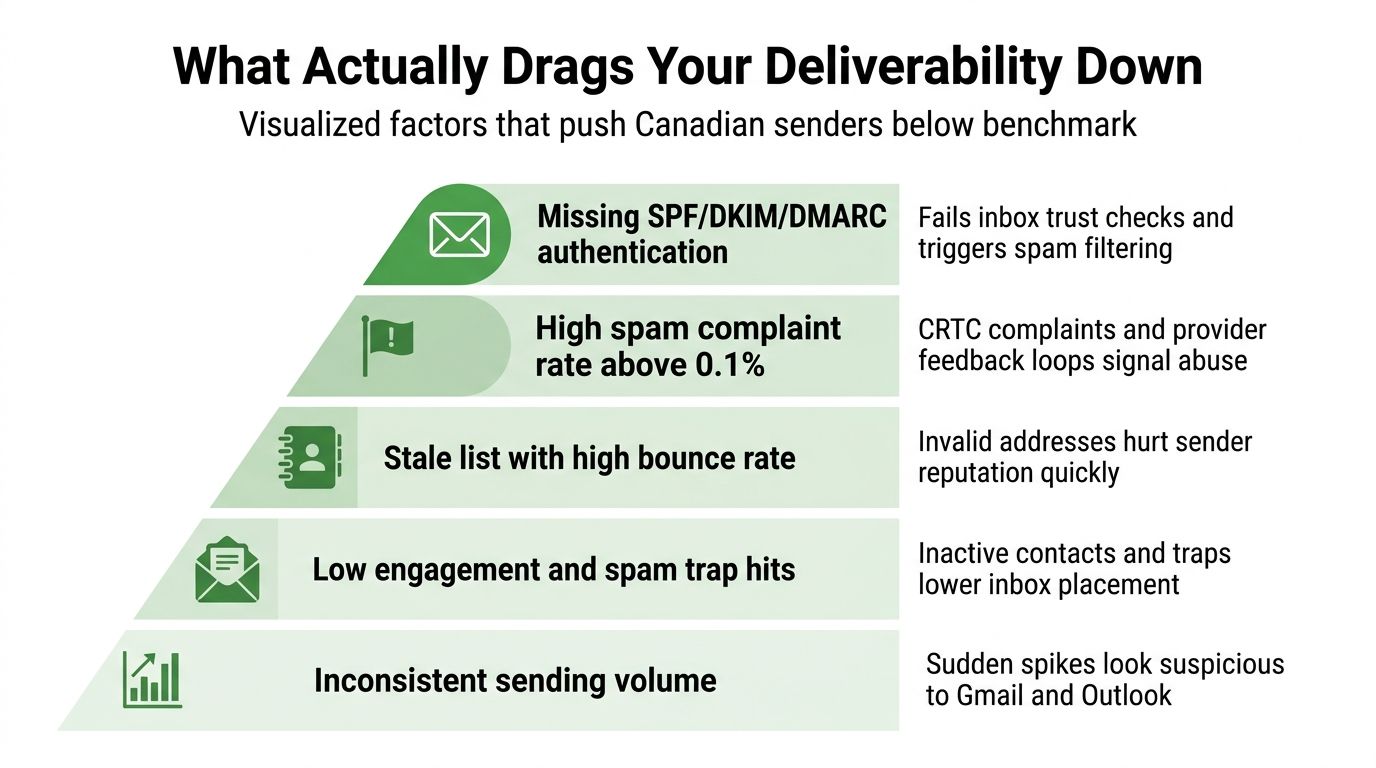
    A pyramid infographic listing five key factors that negatively impact email deliverability rates for Canadian senders.

    Fix permission before polishing content

    SPF, the Sender Policy Framework, tells receiving servers which systems may send for your domain. DKIM, or DomainKeys Identified Mail, adds a cryptographic signature to help prove that the message wasn't altered. DMARC, Domain-based Message Authentication, Reporting, and Conformance, lets the receiving server compare those signals with the visible From domain and report failures.

    Misaligned or missing records can trigger spam placement, deferrals, or rejection. They deserve attention early, but authentication cannot turn a purchased list into a permission-based list.

    CASL, Canada's anti-spam law, makes consent and sender identification central responsibilities. The CRTC reported 152,603 complaints in one half-year period, and 93% cited lack of consent (CRTC CASL compliance and complaint information). That evidence makes list origin a higher-priority question than many generic deliverability checklists suggest.

    Match symptoms to likely causes

    • Spam placement: Often follows weak engagement, high complaint activity, unclear sender identity, or authentication problems.

    • Deferrals: Can appear when a provider slows traffic because volume, reputation, or sending patterns look risky.

    • Hard bounces: Usually point to invalid or abandoned addresses. Repeated bounces damage your sender reputation.

    • Blocks: May follow repeated complaints, poor list quality, suspicious volume, or failed authentication.

    • Engagement collapse: A re-engagement campaign can expose how many contacts no longer recognise or want your messages.

    Old addresses, role accounts, shared lists, and implicit permission all increase risk. A clear subject line helps recipients understand the message, but a clever subject line won't repair a list that people never agreed to join.

    The highest-priority order is simple. Confirm consent, remove risky contacts, authenticate the domain, and then examine content and volume. If you reverse that order, you may spend time testing copy while the underlying trust problem continues.

    How to Measure Deliverability the Right Way

    A small team can build a useful measurement routine without enterprise software. Start with a controlled seed list, which contains addresses you own at Gmail, Outlook, Yahoo, and Apple Mail or iCloud. Send a test campaign, then check inbox, spam, quarantine, and missing status after the campaign has had time to process.
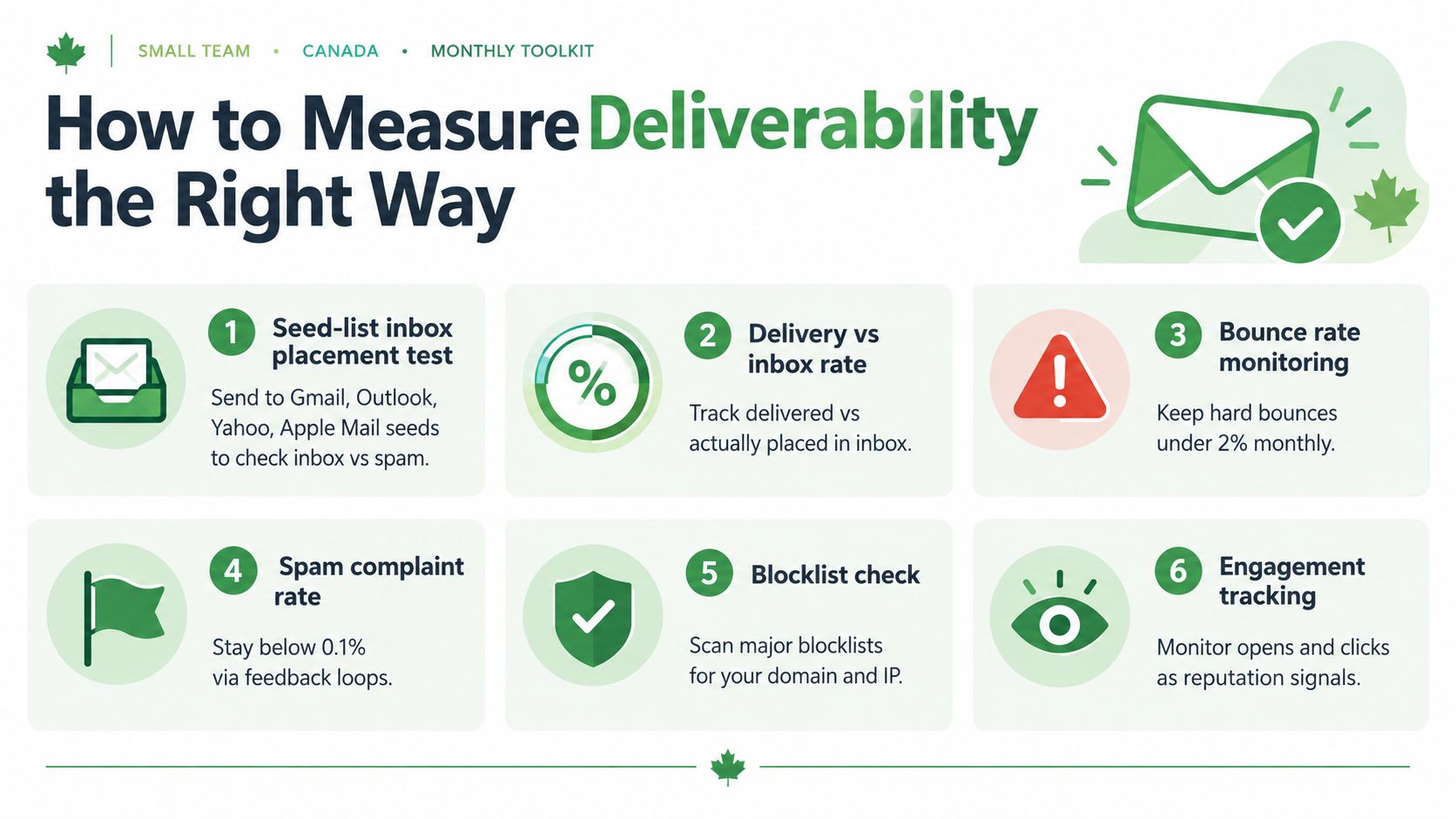
    An infographic titled How to Measure Deliverability illustrating six essential methods for improving email campaign performance.

    Build a repeatable review

    Run a seed test on each important send. Use an inbox placement service such as Validity, Inboxalytics, or a comparable tool when you need trend tracking across campaigns. The value comes from comparing the same providers over time, not from treating one test as a permanent score.

    Google Postmaster Tools can help you review domain and IP reputation for eligible traffic. Microsoft SNDS provides information about outbound traffic sent to Outlook systems. These tools won't explain every individual filtering decision, but they can reveal whether a provider sees a broader reputation problem.

    DMARC aggregate reports add another useful view. They show which systems send mail claiming to use your domain and whether authentication aligns. Review them for unexpected senders, spoofing, and configuration failures.

    Use a calendar, not guesswork

    • Each send: Check seed-list placement and delivery errors.

    • Weekly: Review complaint feedback loops where available, including Outlook, Yahoo, and relevant industry programmes.

    • Monthly: Compare provider reputation, bounces, clicks, unsubscribes, and placement.

    • Quarterly: Audit SPF, DKIM, DMARC alignment, vendors, and consent records.

    • Twice yearly: Run a full inbox-placement benchmark across your main providers.

    Measurement principle: Open rate can help explain engagement, but it shouldn't be your primary deliverability metric.

    Apple Mail Privacy Protection makes open data less precise, and image caching affects other mailbox reports. For a practical blacklist workflow, use our guide to checking and restoring email deliverability. A consistent record will show whether a problem affects one provider or your whole programme.

    A Step by Step Plan to Improve Your Rate

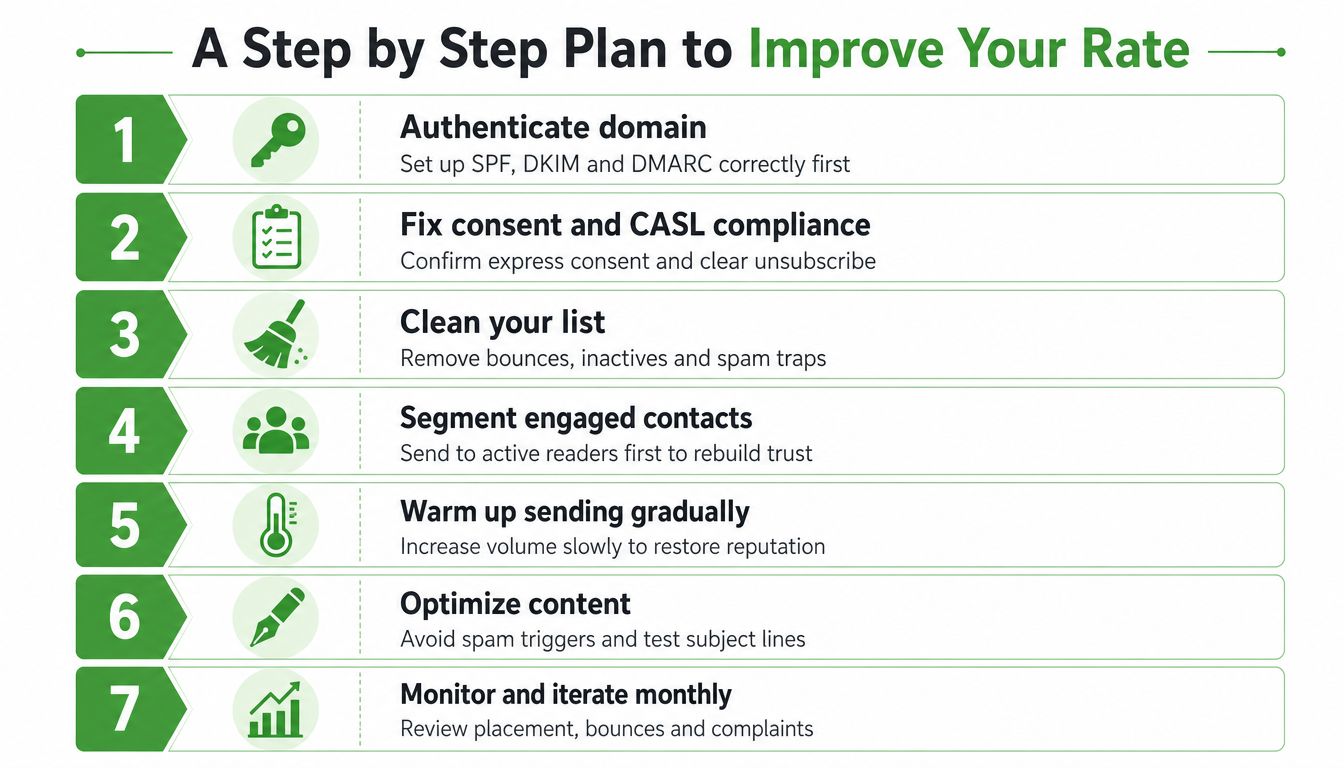
    Improvement works best when you fix trust before increasing volume. Follow the sequence below, and keep records so you can connect each change with later placement results.

    1. Start with permission. Document where each contact came from and whether the person gave express consent. Remove addresses you can't support with a credible consent record, especially purchased or shared-list contacts. Add a clear unsubscribe path and identify your organisation in every marketing message.

    2. Authenticate your sending domain. Configure SPF and DKIM, then publish DMARC so receiving providers can evaluate alignment. Begin with a monitoring approach while you review reports, rather than switching to a strict enforcement policy before you know which legitimate services send on your behalf.

    3. Clean the list. Suppress hard bounces, invalid addresses, dormant role accounts, and contacts who repeatedly ignore your mail. Spam traps often resemble abandoned addresses, so buying lists or recycling old databases creates unnecessary risk.
    A seven-step guide illustrating how to improve email deliverability rates through authentication, list cleaning, and content optimization.

    1. Segment engaged readers. Send your next important campaign to people who recently clicked, replied, or otherwise showed interest. Separate inactive contacts instead of allowing them to determine your main sending pattern.

    2. Increase volume gradually. New sending infrastructure needs a measured ramp-up. Sudden spikes can look suspicious to Gmail and Outlook, particularly when recipients don't interact with the messages.

    3. Make the message recognisable. Use a clear From name, honest subject line, expected branding, and a useful reason to open. Include one-click unsubscribe headers where your platform supports them, and follow the current requirements that apply to your recipients and sending volume. Don't hide the opt-out link in small text.

    4. Review and adjust. Compare seed placement, provider reputation, bounces, complaints, clicks, and DMARC reports. If one provider falls while others remain stable, investigate that provider's traffic and audience segment before making broad changes.

    A weekly review catches sudden placement changes. A monthly review helps you remove inactive contacts and validate complaint signals. A quarterly authentication and consent audit keeps technical settings aligned with the tools your business uses.

    Typewire is one Canadian email option for teams that want ad-free hosting, custom domains, Canadian data residency, and infrastructure operated in Vancouver. Those hosting choices can simplify control over your mailbox environment, but any marketing sender still needs proper consent, authentication, and list hygiene.

    Common Questions About Email Deliverability

    What's considered a good email deliverability rate?
    Above 85% inbox placement is generally considered good. The 2026 Canadian average is 89.4%. However, a "good" rate depends on your industry, list age, and provider mix. Gmail averages 94.4% inbox placement in Canada, while Microsoft averages 78.9%, so segment your results by provider rather than relying on a single number.

    What's the difference between deliverability rate and inbox placement rate?
    Deliverability rate measures whether a receiving server accepts your message (accepted, deferred, filtered, quarantined, or rejected). Inbox placement rate measures specifically whether the message reached the primary inbox rather than spam or quarantine. Inbox placement is the more practical metric for marketing.

    Why is my deliverability rate lower than the Canadian benchmark?
    Common causes include weak consent records (93% of CASL complaints cite lack of consent), poor authentication (missing or misaligned SPF/DKIM/DMARC), stale email addresses, high complaint rates, or sudden volume changes. Start by auditing your consent records before adjusting content or authentication.

    How often should I test my email deliverability?
    Run a seed-list test on each important send, review complaint feedback weekly, audit placement and reputation monthly, and conduct a full authentication audit quarterly. A twice-yearly benchmark across major providers (Gmail, Microsoft, Yahoo, Apple) helps you spot trends.

    Why is Microsoft inbox placement lower than Gmail in Canada?
    Microsoft applies stricter bulk filtering and reputation monitoring than Gmail. Factors that affect Microsoft placement include sender reputation, authentication alignment, complaint rates, and engagement patterns. Segment your testing by provider to see if Microsoft shows different behaviour than Gmail or Yahoo.

    Does authentication (SPF, DKIM, DMARC) guarantee good inbox placement?
    No. Authentication helps receiving systems verify your domain, but it cannot repair weak consent or poor list quality. A technically perfect DMARC setup can still produce poor placement if recipients didn't expect the message or if complaints are high. Fix permission before polishing authentication.


    If you want private, ad-free email hosted in Canada, visit Typewire to review custom-domain plans, encrypted mail, and support for migration. Choose the setup that fits your business, then apply the same consent and authentication discipline to protect inbox placement.
  • Phishing vs Spam: What’s the Difference?

    Phishing vs Spam: What’s the Difference?

    Spam is unsolicited bulk messaging aimed at selling or promoting, while phishing is targeted deception aimed at stealing credentials or money. The overlap is mostly cosmetic, even though both can arrive as unwanted messages.

    You may see both in the same inbox during a busy morning. One message advertises a product you never asked about. Another claims your bank account needs urgent verification. The first wants your attention. The second wants your trust.

    That distinction changes how you respond. Spam usually calls for filtering, deletion, or an unsubscribe action you trust. Phishing calls for caution, reporting, and sometimes immediate account recovery. We'll separate the two by motive, sender behaviour, technical signals, and potential harm.

    Quick answer on phishing vs spam

    The simplest way to remember the difference is this: spam is a volume problem, while phishing is a deception problem. Spam usually sends the same promotional message to many people. Phishing impersonates a trusted person or organisation to make you click, pay, download something, or reveal confidential information.

    The difference between spam and phishing can be unclear because phishing often uses the same delivery system as spam. Both may land in junk folders, use urgent subject lines, and include links. A phishing message can also look like a marketing email, while legitimate marketing can use poor design and aggressive language without being a scam.

    A useful rule: Spam wants your attention. Phishing wants your trust.

    Canada's complaint data shows why the distinction matters. The CRTC received over 216,800 complaints at the Spam Reporting Centre between October 1, 2023 and March 31, 2024, or about 8,338 complaints per week. The leading phishing and scam categories included private company impersonation, government impersonation, employment scams, advanced fee scams, and bank impersonation, as recorded in the CRTC's 2023–24 report.

    If you want a broader introduction to the filtering side, our guide to what spam filtering does for email security explains how providers sort unwanted messages before they reach your inbox.

    The practical test is straightforward. Ask what the sender wants, whether the sender is genuine, and what could happen if you follow the request. Those questions work better than judging a message by its appearance alone.

    What spam actually is

    Spam is unsolicited messaging sent in bulk, usually to promote a product, service, website, or offer. It often comes from a mailing list or campaign system, and the sender's main goal is reach. The message may be annoying, irrelevant, or misleading without directly trying to steal your password.

    A common example is an email titled “Limited time offer!” from a retailer you don't recognise. It may use a generic greeting, place many recipients in a broad mailing field, repeat sales language, and push you towards a product page. The sender may include an unsubscribe link, but you shouldn't assume every link is safe just because it says “unsubscribe”.

    Spam commonly appears in a few forms:

    • Marketing blasts: Repeated promotions sent to a large list.

    • Affiliate promotions: Messages that earn the sender a commission when you visit or buy.

    • Sweepstakes lures: Offers claiming you've won a prize or can enter an exclusive draw.

    The key signal is breadth. The sender often doesn't know much about you and doesn't need a specific response from you. They want many people to notice the offer, visit a page, or make a purchase.

    Why junk and spam aren't exactly the same

    People often use junk and spam interchangeably. In everyday email software, “junk” usually describes the folder or classification used for unwanted messages. Spam describes the message behaviour itself, particularly unsolicited bulk distribution.

    A legitimate newsletter can become spam for you if you never subscribed, even if the business is real. A message can also avoid the junk folder while still being unwanted. Filtering systems make predictions based on sender reputation, message patterns, recipient reports, and authentication signals, so folder placement isn't proof of legitimacy.

    Spam can still carry danger. A promotional-looking message may send you to a deceptive shop, a malware download, or a phishing page. That's why you should judge the requested action, not just the marketing tone.

    Safe action: If you don't recognise the sender and don't need the offer, mark the message as spam and delete it. Don't reply.

    What phishing actually is

    Phishing is a deceptive attempt to steal credentials, money, personal information, or access to a system. The attacker impersonates a trusted source and creates a reason for you to act quickly. The message may arrive by email, text, direct message, or another communication channel.

    Suppose you receive a delivery notice that appears to come from a courier. It uses your name, says a parcel is waiting, and asks you to confirm a small detail through a tracking link. The sender address contains a look-alike domain with one altered character. The page resembles the courier's login screen, but it sends your username and password to the attacker.

    The message succeeds through deception, not just through volume. It may target a broad audience, a particular business team, or one individual. A polished logo doesn't make it genuine, and a spelling mistake doesn't automatically make it fake.

    Common phishing forms

    Bulk phishing sends similar lures to many recipients. A fake account notice or delivery alert may reach people who have no relationship with the supposed organisation.

    Spear phishing targets a particular person or team. The attacker may mention a real colleague, supplier, project, or payment process. Familiar details can make the request feel routine.

    Smishing is phishing delivered by SMS or another text-based mobile channel. Canadian reporting shows why this matters. In one reporting period, 83% of phishing messages reported to the CRTC were texts, and Canadian reporting has also described more spam-text reports than email-spam reports in 2022 data cited by Global News. The Global News coverage also discusses how phishing has moved beyond traditional email.

    Phishing messages often ask you to log in, confirm payment information, open an attachment, transfer funds, or share a verification code. The request may look ordinary, but the consequence can include account takeover, financial fraud, malware infection, or exposure of business data.

    The warning sign isn't urgency by itself. It's urgency combined with an unexpected request and a sender you haven't independently verified.

    Key differences between phishing and spam

    A suspicious message becomes easier to judge when you score it across several dimensions. No single signal proves that a message is safe or malicious, but the pattern gives you a better basis for action.

    Axis Spam Phishing
    Motive Promotion, advertising, or gaining attention Credential theft, financial fraud, data theft, or malware delivery
    Sender behaviour Bulk distribution through marketing or campaign infrastructure Impersonated display names, look-alike domains, unusual reply-to addresses, or a compromised account
    Technical signals Repeated templates, campaign links, unsubscribe patterns, and sender reputation issues Link and domain mismatches, anomalous authentication, shortened or redirected links, and suspicious attachments
    User risk Wasted time, clutter, unwanted marketing, or exposure to unsafe pages Account takeover, stolen funds, malware, identity misuse, or a wider data breach

    Spam usually tries to move you towards a product page. Phishing tries to move you towards a decision that benefits the attacker. That decision may involve entering a password, paying an invoice, opening a document, or approving a login.

    Junk vs Phishing: A Specific Distinction

    Junk email describes unwanted mail of any kind, including spam, newsletters you didn't sign up for, or old promotional offers. Phishing is a type of fraud that uses deception to steal credentials or money.

    Every phishing email is potentially a threat, while junk email is mostly a nuisance. That's why your provider's junk folder serves as a first line of defence for volume and obvious spam, but phishing messages sometimes evade those filters because they're designed to look legitimate.

    The safest approach: Treat unexpected requests from trusted organisations as potentially suspicious, even if they land in your inbox instead of junk.

    Sender behaviour tells only part of the story

    A display name is easy to copy. An email that appears to come from “Payroll” may use an unrelated address, and a familiar brand name may sit beside a domain that differs by one character. Check the actual address and the reply-to field rather than relying on the name shown in your inbox.

    Authentication also needs careful interpretation. SPF, or Sender Policy Framework, checks whether a sending server is authorised for a domain. DKIM, or DomainKeys Identified Mail, adds a cryptographic signature. DMARC, or Domain-based Message Authentication, Reporting and Conformance, helps a domain owner specify how receiving systems should handle messages that fail alignment checks.

    These standards are valuable, but they don't prove that the sender's business request is legitimate. A real domain can be compromised, and an attacker can send a message from infrastructure that passes authentication.

    For a deeper look at the evidence inside an email, use our guide on reading email headers and spotting a fake sender. The safe approach is to combine technical evidence with context. Were you expecting the message? Does the request fit the sender's normal process? Can you verify it through a separate channel?

    Where the two threats overlap in real inboxes

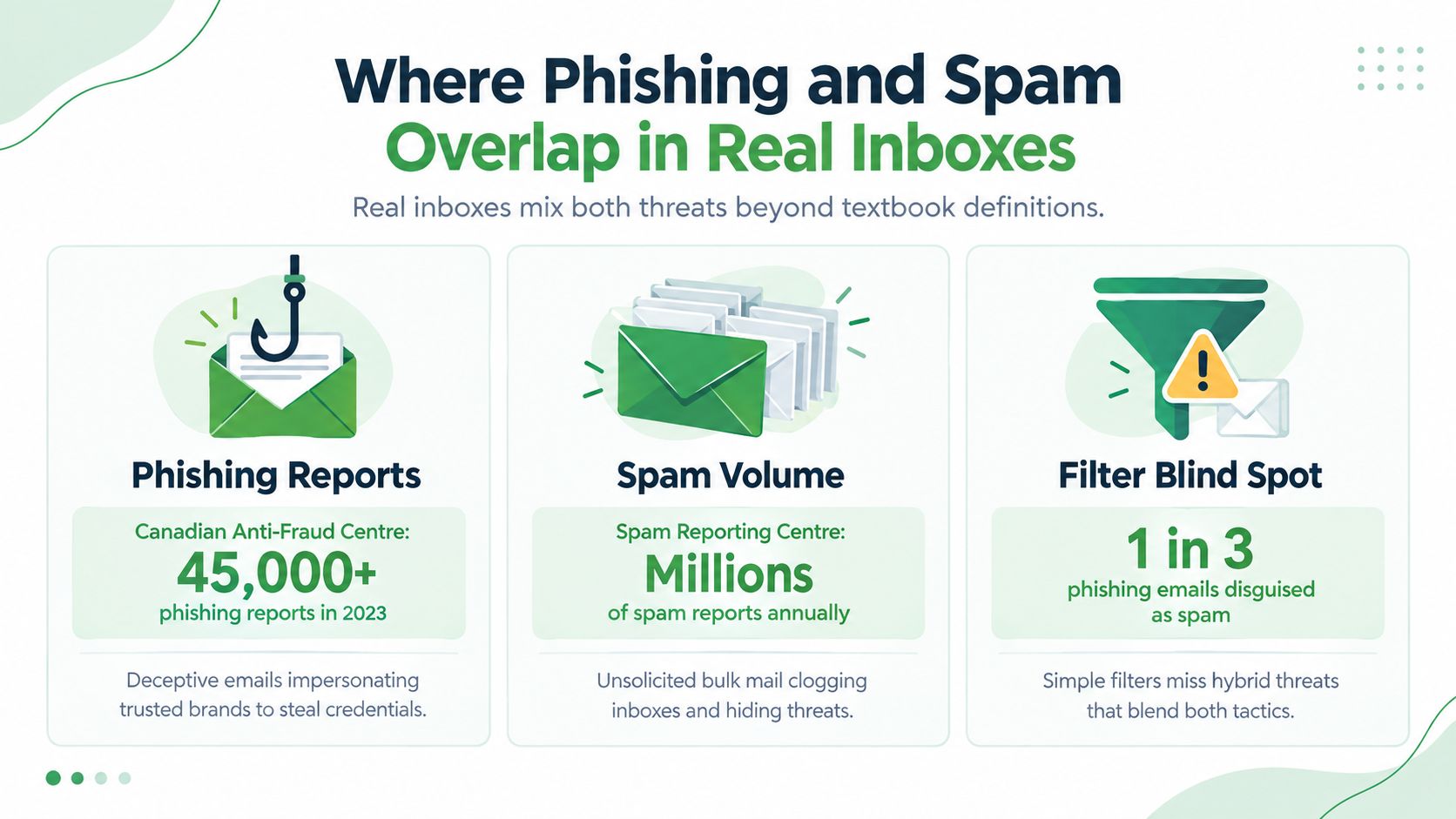
    Real inboxes don't separate threats as neatly as a textbook. A phishing campaign may use bulk delivery methods, while an ordinary promotional email may contain a risky link. Some messages combine commercial language with a request for payment or account details, making motive harder to identify at a glance.

    Canadian complaint data shows the scale of both unwanted messaging and impersonation-based fraud. In the 2024–25 reporting cycle, the CRTC received over 208,083 complaints, or about 8,003 per week, and the leading phishing and scam categories included government impersonation, extortion scams, private company impersonation, employment scams, and bank impersonation. The CRTC's 2024–25 update also records that only about 2.2% of complaints came through the online form.

    An infographic titled Where Phishing and Spam Overlap in Real Inboxes, showing stats on phishing and spam.

    The complaint categories point to an important difference. Spam filtering can identify repeated campaigns, unusual volume, and common marketing patterns. Phishing detection needs to inspect trust signals, including display-name anomalies, look-alike domains, reply-to mismatches, and the intent behind a request.

    A clean authentication result isn't a guarantee of good intent. A compromised account can send authenticated mail, and a phishing operator can use legitimate sending infrastructure. Likewise, a real business can send poorly targeted or overly aggressive marketing that resembles spam without trying to steal information.

    Practical rule: Treat authentication as evidence, not a verdict. Verify unexpected requests through a trusted route.

    This is why the best email protection uses layers. Volume signals help reduce clutter. Behavioural and impersonation signals help identify messages that look ordinary but ask you to take an unsafe action.

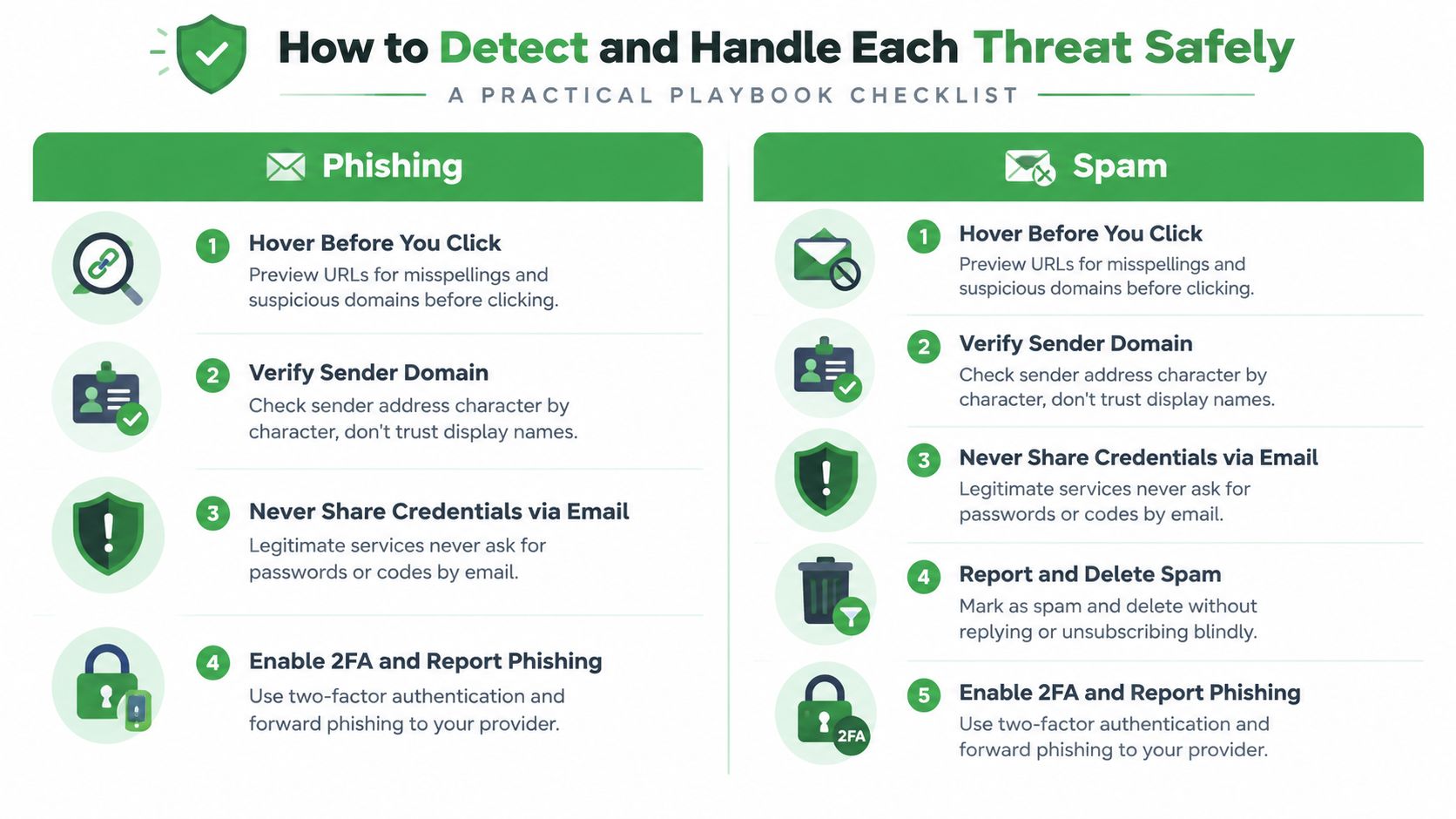
    How to detect and handle each one safely

    Start with the message, not the story it tells. If an email asks you to log in, pay, download, or share information, pause before following its instructions.

    A personal inbox playbook

    First, hover over links without clicking. Look for misspellings, unexpected domains, shortened addresses, and destinations that don't match the organisation named in the message. On a phone, press and hold carefully or use a separate browser search instead of opening the link.

    Next, inspect the sender address character by character. A display name can be copied, but the full address gives you more information. If the email claims to be from your bank, open the bank's app or type its known web address yourself. Don't use the contact details supplied in the suspicious message.

    Use the following habits:

    • Pause on urgent requests: Treat unexpected payment, login, account-lock, and verification prompts as high-risk.

    • Protect credentials: Never enter a password or one-time code through a link you didn't independently verify.

    • Report before deleting: Send suspected phishing through your provider's reporting function and use the appropriate Canadian reporting channel.

    • Handle ordinary spam discreetly: Mark unwanted promotional mail as spam and delete it. Don't reply, and don't follow an unfamiliar unsubscribe link.

    The Canadian Anti-Fraud Centre provides federal consumer guidance and reporting information for fraud. The CRTC's Spam Reporting Centre remains the relevant route for suspected spam and violations related to Canada's anti-spam framework. Use the official government pages rather than contact details inside a questionable message.

    If you clicked or submitted information

    Don't assume that closing the browser solves the problem. If you downloaded a file or suspect malware, disconnect the device from networks and run a trusted security scan. From a clean device, change the affected password and any other password you reused.

    Enable multi-factor authentication where it's available. Contact your bank or card provider if financial details were entered, and monitor accounts for activity you don't recognise. Tell your workplace security contact quickly if a business account, device, or document was involved.

    For small businesses, turn these habits into a short staff process:

    1. Report quickly: Give employees one visible reporting route.

    2. Use technical controls: Configure DMARC enforcement with SPF and DKIM alignment, and isolate suspicious links or attachments where possible.

    3. Keep the response blameless: Employees report faster when they know a mistake will lead to help, not punishment.

    4. Verify payments separately: Confirm changes to banking details or urgent transfers by phone using a known number.

    A checklist infographic illustrating practical steps to safely detect and handle phishing and spam email threats.

    A secure email routine should make the safe action easy. Report the message, stop interacting with it, and involve the right person when credentials, money, or company data may be exposed.

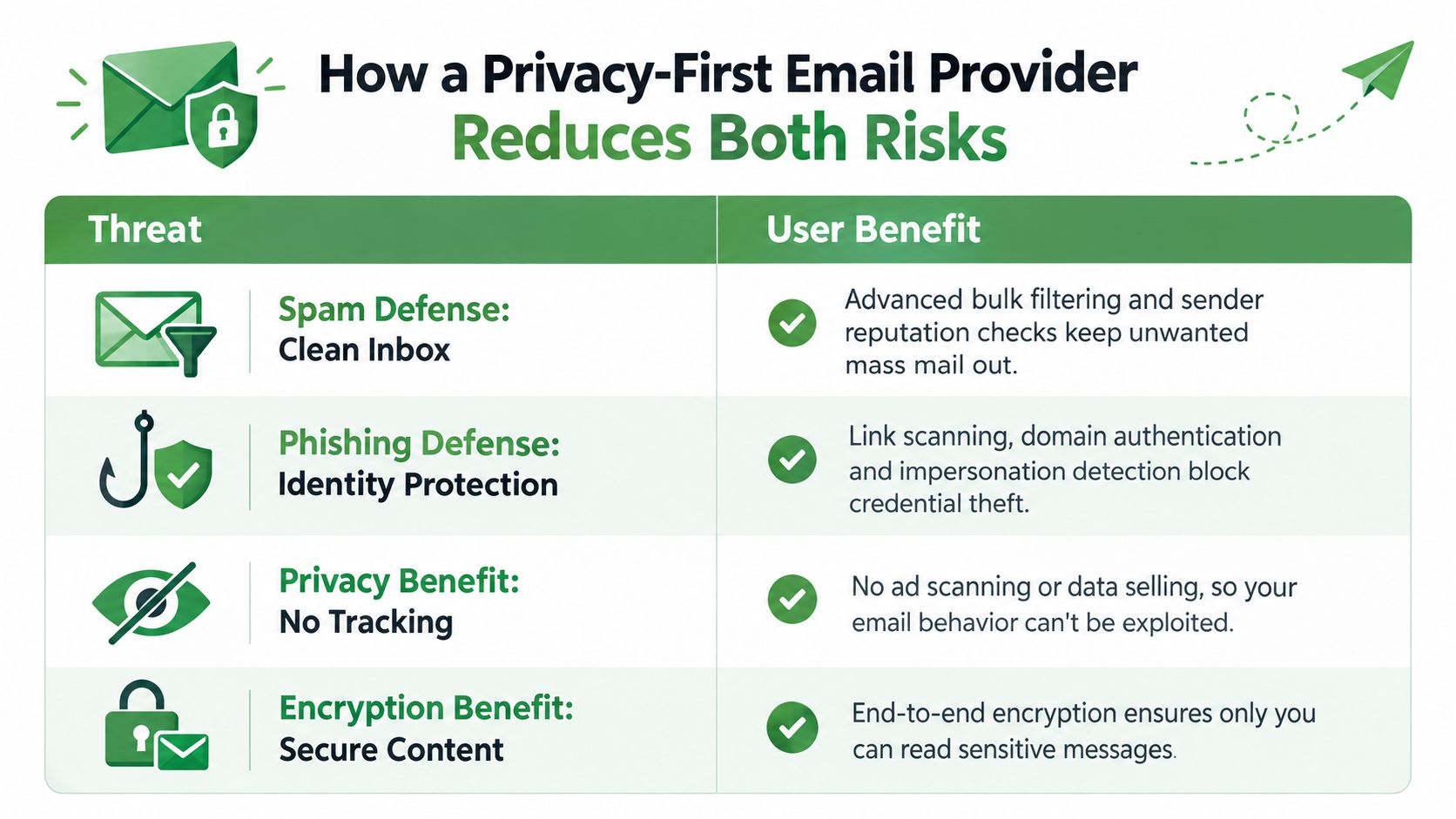
    How a privacy-first email provider reduces both risks

    Spam and phishing need different controls, so a provider shouldn't treat them as one problem. Spam defence should reduce unwanted bulk mail through sender reputation, campaign similarity, recipient feedback, and volume patterns. The result is a cleaner inbox, with less noise hiding a message that deserves closer attention.

    Privacy changes the incentive structure as well. An ad-supported provider may scan message content for advertising or build behavioural profiles around how you use email. A privacy-focused service should explain what it processes, avoid ad profiling, and limit data collection to what the service needs to operate.

    Phishing protection needs a separate layer. Useful controls include display-name spoofing detection, domain alignment checks, attachment and link analysis, and warnings for suspicious destinations. The provider should also offer a clear reporting action so threat samples can improve detection without making the user investigate technical details.

    A chart comparing security threats like spam and phishing with the benefits of a privacy-focused email provider.

    Encryption protects a different part of the problem. SMTP, the Simple Mail Transfer Protocol, moves messages between servers. IMAP, the Internet Message Access Protocol, synchronises messages with your devices. PGP, or Pretty Good Privacy, can protect message contents in compatible exchanges, but it requires key management and doesn't automatically secure every email you send.

    A provider may also offer zero-access encryption, encrypted storage, virus filtering, aliases, and custom filters. Those features can reduce exposure, but they don't remove the need for judgement. A trusted provider can still receive a carefully crafted phishing message, and no filter can understand every unusual business request perfectly.

    Typewire is one option for readers who want a Canadian private email service. We operate infrastructure in Vancouver, host email in Canada, and offer ad-free encrypted email with spam filtering and phishing detection. Our business model relies on subscriptions rather than advertising or data sales, but you should still review any provider's technical documentation, privacy terms, and encryption limits before choosing it. You can read more in our overview of Typewire as a private email alternative.

    Key takeaways and common follow-up questions

    Keep these five points in mind:

    • Spam is volume: It usually promotes something to a broad audience.

    • Phishing is deception: It tries to make you trust a false identity.

    • Signals differ: Spam relies more on campaign and volume patterns, while phishing needs impersonation, domain, link, and intent checks.

    • Reporting paths differ: Use your provider and the relevant Canadian reporting services.

    • Privacy still matters: An inbox shouldn't turn your messages and behaviour into advertising data.

    Frequently Asked Questions

    How do I report a suspicious message? Use your email provider's report function, then consult the official Canadian Anti-Fraud Centre guidance for fraud and the CRTC Spam Reporting Centre for suspected spam activity. Don't use a phone number or link supplied by the suspicious message.

    Does SMS phishing follow the same rules? The goal is the same, but the channel changes the clues. Smishing may use a phone number, short code, delivery notice, or message thread instead of an email address. Don't open the link. Verify through the organisation's official app or website.

    What should I do after entering credentials? Change the password from a clean device, change reused passwords, enable multi-factor authentication, and contact the affected service. If financial information was involved, contact your bank and monitor the account.

    How long does a compromised account remain at risk? There's no fixed timeline. Treat it as at risk until you reset credentials, revoke unfamiliar sessions, secure recovery methods, and confirm that no forwarding rules or new devices remain connected.

    Return to the checklist above and apply it to the next unexpected message before you click.


    We provide ad-free, encrypted email with spam filtering, phishing detection, Canadian hosting, custom domains, and no data mining. Visit Typewire to start the free trial and keep your inbox focused on communication rather than tracking and unwanted threats.